

Description
Debugging WordPress shouldn’t be painful.
Most developers deal with debug logs the hard way: SSH into the server, tail -f debug.log, squint at wall-of-text output, scroll endlessly to find the one error that matters. It’s slow, it’s fragile, and it pulls you out of your flow.
LogIQ fixes that.
LogIQ is an intelligent debug log viewer built for WordPress developers. It lives in your admin dashboard, parses your log file automatically, and surfaces exactly what you need — with search, filters, collapsible stack traces, and one-click editor access. No config files. No terminal. No wasted time.
What Makes LogIQ Different
Most log plugins just dump raw text into a <textarea>. LogIQ actually understands your logs.
- Categorizes every entry by level (Fatal, Error, Warning, Notice, Deprecated, Info, Debug, DB Error)
- Detects duplicate/repeated errors and groups them with a count badge
- Collapses multi-line stack traces so your screen isn’t buried in noise
- Highlights your search term inline across all matching entries
- Shows relative timestamps («3 minutes ago») with the full timestamp on hover
- Lets you copy any entry to clipboard in one click
- Opens the exact file and line in VS Code, PhpStorm, or Sublime Text — no copy-pasting paths
Core Features
Smart Log Parsing
Automatically detects PHP Fatal errors, Warnings, Notices, Deprecated calls, Database errors, and custom error_log() output. No setup required.
Full-Text Search
Search across message content, file paths, and timestamps instantly. Matches are highlighted in-place with a count of results.
Level Filters
Filter by Fatal, Error, Warning, Notice, Deprecated, Info, Debug, or DB Error with a single click. Counts update live with each filter.
Collapsible Stack Traces
Long stack traces are collapsed by default. Expand only the ones you care about — keeping your view clean and focused.
Duplicate Detection
Consecutive identical log entries are automatically grouped into a single entry with a ×N badge. Stop scrolling past 200 copies of the same warning.
Relative Timestamps
Log timestamps show as «2 minutes ago», «1 hour ago» etc. Hover to see the full timestamp. Great for spotting when errors started.
Copy to Clipboard
One-click copy on every log entry. Paste directly into Slack, a bug report, or a support ticket.
Log Export
Download your current filtered view as a .log file or structured .json — perfect for sharing with your team or attaching to issue trackers.
Editor Integration
Click any file path in a log entry to jump directly to that file and line in:
* Visual Studio Code
* PhpStorm
* Sublime Text
* Falls back to file:// if no supported editor is detected
Auto-Refresh
The log viewer refreshes automatically every 30 seconds so you can watch logs update in real time without touching the page.
Secure by Default
Only users with manage_options capability can access LogIQ. All AJAX requests are nonce-verified. Sensitive values (passwords, API keys, auth tokens) are masked automatically before display.
Pagination
Handles large log files gracefully — reads up to 5 MB from the end of the file, paginates entries, and never loads more than needed.
Perfect For
- WordPress plugin and theme developers
- Agencies managing multiple client sites
- Developers debugging WooCommerce, REST APIs, and third-party integrations
- Anyone who’s tired of
tail -f debug.log
How to Use error_log() with LogIQ
LogIQ reads from WordPress’s standard debug log. Write to it from anywhere in your code:
error_log( 'Something happened' );
For arrays and objects:
error_log( print_r( $my_array, true ) );
For exceptions:
error_log( $exception->getMessage() . ' in ' . $exception->getFile() . ':' . $exception->getLine() );
Privacy Policy
LogIQ does not collect, transmit, or store any personal data outside of your own server. All log data remains local. The plugin does not make any external HTTP requests.
Credits
Developed by AKM Elias. If LogIQ saves you time, consider leaving a review on WordPress.org — it helps more developers find it.
Screenshots

Main log viewer with color-coded levels, search, and filter tabs 
Collapsible stack trace on a Fatal error entry 
Duplicate detection with count badge 
Relative timestamps with full timestamp on hover 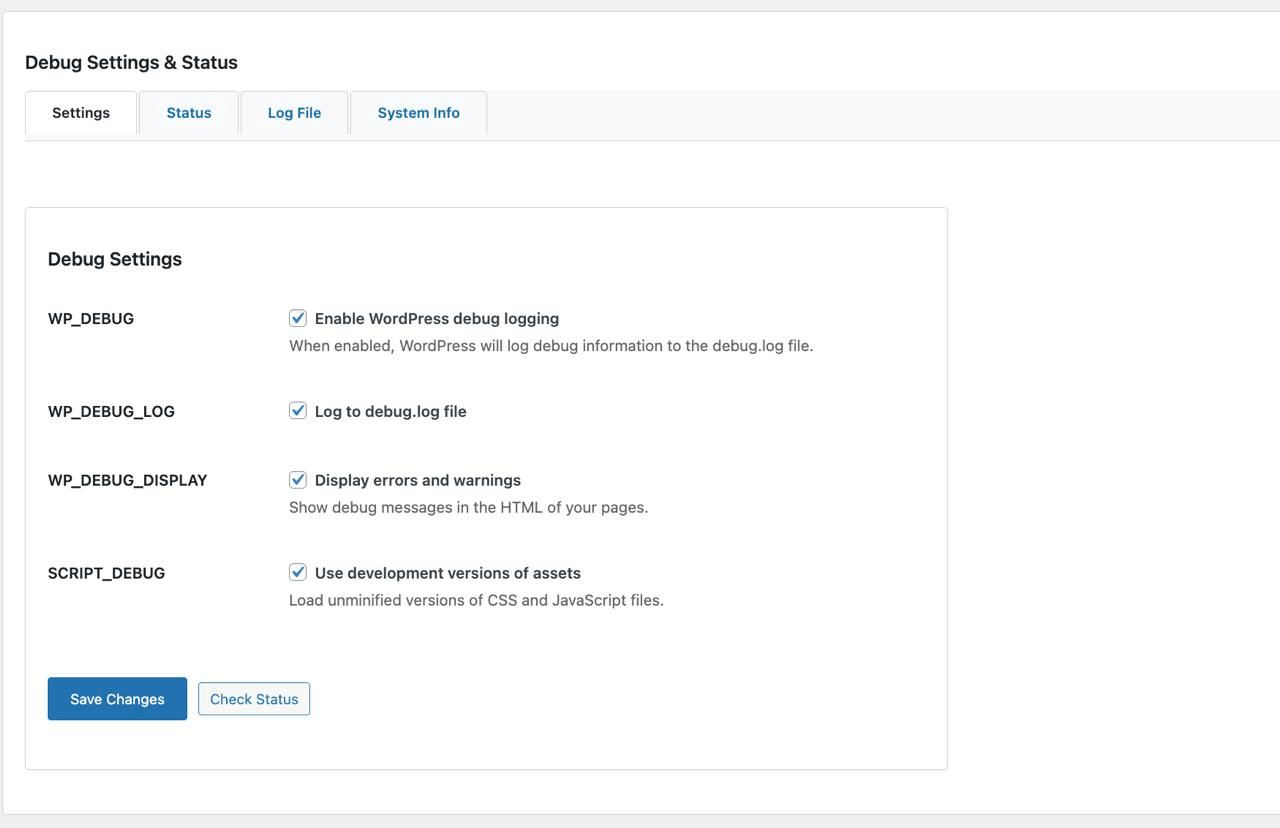
Debug Settings & Status panel 
Export and copy-to-clipboard controls
Installation
- Upload the
log-iqfolder to/wp-content/plugins/ - Activate the plugin through Plugins > Installed Plugins
- Go to Tools > LogIQ Debug
- Enable WP_DEBUG and WP_DEBUG_LOG in the settings panel and save
- Your logs will start appearing immediately
Note: LogIQ writes its own log file to /wp-content/uploads/logiq-debug.log. This directory is outside the web root in most setups — but for extra security, you can add the following to your .htaccess:
<Files "logiq-debug.log">
Order Allow,Deny
Deny from all
</Files>
FAQ
-
Does LogIQ require WP_DEBUG to be set in wp-config.php?
-
No. LogIQ manages its own debug settings via the WordPress options table. You don’t need to touch
wp-config.php. Enable settings from the LogIQ settings panel inside the admin. -
Where is the log file stored?
-
LogIQ stores its log file at
/wp-content/uploads/logiq-debug.log. This is separate from the standard WordPressdebug.logfile. -
Will LogIQ slow down my site?
-
No. LogIQ only loads its assets on its own admin page. It adds zero overhead to the frontend or any other admin page.
-
Which editors are supported for file links?
-
Visual Studio Code, PhpStorm, and Sublime Text. LogIQ auto-detects which editor is installed on your server. If none are found, links use the
file://protocol. -
Can I use LogIQ on a live production site?
-
LogIQ is designed for development and staging environments. Debug logging on production can expose sensitive information in log output. Use with caution on live sites.
-
Is LogIQ compatible with multisite?
-
LogIQ is currently designed for single-site installs. Multisite support is planned for a future release.
-
How does the duplicate detection work?
-
LogIQ groups consecutive identical log entries (same level + same message) into a single entry with a
×Ncount badge. This keeps your view readable when a loop or repeated process logs the same error many times.
Reviews
There are no reviews for this plugin.
Contributors & Developers
“LogIQ – Intelligent Debug Log Viewer” is open source software. The following people have contributed to this plugin.
Contributors
Translate “LogIQ – Intelligent Debug Log Viewer” into your language.
Interested in development?
Browse the code, check out the SVN repository, or subscribe to the development log by RSS.
Changelog
1.2.0
March 2026
New Features
* Full-text search with inline highlighted matches and result count
* Collapsible stack traces — long entries collapse by default, expand on demand
* Log export — download current filtered view as .log or .json
* Copy-to-clipboard button on every log entry
* Duplicate / repeated entry detection with ×N count badge
* Relative timestamps («3 minutes ago») with full timestamp on hover
Bug Fixes
* Fixed pagination conflict with WordPress native admin list table pagination
* Fixed plugin assets loading on every admin page instead of only the LogIQ page
* Fixed PHP warning from realpath() returning false on non-existent directories
* Fixed potential memory exhaustion on large log files — now reads at most 5 MB from end of file
* Fixed preg_split returning false on malformed log files
* Fixed initial log file header text breaking the timestamp parser
* Fixed sanitize_log_level not recognizing notice and dberror levels
* Fixed logiq_write_log failing silently when the file was not writable
* Removed dead wpdb_query hook that doesn’t exist in WordPress core
* Removed empty logiq_apply_debug_settings function called on every page load
1.0.3
July 2025
* Added LogIQ shortcut to the WordPress admin bar
* Removed unnecessary internal logging
1.0.2
June 2025
* Added Database error log detection and filtering
1.0.1
June 2025
* Made LogIQ independent of wp-config.php constants
* General bug fixes and stability improvements
1.0.0
May 2025
* Initial release
* Real-time log viewing with auto-refresh
* Smart log parsing and level categorization
* Level filter tabs (Fatal, Error, Warning, Notice, Deprecated, Info, Debug)
* Editor integration with clickable file links (VS Code, PhpStorm, Sublime Text)
* Sensitive data masking (passwords, API keys, auth tokens)