
Beskrivelse
The plugin allows to display PHP errors on the dashboard in a widget.
I’ve wrap Gyrus’s code into a plugin, you can see the original code here:
http://sltaylor.co.uk/blog/wordpress-dashboard-widget-php-errors-log/
Skærmbilleder
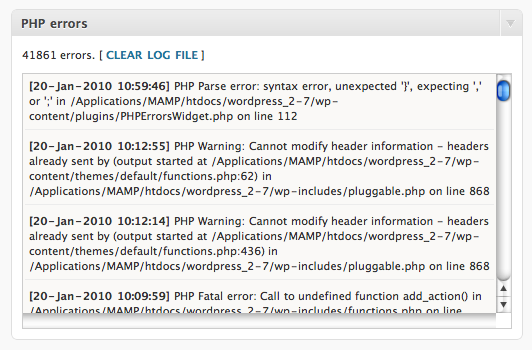
Widget
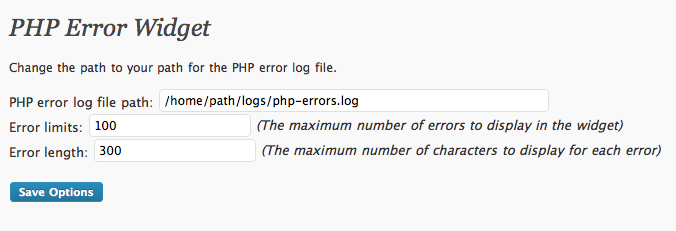
Setting the PHP error log file’s path and other settings
Installation
This section describes how to install the plugin and get it working.
- Upload
php-errors-widgetfolder to the/wp-content/plugins/directory - Activate the plugin through the ‘Plugins’ menu in WordPress
- Go to ‘Settings’ on the admin panel and select ‘PHP Errors Widget’
FAQ
- How to set up?
-
Go to admin panel, select ‘Settings’ then ‘PHP Errors Widget’.
Enter your path for the php error log file (ex.: /home/path/logs/php-errors.log).
That’s it.
Anmeldelser
Der er ingen anmeldelser for denne widget.
Bidragsydere & udviklere
“PHP Errors Widget” er open source-software. Følgende personer har bidraget til dette plugin.
Bidragsydere

Oversæt “PHP Errors Widget” til dit eget sprog.
Interesseret i udvikling?
Gennemse koden, tjek SVN repository, eller abonner på udviklerloggen via RSS.
Ændringslog
0.1
- First release.