WordPress.org

Dansk

  • Temaer
  • Plugins
  • Nyheder
  • Support
  • Om
  • Meetup
  • Vær med
  • Om
  • Få WordPress
Få WordPress
WordPress.org

Plugin Directory

Hide User Profile Fields

  • Submit a plugin
  • My favorites
  • Log ind
  • Submit a plugin
  • My favorites
  • Log ind

This plugin hasn’t been tested with the latest 3 major releases of WordPress. It may no longer be maintained or supported and may have compatibility issues when used with more recent versions of WordPress.

Hide User Profile Fields

Af gugabguerra
Download
  • Detaljer
  • Vurderinger
  • Installation
  • Udvikling
Support

Beskrivelse

A simple plugin with no-backend interface, to clean up some dummy fields from user profiles edition and creation pages, focused on corporate purposes. The following fields are removed right after this plugin activation: Colors Profile, Keyboard Shortcuts, Toolbar, AIM, Jabber, Yahoo IM, Website URL, Biography Description and User Role (every new user is created as Subscriber)
Some contents was inspired on teachingyou.net

Skærmbilleder
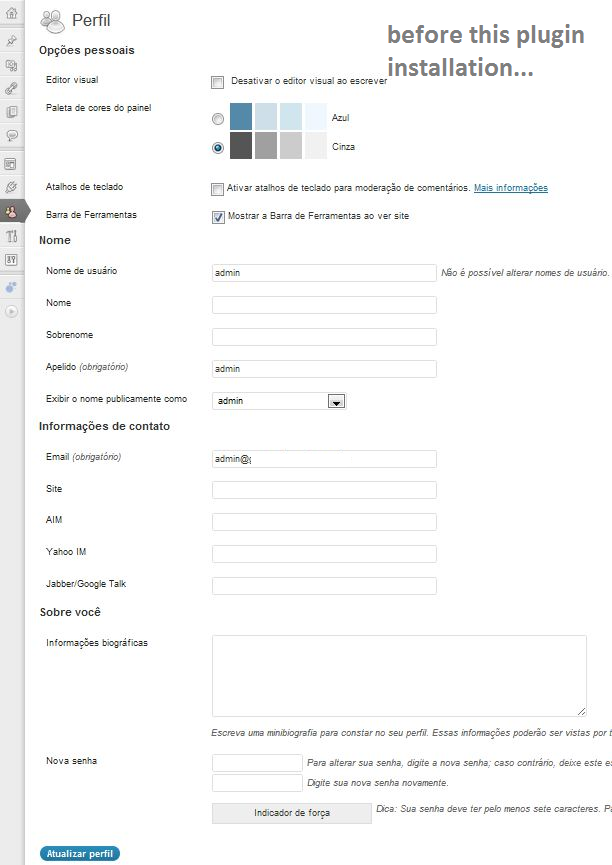
  • Before installation and activation of Hide User Profile Fields plugin.
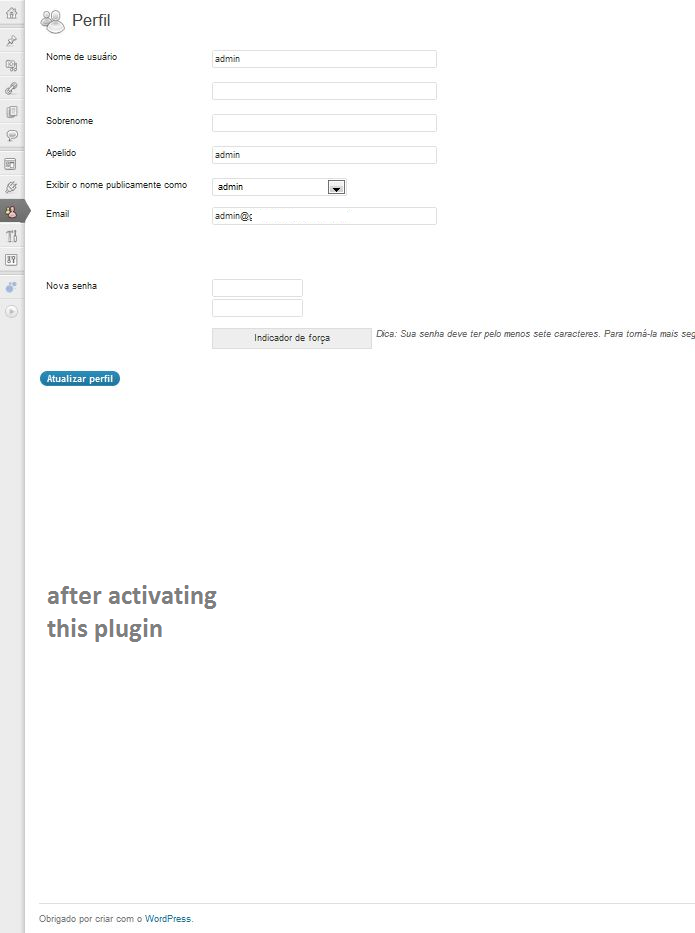
  • After installation and activation of Hide User Profile Fields plugin.

Installation

  1. Upload hide-user-fields.php to the /wp-content/plugins/ directory
  2. Activate the plugin through the ‘Plugins’ menu in WordPress
  3. Navigate to the ‘Hide User Profile Fields’ Settings menu and enable it.

FAQ

How do I enable this plugin?

Once the plugin itself is installed, navigate to the ‘Hide User-Profile Fields’ Settings menu, check the lone checkbox, and click ‘Update Options’.

How can I hide/unhide some specific fields?

You can’t, not through this plugin, but you can edit this as your needs.

Anmeldelser

Excellent but not for non programmers

rafi.w 3. september, 2016
Very good basis for hiding items on your profile. This plugin must be a result of lots of research work, on how to hide items on the profile page. Using browser’s “inspect” feature, you can find the individual fields info and edit the plugin accordingly to hide them.
Læs alle 6 anmeldelser

Bidragsydere & udviklere

“Hide User Profile Fields” er open source-software. Følgende personer har bidraget til dette plugin.

Bidragsydere
  • gugabguerra

Oversæt “Hide User Profile Fields” til dit eget sprog.

Interesseret i udvikling?

Gennemse koden, tjek SVN repository, eller abonner på udviklerloggen via RSS.

Ændringslog

1.2

  • Color Profiles and other checkboxes will also be hidden on this version.

1.0.0

  • First published version.

Meta

  • Version 1.2
  • Senest opdateret 13 år siden
  • Aktive installationer 200+
  • WordPress-version 3.0.0 eller højere
  • Testet op til 3.4.2
  • Language
    English (US)
  • Tags
    aimfieldshideuser profile
  • Avanceret visning

Bedømmelser

3.8 ud af 5 stjerner.
  • 2 5-stjernet anmeldelser 5 stjerner 2
  • 2 4-stjernet anmeldelser 4 stjerner 2
  • 0 3-stjernet anmeldelser 3 stjerner 0
  • 0 2-stjernet anmeldelser 2 stjerner 0
  • 1 1-stjernet anmeldelse 1 stjerne 1

Tilføj min vurdering

Se alle anmeldelser.

Bidragsydere

  • gugabguerra

Support

Har du noget at sige? Har du brug for hjælp?

Vis supportforum

Donér

Vil du gerne støtte udviklingen af dette plugin?

Donér til dette plugin

  • Om
  • Nyheder
  • Hosting
  • Privatliv
  • Fremvisning
  • Temaer
  • Plugins
  • Blokgrupper
  • Lær
  • Support
  • Udviklere
  • WordPress.tv ↗
  • Bliv involveret
  • Begivenheder
  • Doner ↗
  • Fem for Fremtiden
  • WordPress.com ↗
  • Matt ↗
  • bbPress ↗
  • BuddyPress ↗
WordPress.org
WordPress.org

Dansk

  • Besøg vores X (tidligere Twitter) konto
  • Besøg vores Bluesky-konto
  • Besøg vores Mastodon konto
  • Besøg vores Threads-konto
  • Besøg vores Facebook side
  • Besøg vores Instagram konto
  • Besøg vores LinkedIn konto
  • Besøg vores TikTok-konto
  • Besøg vores YouTube-kanal
  • Besøg vores Tumblr-konto
Kode er poesi.