

Disgrifiad
Display Your GitHub Projects on your WordPress website using a simple shortcode. This plugin comes with rich settings page where you can configure everything you need.
Use [ghp_github_repos] inside any page or post to include the repos from your GitHub Profile. Before adding this shortcode, you have to configure the settings panel first. To set the options, use following instructions:
- Install the plugin normally
- From Dashboard panel, you will find a tab called “Github Projects”. Click on that and setup your “username” of your Github profile. Configure other elements if you need to.
- After setting up your username, update the repositories by clicking on “Update Repositories”. You will find this tab under “Github Projects” tab.
- Now you are done and can add the shortcode to use it.
- Caution: Never use the “Update Repositories” tab more than 10 times in a day, or this plugin won’t work.
Any issue? Let me know on Galibweb.
For more features, hire me here.
Lluniau Sgrin

shortcode output page. 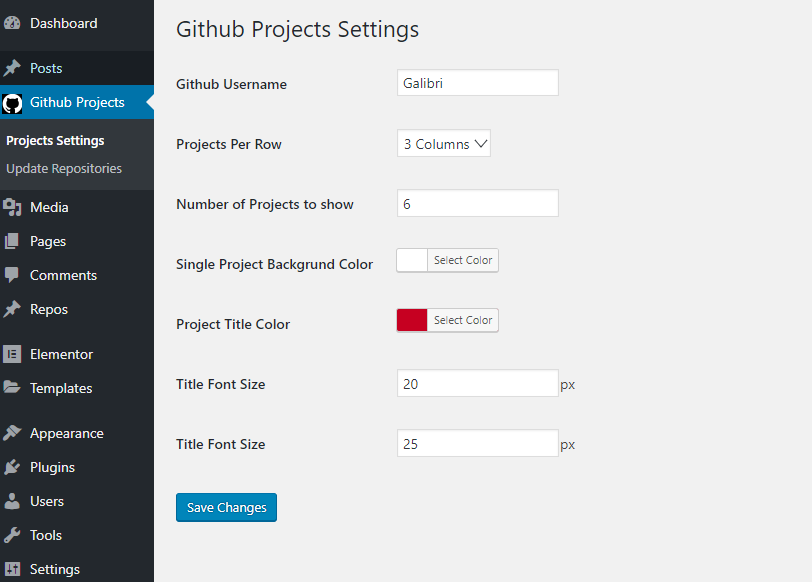
Dashboard Settings page
Gosod
Here is how to install the plugin:
- Upload the plugin files to the
/wp-content/plugins/plugin-namedirectory, or install the plugin through the WordPress plugins screen directly. - Activate the plugin through the ‘Plugins’ screen in WordPress
Cwestiynau Cyffredin
- Is it free to use?
-
Yes, it’s totally free as long as github public repositories API are free to use.
- Does it come with free support?
-
Simply, NO. But for fixing any bug, I will keep updating for free.
Adolygiadau
There are no reviews for this plugin.
Contributors & Developers
“WP Showcase for GitHub” is open source software. The following people have contributed to this plugin.
Cyfranwyr
Translate “WP Showcase for GitHub” into your language.
Interested in development?
Browse the code, check out the SVN repository, or subscribe to the development log by RSS.
Cofnod Newid
1.0
- Initial release