

Popis
Shield WP Admin is a lightweight yet powerful plugin designed to enhance the security of your WordPress admin area. With an easy-to-use interface and essential protection tools, it helps safeguard your site against common threats and vulnerabilities.
Key Features:
-
Custom Admin Login URL
Hide or customize the default/wp-login.phpURL to prevent unauthorized login attempts. -
Limit Login Attempts
Protect against brute-force attacks by limiting failed login retries. -
Google reCAPTCHA Integration
Add reCAPTCHA to the login screen to block bots and automated scripts. -
Disable XML-RPC
Prevent exploitation via XML-RPC by disabling its access entirely. -
Disable File Editor
Block access to the theme and plugin file editor in the WordPress dashboard. -
Hide WordPress Version
Conceal your WordPress version from source code to reduce exposure to targeted attacks. -
Force HTTPS Redirection
Redirect all HTTP requests to HTTPS to ensure secure access. -
Disable Pingbacks & Trackbacks
Protect your site from spam and DDoS attacks by disabling pingbacks and trackbacks. -
IP Blacklisting
Block specific IP addresses directly from the admin panel to protect the site. -
Admin Login Form Logo Change
You can change the logo of admin login form.
Why Shield WP Admin?
Whether you’re a developer or a site owner, Shield WP Admin provides a smart, flexible solution to strengthen your WordPress backend—without bloating your site or overwhelming your dashboard.
External Services
This plugin uses Google reCAPTCHA to protect the admin login from automated brute-force attacks.
- Service Used: Google reCAPTCHA
- Service Domain: https://www.google.com/recaptcha
- Purpose: Used to verify that the user is human, preventing spam or Brute-force attacks on admin login protected by the plugin.
- What Data is Sent: When a user interacts with a reCAPTCHA-protected form, their interaction (including IP address, user agent, and possibly cookies) is sent to Google’s reCAPTCHA service for validation and verification.
- When Data is Sent: This data is transmitted to Google when the form is loaded (due to the JS script) and again when the form is submitted.
- Service Provider: Google
- Terms of Service: https://policies.google.com/terms
- Privacy Policy: https://policies.google.com/privacy
Snímky obrazovky
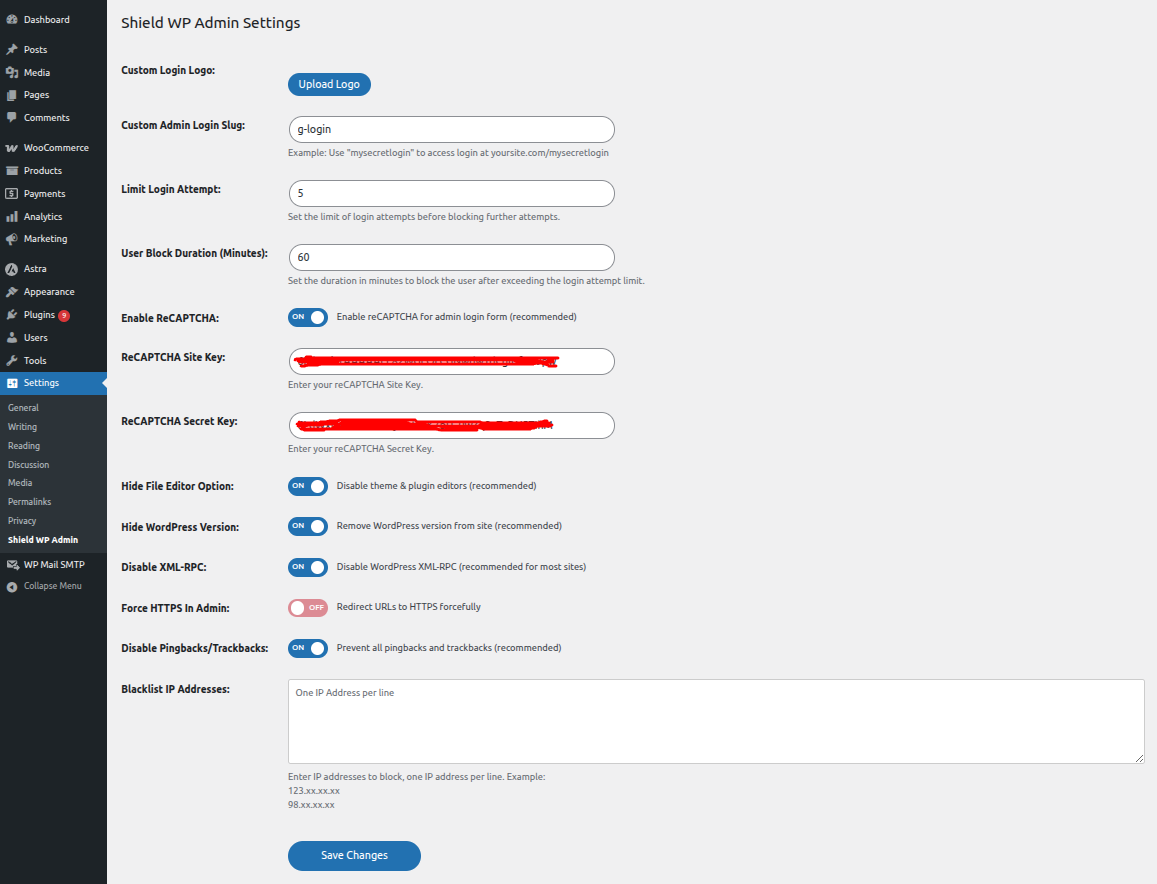
Dashboard settings to manage all Shield WP Admin features.
Instalace
- Upload the plugin folder
shield_wp_adminto the/wp-content/plugins/directory, or install it directly via the WordPress Plugins screen. - Activate the plugin through the Plugins menu in WordPress.
- Navigate to Settings Shield WP Admin to configure the available security features.
Nejčastější dotazy
-
How can I access the login page after changing the URL?
-
Make sure to bookmark or note your new login URL. If you forget it, you can disable the plugin via FTP or your hosting control panel.
-
Will this plugin conflict with other security plugins?
-
Shield WP Admin is built to work alongside most major security plugins. However, it’s best to avoid overlapping functionalities like multiple reCAPTCHA or login limiter features.
-
Can I selectively enable or disable features?
-
Yes, every feature can be individually toggled from the plugin settings page.
-
What is the default admin login slug when you’ve activated it?
-
Default admin login slug is
mysecretlogin.
Recenze
Pro tento plugin nejsou žádné recenze.
Autoři
Shield WP Admin je otevřený software. Následující lidé přispěli k vývoji tohoto pluginu.
Spolupracovníci
Přeložte “Shield WP Admin” do svého jazyka.
Zajímá vás vývoj?
Prohledejte kód, podívejte se do SVN repozitáře, nebo se přihlaste k odběru protokolu vývoje pomocí RSS.
Přehled změn
1.0
- Initial release of Shield WP Admin with core security features.