

Popis
Přidání slovníku pojmů na váš web může být chytrým krokem ke zlepšení čtenářského zážitku vašich uživatelů a k výraznému posílení SEO a pozic ve vyhledávačích.
Pokud hledáte ten nejlepší plugin pro slovník pojmů pro váš web na WordPressu, už nehledejte dál: právě jste ho našli!
Slovník od Codeat je freemium WordPress plugin, který vám umožní vytvořit na vašem webu slovník pojmů a proměnit váš obsah v ucelený a snadno procházelný zdroj informací. Je k dispozici v bezplatné i PRO verzi.
V čem spočívá superschopnost pluginu Slovník od Codeat?
Slovník od Codeat automaticky generuje seznamy slov z vašeho obsahu a vytváří stylované bublinkové nápovědy (tooltipy), čímž zvyšuje zapojení uživatelů bez nutnosti ručního zásahu.
Pojmy a definice budou seskupeny v sekci slovníku a automaticky propojeny s odpovídajícími slovy v rámci vašich příspěvků a stránek.
Plugin Slovník od Codeat můžete používat s klasickým editorem WordPressu nebo s Gutenbergem: je 100% kompatibilní.
Použití v reálném světě
Představte si, že máte blog o jídle.
Jak skvělé by bylo ukazovat vašim čtenářům tooltip (a přímý odkaz) na popis ingredience (nebo kuchyňského náčiní), aniž by museli opustit váš web?
A co když provozujete online obchod s rybářskými potřebami?
S pluginem Slovník od Codeat můžete poskytovat podrobné popisy svého zboží a doporučovat související produkty přímo ze stránek svého obchodu.
Jste velkým fanouškem Návratu do budoucnosti a chcete vytvořit digitální encyklopedii, která pokryje všechny aspekty vaší oblíbené ságy?
Se Slovníkem od Codeat je to hračka! Podívejte se na toto demo.
Jste specialistou na partnerský (affiliate) obchodní marketing?
Plugin Slovník od Codeat můžete použít k vložení svých affiliate odkazů a popisů k některým z vašich klíčových termínů. Tímto způsobem můžete proměnit oblast tooltipu ve vyskakovacím okně na stroj na peníze! Skvělé, ne?
A co je ještě lepší, plugin Slovník od Codeat můžete používat zdarma! Základní verze pluginu Glossary je – a vždy bude – zdarma.
FUNKCE ZDARMA
Bezplatná verze pluginu Slovník od Codeat je nabitá šikovnými funkcemi! Jeho výkonný engine automaticky propojuje každý výskyt termínu (nebo sady termínů) s předem definovaným seznamem definic.
Zde jsou některé z věcí, které můžete dělat s bezplatnou verzí pluginu Slovník od Codeat:
- Seskupujte své termíny do kategorií a vytvářejte vertikální archivy termínů pomocí shortcodů: Seznamy termínů a Seznamy kategorií.
- Vyberte si, kde chcete tyto funkce aktivovat: zda na všech stránkách nebo jen na některých z nich, v archivech, taxonomiích, vlastních typech příspěvků (CPT) atd.
- Zvýrazněte své propojené termíny, nebo při najetí myší zobrazte zvýraznění i tooltip.
- Upravte si vzhled svých tooltipů výběrem jedné ze čtyř bezplatných šablon.
- Propojujte termíny s interními nebo externími odkazy.
- Podporovány jsou související/dodatečné pojmy nebo synonyma pro stejný termín.
- Přidejte vlastní ikonu pro zvýraznění externích odkazů.
- Používejte jej se svými oblíbenými pluginy: Yoast SEO, Ninja Forms, Elementor, Bricks Builder, Fixed TOC, Easy Table of Contents, YARPP, pluginy pro správu rolí jako User Role Editor nebo vícejazyčnými pluginy jako WPML a Polylang.
- Vlastní integrace pro šablony: Bricks, Divi a Genesis.
- Hladký přechod z pluginu CM Glossary Tooltip.
- Vyzkoušejte si naše widgety: Vyhledávací panel slovníku, Nejnovější termíny a Kategorie slovníku.
- Bezproblémová integrace s bloky Gutenberg.
- Integrace ChatGPT (vyžaduje OpenAI API klíč) pro generování obsahu pojmů
- Importy pojmů z CSV
- Podpora Schema.org pro DefinedTerm
Bezplatná verze pluginu Slovník od Codeat nezahrnuje dedikovanou podporu.
Pokud potřebujete pomoc, podívejte se na náš demo web, přečtěte si naši dokumentaci nebo přejděte na vyhrazené fórum podpory na WordPress.org.
Verze PRO posouvá všechny fantastické funkce bezplatné verze Slovníku od Codeat na zcela novou úroveň díky sadě užitečných doplňků, které rozšiřují možnosti stylování a přizpůsobení. Pojďme si je všechny podrobně představit:
🚀 PRO FUNKCE
PRO verze Slovníku od Codeat zahrnuje všechny bezplatné funkce a navíc několik nástrojů pro řízení chování, které vylepšují zážitek vašich čtenářů.
Zde jsou některé z věcí, které můžete dělat s verzí PRO pluginu Slovník od Codeat:
- Pokročilé přizpůsobení a stylování vašich tooltipů.
- Automaticky generuje poznámky pod čarou pro pojmy ze Slovníku ve vašem obsahu. Demo
- Plná kontrola nad chováním tooltipů na mobilních zařízeních.
- Rozlišujte u termínů velká a malá písmena.
- Odkazujte pouze na první výskyt stejného nebo jakéhokoli klíčového termínu.
- Zabraňte zobrazování odkazů na termíny na jejich vlastní stránce s popisem.
- Přidejte abecedně seřazený seznam svých pojmů ve Slovníku. Demo
- Plně přizpůsobitelný blok indexu slovníku pro vizuální editory (Gutenberg, Elementor, Fusion Builder, Divi, Beaver Builder, SiteOrigin)
- Přidávejte ke svým klíčovým termínům vlastní pole (Custom Fields) a využijte integraci s pluginem ACF (Advanced Custom Fields).
- Použijte PRO shortcode/blok pro vytvoření Rejstříku pro slovník pojmů.
- Pokročilé shortcody pro zpracování obsahu při použití Visual Composeru nebo jiného tvůrce stránek.
PRO verze Slovníku od Codeat zahrnuje dedikovanou podporu.
Pokud máte jakékoli pochybnosti nebo dotazy, náš přátelský tým podpory vám pomůže co nejdříve. Naše dokumentace pokrývá prémiové funkce včetně snímků obrazovky.
Nejste s pluginem spokojeni?
Využijte naši 14denní záruku vrácení peněz!
Snímky obrazovky


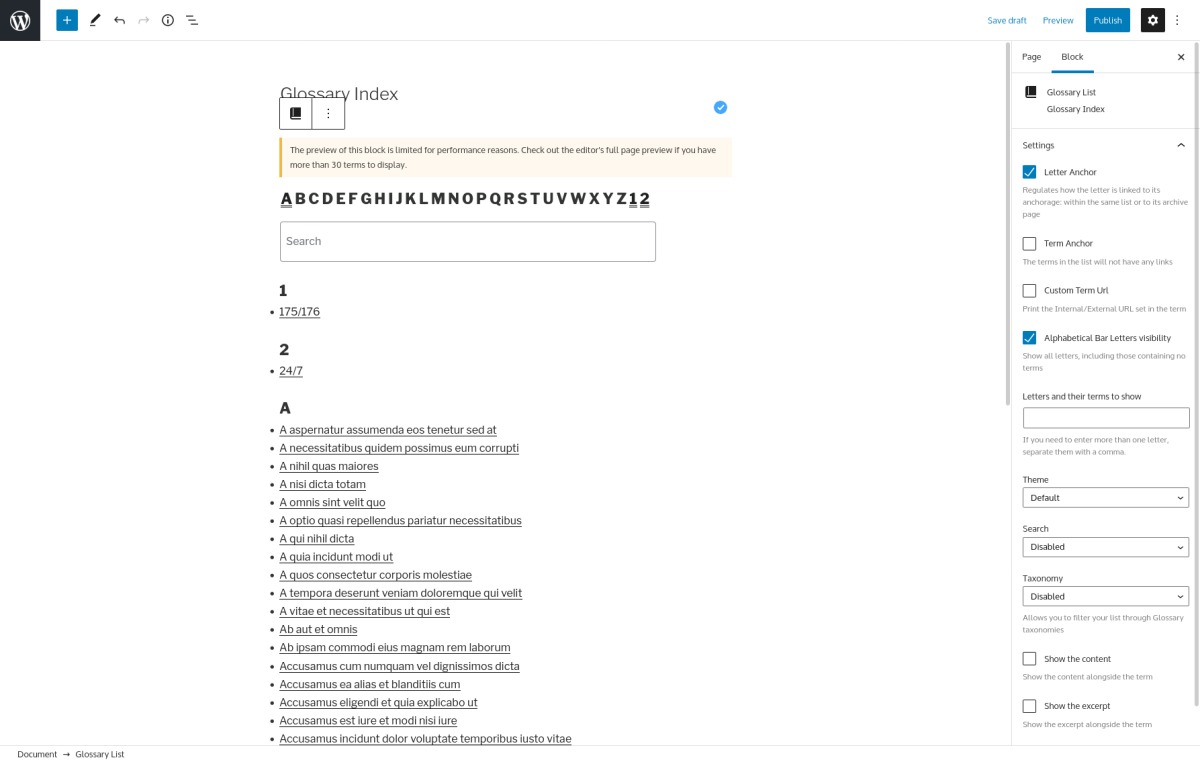
Instalace
Použití nástěnky WordPress
- Přejít na „Přidat nový“ na nástěnce pluginů
- Vyhledejte „glossary codeat“
- Kliknout na „Instalovat nyní“
- Aktivovat plugin na nástěnce pluginů
Nahrávání do nástěnky WordPress
- Přejít na „Přidat nový“ na nástěnce pluginů
- Přejít na oblast „Nahrát plugin“
- Vyberte soubor
glossary.zipze svého počítače - Kliknout na „Instalovat nyní“
- Aktivujte plugin v nabídce Pluginy
Pomocí FTP
- Stáhněte si
glossary.zip - Rozbalte adresář
glossaryve svém počítači - Nahrajte adresář
glossarydo složky/wp-content/plugins/ - Aktivujte plugin v nabídce Pluginy
Nejčastější dotazy
-
Je dostupná dokumentace?
-
Samozřejmě!
Naše rozsáhlá dokumentace pokrývá všechny funkce a tipy, jak z pluginu Slovník od Codeat vytěžit maximum. -
Podporuje všechny jazyky a abecedy?
-
Slovník od Codeat je navržen tak, aby bezproblémově fungoval v jakémkoli jazyce, přičemž podporuje abecedy RTL (zprava doleva) i LTR (zleva doprava) a také nelatinková písma. Plugin jsme rozsáhle testovali v nejpoužívanějších světových jazycích, abychom zajistili jeho širokou přístupnost a spolehlivost.
Kromě nejběžnějších jazyků jsme Slovník důkladně testovali s následujícími jazyky, abychom zajistili optimální výkon: hebrejština, arabština, němčina, japonština, čerokézština, ruština a řečtina.
Uvítáme jakoukoli zpětnou vazbu k těmto i dalším jazykům. -
Můžu jej používat s ACF?
-
Ano! Pokud vlastníte licenci Slovník od Codeat Premium, můžete náš plugin používat s ACF.
Slovník od Codeat přidá do ACF zaškrtávací pole s popiskem „Přidat podporu pro Slovník do vašich polí“.
Tímto způsobem budete moci aktivovat filtrování v ACF pro přizpůsobení svých polí.
-
Je kompatibilní s cachovacími pluginy?
-
Ano, Slovník od Codeat funguje s cachováním na straně back-endu i front-endu.
Cachování může být zajištěno WordPress pluginem a/nebo vaším hostingem: ať už je to jakkoli, nemusíte si dělat starosti s kompatibilitou.Pokud používáte plugin pro cachování na straně back-endu, mezipaměť se obnovuje každých několik hodin nebo maximálně každý den, takže to pro Slovník od Codeat nebude představovat žádný problém.
Na druhou stranu, pokud používáte cachování na straně front-endu a doplněk Slovník Premium, měli byste podniknout několik dalších kroků. Pokaždé, když upravíte svá nastavení – například změníte styl bublinkové nápovědy (tooltipu) –, musíte vymazat mezipaměť front-endu.
Způsob, jakým promažete mezipaměť (cache), se může lišit v závislosti na pluginu nebo hostingu, který používáte, proto si prosím přečtěte jejich dokumentaci, kde se dozvíte, jak na to.
-
Je kompatibilní s WordPress Multisite?
-
Ano!
pokud spustíte Multisite instalaci a spravujete více webů. , může Glossary automaticky obsluhovat celou síť webů, kde je plugin aktivní.Pro práci v tomto prostředí, potřebuje plugin Slovník od Codeat dva elementy:
- Jedna licence na doménu (nebo jedna licence pro subdoménu).
- Multisite se sdílenou databází.
-
Je kompatibilní s překladovými pluginy?
-
Ano, Slovník je 100% kompatibilní s WPML a Polylang.
Aby spolu mohly spolupracovat, budete muset nastavit jazyk u každého typu příspěvku, u kterého si přejete Slovník spouštět.
Tímto způsobem náš plugin rozpozná pojmy a bude odpovídajícím způsobem spravovat jejich příslušné popisy. -
Podporuje Visual Composer / Elementor?
-
Většinu času ano, podporuje.
Na druhou stranu ve WordPress ekosystému existují desítky pluginů pro Visual Composer/Page Buildery a velké množství z nich se nechová standardním způsobem, což může představovat problém.
Recenze


Autoři
Glossary je otevřený software. Následující lidé přispěli k vývoji tohoto pluginu.
Spolupracovníci


Plugin „Glossary“ byl přeložen do 8 jazyků. Děkujeme všem překladatelům za jejich pomoc.
Přeložte “Glossary” do svého jazyka.
Zajímá vás vývoj?
Prohledejte kód, podívejte se do SVN repozitáře, nebo se přihlaste k odběru protokolu vývoje pomocí RSS.
Přehled změn
2.3.13
- Enhancement: CMB2 updated
2.3.12
- Enhancement: Freemius SDK updated
2.3.11
- Vylepšení: Vynutit výchozí hodnoty pro typ obsahu Slovník
2.3.10
- Enhancement: Freemius SDK updated
2.3.9
- [PRO]Fix: Accordion stopped working after 2.3 release
2.3.8
- [PRO]Enhancement: Footnotes CSS
- Enhancement: Freemius SDK updated
2.3.7
- [PRO]Fix: Glossary ChatGPT prompt insert on Classic Editor in some cases wasn’t working
2.3.6
- [PRO]Enhancement: Added a field to set a custom prompt for ChatGPT
2.3.5
- Fix: Improved again EzToc integration of the previous release to avoid other edge cases
2.3.4
- Fix: Improved EzToc integration of the previous release to avoid other edge cases
2.3.3
- Fix: In some edge cases with EzToc the injection wasn’t working if some options was enabled
2.3.2
- [PRO] Enhancement:
glossary-listshortcode improved behavior or term links - [PRO] Fix: In some edge cases there was a crash with a library
2.3.1
- [PRO] Enhancement:
glossary-listshortcode now use the internal system for the excerpt
2.3.0
- Enhancement:
glossary_base_urlfilter to change the base URL - Enhancement: Schema.org support for DefinedTerm in Glossary term page
- Enhancement:
glossary_json_ldfilter to change the JSON-LD content for Schema.org - [PRO]Enhancement:
glossary-a2z-listshortcode to generate a alphabetical letter list - [PRO]Enhancement: option to append at the content bottom the list of terms found
- [PRO]Enhancement: option to use only accordion (also on desktop) instead of tooltips
- [PRO]Enhancement:
glossary-listaccordion parameter has option term to enable it on terms instead of the whole letter - [PRO]Enhancement:
glossary-listmicrodata for Schema.org out the box
2.2.43
- [PRO]Fix: Black and Light tooltip’s theme had issues with copying text
2.2.42
- [PRO]Fix: Elementor wasn’t working perfectly with [glossary-ignore] shortcode when widget where used
2.2.41
- Fix: Search glossary terms in some edge cases didn’t worked
2.2.40
- [PRO]Fix: Mobile tooltip
- Fix: More link wasn’t working in some cases
2.2.39
- Fix: Updated Freemius SDK to the latest version
2.2.38
- Fix: Improved textdomain loading for widgets
- Fix: Archive widget now use category configured for links
2.2.37
- Enhancement: Improved Bricks Builder integration
2.2.36
- Revert: Rollback to the minimum PHP version required as 7.4 but 8.4 is supported
2.2.35
- Enhancement: Improved the code quality thanks to PHPStan 2.0
2.2.34
- Enhancement: Added another parameter to
glossary_tooltip_htmlfor just the HTML wrapper
2.2.33
- Enhancement: Better detection if tooltips are already in the content
- Fix: Improved sup HTML tag removal in tooltip excerpt to avoid HTML broken
2.2.32
- Fix: Improved Polylang integration
- Fix: WPML integration
2.2.31
- Fix: Alphabetical archive list now show only published terms
2.2.30
- Fix: Unused variable reported in php logs
- Enhancement: Freemius SDK updated for PHP 8.2 support
2.2.29
- Fix: Better Bricks integration, now works with „text“ elements
2.2.28
- Fix: Show „Read more“ link on tooltip also if they are External
2.2.27
- Enhancement: Avoid tests folder from dependencies
- [PRO]Fix: issue with A2Z search
2.2.26
- Enhancement: metabox for Excerpt on Glossary post types is avalaible also on free
2.2.25
- [PRO] Enhancement: When
glossary-listas the featured image enabled and links the image get a link to the term
2.2.24
- Enhancement: Filter
glossary_default_term_parametersto change the default parameters before term injection
2.2.23
- Enhancement: Filter
glossary_excerpt_supportto disable the execution on Excerpt - [PRO]Enhancement: Not print CSS from plugin customizer if not configured
2.2.22
- Fix: Support for php 8.2 improved
- Enhancement: More warnings about the fact that the plugin uses a cache for shortcodes and widgets
- [PRO] Fix: Plugin localizaiton wasn’t working in widget settings
2.2.21
- Fix: Better string for shortcodes in admin settings
- Fix: Extra tab for free user missing
- Enhancement: More post type to ignore in the plugin settings
2.2.20
- Fix: Issue with previous update
2.2.19
- Enhancement: Geodirectory plugin was crashing
2.2.18
- Bugfix: In some cases the latest release created issues on Elementor using the shortcodes
2.2.17
- Enhancement: Improved terms detection between post content and ACF fields
2.2.16
- Fix: Tooltip text is ignored on selecting and copy on clipboard
2.2.15
- Fix: Added the missing file for the free version for ChatGPT support
- Fix: Injecting on RTL languages was often misplacing the term
2.2.14
- Fix: A2Z URL fixes on archive and widget
2.2.13
- [PRO]Fix: Mobile tooltips wasn’t working
- Fix: improved unit tests to avoid issues with A2Z
2.2.12
- [PRO]Regression: Shortcode list was showing only the first item
- Fix: archive alphabetical widget used the wrong URL
2.2.11
- [PRO]Fix: Improved ACF integration
- [PRO]Fix: Mobile tooltip in some cases wasn’t opening
- Fix: archive alphabetical list used the wrong URL
2.2.10
- Fix: Avoid JS crash on off-screen.js
- Fix: Prevent duplicate link insertion on Divi theme
2.2.9
- Fix: Prevent duplicate link insertion on Elementor
2.2.8
- Fix: Divi integration now check also the Glossary settings for post types enabled
2.2.7
- [PRO]Fix: A2Z on JS crashes on some edge cases
- [PRO]Fix: Removed Elementor integration for the Icon-List block
2.2.6
- Fix: Off screen now avoid crashes if tooltips is not found
2.2.5
- [PRO]Enhancement: Improved ACF integration
- Enhancement: Updated ChatGPT model list
2.2.4
- Enhancement: Moved to free version the off-screen tooltip JS placement
- Fix: Glossary post name field wasn’t applied for free version
- Fix: Provide better information for the ChatGPT errors
- [PRO]Fix: Avoid some cases when the auto injection on ACF fields wasn’t working
2.2.3
- Fix: Tooltip position off screen wasn’t working in some cases
- Fix: Glossary post name field was missing on the free plugin release
- Fix: Enable Extra tab for free version to show ChatGPT settings
- [PRO] Fix: Glossary injection need to respect the page settings on Elementor widget
2.2.2
- Fix: Widget categories had some duplicates
- Fix: Widget A2Z in some cases hadn’t some settings configured
- [PRO] Fix: Duplicate close X on mobile tooltips
2.2.1
- Enhancement: Different warning for Free/Pro customers about page builders with warning level
- Fix: Readded support for block themes
2.2
- Fix: Automatic injection wasn’t working with some edge cases (with some page builders) that execute multiple times it
- Enhancement: Integration improved with Bricks Builder
- Enhancement: ChatGPT integreated to let you generate the Glossary term content
- Enhancement: New filter ‚glossary_content_priority‘ to set the priority for
the_contentfilter - Enhancement: New filter ‚glossary_tooltip_image_size‘ to set the thumbnail size for tooltips
- Enhancement: New filter ‚glossary_posttype_picker‘ to set the post types the internal URL field will show
- Enhancement: New filter ‚glossary_tax_hierarchical‘ to change the flag to enable or disable the taxonomy hierarchical
- Enhancement: All the frontend JS doesn’t require anymore jQuery
- [PRO] Enhancement: New parameter
term-archor-targetto add target=“_blank“ toglossary-listshortcode term list - [PRO] Enhancement: Improved integration for specific Elementor blocks with Glossary
2.1.33
- Enhancement: Freemius SDK updated to correct fatal error with some specific edge cases
- [PRO]Fix: Avoid crash on tooltip preview with Divi
2.1.32
- [PRO]Fix: Avoid JS error if search field on
glossary-listdoesn’t exist - Enhancement: Freemius SDK updated
2.1.31
- Fix: Wrong Read More disable status in case external url is not configured
2.1.30
- Fix: Localization alert now report the plugin name
2.1.29
- Enhancement: Object cache support for A2Z lists
2.1.28
- Enhancement: Moved away to Yoast i18n-module to avoid deprecated warning for i18n notices
2.1.27
- [PRO]Enhancement: Disable frontend internal cache for
glossary-listonly on admin user
2.1.26
- Fix: Avoid to reinject terms if already found with integration for specific blocks like for Divi
- [PRO]Fix: Avoid to reinject terms if already found with
glossary - Enhancement: Performance improvements on getting the terms list if it is executed multiple times in the same page
2.1.25
- Fix: Removed duplicated code about search that was enabled for anyone
2.1.24
- Fix: Read more link also on internal links
- Fix: Removed code on free version about Read More that is used only on PRO version
2.1.23
- Fix: missing css for A2Z widget for free users
2.1.22
- [PRO]Enhancement: New filter to change field type
glossary_custom_field_type - Fix: in case of external/internal URLs changes
2.1.21
- Fix: The injection now works if the word is on top of the line
2.1.20
- Enhancement: Tooltip now include a CSS class to stilish them by category
- Fix: On Genesis integration it was missing the
genesis_more_textfilter
2.1.19
- Enhancement: Support for Easy Table of Contents plugin
2.1.18
- [PRO]Fix: Rest custom fields are now working again
2.1.17
- Enhancement: Widgets now don’t write empty h2 tags if there isn’t any title
- Enhancement: Warnings now are showed also inside Gutenberg!
- [PRO]Enhancement: Full German localization, thanks to elexem!
- [PRO]Fix: A2Z bar inside archives wasn’t working sometimes
2.1.16
- Enhancement: Switch to original johnbillion/extendedcpts
2.1.15
- [PRO]Fix:
glossary-listshortcode now will use only published glossary terms - [PRO]Fix:
glossary-listbetter scrolling position on arrow buttons
2.1.14
- Fix: Fatal Error on backend for Yoast i18n-module fork
2.1.13
- Fix: Ignore
HTML tag for tooltip injection
2.1.12
- Enhancement: Bump to PHP 7.3
- Enhancement: Execute Glossary also inside Divi text and Woocommerce description blocks
- [PRO]Fix: A2Z issues with encoding on alphabetical bar
2.1.11
- Enhancement: Elementor block detection for our shortcodes to enqueue assets
- Enhancement: Added css class
glossary-only-linkto links injected
2.1.10
- Fix: Various notice errors resolved
2.1.9
- [PRO]Fix: Search prev/next buttons in Glossary Index shortcode now works again
2.1.8
- Enhancement: Better total term counting in the settings
2.1.7
- Fix: Classic tooltip fixed on mobile creating overflow
- [PRO]Fix: A2Z search bar full width in percentage
- [PRO]Fix: The list to select the taxonomy to override the terms filter was missing
- Enhancement: CMB2 updated
2.1.6
- [PRO]Fix: JS error when mobile support is not enabled
- Enhancement: CMB2 updated
2.1.5
- Fix: With Elementor Skins
- Enhancement: Better warning about shortcode
- Enhancement: Code improvements for PHP 8.1
2.1.4
- Fix: If first match is uppercase don’t duplicate itself
- Fix: Alphabetical letters order use the locale of the website
2.1.3
- Fix: Excerpt generation by words
- Fix: Category widget wasn’t indenting sub categories
- Fix: ACF alert dismiss wasn’t working
- Fix: Added requirement for
iconvmodule
2.1.2
- [PRO] Fix: Term anchor flag was inverted
- [PRO] Fix: Block preview wasn’t updating with the parameters
- Fix: Widget was crashing with Elementor Pro
2.1.1
- [PRO] Fix: Duplicate content without custom fields configured
2.1.0
- Changes: Moved to GPLv3 license
- Enhancement: New filter
glossary_a2z_letter_tagto change the HTML tag on letters in the A2Z bar - Enhancement: Option to hide Glossary post type from frontend
- Enhancement: New filter to change the image format size in tooltip
glossary_tooltip_image - Enhancement: New filter to enable bbpress support
glossary_bbpress_support - Enhancement: New option to add rel=“sponsored“ to links
- Fix: OffScreen tooltip detection on left improved
- [PRO] Fix: Customizer set colors also of mobile tooltip
- [PRO] Enhancement: New parameter
custom-fieldsto show the custom field inglossary-list - [PRO] Enhancement: New parameter
featured-imageto show the featured image inglossary-list - [PRO] Enhancement: New theme,
summaryfor the shortcodeglossary-list - [PRO] Enhancement: New mode
accordionfor the shortcodeglossary-list - [PRO] Enhancement: New block for
glossary-listshortcode
2.0.20
- [PRO] Fix: text field alignment on Custom Fields in settings
- [PRO] Enhancement: No loading of emoji on Customizer preview
- [PRO] Enhancement: Show Glossary support on ACF settings just on text/textarea fields
- [PRO] Enhancement: Better mobile detection for mobile tooltip support
2.0.19
- [PRO] Fix: Tabs and customizer preview wasn’t working right
- Fix: External icon link on Webkit browser was rendered bad
- Enhancement: Alert the user when term content and excerpt are empty
2.0.18
- Fix: Broken free version build fixed
2.0.17
- Fix: Behaviour with external links and icon not showed
- Fix: Updated extended-cpts and patched to avoid conflicts
2.0.16
- Enhancement: WCAG support in widgets, shortcodes and tooltips
- Fix: Avoid fatal error with Elementor widget view
- Fix: Now purge of transients is more strong for some edge cases
2.0.15
- Fix: Manual Terms Counter updater is now working again
- Fix: Avoid fatal error in case plugin is not configured
- [PRO] Improvement: ACF integration now will ignore wrong parameters by third part stuff
2.0.14
- Fix: Avoid Fatal error when free and premium version are enabled
- Fix: Glossary Terms shortcode wasn’t parsing always right the parameters
- Enhancement: Updated the various plugin dependences
2.0.13
- Fix: Avoid errors with no terms improved
- Fix: A2Z missing the full bar of letters
2.0.12
- [PRO] Enhancement: Order categories in metabox in hierarchical order
2.0.11
- [PRO] Fix: Revert hide letter in A2Z as there is already a parameter
empty-letters - Fix: Better CSS for glossary-terms shortcode
- Enhancement: Not load general.css if there aren’t Glossary widgets in use
2.0.10
- [PRO] Fix: In
glossary-listshortcode the parameter show-letter wasn’t working - [PRO] Fix:
glossary-listnow shows in the bar just the letter found in the terms - Fix: Avoid errors with no terms
2.0.9
- Fix: „Link only the first occurrence of all the term keys unlinks other glossary terms“ fixed
2.0.8
- [PRO] Fix: HTML broken on
glossary-list - [PRO] Fix: A2Z bar new feature in top of the archives undefined index error
- Fix: Avoid fatal error on free version
2.0.7
- [PRO] Fix: on
glossary-listshortcode improved the compability with some themes - [PRO] Fix: On ACF fields when enabled the support on fields that are not just text it will be ignored
2.0.6
- Release alignment between pro/free
2.0.5
- [PRO] Fix: Undefined index for plugin native custom fields
- Fix: Prevent same term page and other cases with other post types
2.0.4
- Fix: Undefined index for some widgets
- [PRO] Fix: Undefined index for plugin native custom fields
- Fix: Extended-Cpts library can create conflicts https://github.com/johnbillion/extended-cpts/pull/156
2.0.3
- Fix: Issues with Composer autoload not updated for free version
2.0.2
- [PRO] Fix: Issues with Tooltip Customizer and missing parameters
2.0.1
- Fix: Composer Autoload wasn’t optimized and was generating an error for the websites with WP_DEBUG enabled
2.0
- [PRO] Enhancement: New footnote mode to use as alternative for link or tooltip modes
- [PRO] Enhancement: New option to add in top of Glossary terms (if theme support it) the Alphabetical Index Bar
- [PRO] Enhancement: 2 new tooltip themes
- [PRO] Enhancement: New parameter for A2Z shortcode about search bar position
- [PRO] Enhancement: New field to define what string to append to every url injected
- Enhancement: Code refactoring, improvements and new automated tests
- Enhancement: Dropped support for PHP 5
- Enhancement: New banners about multisite support and about documentation for new installation
- Enhancement: Button to purge transients used by shortcodes and widgets in settings
- Enhancement: New option to ignore text inside
<span>tags that improve support for some plugins - Enhancement: New
themeparameter in Last Glossaries Terms and Categories widgets and shortcodes - Fix: Not show taxonomy picker inside post types to enable filtering if there aren’t glossary taxonomies
- [PRO] Fix: Fancy theme arrow now has the color configured in Customizer