

Description
Build your own live streaming platform with WordPress. Broadcast Live Video powers turnkey live streaming sites with multiple channel types, web-based broadcasting, chat, monetization, and full content ownership — no third-party platforms required.
Broadcast from any source: browser webcams via WebRTC, desktop encoders like OBS, mobile apps like Larix Broadcaster, and 24/7 RTSP/RTMP IP cameras.
Broadcast Live Video – Turnkey Streaming Site Solution
What’s New in 7.x
- WebRTC Streaming App — Modern React-based broadcast and playback interface (Webcam-Streaming-WebRTC) with configurable stream quality, watermark overlay, and automatic view routing (broadcast for owners, playback for viewers)
- Visual Schedule Editor — Program 24/7 channels with a drag-and-drop schedule builder: daily, weekly, or one-time programs with live stream, video file, and video folder sources with priority ordering and filler content
- Channel Listing Skins — Choose from ready-made listing designs (Twitchy dark theme, Ticky vertical cards) or fully customize with template placeholders and CSS
- Improved Channel Management — Card-based grid layout with visual status labels, collapsible menus, breadcrumb navigation, and smart interface-aware controls
- VideoWhisper Server Integration — Deep integration with VideoWhisper WebRTC Server for RTMP/HLS restreaming, schedule processing, and WebRTC signaling
- Enhanced Restreaming — Frontend restream channel creation (including guest access), stream pause/resume, admin dashboard with server status, capacity monitoring, and per-stream controls
Get Started
- Free account for testing: Free Streaming account with WebRTC & RTMP/HLS
- Self-hosted: Deploy VideoWhisper WebRTC Server on your own VPS for full control
Live Demos
- Turnkey site: VideoNow.Live
- WebRTC P2P streaming: WebRTC Live Streaming Demo
Key Features
Broadcasting & Playback
- WebRTC broadcast and playback via React app with configurable quality (resolution, framerate, bitrate caps)
- HTML5 HLS / MPEG-DASH live video delivery with automatic protocol selection
- External encoder support: OBS, Wirecast, XSplit, Larix Broadcaster (iOS/Android)
- 24/7 IP camera restreaming (RTSP, RTMP, RTMPS, HTTP/HTTPS sources) with Setup Wizard
- Recording per channel, including WebRTC streams
- Video archive import with Video Share VOD
Channel Management
- Live video channels as WordPress custom post type
- Frontend channel setup and management with card-based grid layout
- Visual status labels: Live, Schedule, IP Camera, WebRTC, Recording, Paused, Restricted
- Context-aware menus adapting to channel interface type (WebRTC App, Restream, HTML5 Videochat, DASH)
- Breadcrumb navigation for intuitive channel management
Scheduling & Automation
- Visual schedule editor with daily, weekly, and one-time programming
- Multiple source types per program: live stream, video file, video folder (with play order and loop options)
- Source priority system with drag-and-drop reordering
- Default filler content when no program is scheduled
- Live/fallback behavior settings per program
- Timezone support with live clock display
Channel Listings
- Template-based listings with customizable placeholders (#title#, #thumb#, #viewers#, #tags#, #rating#)
- Ready-made listing skins: Twitchy (Twitch-inspired dark theme), Ticky (TikTok-inspired vertical cards)
- AJAX live updates with category filtering, tags, and search
- Offline video thumbnails and teaser support
Monetization
- Membership-ready with WordPress role permissions — works with any membership/subscription plugin
- Pay-per-view with custom post type — compatible with access control and content selling plugins
- Tips to broadcasters with myCRED or TeraWallet (WooCommerce gateways)
- Channel access lists: restrict by user role, login, email, or password
- Recommended: Paid Membership for credit-based membership purchases
Restreaming & IP Cameras
- Admin restream dashboard with server status, capacity monitoring, and per-stream controls
- Frontend restream channel creation with guest access support
- Stream pause/resume, mute audio, auto-cleanup for guest channels
- Private network detection with confirmation for local sources
- Push channel configuration to VideoWhisper server
Chat & Interaction
- AJAX chat alongside live video playback
- Custom ads in chat for monetization
- Floating watermark/logo overlay
- Event details display (title, schedule, description) when channel is offline
- Integrates Rate Star Review for channel ratings
Access Control & Administration
- Fine-grained permissions by role, email, ID, or username
- Broadcast and watch time limits per channel and per membership level
- Premium channels with unlimited membership levels
- Channel statistics: broadcast time, watch time, last activity, viewer counts
- BuddyPress integration: Live Stream tab in groups
Who Is This For?
Build platforms similar to Twitch, YouTube Live, Kick, or LiveStream — a self-hosted alternative where you own the content, control access, and keep 100% of revenue. Perfect for:
- Media companies — launch branded streaming channels
- Educators — deliver live classes, webinars, and scheduled course content
- Churches & organizations — stream events and services 24/7
- Surveillance — monitor IP cameras with web-based access control
- Creators & entertainers — monetize live content with tips, pay-per-view, and memberships
Hosting Requirements
- This plugin requires streaming server infrastructure beyond standard WordPress hosting
- For testing, register for a Free Streaming account with WebRTC & RTMP/HLS
- Self-hosted: deploy VideoWhisper WebRTC Server on a VPS or dedicated server
- Some advanced features (FFmpeg transcoding, server commands) require additional server configuration — disabled by default for security
Attributions
Some demo site screenshots show tests with the “Big Buck Bunny” video, available under Creative Commons Attribution at https://peach.blender.org/download/ .
Documentation
- Plugin Homepage: https://broadcastlivevideo.com
- Developer Contact: https://consult.videowhisper.com
- VideoWhisper Server: https://github.com/videowhisper/videowhisper-webrtc
- WebRTC Streaming App: https://github.com/videowhisper/Webcam-Streaming-WebRTC
Demo
- Live demo site: https://videonow.live
Extra
More information, latest updates, other plugins and non-WordPress editions at https://videowhisper.com/ .
Screenshots

Live Broadcast (for publisher) 
Live Video Watch (for active viewers, discuss online, see who else is watching) 
Live Video Streaming (for passive viewers, simple live video) 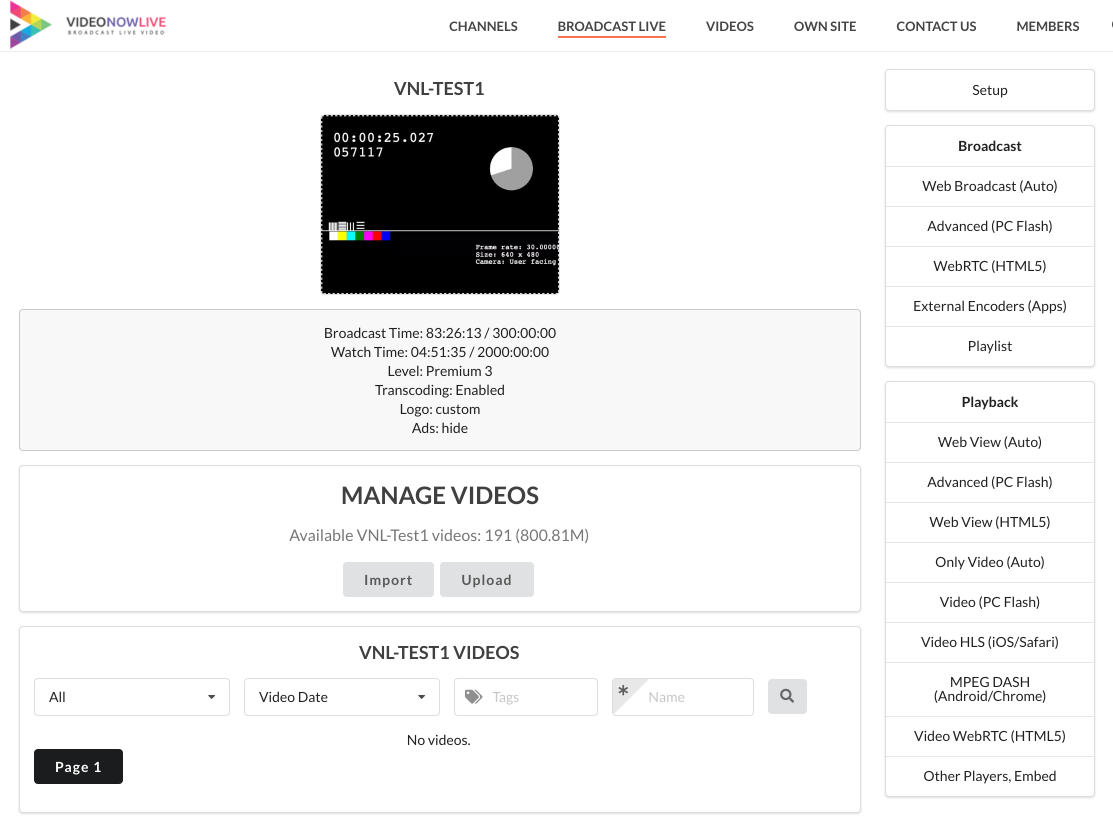
Manage channels features from frontend 
Channels listing with AJAX live updates, star ratings 
Playlist: Schedule videos to play as live stream 
Manage channel videos 
Broadcast using HTML5 WebRTC and AJAX chat (iPad view) 
Playback using HTML5 HLS and AJAX chat (iPhone view) 
Access IP Camera / Re-Stream Setup Wizard
Installation
- Upload the plugin to
/wp-content/plugins/or install directly from the WordPress plugin repository - Activate the plugin through the Plugins menu
- Go to Live Streaming > Setup to configure your streaming server connection
- Configure streaming server details (RTMP server address, VideoWhisper server API if applicable)
- Create pages with shortcodes:
[videowhisper_channel_manage]for channel management,[videowhisper_channels]for channel listings
For detailed setup with screenshots, see the Installation Tutorial.
Before installing, verify your hosting meets the streaming requirements.
FAQ
-
How can I get support?
-
Consult VideoWhisper for clarifications, issue reports, free consultations, and paid services (turnkey platform setup, streaming hosting, installation, custom development).
-
What streaming server do I need?
-
You need a streaming server that supports RTMP/HLS. Options include the open-source VideoWhisper WebRTC Server, Wowza Streaming Engine, or a managed VideoWhisper hosting plan. A free account is available for development and testing.
-
Can I use this with OBS or other desktop encoders?
-
Yes. The plugin provides RTMP credentials (server URL, stream key) that work with OBS, XSplit, Wirecast, and any RTMP-compatible encoder. Mobile apps like Larix Broadcaster (iOS/Android) are also supported.
-
Does it work on mobile devices?
-
Yes. HTML5 HLS/MPEG-DASH delivery is automatically used for mobile browsers. The WebRTC App interface works on modern mobile browsers that support WebRTC.
-
How can I report security bugs?
-
Report security bugs through the Patchstack Vulnerability Disclosure Program. The Patchstack team helps validate, triage, and handle security vulnerabilities. Report a security vulnerability.
Reviews


Contributors & Developers
“Broadcast Live Video – Live Streaming : WebRTC, HLS, RTSP, RTMP” is open source software. The following people have contributed to this plugin.
Contributors
“Broadcast Live Video – Live Streaming : WebRTC, HLS, RTSP, RTMP” has been translated into 1 locale. Thank you to the translators for their contributions.
Translate “Broadcast Live Video – Live Streaming : WebRTC, HLS, RTSP, RTMP” into your language.
Interested in development?
Browse the code, check out the SVN repository, or subscribe to the development log by RSS.
Changelog
7.1
- New: WebRTC Streaming App integration — modern React-based broadcast and playback interface (Webcam-Streaming-WebRTC) with configurable stream quality, watermarks, PIN authentication, and automatic view routing
- New: Visual Schedule Editor — program 24/7 channels with daily, weekly, or one-time schedules; multiple source types (live stream, video file, video folder) with priority ordering and filler content
- New: Channel listing skins — Twitchy (Twitch-inspired dark), Ticky (TikTok-inspired vertical), Custom, and Default presets with template-based customization
- New: Improved channel management — card-based grid layout, visual status labels (Schedule, IP Camera, WebRTC, Recording, Paused), collapsible accordion menus, breadcrumb navigation
- New: Enhanced restreaming — frontend channel creation with guest access, stream pause/resume, admin dashboard with server status and capacity monitoring, per-stream controls
- New: VideoWhisper Server schedule API integration — REST client for server-side schedule processing with token authentication
- New: Stream name normalization — consistent server-compatible naming across all integrations
- New: Admin restream management page with push configuration, auto-refresh, and visual capacity warnings
- Improved: Context-aware playback menus adapting to channel interface type
- Improved: Tags display in channel listings
- Improved: Offline video thumbnail support from teaser videos
- Improved: Security hardening — input sanitization, output escaping, nonce verification, rate limiting on API callbacks
6.3
- Integrate VideoWhisper Server for Restreaming
- VideoWhisper Restreaming player
6.2
- Improved code for security, reliability
6.1
- Support for VideoWhisper server (RTMP/HLS + WebRTC)
- Automated import of streaming settings from VideoWhisper account
5.7
- Integrates HTML5 Videochat with client side snapshots (no longer relies on FFmpeg for WebRTC streams)
- Integrates offline video (teaser), floating logo in H5V
5.6
- Integrates HTML5 Videochat with P2P WebRTC signaling support
5.5
- Removed Flash interfaces (discontinued by most browsers)
- Improved code
5.4
- Setup Overview page and notifications with requirements, steps
- Interface class setting for applying inverted (dark mode) or other Semantic UI classes
- Adaptive streaming bitrate based on resolution
- 1/2 category selector mode with optional subcategories only
- Updated BuddyPress integration to create channel post
- Hosting limits bitrate
- On demand recording setting per channel using FFmpeg
5.3
- Admin bar menus for quick plugin access
- Tips in HTML chat: AJAX updated balance and Tip buttons as configured from backend with image, sound, amount
- MPEG DASH Shaka Player (by Google) for increased reliability
- Added support for tipping with WooWallet credits
- User channel shortcode [videowhisper_channel_user] to create a channel automatically for current user and display broadcasting interface
- POT translation file
- Re-Streaming / IP Camera optimizations: Auto-Pause and resume on channel access or owner activity
5.2
- AJAX Chat with HTML5 stream playback
- Semantic UI integration for improved interface
- Integrate Rate Star Review — AJAX Reviews for Content, with Star Ratings
- Filter by Tags, Name
- Options to set HTML5 interfaces (WebRTC broadcast, transcoded playback) as available or preferred
- WebRTC Broadcast with AJAX chat
- Automatically using most suitable delivery method in HTML5 view (WebRTC if directly available, HLS, MPEG-DASH)
- IP Camera / Re-Stream Setup Wizard
5.1
- WebRTC broadcast and playback
- MPEG DASH transcoding and delivery
4.67
- Broadcaster layout code
4.66
- User watch limit: Set watching time limits based on role (membership)
- Configure parameters by user role (overrides channel settings)
- Update channel image by uploading picture
- Event Info: While channel is offline show event title, start, end, description
4.65
- View Profile context menu in participants lists
- User avatar in participants context menu
- Easy webcam/microphone select from dropdowns on preview panel
4.63
- Schedule playlists option
- Toggle default loader, loader static image option
- Advanced permission lists per channel: group chat, write in chat, view participants, private chat
4.61
- On demand archiving support in web broadcasting app
4.42.1
- Tips for broadcaster using myCRED
4.32.51
- Auto transcoding (on HLS request or always)
4.32.41
- Access Password
4.32.37
- Unlimited premium channel levels
- Feature control by user roles/lists
4.32.21
- myCRED integration: allow selling access to channels
- Channel access list (owner can configure user logins, emails, roles that can access)
4.32.8
- Improved iOS HLS transcoding reliability (retry and verify automatically)
- Navigation menus (setup in backend) for Channel Categories
4.32.7
- Improved channel AJAX listings: list by category in custom order
4.32.6
- Ban channel interface
- Web server load optimisation settings
4.32.1
- Broadcasting application v4.32 (w. autopilot reconnect)
4.29
- Category and tag archive pages include channels
- Channel time warnings and offline notifications
- Video Share VOD plugin support
- iOS detection, automated HLS display
- External encoder authentication and status monitoring
4.27
- Channel posts with frontend management and automated snapshot
- Channels list page with AJAX updates and pagination
- Shortcodes: watch, video, HTML5 HLS, broadcast
- Premium channels, transcoding, statistics
- RTMP web session check and external authentication
4.25
- Video & sound codec settings
- Floating watermark settings
4.07
- Widget with room participant counter
4.05
- P2P streaming support
- Secure token and bandwidth detection settings
2.2
- BuddyPress integration
2.1
- Permissions for broadcasters and watchers
- Display name configuration
2.0
- Self-contained plugin with settings page
1.0.2
- Initial release