Cache
Developer documentation for the Ajax Load More Cache add-on.
Auto-Generate Cache
The Ajax Load More Cache can be automatically generated by defining an array of cache URLs and IDs in the alm_cache_array filter. This filter tells Ajax Load More which cache instances to build when the process is initiated.
function my_alm_cache_array() {
	 return [
		 [
		 	 'url' => 'https://website.com/blog/',
			 'id'  => '7402199883',
		 ],
		 [
			 'url' => 'https://website.com/team/our-staff/',
			 'id'  => '2460844120',
			 'max' => 5,
		 ],
	 ];
}
add_filter( 'alm_cache_array', 'my_alm_cache_array' );Parameters
| url | The URL to the page holding the Ajax Load More instance. Required |
|---|---|
| id | The unique Ajax Load More ID.Required |
| max | The maximum number of cache pages to create per instance. Default: -1 |
Note: The Ajax Load More Cache can not be built on its own via cron or server-side action. It requires a client-side initiation of the build process from the WordPress admin.
Building the Cache
To start the cache build process, visit the Ajax Load More Settings > Cache page in your WordPress admin and click the Build Cache button under the Generate Cache option.
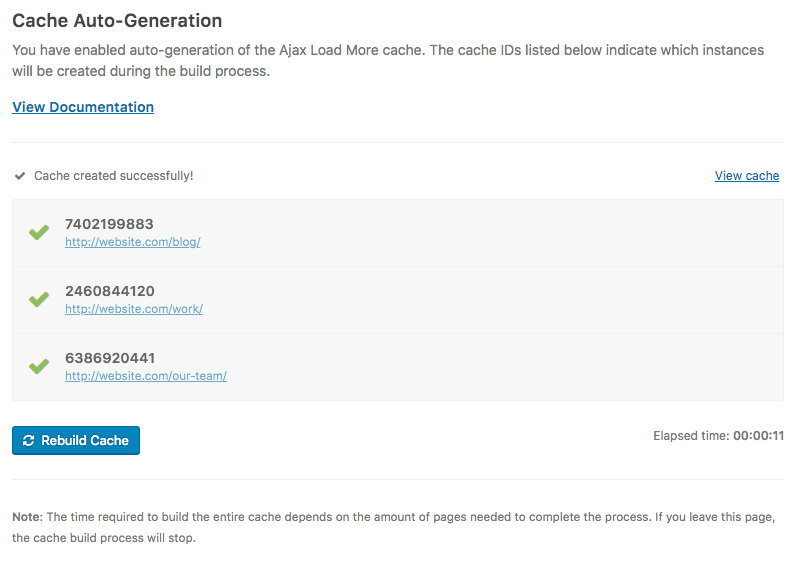
Note: If you exit the page while auto-generating the cache, the process will stop where you exited.
Filter Hooks
The following filters and actions are available when using this add-on:
alm_cache_path
The alm_cache_path filter can be used to update the absolute server path of the Ajax Load More Cache. This path is used when writing and saving files to the server.
The following snippet will adjust the default cache path to a /cache/ folder in the current theme directory.
add_filter( 'alm_cache_path', function() {
   return get_stylesheet_directory() . '/cache/';
} );alm_cache_created
The alm_cache_created action hook is triggered after a cache item has been created.
add_action( 'alm_cache_created', function( string $id, array $data ){
   // Run custom function here
}, 10, 2 );| $id | The cache ID. |
|---|---|
| $data | The cache data as an array. |
alm_cache_deleted
The alm_cache_deleted action hook is triggered after the Ajax Load More Cache has been cleared.
add_action( 'alm_cache_deleted', function( string $id ){
   // Run custom function here
} );| $id | The cache ID. |
|---|
alm_clear_cache
The alm_clear_cache action hook can be used by authenticated users to clear the entire Ajax Load More Cache or by a specific cache ID.
// Clear full cache.
do_action( 'alm_clear_cache' );

// Clear cache by specific cache ID.
do_action( 'alm_clear_cache', '%your_cache_id%' );