While learning the Basics in Python, one of the most important topics where you should increase your skills is the “Loop in Python”. Python Loops help to iterate a code block until a certain condition remains true.
In this article, we will first define the Loops in Python and their different types. Later, we will share the practical implementation of Python Loops. So, let us start discussing the topic without wasting more time.
Python is one of the most demanding programming languages, and there are many important reasons to learn Python. Loop in Python is one of the important concepts. Let’s read this article and discover more about loops.
TL; DR: Loops In Python
Aspect | Summary |
Loop Definition | A loop in Python repeatedly executes a block of code until a given condition becomes false. |
Loop Working | It initializes a variable, checks a condition before each iteration, updates the variable, and stops when the condition fails. |
Types Of Loops | Python mainly uses the While Loop, For Loop, and For Each Loop for iteration. |
Differences In Loops |
|
What Is The Loop In Python?
A loop in Python is a very useful feature to implement. In this case, we have to provide a variable to initialize the loop. Then, depending on the loop’s condition, it continues to iterate. After every iteration, it will check the condition.
If the condition is fulfilled, then it will again start the iteration. After every iteration, it will change the variable value by some amount. When at any point it will not fulfill the condition, the loop will stop.
What Are The Different Loops In Python Language?
In Python, there are mainly three ways to use a loop. Every procedure is unique. Every procedure has its way to represent. Let’s make a list of those methods:
- While Loop
- For Loop
- For Each Loop (For Loop With An Iterable)
How To Implement a Loop In Python Using a While Loop?
In the case of a while loop, there is a condition present at the very beginning of the block of code. The condition is the checking point before entering the loop. If the condition is satisfied, then the execution of the while loop will start.
Inside the while loop, some modifications should be made that will affect the condition fulfillment. We can make changes so that the condition at one time becomes false & the execution of the loop gets stopped.
Otherwise, it will become an infinite loop.
General Syntax: while(condition)
After knowing what a while loop is in Python, let’s take an example to clarify the concept.
Example:
# Declaring The Starting Variable
i=0
# Declaring The Ending Variable
n=5
# Declaring The While Loop
while(i<=n):
# Printing The Statement
print("I Love Codingzap!!")
# Increasing The Condition
i=i+1
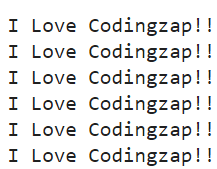
Steps Of The Program:
- First, we have declared two variables. One acts as the starting variable & another acts as the ending
variable.
- Now, the while loop declaration is done, and the condition is applied there. The condition is that when the
starting variable is less than or equal to the ending variable, the loop will be executed.
- Now, inside the loop, some statement is declared. And the starting variable is increased by one.
- In this way, at one point in time, the starting variable will become more than the ending variable.
That will make the condition false & the loop will be finished.
How To Implement a Loop In Python Using a For Loop?
A for loop provides a method to reduce the work pressure. The for loop comes with a method which is known as the range().
The range () method is used to combine the starting variable & ending variable. This method takes two arguments. One is the starting variable & another is the ending variable. Suppose, if we write the method as the range(0, n), then the starting value of the loop is 0 & ending value of the loop is n-1.
Here, there is no need to increment & decrement the value of the starting point. The range () method will do those automatically.
Let’s take a For Loop Python example.
Example:
# Declaring The Ending Variable
n=5
# Starting For Loop Till The Ending Point
For i in range (0,n):
# Printing The Statement
print("Codingzap Is Great!!")
Steps Of The Program:
- First, we have provided the end variable value in the program. It is needed to get the range of
numbers for iteration. From starting at zero index to the end variable five value, the loop will iterate.
- Now, the implementation of the for loop will be done along with a third variable. The variable will be
used to get each iteration number.
- Inside that loop, one random statement is declared.
Let’s look at the output of the above code. Hence, we come to know about the for loop in Python.
Output:
How To Implement a Loop In Python Using a For Each Loop?
Each loop in Python is another way to implement a loop. It is the easiest loop in Python. Another powerful way to process sequences is through the enumerate() function in Python, which simplifies tracking index values in loops. It is mostly used for the iteration of Strings & Lists.
This way is quite different from the traditional for loop. As there is no range() method present here.
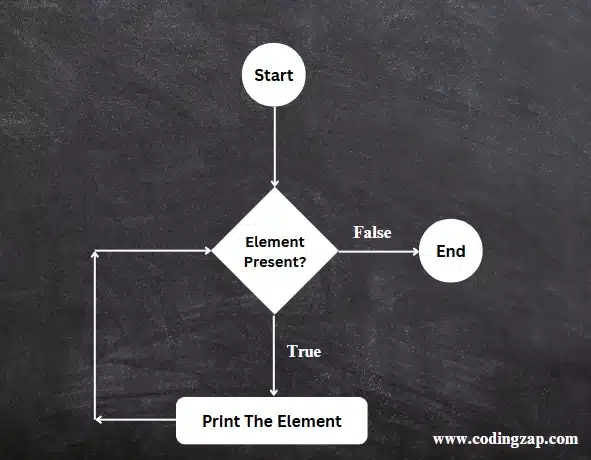
Instead of range(), we use a variable that acts as a picking element. It will pick every element from the String or the List. Then it will print every element there in every line.
General Syntax: for variable-name in string-name
Let’s take an example to demonstrate the For Each Loop.
Example:
# Declaring The String
s='Codingzap'
# Starting For Each Loop
For ele in s:
# Printing Every Element Of a String
print(ele)
Steps Of The Program:
- One string variable is declared inside the program.
- Now, the for each loop will be implemented. For that, one variable is used before the keyword ‘in’.
And the name of the string is used after the keyword ‘in’.
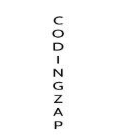
- Now, the variable will be printed. It will create a loop & it will execute until it reaches the end
element of the string variable.
Let’s look at the output of the above code. Hence, we learn how to use the For Each loop in Python.
Output:
What Are The Nested Loops In Python?
Nested Loops in Python are a different category of loops. Such loops are implemented either with the While or For Loop. Here, inside one loop, one or more loops can be present. Let us check the implementation process.
print("The Nested Loop In Python: ")
for i in range(1, 4): # The Outer Loop
for j in range(1, 3): # The Inner Loop
print(i, j)
Steps Of The Program:
- At first, the Outer Loop will be implemented using the For Loop.
- Inside the Outer Loop, another For Loop will be implemented.
- If the condition of the Outer Loop is true, then the execution of the inner loop will happen.
- If the condition of the inner loop is true, then the print statement inside the nested loop will work.
Output:
How To Loop With Index In Python?
Now, if you want to iterate over different data types like List, Tuples, Dictionaries, etc., in a loop using the indexes, then the enumerate() function should be used along with the For Loop. Here is the implementation.
data = ["Python", "Java", "CPP"] # The List Of Elements
print("Looping With Index: ")
# Implementing Enumerate With For Loop
for index, value in enumerate(data):
print(index, value)
Steps Of The Program:
- At first, a List Element will be taken, and the For loop will be implemented with Enumerate.
- All the elements along with their index values will be printed on the screen.
Output:
What Are Some Loop Control Statements In Python?
The Loops in Python can also be controlled with the different Loop Control Statements. They can alter the loop execution. There are mainly three types of loop control statements. Let us check about them.
1. Break:
The Break Statement helps to terminate the loop whenever it is executed. Even if the loop condition is true after it, it will be terminated. Let us check the following code for its implementation.
for i in range(1, 7): # A For Loop Till Value 7
if i == 4: # If The Value Is 4
break # Break Condition Will Be Applied
print(i)
In the above code, when the value becomes 4, the Break Statement will be encountered. Hence, the loop will end. However, the loop was earlier made to execute until the value 7.
2. Continue:
The Continue Statement is the opposite of the Break Statement. The Break Statement ends the loop, but the Continue Statement skips the iteration when it is encountered. Let us check its implementation.
for i in range(1, 7): # A For Loop Till Value 7
if i == 4: # If The Value Is 4
break # Break Condition Will Be Applied
print(i)
We have used the same example as the above one. Here, instead of the Break, we have used the Continue. So, when the value is 4, the iteration will be skipped. So, the output will be 1 to 7, but the value 4 will not be there.
3. Pass:
The use of the Pass Statement is very much less. The Pass Statement performs nothing, but it is a placeholder. This is used when something has to be written in the Loop body.
for i in range(1, 7): # A For Loop Till Value 7
pass
What Are Some Performance Tips For Loops In Python?
No doubt, looping in Python is not a complicated issue. After going through such an intensive discussion, you are ready for some practical problems. However, here are some additional performance tips for your betterment.
- Whenever possible, try to use the For Loop instead of the While Loop, as it will give you an edge.
- Don’t create nested loops unless they are very much necessary for your code.
- There are many built-in functions in Python that you can use to avoid manual looping.
- If possible, make the loop body as simple as you can. Don’t make it too complicated to understand.
- Always intend the loop structure in Python. Otherwise, the code will not be executed.
What Are Some Common Mistakes While Looping In Python?
Looping in Python is not always easy. If we make some tiny mistakes there, the consequences can be difficult. That is the reason, knowing about the common mistakes while looping in Python is necessary.
- Sometimes, we forget to place the condition in the loops that make a loop infinitely executable.
- When a loop is iterating over a list, sometimes we modify the list, which can cause an error in the code.
- When using While Loops, we have to increase the counters that we sometimes forget.
- Sometimes, we misunderstand the usage of loop control statements and use them in the wrong places.
- In Nested Loops, sometimes, we combine the While and For Loops, which is not a good practice.
Conclusion:
As we saw, using loops in Python is a very important topic.
It will help in the future when you will move to the bigger & more difficult questions.
Also, it helps to reduce the calculation difficulties in a certain programming language. If you’re working with mathematical operations, understanding Squaring A Number In Python can also be beneficial in your programming journey.
So, hope you have liked this piece of article. Share your thoughts in the comments section and let us know if we can improve further.
Key Takeaways: [H3]
- Loop in Python helps to iterate over a code block till a condition remains true.
- The Python Loops can be divided into While, For, and For Each Loop categories.
- The checking of the condition is done first, then the code block execution happens.
- The Updation of the counters happens separately in a while loop, but in a for loop with a condition.
- Some of the Loop Control statements are Pass, Break, and Continue in Python.


