In the dynamic realm of education, an innovative student grading system implemented in Java emerges as a beacon of efficiency and transparency.
Before we delve into the coding, let’s understand what a student grading system is, particularly the “Student Grading System in Java”. Essentially, it’s a way to assess student performance by assigning grades based on their marks. In Java, this translates into creating a program that takes numerical input (marks) and outputs a grade (like A, B, C, etc.).
Grading System Java Source Code
A grading system in Java would typically consist of a few key components:
- Student Class: A class to represent a student’s data.
- Grading Logic: Methods to assign grades based on scores.
- Main Application: The entry point of the program to interact with the user.
- Data Storage: A way to store student data, such as an array or list.
- User Input: Mechanism to input student data, typically via console or GUI.
Student Class
The Student class would hold information about each student and their score. Here’s an example of a simple Student class:
public class Student {
private String name;
private int score;
private char grade;
public Student(String name, int score) {
this.name = name;
this.score = score;
this.grade = calculateGrade(score);
}
private char calculateGrade(int score) {
if (score >= 90) return 'A';
else if (score >= 80) return 'B';
else if (score >= 70) return 'C';
else if (score >= 60) return 'D';
else return 'F';
}
// Getters and Setters
public String getName() { return name; }
public int getScore() { return score; }
public char getGrade() { return grade; }
}
This Java code defines a Student class with private attributes for the student’s name, score, and grade. The class has a constructor that takes a name and score as parameters, initializes the corresponding attributes, and calculates the grade based on the provided score using the calculateGrade method.
The calculateGrade method assigns a letter grade (‘A’ to ‘F’) based on specific score ranges. The class also includes getters for retrieving the name, score, and grade. Overall, this class encapsulates student information and provides a convenient way to access and manage these attributes for a given student.
Grading Logic
The grading logic is encapsulated within the Student class in the example above as the calculateGrade method. This method determines the grade based on the score and is used when initializing a Student object.
Main Application
The main application might use the Student class and handle user interaction. Below is an example using the console for input and output:
import java.util.Scanner;
public class GradingSystem {
public static void main(String[] args) {
Scanner scanner = new Scanner(System.in);
System.out.print("Enter the number of students: ");
int numStudents = scanner.nextInt();
Student[] students = new Student[numStudents];
for (int i = 0; i < numStudents; i++) {
System.out.print("Enter student name: ");
String name = scanner.next();
System.out.print("Enter student score: ");
int score = scanner.nextInt();
students[i] = new Student(name, score);
}
scanner.close();
for (Student student : students) {
System.out.println(student.getName() + "'s Grade: " + student.getGrade());
}
}
}
This Java code represents a simple grading system that takes user input to gather information about a specified number of students, including their names and scores. It utilizes the Student class, presumably defined elsewhere, to create an array of student objects.
The program prompts the user to input the number of students and then iterates through a loop to collect each student’s name and score.
The information is stored in the array of Student objects. Finally, the program prints out each student’s name and calculates grades by utilizing the getters from the Student class. The Scanner is used for user input, and the program concludes by closing the scanner.
Overall, this code allows for the input and display of student information within a grading system.
Data Storage
In the main application, an array of Student objects stores the data. You might use a database or file system for persistence in a more advanced system.
User Input
User input is handled using the Scanner class in the console-based example. A GUI-based system might use text fields and buttons for a more user-friendly interface.
How To Set Up Your Java Environment?
To begin coding, ensure you have a Java Development Kit (JDK) installed. You can download it from the official Oracle website. After installation, you can write your Java program in any text editor, but IDEs like Eclipse or IntelliJ IDEA offer more features and tools.
Planning the Grades Java Program
Planning the Grades Java Program involves outlining the essential components and logic required for a robust student grading system. The initial step is to define the grading criteria, determining the score ranges for each letter grade (A, B, C, etc.). Next, envision the user interaction by incorporating input methods to gather student data, such as marks.

Consider the design of a Student class to encapsulate relevant attributes and a method to calculate grades based on the provided marks. Additionally, plan for user-friendly prompts and output messages. This preparatory phase ensures a clear roadmap for implementing the Grades Java Program, making the coding process more structured and efficient.
Defining the Requirements
A clear understanding of what the program should do is vital. For our grading system, the requirements could be:
- Input student’s marks.
- Calculate the total score.
- Determine the grade based on the score.
- Output the grade.
Choosing the Data Structures
For handling multiple students, arrays or ArrayLists would be practical. If you want to store more details like student names, a HashMap or a custom Student class might be better.
How to Write the Code to Calculate Student Grading System in Java?
Let’s start by creating a simple program that calculates grades for one student.
Code to calculate grades for one student:
public class StudentGradingSystem {
public static void main(String[] args) {
int marks = 85; // Assume the marks are out of 100
char grade = calculateGrade(marks);
System.out.println("The grade is: " + grade);
}
public static char calculateGrade(int marks) {
if (marks >= 90) {
return 'A';
} else if (marks >= 80) {
return 'B';
} else if (marks >= 70) {
return 'C';
} else if (marks >= 60) {
return 'D';
} else {
return 'F';
}
}
}
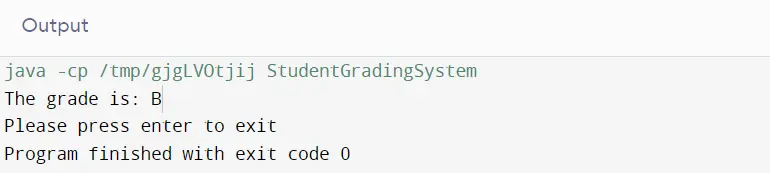
In this Java code, the variable marks are set to 85, assuming a maximum score of 100. The calculateGrade method is then called with the value of marks as an argument. The method checks the score against various ranges and assigns a corresponding letter grade.
Since 85 falls within the range of 80 to 89, the method returns ‘B’. The main method then prints out “The grade is: B”. Therefore, the output of this code would be “The grade is: B”, indicating that a score of 85 earns a ‘B’ grade in this student grading system in Java.
Expanding the Program
Now, let’s enhance the program to handle multiple students. We’ll use an array to store marks.
public class StudentGradingSystem {
public static void main(String[] args) {
int[] studentMarks = {85, 92, 58, 77, 69};
for (int marks : studentMarks) {
char grade = calculateGrade(marks);
System.out.println("Student with marks " + marks + " gets grade: " + grade);
}
}
public static char calculateGrade(int marks) {
if (marks >= 90) {
return 'A';
} else if (marks >= 80) {
return 'B';
} else if (marks >= 70) {
return 'C';
} else if (marks >= 60) {
return 'D';
} else {
return 'F';
}
}
}
Output:
In this Java code, an array studentMarks is defined with integer values representing the scores of different students. The program then iterates through each element of the array using a for-each loop. For each student’s marks, the calculateGrade method is called to determine the corresponding letter grade based on predefined score ranges.
The program prints out a message for each student, indicating their marks and the calculated grade. For instance, the output might be: “Student with marks 85 gets grade: B”, “Student with marks 92 gets grade: A”, “Student with marks 58 gets grade: F”, “Student with marks 77 gets grade: C”, and “Student with marks 69 gets grade: D”.
The output reflects the assigned grades for each student based on their respective marks in the grading system.
Handling User Input
To make the program interactive, we can use the Scanner class to allow users to input marks. So, if you are struggling with Java coding assignments or debugging input handling errors, our experts offer comprehensive help with Java assignment to guide you.
import java.util.Scanner;
public class StudentGradingSystem {
public static void main(String[] args) {
Scanner scanner = new Scanner(System.in);
System.out.println("Enter the number of students: ");
int numberOfStudents = scanner.nextInt();
int[] studentMarks = new int[numberOfStudents];
for (int i = 0; i < numberOfStudents; i++) {
System.out.println("Enter marks for student " + (i + 1) + ": ");
studentMarks[i] = scanner.nextInt();
}
// Close the scanner to prevent resource leak
scanner.close();
for (int marks : studentMarks) {
char grade = calculateGrade(marks);
System.out.println("Student with marks " + marks + " gets grade: " + grade);
}
}
public static char calculateGrade(int marks) {
if (marks >= 90) {
return 'A';
} else if (marks >= 80) {
return 'B';
} else if (marks >= 70) {
return 'C';
} else if (marks >= 60) {
return 'D';
} else {
return 'F';
}
}
}
This Java code represents a simple student grading system that takes user input to determine the grades of a specified number of students. It prompts the user to enter the number of students and then collects their respective marks through a loop.
After closing the scanner to prevent resource leakage, the program uses the calculateGrade method to determine the letter grade for each student based on their entered marks.
The output consists of messages for each student, indicating their marks and the corresponding calculated grade. The final result reflects the individual grades for the entered marks, providing a personalized assessment for each student in accordance with the grading system defined in the calculateGrade method.
If you’re interested in knowing about other mathematical topics in Java, then you can check out our article on calculating standard deviation using Java.
What is the difference between class and grade?
In the realm of Java programming, “class” and “grade” have meanings that pertain to the structure and function within the code, and they serve entirely different roles.
Class in Java
A class in Java is a fundamental concept of object-oriented programming. It acts as a blueprint for creating objects and can contain data and methods to manipulate that data. Here’s a brief overview of a class in Java:
- Blueprint: A class defines the properties (fields) and behaviors (methods) that the objects created from the class will have.
- Encapsulation: It encapsulates data for the object and methods to manipulate that data securely.
- Inheritance: Classes can inherit from other classes, sharing their structures and behaviors.
- Instantiation: When you create an object from a class, it is called instantiation, and each object is an instance of that class with its own state.
Here’s an example of a simple class in Java:
public class Student {
private String name;
private int id;
public Student(String name, int id) {
this.name = name;
this.id = id;
}
// Getter and Setter methods
}
In this example, Student is a class that has two properties: name and id. It also includes a constructor to initialize the objects of this class.
Grade in Java
The term “grade” in Java does not have a built-in technical meaning; it is not a reserved word or a concept in Java. However, it’s often used in the context of applications like a student grading system to represent a value or a result. Here’s how “grade” might be used in Java:
- Variable: It could be a variable that holds the grade value of a student.
- Method: A method might calculate a grade based on input scores and return it.
Here’s how you might see “grade” represented in a Java program:
public char calculateGrade(int score) {
if (score >= 90) {
return 'A';
} else if (score >= 80) {
return 'B';
} // ... other conditions
}
In this context, calculateGrade is a method that determines a student’s grade based on their score and returns a character representing that grade.
To summarize, in Java coding:
- A class is a construct that defines the structure and behavior of objects.
- A grade (in the non-technical sense applicable to Java coding) would typically be a value associated with an object’s state or a result determined by a method within a class.
Advanced Features
Adding File I/O
File I/O in Java is a mechanism that allows programs to persistently store data in files on the filesystem and to read data from files. For a student grading system, this feature is particularly useful because it enables the program to save the student’s data (like names and grades) between sessions, meaning the data won’t be lost when the program is closed.
To implement file I/O, you would use classes from the java.io package, such as FileWriter to write data to files and BufferedReader to read data from files.
GUI Implementation
A GUI provides a visual interface to your application, making it more intuitive and easier to use, especially for non-technical users. Java offers two primary libraries for creating GUIs: Swing and JavaFX.
Swing is part of the Java Foundation Classes (JFC) and has been part of the Java programming language since version 1.2. JavaFX is a more modern library that provides a rich set of graphics and media APIs and can be used to replace Swing.
Both file I/O and GUI implementation are broad topics that can greatly enhance the functionality and user experience of your Java applications. Implementing file I/O allows your programs to interact with the file system for persistent data storage, while a GUI makes your programs more accessible.
In a student grading system, these features can lead to a more robust and user-friendly application.
Conclusion:
Our journey in constructing a student grading system in Java at CodingZap has resulted in a simple yet versatile solution. By seamlessly handling inputs and calculating grades, our system serves as a foundational tool for academic assessment. What makes this project particularly exciting is its potential for expansion.
Whether venturing into the realm of file operations or exploring the integration of Graphical User Interfaces (GUIs), our student grading system is poised to evolve, adapting to the diverse needs of users. This accomplishment reflects CodingZap’s commitment to delivering not just functional solutions but also platforms that can grow with the ever-changing landscape of programming challenges.
Future Enhancements
The possibilities are endless: adding a database for storage, implementing a web-based interface, or even integrating machine learning to predict student outcomes based on historical data.
This article is just a starting point, and as you grow as a Java developer, you’ll find numerous ways to enhance and adapt your grading system to meet various educational needs. Happy coding!
Takeaways
- Start with simple code and expand gradually.
- Use objects to manage complex data.
- Always plan before you code.
- User interaction makes your program versatile.
- Continue learning and adding features.


