
Are you working on a project that requires you to represent numbers in scientific notation in Java? Are large digits making your output and result difficult to read and interpret?
You have reached the right place to get your answers! This article will discuss how to represent numbers using the Java programming language in scientific notation. So, without waiting any further, let’s dive in!
All of your doubts are going to be cleared in this particular article. So, get ready to experience an intensive discussion.
Summary Of The Article:
We can express very long numbers or very small numbers in the form of scientific notation.
This format mainly has three parts – coefficient, base, and exponent.
In Java, we use the NumberFormat class to perform operations and parse numbers in their scientific or natural format.
What Is Scientific Notation In Java? Read Below
basScientific notations are a way of representing either very large numbers or very small numbers in a simple format. For instance, writing the radius of an electron or the speed of light with all the digits is lengthy and time-consuming when you need to do calculations. It’s been in use for many years!

Thus, to solve this problem, we can simply write the values using different scientific notations even in programming. In Java, we use this to represent the float data type numbers.
Let’s see how can we write a scientific notation in Java.
What Are The Parts of A Scientific Notation?
The image given below depicts various parts of this format. We have a float number in this image that is shown in the image. If we were to write this number in a general format, we would have to write too many digits as this number is extremely small.
Thus, to save us from reading such a small number, we have used this notation. Let me briefly explain its parts.
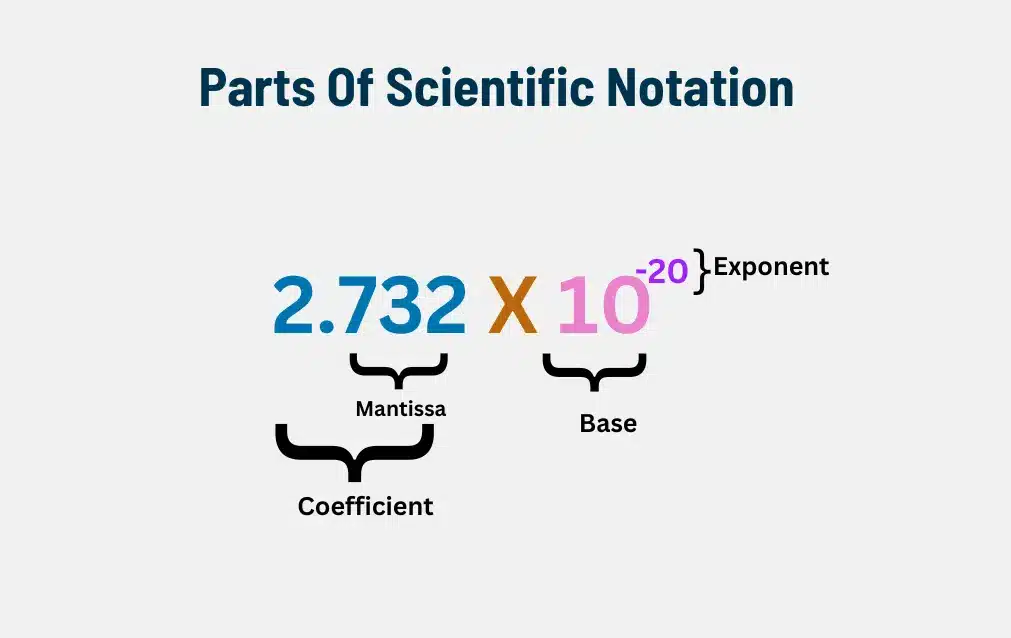
Scientific notations are generally broken down into three parts. These are:
Coefficient: This represents the number before “X 10” and it is a decimal number. The digits written after the point of decimal are collectively called the mantissa.
Base: In this, the base is always 10 as we are using float or decimal digits.
Exponent: This represents the power to the base. It can be both positive and negative integers. Large numbers have a positive exponent and small numbers have a negative exponent as given in the example above.
If you’re interested in how floating-point numbers are stored and manipulated in Java, check out our Float vs Double article.
Now, you must be wondering how you do scientific notation in Java. Let’s see below!
How To Express Floating Point Numbers In Scientific Notation?
If we need to display a very long number, we can convert it into its scientific form. In Java, the scientific form of a number is written using an E followed by a + or – sign to indicate the power or exponent to the base 10.
For example, we can print Avogadro’s number which was formulated years ago, in Java in the following way: 6.022141793E+23. Notice the + sign here indicates that the number is very large.
For this, we will have to create a NumberFormat object. NumberFormat class is an abstract class in Java that defines all the number formats, and their methods, and provides an interface for parsing numbers whether it is integer, float, or double value.
Here, we will also be using the DecimalFormat class which is a subclass of NumberFormat. It is used to parse decimal point numbers.
Let’s look at the example code given below to see how we can express decimal numbers in their scientific form.
import java.text.NumberFormat;
import java.text.DecimalFormat;
import java.util.Scanner;
public class DecimalToScientificNotation {
public static void main(String[] args) {
// Get user input
Scanner scanner = new Scanner(System.in);
System.out.print("Enter a decimal number: ");
double decimalNumber = scanner.nextDouble();
// Create a NumberFormat object for scientific format
NumberFormat scientificFormat = new DecimalFormat("0.###E0");
// Convert the number to scientific format
String scientificNotation = scientificFormat.format(decimalNumber);
// Display the result
System.out.println("Scientific form For The Entered Number Is: " + scientificNotation);
scanner.close();
}
}
Explanation of the Program:
In this example, we are asking the user to insert some input number in the system that we will use for printing the scientific format. This floating point number value will be stored in a double data type.
We will then create a new object using the new DecimalFormat for the scientific format. Here, (0.###E0) depicts the scientific form.
Once the value is converted, we will print it on the console.
Output:
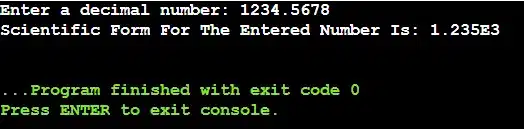
From the above output, we can see that the user input in the normal format is converted to scientific format. E3 represents the exponent part and is an integer value.
Do you want to know how to convert scientific numbers to default numbers? You will find the exact answer in the below section. Keep reading!
In case if you face difficulties in writing the above Java code then you can check out our article on tackling challenges for improving Java coding skills.
How To Convert Scientific Number To Normal Number In Java?
Let us see what is the method to change a number to the default! In the program given below, we will see what steps are needed to change a number from Scientific format to float or double value. You can also change it into a regular integer value. Have a look below!
import java.text.DecimalFormat;
import java.text.NumberFormat;
import java.text.ParseException;
import java.util.Scanner;
public class ScientificToDecimal {
public static void main(String[] args) {
Scanner scanner = new Scanner(System.in);
// Get user input
System.out.print("Enter a number in scientific form: ");
String scientificForm = scanner.next();
// Change string to number and use exception handling
try {
NumberFormat format = NumberFormat.getInstance();
Number number = format.parse(scientificForm);
// Change to double value
double normalNumber = number.doubleValue();
// Print the result
System.out.println("Normal Number: " + normalNumber);
} catch (ParseException e) {
// Handle exceptions
System.out.println("Invalid scientific format input.");
}
scanner.close();
}
}
Explanation Of The Program:
In this method, we are taking the input in the scientific format in our system.
We are also using exception handling to handle wrong or invalid input the users enter into the system.
We first change it into NumberFormat and then to double instead of a new DecimalFormat.
At last, the result is printed on the console.
Output:
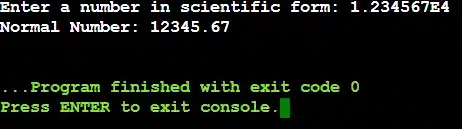
We can see that the scientific number entered is now represented in the way we are used to reading float or double values. Thus, our method has worked!
Also, if you’re facing difficulty with an assignment regarding comparing strings in Java, then you can check out our article.
What Are Some Real-world Applications Of Java Scientific Notations?
If you think that there is no use of Java Scientific Notation in the world, then you are thinking wrong. There are many fields where the knowledge of Java Scientific Notation is necessary to prosper. In this section, we are going to know about those fields.
Let us check the following list where we have discussed some Real-world Application Fields where Java Scientific Notations is used.
- Scientific Calculating: If you are working in the fields of physics, astronomy, etc., then Java Scientific Notations can help you interact with small and large numbers in any program.
- Financial Service: As a Software Engineer, if you are working on any Banking System Software, then you should use Java Scientific Notation Knowledge during application development.
- Machine Learning: In the field of Machine Learning, the Java Scientific Notation will help extensively. To calculate Probability and Statistical Values, this knowledge will be needed.
- Engineering Application: If you are working on any Circuit Design Software, then the use of Scientific Notation will become necessary. In that case, Java Scientific Notation Knowledge will be needed.
- Database Processing: In Database Processing, the Scientific Notations are used to save some spaces. Also, the Scientific Notation can increase the Performance of the database.
What Are Some Performance Implications Of Using Scientific Notation In Java?
Now, we hope that the Concept of Scientific Notation in Java Programming Language has become clear to you. However, there are some Performance Implications of using Scientific Notation in Java that we should consider before extensively practicing it.
So, let us check the following points where we have discussed important Performance Implications with Scientific Notation.
- When we convert Numbers to Scientific Notations, it can create Small Processing Overheads.
- For Scientific Calculators, this Overhead can significantly Impact the Performance.
- If we do Frequent Number Conversion, the execution speed can get Slower.
- If we work on Scientific Notations inside any Java Loop, then the Execution Speed gets Slow.
- If we convert the Scientific Notation String to a Number, it will consume a High Amount of Time.
What Are Some Common Errors With Scientific Notations?
Whatever we have discussed till now,, if you are thinking working on Scientific Notation in Java is a very simple problem, then you are thinking wrong. While working on Java Scientific Notations, we have to be very cautious. Otherwise, we can face some Programming Exceptions.
Let us check the following list where we have discussed some points to clear the concept more.
- We have to be careful about Rounding Errors as many numbers can’t be converted into Floating-point Values.
- We have to always use the Try-Catch Block to figure out the Scientific Notation Format which is not a Valid One.
- We have to check whether the String has some Non-Numeric Values. If it has some Non-Numeric Values, then it should not be passed.
- If any Extra Large Numbers can give Infinity Result, then we should be cautious as it can create the Overflow Issue.
- If any Extra Small Numbers can Round Down to 0.0, then we should handle them carefully as it can cause the Underflow Issue.
Comparison Table With Scientific Notations On Different Programming Languages:
As we are approaching towards the end, let us built one Comparison Table with Scientific Notation on Different Programming Languages. This will help to clarify the concept more and help to grab the concept easily. We will make the Comparison Table on Conversion Method, Performance Considerations, etc. features.
Let us check the following table to know more about the points.
Category | Java | Python | C++ | C# |
Syntax | 6.02E23 | 6.02e23 | 6.02e23 | 6.02e23 |
Default Data Type | Double | Float | Double, Float, Long Double | Double, Float, Decimal |
Conversion Method | DecimalFormat | format() | std::scientific | ToString(“E”) |
Performance Considerations | Slow | Fast | Fast | Slow |
Multithreading Support | Not Present | Present | Present | Present in .NET |
Conclusion:
I hope that now you have learned about Scientific Notation and how we can change the format of numbers with the help of the examples given in the article. So far, we have discussed two methods of how to do this.
Why don’t you give it a try and see how you can support your projects using this ability of the programming language?
CodingZap also provides exceptional services in live 1:1 classes in Java. You can explore more on our website.
Takeaways:
The NumberFormat class is used for interchanging the format of numbers. We can create an object of this class to describe such numbers and use them in our projects.
It is recommended to use programming best practices like exception handling while you are performing conversions of number format as it may lead to program termination if uncaught errors are present.
Besides Java, we can also use scientific format in other languages like SQL, Python, JavaScript, etc.


