

Steps Of The Program:
At first, the Scanner Class will be imported to take the inputs from the users.
In the Main Function, we will first declare some variables. Either they will all be under the Double Data type or Float Data Type.
Now, the Total Obtained Marks will be taken from the users & saved in some double variable.
With the same process, we will enter total marks from the users & store them in the variable.
Now, the above formula will be implemented. And the answer will be printed in the system.
Output:

From the above output, we can see that the two values have been taken into the system successfully and they are saved to the variables. And the implementation of the percentage rule has also been done great as the required answer is coming.
Understanding how to implement mathematical formulas in Java is an essential skill. However, students often face challenges when applying these concepts in their assignments.
If you’re struggling with similar Java problems in your coursework, you can always get your specific Java assignment solved from our experts to tackle complex coding tasks.
Now, it is time to address other questions related to the Percentage Concept in Java that are a bit advanced. After getting knowledge of how to implement percentages with Java, it is time to know how to add percentages using the Java programming method.

The Mathematical Theory related to the addition of percentages says that it is a simple mathematical operation. That means, two percentages can be added to each other as two simple integer values get added.
Percentage Addition: Percentage1 + Percentage2
Method To Demonstrate The Procee To Add Two Percentages With Simple Java Code:
Steps Of The Program:
Here, we will again import Scanner Class to the program to get the user input.
Now, the Double or Float variables will be declared. Inside of that, we will write the user input.
We will first take the first percentage data into the program. And later, the second one will be taken.
Now, those two percentage data will be added to each other in a simple format.
At last, we will print the answers in double or float format after performing the addition.
Output:
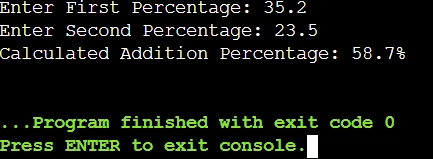
From the above image, we can see that the users are first providing the percentage details to the system. The result of those percentage data after doing the addition operation is coming as the output. So, the program is executing perfectly without any errors.
Steps Of The Program:
At first, the Scanner Class will be taken in the program to make it more interactive with the users.
Now like the previous programs, the percentage values will be taken from the users.
We will first make the percentages decimal by dividing them by 100. Now, the multiplication will done in the same statement.
It is time to finalize the result, we will multiply the data by 100 to make it again a percentage.
Now, the answers will be printed in the program.
Output:

From the above screenshot, we can say that the operations that are executed in the statements of the program running completely well. After taking the input from the users, it is converted to the decimals & multiplication is done later. As the result is marked as float, it comes in the decimal format.
Now, before we end our discussion, it is very crucial to highlight some of the percentage libraries and tools that are present in the Java programming language. But, they are highly advanced and a good background knowledge should be present to handle those.

However, those libraries are needed when you will be working on some difficult statistical operations or working collaboratively with some banking sectors. For those cases, the following libraries can be utilized:
Apache Common Maths: The library is useful for working on simple mathematical concepts. As it provides a large set of math operations including the Percentage one.
Java Matrix Package (JAMA): The JAMA is mainly used for handling the Linear Algebra Mathematical Concepts. It comes with a dedicated wing for Percentage operations.
Google Core Libraries for Java (Guava): It is a library that was developed by Google to serve the Core libraries of Java. It comes with the Percentage library can be used for statistical problems.
Also, if you’re looking for other mathematical blogs related to Java Language, then you can check out our article on calculating student grades in Java.
As we saw “calculating percentage marks in the Java Program” is very useful from both the Math & CS point of view.
For calculating the percentage, you should be first ready with the mathematical formula. If the Mathematical Formula is clear to you, then implementing the formula in Java or any other program becomes a breeze.
It’s a smart move to make sure you’ve got the basics down before diving into a new topic. Even though, the Java Percentage concept can be categorized as one of the simple concepts. But still, if you have any doubts about the Java Basics, clear it out first before jumping for the article.

