Patterns Programs In Java: Star, Number & Character

Patterns in Java

You should know that different pattern programs can be developed using different programming languages. And Java programming language is no different from that. We can also develop “Patterns in Java” using the for loops & conditional statements.

Pattern programs are the most important sector for questions in every interview to enter into the software development field. In this article, we will discuss 30+ pattern programs in Java programming language.

So, let us start our discussion.

Summary or Key Highlights: 

  • Pattern program is a popular practice where characters & numbers are placed in a certain order.
  • Based on the elements used for the printing of patterns, the categories are defined.
  • The use of Conditional Statements & loops are must to work on pattern programs.
  • Think logically from the Row & Column viewpoint to understand the concept.
  • You have to execute nested loops to get certain pattern programs.

How Many Design Patterns In Java?

In every programming language, pattern programs can be implemented using different kinds of elements. Based on those elements, the pattern programs can be differentiated into three parts. In the case of Java, the same thing is applied.

The patterns in Java programming language can be divided into three categories:

  1. Java Character Patterns
  2. Java Special Character Patterns or Java Star Patterns
  3. Java Numeric Patterns

We will learn about each of them one by one along with sample examples & their output.

How To Print Character Patterns in Java In Different Ways?

In such pattern programs, alphabetic characters are used to develop the design. Sometimes, the alphabetic character increases or decreases in order along with the number of rows value.

We can classify it into Ten parts.

1. Triangle Character Pattern Program:

				
					public class Main
{
	public static void main(String[] args) {
	int a = 115; // ASCII Value Of Character 
        for (int i = 0; i <= 2; i++) // Outer Loop
        {
            for (int j = 0; j <= i; j++) // Inner Loop
            {
                System.out.print((char) (a + j) + " "); // Print Pattern
            }
            System.out.println();
        }
    }
	}


Output:

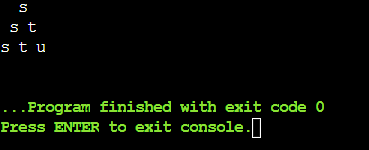
Triangle Character Pattern

2. Row-Wise Alphabetic Triangle Pattern:

				
					public class Main
{
	public static void main(String[] args) {
	int a = 115; // ASCII Value Of Character
        
        for (int i = 0; i<= 2; i++) // Outer Loop
        {
            for (int j = 0; j <= i; j++) // Inner Loop
            {
                System.out.print((char) a + " "); // Print Pattern
            }
            a++;
            System.out.println();
        }
    }
	}


Output:

Row-Wise Alphabetic Triangle Pattern

3. K-Style Alphabetic Character Pattern:

				
					public class Main
{
	/* Program Starts With Public Static Void Main (String[] args)Function*/
	public static void main(String[] args) {
	for (int i = 2; i >= 0; i--) // Outer Loop For Upper Part
    {
        int a = 115; // ASCII Value Of Upper Character
        for (int j = 0; j <= i; j++) // Inner Loop For Upper Part
            System.out.print((char) (a + j) + " "); // Printing Value
        System.out.println();
    }
    
    for (int i = 0; i<= 2; i++) // Outer Loop For Lower Part
    {
        int b = 75; // ASCII Value Of Lower Character
        for (int j = 0; j <= i; j++) // Inner Loop For Lower Part
        {
            System.out.print((char) (b + j) + " "); // Print Pattern
        }
        System.out.println();
    }
}
}


Output:

K-Style Alphabetic Character Pattern

4. Increasing Character In Triangle Pattern:

				
					public class Main
{
	public static void main(String[] args) {
	for (int i = 0; i <= 2; i++) { // Outer Loop 
	    int a = 115; // ASCII Value Of Character
	    for (int j = 2; j > i; j--) // Inner Loop
            System.out.print(" ");
        for (int k = 0; k <= i; k++) // Inner Loop
            System.out.print((char) (a + k) + " "); // Print Pattern
        System.out.println();
    }
}
}


Output:

Increasing Character In Triangle Pattern

5. Diamond Shape Character Pattern:


public class Main { 
    public static void main(String[] args) { 
        int s = 3;
        for (int i = 0; i < s; i++) { // For Loop For Printing the Upper Pyramid
            for (int j = s - i - 1; j > 0; j--) { // Inner Loop For Spaces
                System.out.print(" "); 
            } 
            
            for (int k = 0; k <= i; k++) { // For Loop For Printing Alphabets In Ascending
                System.out.print((char)('C' + k)); 
            } 
            for (int l = i - 1; l >= 0; l--) { // For Loop For Printing Alphabets In Descending
                System.out.print((char)('C' + l)); 
            } 
            System.out.println(); 
        } 
         
        for (int i = s - 2; i >= 0; i--) { // For Loop For Printing the Down Pyramid
            for (int j = s - i - 1; j > 0; j--) { // Inner Loop For Spaces
                System.out.print(" "); 
            } 
             
            for (int k = 0; k <= i; k++) { // For Loop For Printing Alphabets In Ascending
                System.out.print((char)('C' + k)); 
            }
            for (int l = i - 1; l >= 0; l--) { // For Loop For Printing Alphabets In Descending
                System.out.print((char)('C' + l)); 
            } 
            System.out.println(); 
        } 
    } 
}


Output:

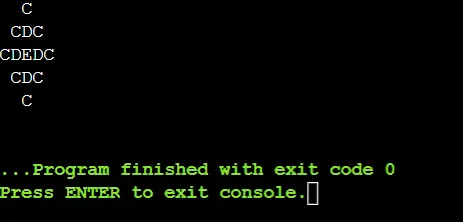
Diamond Shape Character

6. Upper & Lower Character Pattern:


public class Main {
    public static void main(String[] args) {
        int n = 5; // Number Of Rows In Pattern
        char cc = 'C'; // Starting Character In Of Pattern

        for (int i = 1; i <= n; i++) { // Outer Loop For Column
            for (int j = 1; j <= i; j++) { // Inner Loop For Row
                
                if (j % 2 == 1) { // Marking The Posstion
                    System.out.print(Character.toLowerCase(cc) + " "); // Making Lowercase
                } else {
                    System.out.print(cc + " "); // Printing Current Letter
                }
                cc++;
            }
            System.out.println();
        }
    }
}


Output:

Upper & Lower

7. Reverse Triangle Pattern:


public class Main {
    public static void main(String[] args) {
        int s = 5; // Size Of The Pattern
        
        for (int i = 0; i < s; i++) { // Outer Loop For Column
            for (int j = s - 1; j >= i; j--) { // Inner Loop For Printing Alphabets
                System.out.print((char) ('C' + j) + " ");
            }
            System.out.println();
        }
    }
}


Output:

Reverse Triangle

8. Stair Character Pattern:


public class Main {
    public static void main(String[] args) {
        int s = 3; // Size Of The Pattern
        
        for (int i = 0; i < s; i++) { // Outer Loop For Column
            for (int j = s - 1; j > i; j--) { // Inner Loop For Printing Spaces
                System.out.print("  ");
            }
            for (int k = 0; k <= i; k++) { // Inner Loop For Printing Alphabets
                System.out.print((char) ('C' + i) + " ");
            }
            System.out.println();
        }
    }
}


Output:

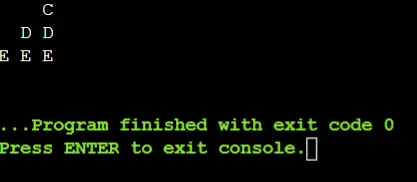
Stair Pattern

9. Pyramid Character Pattern:


class Main {
    public static void main(String[] args) {
        int s = 5; // Size Of The Pattern
        char cc = 'C'; // Starting Character Of The Pattern
        
        for (int i = 1; i <= s; i++) { // Outer Loop For Column
            for (int j = 1; j <= s - i; j++) { // Inner Loop For Printing Spaces
                System.out.print(" ");
            }
            for (int k = 1; k <= i; k++) { // Inner Loop For Printing Alphabets
                System.out.print(cc + " ");
                cc++;
            }
            System.out.println();
        }
    }
}


Output:

 Pyramid Alphabet Pattern

10. Rectangle Character Pattern:


public class Main {
    public static void main(String[] args) {
        int r = 3; // Rows In The Pattern
        int c = 5; // Columns In The Pattern

        char sc = 'C'; // Starting Character Of Pattern

        for (int i = 0; i < r; i++) {  // Outer Loop For Rows
            for (int j = 0; j < c; j++) { // Inner Loop For Printing Alphabets
                char cc = (char) (sc + j); // Getting Alphabets
                System.out.print(cc + " "); // Printing Letters
            }
            System.out.println();
        }
    }
}


Output:

Rectangle Pattern

How Many Pattern Programs Belong To Java Special Character Or Star Patterns?

In such pattern programs, special characters like *,#,@,& are used to develop the design. In this case, we have implemented star pattern programs or special character pattern programs using the character “@”.

Using some loops & conditions such designs are built along with the help of the number of rows. We can classify it into eleven parts.

1. Hollow Diamond Shape Pattern Program:

				
					public class Main
{
	public static void main(String[] args) { // Diamond Star Pattern Enter
	int r = 3; // Number Of Rows
    for (int i=1 ; i<= r ; i++)  // Outer Loop
    { 
        for (int j = r; j > i ; j--)
            System.out.print(" ");
        System.out.print("@");
        for (int k = 1; k < 2*(i -1) ;k++) 
            System.out.print(" "); 
        if(i==1) 
            System.out.println("");
        else
            System.out.println("@"); // Print Pattern
    } 
        for (int i=r-1; i>= 1 ; i--)
        {
            for (int j = r; j > i ; j--)
                System.out.print(" ");
            System.out.print("@"); // Print Pattern
            for (int k = 1; k < 2*(i -1) ;k++)
                System.out.print(" ");
        if(i==1)
            System.out.println("");
        else
            System.out.println("@"); // Print Pattern
    }
    }
}


Output:

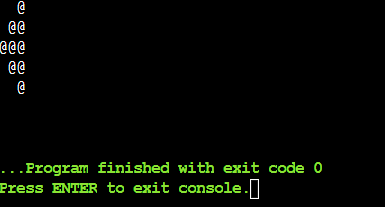
Hollow Diamond Shape Pattern Program

2. Downward Special Character Triangle:

				
					public class Main
{
    public static void main(String[] args) { // Down Triangle Star Pattern Enter
	int r = 3; // Number Of Rows
    for (int i=r; i>= 1 ; i--) // Outer Loop
    {
        for (int j = i; j < r ; j++)
            System.out.print(" ");
        for (int k = 1; k <= (2*i -1) ;k++) {
            if(k==1 || i == r || k == (2*i-1))
                System.out.print("@"); // Print Pattern
            else
                System.out.print(" ");
        }
        System.out.println("");
    }
    }
}


Output:

Downward Special Character Triangle

3. Upward Special Character Triangle:

				
					public class Main
{
	/* Program Starts With Public Static Void Main (String[] args)Function*/
	public static void main(String[] args) {
	int r = 3; // Number of Rows  
    for (int i=1; i<= r ; i++) // Outer Loop
    {
        for (int j = i; j < r ; j++)
            System.out.print(" ");
        for (int k = 1; k <= (2*i -1) ;k++) {
            if( k==1 || i == r || k==(2*i-1))
                System.out.print("@"); // Print Pattern
            else
                System.out.print(" ");
        }
        System.out.println("");
    }
}
}
/* Here, the program also resembles with Pyramid star pattern or special character pattern */


Output:

Upward Special Character Triangle

4. Left Pascal’s Triangle Program With Special Characters:

				
					public class Main
{
	/* Program Starts With Public Static Void Main (String[] args)Function*/
	public static void main(String[] args) {
	int r = 3; // Number Of Rows  
    for (int i= 1; i<= r ; i++) // Outer Loop
        {
            for (int j=i; j < r ;j++)            
                System.out.print(" ");
            for (int k=1; k <= i ; k++)
                System.out.print("@"); // Left Triangle Pascal's Enter
            System.out.println(""); 
        } 
        for (int i=r; i>=1; i--)
        {
            for(int j=i; j<=r;j++)
                System.out.print(" ");
            for(int k=1; k<i ;k++) 
                System.out.print("@"); // Left Triangle Pascal's Enter
            System.out.println("");
    }
}
}


Output:

Left Pascal’s Triangle

5. Right Pascal’s Triangle With Special Character:

				
					public class Main
{
	/* Program Starts With Public Static Void Main (String[] args)Function*/
	public static void main(String[] args) {
	int r = 3; // Number Of Rows 
    for (int i= 0; i<= r-1 ; i++) // Outer Loop
        {
            for (int j=0; j<=i; j++) 
            { 
                System.out.print("@"); // Pattern Programs Enter
                System.out.print(" ");
            } 
            System.out.println(""); 
        } 
        for (int i=r-1; i>=0; i--)
        {
            for(int j=0; j <= i-1;j++)
            {
                System.out.print("@"); // Print Character
                System.out.print(" ");
            }
            System.out.println("");
        }
}
}


Output:

Right Pascal’s Triangle

6. Reverse Pyramid Program With Special Character:

				
					public class Main
{
	/* Program Starts With Public Static Void Main (String[] args)Function*/
	public static void main(String[] args) {
	int r = 3; // Number Of Rows Value  
    for (int i= 0; i<= r-1 ; i++) // Outer Loop
    {
        for (int j=0; j<=i; j++)
            System.out.print(" ");
        for (int k=0; k<=r-1-i; k++)
        {
            System.out.print("@"); // Printing Pattern
            System.out.print(" ");
        }
        System.out.println();
        } 
}}


Output:

Reverse Pyramid Program

7. Right Triangle Star Pattern Or Special Character Pattern:

				
					public class Main
{
	// Triangle Star Program Enter means starting the field
	public static void main(String[] args) {
	int i;
	int j;
	int n = 3; // Number Of Rows  
    for(i=0; i<n; i++){  // Outer Loop
        for(j=0; j<=i; j++) //  Inner loop
            System.out.print("@" + " "); // Printing Pattern
        System.out.println();}
}}


Output:

Right Triangle Star Pattern

8. Reverse Right Triangle Special Character Pattern:

				
					public class Main
{
	/* Mirror Star Pattern Enter or Starting of Reverse Right Triangle Special Character Pattern */
	public static void main(String[] args) {
	int i;
	int j;
	int r = 3; // Number Of Rows  
    for (i = r-1; i>=0 ; i--) // Outer Loop
    {
        for (j = 0; j<=i; j++) // Inner Loop
            System.out.print("@ ");
        System.out.println();
}}}


Output:

Reverse Right Triangle

9. Left Triangle Star Pattern Or Special Character Pattern (Mirror Of Right Angled):

				
					public class Main
{
	public static void main(String[] args) {
	int r = 2; // Number Of rows  
    for (int i= 0; i<= r; i++) // Outer Loop
    {
        for (int j=1; j<=r-i; j++) // Inner Loop
            System.out.print(" ");
        for (int k=0;k<=i;k++) // Inner Loop
            System.out.print("@"); // Printing Pattern
        System.out.println();
    }    
    }}


Output:

Left Triangle Star Pattern

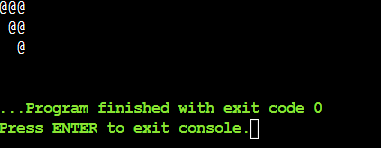
10. Reverse Left Triangle Special Character Pattern:

				
					public class Main
{
	public static void main(String[] args) {
	int r = 3; // Number Of Rows  
    for (int i = r; i>= 1; i--) // Outer Loop
    {
    for (int j = r; j>i; j--) // Inner Loop
        System.out.print(" ");
    for (int k=1;k<=i;k++) // Inner Loop
        System.out.print("@"); // Printing Pattern
    System.out.println();    
}
}}
Output:

#11 Full Diamond Shape Pattern Program:
public class Main
{
	public static void main(String[] args) {
	int r = 2; // Number Of Rows
	int i;
	int j;
	int a = r-1; // Number Of Space
    for (j = 1; j<= r; j++) // Outer Loop For Upper Part
    {
        for (i = 1; i<= a; i++) // Inner Loop For Upper Part
            System.out.print(" ");
        a--;
        for (i = 1; i <= 2 * j - 1; i++) // Inner Loop For Upper Part
            System.out.print("@");
        System.out.println();
    }
    a = 1;
    for (j = 1; j<= r - 1; j++) // Outer Loop For Lower Part
    {
        for (i = 1; i<= a; i++) // Inner Loop For Lower Part
            System.out.print(" ");
        a++;
        for (i = 1; i<= 2 * (r - j) - 1; i++) // Inner Loop For Lower Part
            System.out.print("@");
    System.out.println();
}
}}


Output:

Reverse Left Triangle

How To Print The Different Java Number Patterns?

After discussing the Character and Special Character Patterns in Java, it is time to move ahead to another type of Java pattern. This pattern will be developed with the help of Numeric Values.

In this section, we will show 4 different types of Java Patterns developed with numbers. Let us check those patterns one by one from the following list.

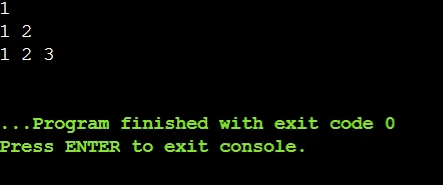
1. Increasing Right Triangle Pattern:


public class Main
{
	public static void main(String[] args) 
            {
	int n = 3; // Number Of Rows
	int a; // Declaration Of Variable int a
	int i; // Declaration Of Variable int i
	int j; // Declaration Of Variable int j
	for(i=0; i<n; i++) // Outer Loop
    { 
        a = 1; 
        for(j=0; j<=i; j++) // Inner Loop
        { 
            System.out.print(a + " "); // No Pattern (Void Display Function used To Print)
            a++; 
        } 
        System.out.println(); 
    } 
}
}


Output: 

 Increasing Right Triangle

2. Decreasing Right Triangle Pattern:


public class Main
{
	// Starting of The Triangle Numeric Pattern Program
	public static void main(String[] args) 
{
	int n = 3; // Number Of Rows
	int i; // Declaration Of Variable int i
	int j; // Declaration Of Variable int j
	for (i = n; i >= 1; i--) // Outer Loop
    {
        for (j = n; j >= i; j--) // Inner Loop
            System.out.print(j+" "); // Printing Pattern
        System.out.println();
    } 
}
}


Output:

 Decreasing Right Triangle

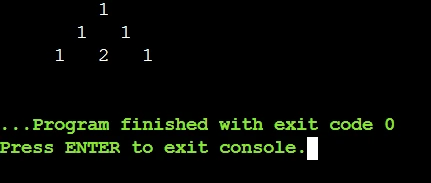
3. Pascal Triangle Pattern:


public class Main
{
	public static void main(String[] args) 
            {
	int n = 3; // Number Of Rows
	int i; // Declaration Of Variable int i
	int j; // Declaration Of Variable int j
	for (i = 0; i < n; i++) { // Outer Loop
        int a = 1; // Space Number
        System.out.printf("%" + (n - i) * 2 + "s", ""); // Printing Pattern
        for (j = 0; j <= i; j++) {
            System.out.printf("%4d", a); // Printing Pattern
            a = a * (i - j) / (j + 1); 
        }
        System.out.println();
    } 
}
}


Output:

Pascal Triangle Pattern

4. Row Number Pattern:


public class Main
{
	public static void main(String[] args) 
            {
	int n = 3; // Number Of Rows
	int i; // Declaration Of Variable int i
	int j; // Declaration Of Variable int j
	for (i = 1; i <= n; i++) // Outer Loop
    {
        for (j = 1; j <= i; j++) // Inner Loop
            System.out.print(i+" "); // Printing Pattern
        System.out.println();
    } 
}
}


Output:

Row Number Pattern

What Are Some Real-World Applications Of Pattern Programs In Java?

If you are thinking that the Pattern Programs in Java exist only for Practicing Purposes, then you are thinking wrong. There are many real-world applications of such programs.

In this section, we will discuss some real-world applications of Pattern Programs in Java. This will help to understand the importance of such programming problems. Let us have a look there.

1. User Interface Design: 

If we are developing lightweight applications or Console-based Applications, the patterns help draw different shapes in the application that might be used as the User Interface.

When To Use In Real-World Applications: 

  • With Pattern Programs, we can develop the Progress Bar in the Console-based Applications.
  • To make the Box-drawn User Interface Design, the Pattern Programs are used.

2. Game Development: 

Not only for the User Interface in Lightweight Applications but the Pattern Programs can also be used in Game Development Process. There are many 2D games developed with different Pattern Programs.

When To Use In Real-World Applications: 

  • With Pattern Programs, we can develop Game Boards in Chess, Tic-Tac-Toe, etc., games.
  • To develop different obstacles or player paths in the game, the Pattern Programs are used.

3. Data Visualization:

In the field of Data Visualization as well, the use of Pattern Programs can be seen. We can see the use of Pattern Programs mostly in the CLI Tools for Data Visualization.

When To Use In Real-World Applications: 

  • We can show the Resource Usage using Asterisk in the Pattern Programs.
  • Without using the Graphics Libraries, with Pattern Programs, we can show the Data Streams.

What Are Some Common Mistakes With Pattern Programs In Java?

We hope, from such a detailed discussion, you are getting interested in the Pattern Programs and you are becoming eager to solve more different types of Java Pattern Problems.

However, before you leave to solve different types of Pattern Problems, let us have a look at some Common Mistakes with it. This will help us to avoid making such mistakes.

  • Sometimes, we misplace the Loop Boundaries. This happens more when there are Outer and Inner Loops are working. So, we have to place the boundaries in the right places.
  • After completion of each row, sometimes, we forget to Reset the Loop Counters. Hence, the pattern is impacted. So, we have to check the Loop Counters after every iteration.
  • Sometimes, we get confused with the Row-wise and Column-wise Logic. Hence, the Pattern comes completely different from what is expected. So, our programming logic should be clear.
  • Oftentimes, we use the New Line (\n) wrongly instead of the Println(). In that case, we will get a different pattern as the output. So, it will be better, if we use the Println() for printing new lines.
  • While practicing the Pattern Programs, we should use the perfect number of Whitespaces. If the Whitespace Numbers are not correct, then the pattern will not match with the output.

Conclusion:

From the above discussion, we hope, the concept of “Patterns in Java” is much more clear to you. Still, if you are facing issue then you can solve any Java pattern program with our help

All the sample programs are implemented by taking the Public Static Void Main function as the base. We have not declared any special user-defined function besides the Public Static Void Main function. You should remember that.

We advise you to focus on the basic concept of Java programming language, more specifically on loops & conditional statements. Because the pattern programs are the result of particular usage of such concepts. Loops are an interesting concept and loops have different features in each programming language. Like, a loop in Python is used for iteration. If you get the condition for implementing that, it will become a cakewalk for you. If you want to know more about patterns in Java, then you can read our article on MVC architecture in Java and know about patterns.

Takeaways: 

  • To draw patterns, we can use Characters, Stars, or Special Characters & Numbers in Java.
  • Based upon the pattern, we can provide different names like Pyramid, Diamond, etc.
  • You have to think from the Row & Column perspective to get the correct logic.
  • The inner & outer loops will represent the Row & Column respectively.
  • The use of Conditional If-Else will help to place the elements in the correct order.

Get Programming Help Now