Optional Parameters in Java: 4 Methods With Codes Explained

Optional Parameters in Java

As a CS Student, if you want to become an expert in Java Methods and Parameter Passing, then learning the basics will not help you. For that purpose, you should know about “Optional Parameter in Java”.

The Java Optional Parameters help to work with the missing or default values instead of mentioning all the arguments in the function. In this article, we will learn about the Optional Parameter in Java.

Still, if you have any questions related to optional parameters then you can get get expert coding help for your Java project to ensure you understand the concepts and apply them effectively.

Additionally, we will explore methods for implementing optional parameters. Let’s begin our discussion.

Summary Or Key Highlights: 

  • Optional Parameter is the process by which we can skip some Parameters while calling a Method.
  • There is no Built-in Support present for the Optional Parameters in Java like in other languages.
  • There are Four Important Processes in Java Language to implement an Optional Parameter.
  • The Optional Parameters in Java can be used for API Development and Database Queries.
  • While working with the Optional Parameters, we should remember some Performance Considerations.

What Is Optional Parameter In Java? Read Below

While working with Java Methods, we have to pass all the required arguments to execute the code properly. If we fail to pass any argument in the method, the code will prompt an error. 

In this scenario, the Optional Parameter Concept comes where it makes some arguments in the method as the Optional. So, if we fail to share any argument to the method, the code will not stop its execution.

There is no Built-in Support present for the Optional Parameter in Java like other programming languages. Java is a Statically-typed Language, where we have to provide the Method Signatures at the Compile Time. 

So, we have to use some alternatives like Overloading, Optional Classes, Varargs, etc. to work on it.

Historical Evolution Of Java Optional Parameter: 

  • 1990s: Method Overloading was the only process to implement Optional Parameters in Java.
  • 2000s: The Varargs Class was introduced with Java 5 which replaced the need for Method Overloading.
  • 2010s: The Optional Class was introduced in Java 8 which helps to handle Nullable Values.
  • 2020s: Some improvements are made in the methods, but still no Built-in Support is present.

How To Implement Optional Parameters In Java Language?

Now, we hope the definition and other details of the Java Optional Parameters have become clear to you. So in this section, we can move ahead with its implementation process.

As we have stated earlier to develop Optional Parameters in Java, we have to use some alternatives. Let us start with the first alternative where we will use the Method Overloading process.

1. Using Method Overloading:

We all know about the Method Overloading concept in the Java language. Method overloading is a technique by which we can call the same method with a different number of arguments.

As in the Method Overloading, we have the benefit of using a different number of arguments for the same method; this can be utilized to implement the Optional Parameter Concept. Let us check the following code to know more.

				
					public class Main
{
	public static void main(String arg[])
	{
                        System.out.println("Optional Parameters Using Method Overloading: ");
	            // Calling Function With Two Arguments
		System.out.println("Normal Function Calling: "+ Zap("Zap", "One")); 
		// Calling Function With Three Arguments
		System.out.println("Optional Parameters Using Overloading: "+ Zap("Coding", "Zap", "One")); 
	}
	
	// Original Function With Two Arguments
	public static String Zap(String a, String b) 
	{
		return a + b; // Adding Two Strings
	}
	// Overloading Methods For Optional Parameters
	public static String Zap(String a, String b, String c) 
	{
		return a + b + c; // Adding Three Strings
	}
}


Steps Of The Program: 

  • At first, in the Main Function, we will call the “Zap” Method 2 times. 
  • The first time, we will call with 2 arguments, and in second time, we will call with 3 arguments.
  • Now, we will create the “Zap” Method two times as well. 
  • One “Zap” Method will accept 2 Arguments and another will receive the 3 arguments. This means we are doing the Method Overloading.
  • Inside of those Two methods, we are concatenating the string arguments that we are receiving.

Output: 

Output1- Overloading

2. Using NULL As Placeholder:

Another important method will be the Null as a Placeholder. We can share the Null Values as the argument to the method that we want to make optional. Though, it is very risky to use.

If we don’t handle the Null Value properly in the Method as the argument, then we might face the NullPointer Exception. So, we have to be careful with it. Let us check the following code to know more about it.

				
					class zap 
{
    public void zapone(String z, String o) // Implementation Of ZapOne Function
    {
        if (o == null) // If The Data Is Null
        {
            o = "Data Has Not Given";
        }
        System.out.println("Item Name: " + z + ", Price: " + o);
    }
}

public class Main 
{
    public static void main(String[] args) 
    {
        zap sg = new zap(); // Creating Object Of The Class
        
        System.out.println("Optional Parameters Using Null: ");
        sg.zapone("Laptop" , "35k"); // Calling The Object With Two Arguments
        sg.zapone("Computer" , null); // Calling The Object With Null Argument
    }
}


Steps Of The Program: 

  • At first, the method “ZapOne” will be created inside the “Zap” Class.
  • Now, we will create a Conditional Statement, that will check whether the Second Argument is Null or Not.
  • If it is Null, it will print some statements. Otherwise, the Default Statement will be displayed.
  • In the Main Function, we will create the Object of the “Zap” Class. After that, we will share some values of the method.
  • In one case, there will be some values in the Second Argument, and in another case, there will be the Null Value.

Output: 

Output- Null Values

3. Using Optional Class:

Now, the best way to work on the Optional Parameter in Java will be to use the Optional Class. The Optional Class can explicitly make some argument in the method as the Optional.

If we use the Optional Class, then we don’t need to worry about the NullPointer Exception that we might face in the above method. Let us check the following code to know more about its implementation process.

				
					import java.util.Optional;
public class Main
{
		public static void main(String args[])
		{
		    System.out.println("Optional Parameters Using Optional Class: ");
			zapone("Zap","One"); // Normal Function Calling
			zapone("Coding",null); // Function Calling With Null Value
        }
        
        // Implementation Of User Defined Method
        private static void zapone(String z, String o)
        {
            // Creating Optional Object & Making O The Optional
            Optional<String> c = Optional.ofNullable(o);  
            
            // Checking Presence Of Optional Data
            String zz = c.isPresent() ? c.get() : "Data Is Not Present";
            System.out.println("First Argument: "+ z + " & Second Argument: "+ zz); 
        }
}


Steps Of The Program: 

  • In the Main Function, we will first class the “ZapOne” Method two times. 
  • The first time, there will be some String Values in the Second Argument and in Second Time, there will be the Null Values.
  • Now, the “ZapOne” Method will be implemented where we will make the Second Argument the Optional one.
  • Later, we will check the presence of the Null Value in the Second Argument. If Null Value is present the statement “Data Is Not Present” will be printed.

Output: 

Output3- Optional Class

4. Using Variable Length Arguments (Varargs) Class:

The last yet important process to implement an Optional Parameter in Java will be by using the Variable Length Arguments or Varargs Class. In this process, we can share Zero to Infinite arguments to the method.

Though this is one of the easiest implementation processes, we have to be careful while working on it as we can face Compiler Errors, if the syntax of the Varargs Class is incorrect. Let us check the following code.

				
					class zapone // Implementing The Varargs Class
{
    public void zap(String... z) // Zap Method With Infinite Arguments
    {
        for (String val : z) // For Loop To Print The Arguments
        {
            System.out.println(val);
        }
    }
}

public class Main 
{
    public static void main(String[] args) 
    {
        zapone sg = new zapone(); // Creating The Object Of Varargs Class
        
        System.out.println("Optional Parameters Using Varargs Class: ");
        sg.zap("1st Argument"); // Method Calling With 1 Argument
        System.out.println();
        // Method Calling With 3 Arguments
        sg.zap("New 1st Argument", "New 2nd Argument", "New 3rd Argument");
    }
}


Steps Of The Program: 

  • At first, in the Main Function, we will call the “Zap” Function from the “ZapOne” Class two times.
  • The first time, we will call with 1 Argument, and in second time with 3 Arguments.
  • Now, we will define the “Zap” Function using the Varargs Class syntax which is capable of taking multiple arguments and all are optional.
  • Inside that function, we will print the arguments one by one.

Output: 
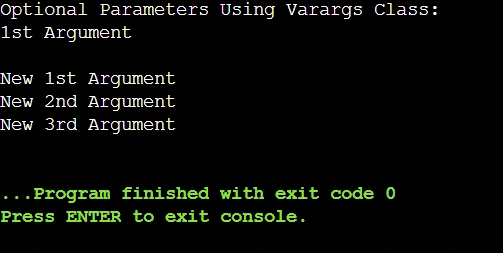
Output4- Varargs

Comparison Table Between Different Java Optional Parameter Methods:

We hope that the different implementation processes of Java Optional Parameter are now clear to you. But, before further moving ahead, we want to clarify those methods by discussing their differences.

For that purpose, in this section, we will draw a Comparison Table on all the above-discussed Optional Parameter implementation processes. So, let us have a look at the following table to have a deeper understanding.

Criteria

Method Overloading

Null as a Placeholder

Optional Class

Varargs Class

Readability

High

Low

Low

Low

Flexibility

Low

High

High

High

Performance

Fast

Fast

Slow

Slow

Complexity

Simple

Simple

Complex

Complex

Memory Usage

Low

Low

High

High

Best Use Case

Fixed Arguments

Nullable Arguments

Optional Values

Infinite Arguments

Comparison Table On Optional Parameter Between Java And Other Languages:

The Optional Parameter is a concept that is not only native to Java Programming. In different other programming languages as well, we will find the same kind of concept.

In this section, we will make a Comparison Table that will let us know the differences between the Optional Parameter in Java and any other programming languages. So, let us have a look below.

Criteria

Java

Python

C++

JavaScript

Built-in Support

No

Yes

Yes

Yes

Default Value Support

No

Yes

Yes

Yes

Presence of Named Arguments

No

Yes

No

Yes

Use of Null Values

Yes

Yes

Yes

Yes

Default Constructor

No

Yes

Yes

Yes

What Are Some Real-world Applications Of Java Optional Parameters?

If you are thinking that there is no use of the Java Optional Parameter Process, then you are thinking wrong. The Optional Parameter in Java can be used for different applications across different fields.

In this section, we will highlight some important Real-world Applications of the Java Optional Parameters. This will help to encourage you to learn this concept in depth.

1. API Development: 

One of the best domains where the Optional Parameter concept is highly used will be API Development. When we are working with the REST API, then the Optional Parameter is used to reduce Overloaded Methods.

When To Use In Real-World Applications:

  • To provide Optional Filters in Search APIs, the Optional Parameter concept is used.
  • It can be used in User Profile Updates to update any information by keeping the rest unchanged.

2. Database Queries:

The Optional Parameters can also be used in the Database Queries. If we want to make a Dynamic SQL Query where we don’t have to provide all the parameters, then the Optional Parameter is used.

When To Use In Real-World Applications: 

  • It is used in E-Commerce Applications to filter products based on Price, Brand, Category, etc.
  • In the Reporting System, the Optional Parameters are used to generate reports based on different data.

3. Logging And Debugging: 

As a developer, if we are working with the Logging Frameworks, then we can use the Optional Parameter Concept to do better debugging. Using it, we can write more context whenever it is needed.

When To Use In Real-World Applications:

  • Using an Optional Parameter, we can add Optional Metadata in the Error Tracking Systems.
  • In Application Monitoring, we can control Verbosity Levels by using the Optional Parameters.

What Are Some Performance Considerations With Java Optional Parameters?

After discussing much information about the Optional Parameter in Java, you should become eager to work on it extensively. However, before you start working on it, we should discuss some Performance Considerations.

Excessive and Wrong use of the Optional Parameter can impact the performance of the program which is bad. So, let us check the following list where we have discussed some important Performance Considerations.

  • If we use Method Overloading, it will increase the Bytecode Size to be faster.
  • If we are using the Method Overloading excessively, the Compile Time will increase.
  • The Optional Class will create an Extra Object that will increase the Memory Overheads.
  • If we are using an Optional Class, the Garbage Collection Process will be increased.
  • Varargs Class creates Unnecessary Arrays that might impact performance in any Loop.

How To Choose The Right Java Optional Parameter Method?

In this article, we have discussed 4 Important Processes by which we can implement the Optional Parameters. However, Students often get confused about which method will be the best to use.

To remove such confusion from your mind, we have brought this section where we will provide some tips that will help to pick up the right Optional Parameter Implementation Process. So, let us have a look below.

  • We can use the Method Overloading Process for a Small Number of Variations.
  • We can use the Optional Class to increase Readability when Parameters may or may not be present.
  • We can use the use Varargs Class when we are handling an unknown number of arguments.
  • If the Performance is critical and Null-checks are done, then only we can use Null as a Placeholder.

What Are Some Common Errors With Java Optional Parameters?

We hope whatever we have discussed till now will be enough to clear your understanding of the Optional Parameters in Java. So, before we conclude our discussion, we would like to share some Common Mistakes with Optional Parameters that most of the students commit.

Let us check the following list where some important Common Mistakes are marked.

  • Oftentimes, we use Multiple Overloaded methods with Similar Parameter Types which causes the Overloading Conflict. So, we have to be careful with the Parameter Type.
  • Sometimes, we write the Syntax of the Varargs Class incorrectly which leads to some error in the code. That is the reason, the Syntax of Varargs Class should be correct.
  • Sometimes, we use Null as a Placeholder but don’t implement conditions to check Null Values. This might cause a Null Exception Error.
  • Oftentimes, we use Too Many Overloaded Classes or Optional Classes. This makes the code complex and hard to read. 
  • Occasionally, we pass the Optional Class as the Method Argument which is not a good practice. We have to define the Optional Class in any method without sharing it as an argument.

Conclusion:

In the end, we can say, it is very important to learn about the “Optional Parameters in Java”.

However, we will advise you to clear your basics of Java Programming before starting such a complex concept. If your basics of Java Programming are not clear, you will find this concept very hard to understand. So, first, get a nice foundation in Java Programming Language.

Takeaways: 

  • We can define Java Optional Parameters by Overloading, Optional, Varargs Class, and Null Values.
  • The best way to implement Optional Parameters in Java will be by using Varargs Class.
  • If we are using the Null as a Placeholder, then we should be aware of the NullPointer Exception.
  • Excessive use of the Overloading for implementing Optional Parameters can impact the Performance.
  • If there is an infinite number of arguments, then the best method will be the Varargs Class.