In this article, we will get to know about method signatures in Java. So, by the end of reading this article, you will be able to answer what Java method signature is.
In real life, you may find many people having the same name as you. But how can we identify and differentiate the identities of all the people having the same name? One way for identification is signature matching.
Your signatures can act as a differentiator in this case. A similar thing happens in Java programming language, where we do this with the help of a method signature.
Are you ready to learn about the topic in detail? Well then, let’s dive in!
Summary Of The Article:
Java method signature is used as a differentiator or an identifier for Java methods.
It takes the parameter list and the method name in its syntax.
It helps us in determining how to use a method especially while using overloaded methods.
Method signature in Java also helps the Java compiler to match the correct method with its definition.
What Is A Method Signature In Java?
A method signature in the Java programming language is a unique value or an identifier that helps the Java compiler match the correct method with its definition. It helps us to know how a particular method is being used.
It mainly consists of the method name and the parameter list in its definition. However, it also has other components like the return type and more. We will see what these are in the following sections with the help of code examples.
Note that method signatures are unique, therefore, if there is more than one method having the same method signature in the same class, it will lead to a compilation error. Thus, we should be careful while defining a Java method signature.
Now, let us learn about the components of a method signature in detail. Keep reading to know!
What Are The Components Of A Java Method Signature?
As stated above, a method signature consists of two main components: the method name and the parameter list. In addition to this, we also use the return type if that particular method is returning some value.
Let us know more about these components of the method signature below.
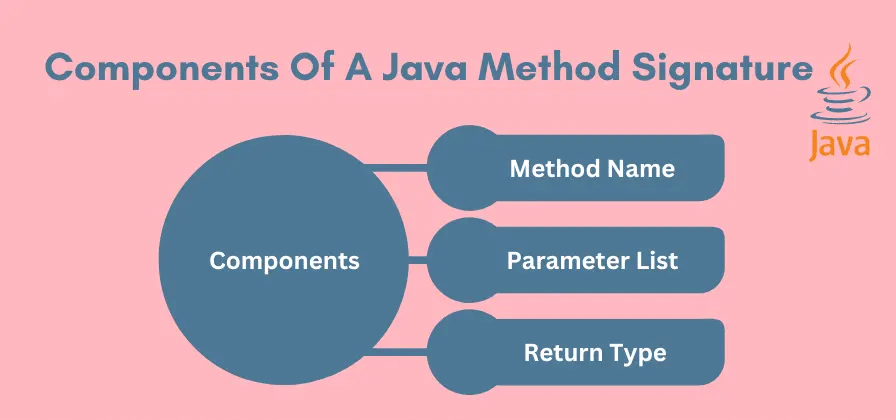
Method Name:
This signifies the name of the method you are creating the method signature for. A healthy practice for defining methods would be to follow the naming conventions so that your method name acts as a valid identifier.
Let us consider an example and name our method as Codingzap() and we will see how we can create a method signature for it.
Parameter List:
A parameter list or an argument list is nothing but a list of arguments or parameters that a method takes or expects to receive. This list of parameters is written inside the parenthesis that is followed by a method name. It is the same as a typical method declaration.
Here, let us suppose that our method Codingzap() is taking two method parameters ‘a’ and ‘b’. The parameter types of these are int. So, how can we write its syntax for method declaration? See below!
void Codingzap(int a, int b)
Return Type:
A return type defines or specifies the data type of the value a method returns. So, for instance, if a method is returning a value, we need to specify its type before the method name.
In the above line, we have used the return type as ‘void.’ This is used if the method is not returning any value. Let us consider that our Codingzap() method adds the two parameters and returns their sum. Thus, the return type of it will be int.
Thus, the above method declaration will be written as:
int Codingzap(int a, int b)
Besides these, we also have some additional components to method signatures that may or may not be required depending on the program we are writing. However, it is also a bonus to know about them. So, let us have a short look at these as well.
Apart from the above components, we can also provide some additional components to the method signature. These are the different modifiers like static, final, etc as well as access modifiers. Let us have a quick look at them as well.
Access Modifiers:
We do not usually consider these as a part of the signature for a method, however, providing these to the method signifiers helps to determine how and where can we access the method.
There are three main access modifiers in Java. These are public, private, and protected. A public method can be accessed anywhere in the program, while a private one is only accessible in the class. An example of syntax is below.
public double calculateanswer();
Understand Concepts Related To Java Method Signature
Now, In Java, a method signature can be considered as a part of a method declaration. There are a few concepts that are necessary to know to go further in detail on this topic.
These concepts are – Method overloading and exceptions. Let us have a look at both with the help of code examples below.
Method Overloading
Method overloading occurs when a class consists of two methods or more than two methods having the same name but different method signatures. So, for example, our method Codingzap() can share its name, but not the same parameter types or numbers.
The following code represents how overloaded methods work in Java with different signatures. Have a look to understand.
public class MethodSignatures {
// Method with no parameters
public void Codingzap() {
System.out.println("No parameters to add.");
}
// Method with two int parameters
public int Codingzap(int a, int b) {
return a + b;
}
// Method with three integer parameters
public int Codingzap(int a, int b, int c) {
return a + b + c;
}
public static void main(String[] args) {
MethodSignatures obj = new MethodSignatures();
// Calling the different overloaded methods
obj.Codingzap(); // No parameters
int result1 = obj.Codingzap(10, 20); // Two int parameters
System.out.println("Sum of 10 and 20 is: " + result1);
int result2 = obj.Codingzap(5, 10, 15); // Three int parameters
System.out.println("Sum of 5, 10 and 15 is: " + result2);
}
}
In the above code, we have multiple methods in the class MethodSignatures having the same name i.e. Codingzap() However, the part of the signature that makes them different is the parameter lists.
As we can see, the first method takes no arguments, thus, the method’s return type part of the method is void. The other two methods have some arguments. The parameter type is the same, however, each method consists of a different number of input parameters in their method declarations.
Understanding method overloading is crucial for writing efficient and reusable Java code. If you’re struggling with implementing method overloading in your assignments, you can get One-on-One live Java tutoring from our experts.
Although both are performing addition as seen in the method body, the two methods differ with different numbers of required elements in the parameter lists. So, we can call them overloaded methods.
Output:
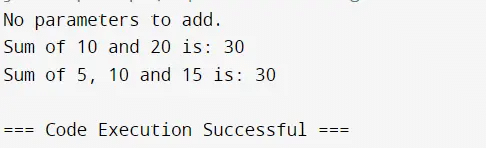
As seen in the output of the program, we are invoking all the methods, and as the method signature includes different argument lists, we are able to run each one of them. In case the method names also share the same signature, a compile-time error will be thrown.
Exceptions
Exceptions are errors that may arise during the run-time and handling these are necessary to prevent program termination. In this case, if a method throws one or more exceptions, it is included in the method signature.
For this purpose, we use the throw keyword which is then followed by the exception list. Have a look at the code example below.
public class MethodSignatures {
// Method with no exception
public int Codingzap(int a, int b) {
return a + b;
}
// Method with a string parameter to demonstrate exception handling
public int Codingzap(String a, String b) throws NumberFormatException {
int num1 = Integer.parseInt(a);
int num2 = Integer.parseInt(b);
return num1 + num2;
}
public static void main(String[] args) {
MethodSignatures obj = new MethodSignatures();
int result1 = obj.Codingzap(10, 20);
System.out.println("Sum of 10 and 20 is: " + result1);
// handling the exception for string to int conversion
try {
int result2 = obj.Codingzap("10", "twenty"); // Invalid string input
System.out.println("Sum of '10' and 'twenty' is: " + result2);
} catch (NumberFormatException e) {
System.out.println("Error: Invalid number format. " + e.getMessage());
}
}
}
Here, we have used another method having the int return type but its parameters have the string data types. An exception will arise if we pass the in-word or spelling of a number to be added, instead of simply writing the desired number.
You can also see that the method signature includes the exception NumberFormatException. This helps in representing what kind of exception is thrown.
Below is the output for this code. Let’s see and understand it in a better way.
Output:
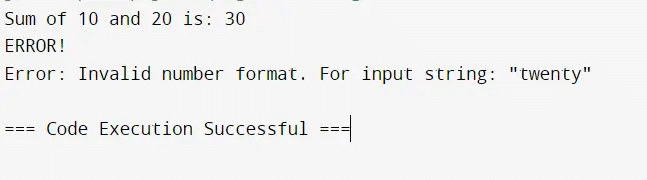
Here, you can clearly see that our first method is working properly. However, the second method throws an exception and provides us with an error message.
Comparison Table On Method Signature Between Java And Other Programming Languages:
The Method Signature is a concept that is not only present in the Java Programming Language. But, there are some other programming languages as well where a similar type of concept is present.
In this section, we will learn all about them by drawing a Comparison Table. We will make a Comparison Table on Method Signature between Java and Other Programming Languages.
Criteria | Java | Python | C++ | JavaScript |
Typing | Static | Dynamic | Static | Dynamic |
Overloading | Yes | No | Yes | No |
Based On Name | No | Yes | No | Yes |
Parameter Checking | Strict | Flexible | Strict | Flexible |
Method Uniqueness | Signature | Name | Signature | Name |
What Are Some Real-World Applications Of Method Signature In Java?
Method Signature in Java is a fundamental concept. The importance of the concept becomes feel when we go through the list of Real-world Applications of Java Method Signature.
That is the reason why, in this section, we will discuss some of the Real-world Applications of Java Method signatures. From there, you will understand the high necessity of it.
1. Banking Applications:
When we are developing any Banking Application with the Java Language, the need for Method Signature can be felt at different phases while taking different inputs from the users.
When To Use In Real-World Applications:
- With Method Signature, we can get the Account Details by taking the Account Number input.
- Using different Method Signatures, we can calculate the different types of account interests.
2. Java Frameworks:
Not only in Banking Applications but in some Java Frameworks as well, the Method Signature concept is highly used. In Spring Framework, the Method Signatures are used to match the HTTP Requests.
When To Use In Real-World Applications:
- The Method Signature is highly used when we call @RequestMapping in REST APIs.
- The Method Signature is also used to define the Service Layer Methods.
3. Integrated Development Environments:
In different Integrated Development Environments or IDEs, the Method Signatures are used to ensure a smooth code compilation. Also, it helps in detecting errors in the IDE Code.
When To Use In Real-World Applications:
- Method Signature is highly used in the Large Scale Application development in collaboration.
- In the Static Analyzing Tool, the Method Signature is used to implement the consistency.
Conclusion:
Method Signature in Java is a part of the method declarations that is simply the combination of the method names and parameter lists. While the method names can be the same in a class, the signatures should be different.
If this is not followed, our program will not run because of a compilation error. Therefore, it is important to make note of the methods and perform tasks like polymorphism carefully. You should also follow naming conventions and provide method names that signify their functions or tasks.
For all final year students you can also read our article on Final Year Project Ideas.
Takeaways:
The Java method signature consists of two main components. These are the name of the method and the list of parameters.
No two methods can have the same signature. If this happens, our code will not compile.
However, performing method overloading is perfectly legal if you follow the proper procedure.
It is important to note that one method can have the same name as other methods but can never have the same signature in Java programming language.


