
As a beginner in the Java Programming Language, you should put more focus on the Basics of Java to become an expert in this field in the future. One of the most important Java Basic Topics will be the “If-Else Statement in Java,” where you should be the master.
If you want to execute your Java Program based on different Conditions, then the use of the If-Else Statement becomes eminent. Whatever Java Complex Program you are going to solve, you have to use the If-Else to get the result. So, knowing about Java if–else is a necessity.
In this article, we will first discuss the If-Else Statement in Java. Later, we will show the Workflow and its implementation process. So, let us start our journey.
TL; DR; If-Else Statement In Java
Aspect | Summary |
Overview | An If-else is a decision-making statement that selects one execution path based on a condition. Either If or the Else Condition |
Working | One condition will be evaluated at a time. First, the IF condition will be checked. It runs when it is true. Otherwise, the else will execute. |
Nested If-Else | When an If-Else Statement is placed inside one or more If-Else Statements. If the Outer If statement is true, then the Inner If Statement will be evaluated. |
Ladder Else If | If multiple conditions are placed one after another using Else If, so that any condition becomes true. Multiple conditions are placed in this case. |
What Is An If-Else Statement In Java? Read Below
An If-Else Statement is a simple Conditional Statement in the Java Programming Language. It is called the Conditional Statement because a Condition helps to determine which Code Snippet Set will be executed in the program. There are two keywords used: IF and ELSE.
The Condition is placed after the IF Keyword. If the Condition of the IF Block is TRUE, then the Code Snippet written inside the IF will be executed. If the Condition is FALSE, then the Code Snippet written under the ELSE will be executed.
if(Condition)
{
// Set Of Statements Under IF Block
}
else
{
// Set Of Statements Under ELSE Block
}
What Is The Workflow Of An If-Else Statement In Java? Get To Know
You might have problems understanding the total processes. Here, we try to implement the process with the help of the diagram. This will help to understand the process in a quick form. It is the workflow diagram of the if-else statement in Java.
Suppose, in a program, the flow encounters an if-else format. It will first check the condition of the if statement. If the condition is true, then the statement under the if block will be executed. If the condition is not true, then the statement under the else block will be executed.
This means any one of the blocks should be processed. The process depends upon the condition. If the condition is not alright, then the whole program may cause an error. After encountering the if-else statement, the remaining part of the program will be executed.
How To Implement An If-Else Statement In Java?
Now, after understanding the workflow of the If-Else Statement, it is time for practical implementation. Here, we will take a simple example to use If-Else. Let us check the following code for that.
Example:
public class Main{
public static void main(String[] args) {
String str = "ZapOne"; // String Declaration
if (str.equals("CodingZap")) // If Condition
System.out.println("Welcome To CodingZap");
else // Else Condition
System.out.println("Welcome To ZapOne");}}
Steps Of The Program:
- Here, we have taken a string and declared it with some initial value.
- Then, the If-Else block will start. The IF Block will be placed first, and then the ELSE block. After the IF Keyword, the Condition will be placed.
- Now, we will use the condition that checks the Strings. If those Strings are Similar, then the IF Block will be executed. Otherwise, the ELSE Block will be executed.
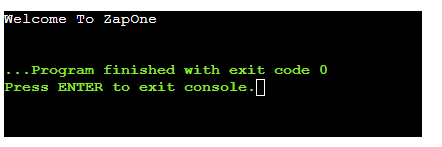
- Here, the strings will not be the same. So the Else Block Print Statement will be shown.
Let us try to find out the output of the above code. It will help to understand the if-else statement Java example.
Output:
How To Implement Nested If-Else In Java?
Now, from the above section, the Concept of the Java If-Else should become clear to you. Now, we can discuss the Nested If-Else in Java. The Nested If-Else is nothing but a Complex Approach to the Conditional Statements. Here, one If-Else Block is placed inside Another One.
So, if the Outer Condition of the If-Else is True, then only the Inner If-Else Block will be executed, and its Condition will be evaluated. We can take an example and clear the process.
public class Main {
public static void main(String[] args) {
int zap = 42; // Providing Value
if (zap > 0) // First Outer If Condition
{
System.out.println("The Value Is Positive");
if (zap % 2 == 0) // Nested If Condition (Inner One)
{
System.out.println("The Value Is An Even Number");
}
else // Nested Else Condition (Inner One)
{
System.out.println("The Value Is An Odd Number");
}
}
else // First Outer Else Code Block
{
System.out.println("The Value Is Negative");
}
}
}
Steps Of The Program:
- At first, a Value 42 has been taken in the Variable “Zap”, which we will use in the program.
- Now, the First or Outer If-Else Block will be implemented. Here, the Outer IF Condition will check whether the Variable “Zap” has a Positive Value or not.
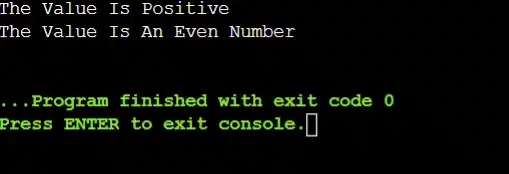
- In this case, the Value is 42, so it will be Positive. So, the Condition will be True, and the Outer IF Block will be executed.
- Now, the Statement written under the Outer IF Block will be executed. And then, it will come to the Inner If-Else Block.
- In the Inner If-Else Block, the Condition will check whether the Value 42 is Even or Odd.
- As the Value 42 is even, the Inner IF Condition will become True, and the Inner IF Block will be executed, and the Even Message will be printed.
- The Code Execution will end there, as no ELSE Code Block will be executed, as all IF Code Blocks have been executed.
Output:
How To Implement An Else If Ladder In Java?
The Else If Ladder is another version of the If-Else Statement. Here, we implement multiple conditions one after another. When a single condition becomes true, the program execution will end. Let us check it.
public class Main
{
public static void main(String[] args)
{
int marks = 78;
System.out.println("Example Of Ladder Else If: ");
// If This Condition Is True, No More Conditions Will Be Checked
if (marks >= 90)
System.out.println("The Grade Is A");
else if (marks >= 75) // If The Previous Was False, This Will Be Checked
System.out.println("The Grade Is B");
else if (marks >= 60) // If Marks Were Not More Than 75
System.out.println("The Grade Is C");
else if (marks >= 40) // If Marks Were Not More Than 40
System.out.println("The Grade Is D");
else // If All Conditions Are False
System.out.println("Grade: F");
}
}
Steps Of The Program:
- At first, the If Statement will be declared, which will check a condition.
- If that condition is True, no other conditions will be checked. If it is false, the next Else if will be checked.
- If that else if is false as well, then the next one will be checked. In this way, the complete execution will happen.
- If no Else If and If Statement becomes True, then the Else will execute and stop the program.
Output:
Comparison Table Between If-Else And Switch Case In Java:
Other than the If-Else Statement, there is the Switch Case Statement as well in Java that works as an alternative to the If-Else. Let us compare both of them to understand which one is better.
Criteria | If-Else Statement | Switch Case Statement |
Condition Type | Flexible | Fixed |
Expression | Boolean | Single Value |
Range Check | Allowed | Not Allowed |
Readability | Medium | High |
Performance | Slower | Faster |
How To Use If-Else In Java Assignment Solutions?
As a beginner, if you are still confused about the use of the If-Else Statement in a Java Assignment Solution, then here is a quick overview of the entire process. Keep in mind this process while solving any If-Else problems.
- First, start with a simple condition. Don’t try to take a complex condition in the beginning.
- Always use a meaningful variable name in the condition that reflects the logic behind it.
- As a novice, try to put one condition in an If-Else, instead of combining two or more.
- Use the proper indentation and formatting in the conditional statements to increase readability.
- If there are multiple conditions, then use Ladder Else-If or Nested If-Else statements.
What Are Some Performance Considerations On Java If-Else?
We hope that the Concept of Java If-Else has become clear to you. Now, in this section, we can discuss some Performance Considerations on Java If-Else. It is necessary to know about these Performance Considerations to write a workable Java Code.
Let us check the following list, where we have discussed some important Performance Considerations on Java If-Else.
- When you are dealing with some Complex Conditions, then only you can use the If-Else.
- If you use Too Many If-Else Blocks, then the Program Execution Speed will become Slow.
- To work on Multiple Conditions, you can use the Boolean Flags instead of Nested If-Else.
- For Merging Two or More Conditions, we have to use the AND and OR Operators to reduce code size.
- If you are doing Repetitive Calculations, there is no need to Save Data in any Variable.
Common Mistakes Students Make With If-Else in Java:
Now, before we conclude our discussion, we would like to shed some light on some Common Mistakes related to the Java If-Else. We will advise all the students to keep in mind such mistakes and try not to commit them in their Java assignments, which might prompt an error in the code.
Let us check the following list of Common Mistakes, which will help us to work on Java If-Else.
- Sometimes, we use the Curly Braces Incorrectly for the If-Else Block, which prompts a Syntax Error.
- After writing the Condition, we should Not Provide a Semicolon (;) to end the statement.
- Sometimes, we don’t Handle All Possible Cases in an If-Else, for which we can get Unexpected Output.
- Without proper necessity, we should Not Use Nested If-Else Excessively.
- You have to use the Proper Condition Order for Multiple If-Else Statements to get the proper result.
Conclusion:
As we saw, it is very important to learn the “If-Else Statement in Java”.
An if-else statement in Java will help to understand more similar topics related to it. This topic will help us further in the future.
Key Takeaways:
- In between the IF and ELSE Block, any code will be executed.
- The Execution of the IF or ELSE Block depends upon the Condition.
- For Nested If-Else, the Outer Condition is checked first, and then the Inner Condition.
- If the Outer Condition of the Nested If-Else is False, then the Inner Condition will not be evaluated.
Frequently Asked Questions
Can we use if without else?
Yes, we can use if without Else in Java. If we used IF without ELSE, then only when the condition is true of the IF Block, the code will be executed. If it is not true, then the code execution will not happen.
What happens if multiple conditions are true?
In a Ladder Else If, if multiple conditions are true, then the true condition that is present at the top of all will only be executed. Rest assured that all the true conditions will not matter, as the code block will end.
Which is faster, if-else or switch?
If you are checking something with a single If-Else, then it will be faster than the Switch Case. However, if you are checking something big with multiple conditions, then Switch Case will be the fastest one.


