How To Fix ConcurrentModificationException In Java Loops?

ConcurrentModificationException In Java Loops

As a beginner, when you are dealing with the Lists and Sets inside any Java Loops, you might face a scary-looking error that expresses the “ConcurrentModificationException in Java” message.

The ConcurrentModificationException Error happens when you try to change the structure of the Lists or Sets while iterating over them using any Java Loops. However, fixing this problem is not at all complicated.

In this article, we will first talk about the Java ConcurrentModificationException and its common causes. Later, we will show some effective methods to fix this error in your Java homework. So, let us start our discussion.

Still, if you have any questions related to the ConcurrentModificationException, in that case, you can get expert coding help for your Java project to ensure you understand the concepts and apply them effectively.

TL;DR: ConcurrentModificationException In Java Loops 

Aspect

Summary

Overview of the Exception

ConcurrentModificationException happens when you modify, like add or remove elements from a Collection like ArrayList or HashSet, during iteration.

Reason for the Exception

Java doesn’t allow structural modification of a collection while looping over it because it confuses the Iterator about size and order.

Common Causes

  1. Directly removing elements from a list during a loop
  2. Adding new elements inside the loop
  3. Modifying a collection without using an Iterator

Resolving Methods

  • Use Iterator.remove() instead of direct removal
  • Perform modifications on a separate copy of the list
  • Use fail-safe collections like CopyOnWriteArrayList

Real Example

A real Java Problem Statement has been taken with the following:

  • Wrong Code: removed and added elements directly.
  • Correct Code: Iterator is used for removal, and a copy list for addition.

What Is The ConcurrentModificationException In Java?

For Java Collections like ArrayList, HashSet, etc., there are some built-in rules present for safe looping over them. You can’t change the structure of the collections like ArrayList when you are looping over it.

That means you can’t add or remove elements while iterating over them. It is similar to the Java program iterating over the ArrayList, while simultaneously removing or adding elements to it, which changes its size.
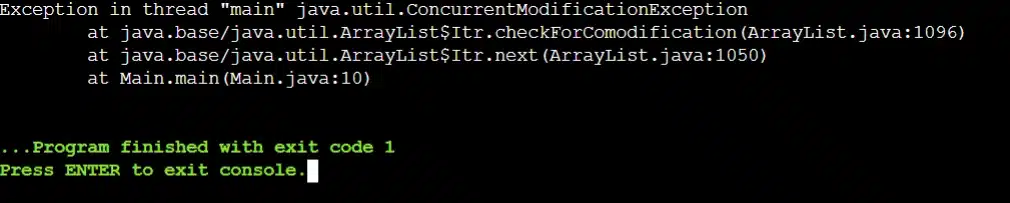
Error Output

If you are performing anything like that, you will get a ConcurrentModificationException error message like the above. If you need to loop and modify the Java Collections, then you have to use some safe methods.

What Does The ConcurrentModificationException Occur In Java?

Now, after understanding a brief background of the ConcurrentModificationException error in Java, we have to focus on some common causes for which you might see such an error in your code.

All of the reasons orbit around the common idea that you are changing the list structure during any iteration.

1. Directly Removing Elements: 

When a Java Loop is working on an ArrayList, you can’t change its structure directly. If you do so, the Java Compiler will get confused regarding the ArrayList Size and hence, you will get the error message.

				
					import java.util.*;
public class Main 
{
    public static void main(String[] args) 
    {
        // A Simple ArrayList
        List<String> lang = new ArrayList<>(Arrays.asList("Coding", "Zap"));
        
        for (String l : lang) //For Loop Execution
        {
            if (l.startsWith("Z"))
                lang.remove(l); // Removing Directly From List
        }
    }
}


Here, the For Loop is iterating over the ‘Lang’ ArrayList. Now, during iteration, if the For Loop finds any word starting with ‘Z’, it will be removed from the original list. Hence, the error will happen as the size is reduced.

2. Adding New Elements In Iterations: 

Not only removing an element, but the addition of any new element will also change the ArrayList Size. Hence, the ConcurrentModificationException will happen during the addition of any new element to the original list.

				
					import java.util.*;
public class Main 
{
    public static void main(String[] args) 
    {
        // A Simple ArrayList
        List<Integer> zap = new ArrayList<>(Arrays.asList(10, 20, 30));

        for (int x : zap) //For Loop Execution
        {
            if (x == 20)
                zap.add(40); // Adding Elements During Execution
        }
    }
}


Here, the For Loop is iterating over the ‘Zap’ ArrayList. During the iteration, if the Value 20 is found, a new value 40 will be added to the original list ‘Zap’. Hence, the size will increase, and an error will happen.

3.  Modification Without Iterator: 

If you are changing the Java Collection Structure without using the Iterator, then such a problem will happen. Sometimes, we define the Iterator, but we won’t use it inside the Java Loops, which gives the consequences.

				
					import java.util.*;
public class Main 
{
    public static void main(String[] args) 
    {
        // A Simple ArrayList
        List<String> code = new ArrayList<>(Arrays.asList("Zap", "One"));

        Iterator<String> cd = code.iterator(); // Iterator For Modification
        
        while (cd.hasNext()) // While Loop Execution
        {
            String val = cd.next();
            if (val.equals("One"))
                code.remove(val); // Modifying Without Iterator
        }
    }
}


Here, the ArrayList ‘Code’ and Iterator ‘CD’ have been defined. While iterating over the ArrayList, we are removing the ‘One’ value without using the Iterator ‘CD’. Hence, the exception will happen.

How To Resolve Java ConcurrentModificationException Error?

Now, unfortunately, if the ConcurrentModificationException happens in your Java program, then don’t get worried, as there are a lot of methods present that you can use to come out of it.

In this section, we will share the resolving methods one by one with the proper example. So, let us check.

1. Use Remove() From Iterator: 

If you want to remove anything from the ArrayList, then don’t remove the element from the original list. This will change the list size. Instead, use the Remove() function on the Iterator defined on that ArrayList.

General Syntax: IteratorName.remove();

				
					import java.util.*;
public class Main 
{
    public static void main(String[] args) 
    {
        // A Simple ArrayList
        List<String> code = new ArrayList<>(Arrays.asList(“Zap”, “One”, “Coding”));

        Iterator<String> cd = code.iterator(); // Defining Iterator
        
        while (cd.hasNext()) // While Loop Iteration 
        {
            String tmp = cd.next();
            if (tmp.startsWith(“C”))
                cd.remove(); // Removing Using Iterator
        }
        System.out.println(“The New List Elements: “);
        System.out.print(code);
    }
}


Explanation Of The Code: 

  • Here, the ‘Code’ String ArrayList has been defined with some prefixed values.
  • Now, an Iterator ‘CD’ has been defined on the same ‘Code’ ArrayList in the String Datatype.
  • Now, we will create a While Loop with the help of an Iterator and check the elements with the Iterator.
  • If there is any matching element present in the list, we will remove it using the Iterator and Remove().
  • This will not change the ArrayList size and will successfully remove the element, like the following.

Output: 
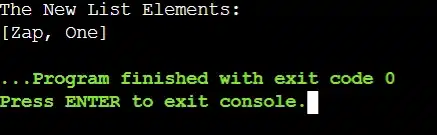
Output- Use Remove() From Iterator

2. Use a Separate Collection For Changes: 

Another good approach will be to use a separate ArrayList. There will be a copy of the original ArrayList. You have to execute loops on one ArrayList and make changes in the ArrayList Copy. Let’s check how.

				
					import java.util.*;
public class Main 
{
    public static void main(String[] args) 
    {
        // A Simple ArrayList
        List<Integer> Zap = new ArrayList<>(Arrays.asList(29, 20, 25, 30));
        List<Integer> One = new ArrayList<>(Zap); // Copy Of ArrayList

        for (int z : Zap) // Iterating Over ‘Zap’ ArrayList 
        {
            if (z == 20)
                One.add(40); // Adding To ‘One’ ArrayList
        }
        System.out.println(“List Elements After Addition: “);
        System.out.println(One);
    }
}


Explanation Of The Code: 

  • Here, the Original ArrayList ‘Zap’ has been created with some numeric values.
  • Now, we are creating a copy of the ‘Zap’ ArrayList as the ‘One’ ArrayList.
  • Now, the For Loop will iterate normally on the ‘Zap’ ArrayList, and the modification will happen on the ‘One’ ArrayList.
  • As we are performing operations on two different ArrayLists, there will be no issues, and the ‘One’ ArrayList will be changed. 
  • We will print the ‘One’ ArrayList at the end to check the changes.

Output: 

 Output- Use Separate Collection For Changes

3. Fail-Safe Iterators For Concurrent Collection:

The last but not least method to deal with such an error is to use a Fail-safe Iterator for Concurrent Collections. Here, instead of a normal ArrayList, we have to create a CopyOnWriteArrayList. Let us go through it.

				
					import java.util.*;
import java.util.concurrent.CopyOnWriteArrayList;

public class Main 
{
    public static void main(String[] args) 
    {
        // A Simple Fail-Safe Iterator
        List<String> code = new CopyOnWriteArrayList<>(Arrays.asList("Coding", "Zap", "One"));

        for (String cd : code) // Simple For Loop Iteration
        {
            if (cd.equals("One"))
                code.remove(cd); // Safe Removal Of Fail-Safe Iterator
        }
        System.out.println("List Elements After Modification: ");
        System.out.println(code);
    }
}


Explanation Of The Code: 

  • At first, the package for the CopyOnWriteArrayList will be imported into the program.
  • Now, a CopyOnWriteArrayList will be created just as we do for a Normal ArrayList.
  • In this case, we will simply do the For Loop Iteration as we normally do.
  • For other cases, this code will give an error, but as it is defined as CopyOnWriteArrayList, we will not face any issues, and the modification will be perfectly done.

Output: 

Output- Fail-Safe Iterators For Concurrent Collection

Real Example: Fixing ConcurrentModificationException In Java Homework

We hope that whatever we discuss will be enough to clarify this complicated issue for you. However, if you still doubt the use of resolving methods in real cases, this section will help you a lot.

In this section, we will take a real Java problem with ConcurrentModificationException and solve it live.

Problem Statement: Write a Java program to remove all even numbers from a list and print it.

Wrong Code: 

Here is a faulty version of the code developed by a student that causes a ConcurrentModificationException:

				
					import java.util.*;
public class Main 
{
    public static void main(String[] args) 
    {
        // A Simple ArrayList
        List<Integer> nums = new ArrayList<>(Arrays.asList(10, 15, 20, 35));

        // Removing Directly From The ArrayList Inside The For loop
        for (int n : nums) 
        {
            if (n % 2 == 0) 
                nums.remove(Integer.valueOf(n)); // Error Will Happen
        }

        // Adding Elements To Original ArrayList Inside Loop
        nums.forEach(n -> {
            if (n > 20) 
                nums.add(n + 1); // This Will Not Be Allowed
        });

        System.out.println(nums);
    }
}


Here, the code gives that error for the following reasons. Let us check them out:

  • In the first For Loop, we are trying to remove the Even Numbers from the original ‘Nums’ ArrayList.
  • In the second case, we are adding some more odd numbers to the list using the same original ArrayList.

Correct Code: 

Now, we will show the correct version of the code, which fixes the error in the previous code version:

				
					import java.util.*;
public class Main 
{
    public static void main(String[] args) 
    {
        // A Simple ArrayList
        List<Integer> nums = new ArrayList<>(Arrays.asList(10, 15, 25, 35));
        Iterator<Integer> it = nums.iterator(); // Defining The Iterator
        
        while (it.hasNext())
            if (it.next() % 2 == 0) 
                it.remove(); // Iterator For Safe Removal

        List<Integer> copy = new ArrayList<>(); // Copy ArrayList For Addition
        
        for (int n : nums)
            if (n > 20) 
                copy.add(n + 1); // Adding Elements In Copy
        
        nums.addAll(copy);
        System.out.println(nums);
    }
}


Now, let us check out the resolving methods that are used in this code to make it perfect. Here is the list:

  • We have defined an Iterator ‘IT’ that is used in the While Loop to remove the Even Numbers.
  • The addition of the odd numbers has not been done on the original ArrayList, but on a Copy of the ArrayList.

Key Takeaways: 

  • ConcurrentModificationException happens when you are dealing with Java Collections inside a loop.
  • If you are trying to modify the Java Collection Size during loop iteration, the error will happen.
  • Directly removing elements, adding new elements, and modifying without Iterators are some causes.
  • Using Fail-safe Iterators, Separate Collections, and remove() on Iterator are some common fixes.