While learning the Java Programming Language, we will encounter some Common yet Important Operations that help to build a strong Java foundation. “Compare Two Strings in Java” is one such operation.
String Comparison in Java is widely used in Data Validation, Chat Application, etc., domains. In this article, we will first verify the problem statement, and later, we will discuss some methods to Compare Strings in Java.
So, grab the seatbelt and be ready to experience the insightful journey through this article.
TL;DR: Compare Two Strings In Java
Aspect | Summary |
Purpose of Comparison | String comparison in Java is mainly used to check whether two strings have the same text, follow a specific order, or match user input in programs and exams. |
Recommended Method | The equals() method is the safest and most commonly used way to compare string content, especially in assignments and theory questions. |
Case Sensitivity | By default, Java treats uppercase and lowercase letters as different. To ignore case differences, equalsIgnoreCase() should be used carefully based on the problem. |
Common Mistake | Many students use the == operator for comparison, but it checks memory references instead of actual text, leading to wrong results. |
Understanding The String Comparison Problem Statement In Java:
Before we start discussing the methods to Compare Strings in Java, we have to first understand the Problem Statement. And the Problem Statement will be like the following:
There will be 2 or more String Values in Java. We have to compare their text and conclude whether those values are the same or not. If they are the same, we will print the True Value. Otherwise, we will print False.
First Example:
String 1: “CodingZap”
String 2: “ZapOne”
Output: False
----------------------------
Second Example:
String 1: “CodingZap”
String 2: “CodingZap”
Output: True
In the above example, two string values have been taken. The first string value is “CodingZap” and the second String Value is “ZapOne”. As they are both different, we will print the value False.
If they are similar, the output will be True, just like the second example that we have taken.
Why Comparing Strings In Java Confuses Students?
When students first learn Java, they usually think strings behave like numbers. Because of this, many assume that using == will compare the actual text of two strings. But Java works differently.
This confusion becomes worse during exams and assignments when two strings look the same but still return false. Most of the time, the mistake happens because Java compares memory references instead of actual text.
This is why understanding string comparison properly is very important for beginners.
What Are Methods To Compare Two Strings In Java?
There exist a number of ways in which you can perform string comparisons. Maybe you can even come up with a whole new logic to do so, yourself.
In this article, we will look at 3 such methods to compare strings in Java. Let us now look at these methods below.
Some of these methods are the inbuild functions of the Java programming language. Using these methods not only helps you to shorten the code. But also it will be implemented by not using the If statement. The methods are:
- Using equals() method
- Using Equals-To (= =) operator
- Using comapreTo() method
Let us know about each method one by one briefly.
How To Compare Two Strings In Java Using Equals() Method?
To compare two string in Java using the equals() method, let us first create the string that we need to compare. In this case, we will be declaring three strings but we will compare two string objects at one time.
These are as:
string1 = ‘CodingZap’
string2 = ‘ZapOne’
string3 =’CodingZap’
Then we will use the equals() method. In this method, the first & the second string will be compared, and a boolean value is returned. After comparing, it will provide the value or results in the Boolean manner.
This means if both the strings are equal to each other, it will print the ‘true’. If they are not equal to each other, then it will print ‘false’.
Here, we have taken the first string & third string as ‘CodingZap’ & the second string as ‘ZapOne’. Comparing the strings between the first & second will provide the value as ‘false’. As they are not equal. Comparing the first & third will print ‘true’. As both of them are the same.
General Syntax: string1.equals(string2)
Code to compare strings in Java using Equals() method:
public class Main{
public static void main(String[] args) {
// Declaring The Strings
String s1="CodingZap";
String s2="ZapOne";
String s3="CodingZap";
// Comparing The First & Second Strings And Printing The Output
System.out.println("Comparing Between S1 & S2: "+ s1.equals(s2));
// Comparing The First & Third Strings And Printing The Output
System.out.println("Comparing Between S1 & S3: "+ s1.equals(s3));
}}
Let’s look at the output of the above code.
Output:
The “Yoda Trick”: Preventing Crashes
If you try to compare a variable that is null or empty, your program will crash with a NullPointerException. This is the most common mistake students make in assignments.
The solution will be only the “Yoda Conditions,” which means, instead of putting the variable first, put the fixed text first. But why is it called the Yoda Trick?
Just like the Star Wars character, you are speaking backward. Instead of saying “If the input equals Admin,” you say “If ‘Admin’ the input is.” It’s a tiny change that makes your code “un-crashable.”
Imagine you are writing a login script. You might write it like this in your assignment.
How To Compare Two Strings In Java Using the Equals-To (= =) Operator?
Here, we need to perform the same operations. We need to declare some strings for comparison purposes.
Let us keep the same three strings declared in the above program here as well.
Then we need to use the Equals-To (= =) operator. This is the same operator that helps to compare two numbers. This can also be used to compare a Java string to the second.
The equals to operator also provides the result in a Boolean manner. If both the strings are equal to each other, it will return ‘true’. If the two strings are not equal to each other, then the operator will return ‘false’.
Here we have taken the same example as in the above. So, it will provide the same result here also.
General Syntax:
string1 = = string2
Code Compare Two Strings In Java Using Equals-To (= =) Operator:
public class Main{
public static void main(String[] args) {
// Declaring The Strings
String s1="CodingZap";
String s2="ZapOne";
String s3="CodingZap";
// Comparing The First & Second Strings And Printing The Output
System.out.println(s1==s2);
// Comparing The First & Third Strings And Printing The Output
System.out.println(s1==s3);
}}
Let’s look at the output of the above program to see the working of the == operator.
Output:
Why Equals-To (==) Is Risky for String Comparison?
Many students use the Equals-To (==) operator because it works fine for numbers. However, for strings, Equals-To (==) does not compare the content. It only checks whether both variables point to the same memory location.
Sometimes, Equals-To (==) may return true by accident, which makes students believe it is correct. But this behavior is unreliable and can cause unexpected results in exams.
That’s why teachers usually recommend using equals() instead of Equals-To (==) for comparing strings.
How To Compare Two Strings In Java Using The CompareTo() Method?
Here, in this case, also, we have also taken some strings from comparing. This method is quite different. If the two strings are the same, then it will print the 0 as the result.
Suppose, the second string is less than the first string, then it will print some negative value. If the second string is greater than the first string then it will print a positive value.
Are you familiar with the strcmp() function in c? Well, the compareTo() method also works in a similar way. Let us understand about it through an example.
In this case, we have taken the same example as above. But here the result will be different. First, it will provide a negative value. As there is a length difference between two strings.
But the second output will be zero. As there is no length difference between s1 and s3.
General Syntax: string1.compareTo(string2)
Code To Compare Two Strings In Java Using The CompareTo() Method:
public class Main{
public static void main(String[] args) {
// Declaring The Strings
String s1="CodingZap";
String s2="ZapOne";
String s3="CodingZap";
// Comparing The First & Second Strings And Printing The Output
System.out.println("Comparing Between S1 & S2: "+ s1.compareTo(s2));
// Comparing The First & Third Strings And Printing The Output
System.out.println("Comparing Between S1 & S3: "+ s1.compareTo(s3));
}}
Let’s look at the output of the above code to understand the workings of the method.
Output:
Up till now, we have seen how we can compare two string objects using the built-in methods in Java.
But what if you are preparing for an interview and you get asked not to use these?
So, how to compare 2 strings without an in-built function? Is there any other way to do this comparison of two string objects in Java?
Yes, there is!
You can create a for loop with an if condition to compare one Java string with another. How? Let’s see.
Compare Java Strings without using Built-In Function
Ever thought about how to compare two strings using a for loop? Let us see what can be the approach to compare a Java string to another in this case.
So, to state it simply, we are going to define our own compareTo() method. We will iterate over the string using the for loop and also use conditional statements for the same.
This function will return the following on string comparison –
- Case I – string s1 < string s2: return negative value
- Case II – string s1 > string s2: return positive value
- Case III – string s1 = string s2: if both strings are equal then return zero
You can say that we are going to compare strings using the if condition and for loop together for this purpose but with a twist. So if you are asked ‘how to compare two strings in Java using if condition?’ Or, ‘how to compare 2 strings in Java using for loop?’ follow the below-given code.
Consider the same strings as given in the above program. Let us now work on our function.
Code to compare Java strings using built-in function:
public class JavaStringCompare{
public static int compareStrings(String s1, String s2){
int lengths1 = s1.length();
int lengths2 = s2.length();
// find the minimum string length so that we know how many characters we can compare
int minlength = Math.min(lengths1, lengths2);
// iterating over strings using the for loop
for(int i=0; i
Now, let us look at the output for the above program to see if it works.
Output:
All these ways compare two strings with case sensitivity. This means that both the strings should either be in upper case or lower case.
An example of this is when comparing ‘CodingZap’ with ‘codingzap’; the result indicates that the strings are not equal because they differ in case. So, how do you compare two strings ignoring case? Let’s see.
Case Sensitivity: A Common Exam Trap
A great exam trap where most students get stuck is the Case Sensitivity while comparing two strings in Java. Sometimes, two identical strings will be given to students, but they will be different in their cases.
To deal with such issues, the following two important methods can be used. Let us check them.
1. Using EqualsIgnoreCase()
Now, we will learn how to compare two strings in Java without being case-sensitive or ignoring cases. For this, we will use another method called equalsIgnoreCase(). This method compares one string object to another irrespective of their case. It also returns the result in Boolean values.
General Syntax: s2.equalsignorecase(s1)
The string to be compared is in the parentheses.
Code to compare strings in Java, ignoring case:
public class Main{
public static void main(String[] args) {
// Declaring The Strings
String s1="CodingZap";
String s2="ZapOne";
String s3="codingzap";
// Comparing The First & Second Strings And Printing The Output
System.out.println("Comparing Between S1 & S2: "+ s2.equalsIgnoreCase(s1));
// Comparing The First & Third Strings And Printing The Output
System.out.println("Comparing Between S1 & S3: "+ s3.equalsIgnoreCase(s1));
}}
matrixData[i][j] = scanner.nextDouble();
} else {
throw new RuntimeException("Insufficient data in the file.");
}
}
}
Matrix matrix = new Matrix(matrixData);
matrix.print(); // Output the read matrix
} catch (FileNotFoundException e) {
System.err.println("File not found.");
}
}
Now let us see how it worked in the output below.
Since s1 and s3 are the same words i.e CodingZap, but with different type cases, we see that after ignoring the case, the result is true.
However, on comparison of s1 with s2, since the strings were not equal, the function returned false.
Output:
2. Using CompareToIgnoreCase() Function:
In this method, we will use a different version of the CompareTo() Function, which is Case-Insensitive. Here, we will use the CompareToIgnoreCase() Function, which works similarly to CompareTo().
In this case as well, if the Two String values are similar, we will get zero (0) as the output. Let us check the following code, where the CompareToIgnoreCase() Function is implemented.
General Syntax: String1.compareToIgnoreCase(String2);
public class Main
{
public static void main(String[] args)
{
// Declaring The Strings
String zap="JAVA";
String one="java";
System.out.println("Checking String Comparison Using CompareToIgnoreCase(): ");
if (zap.compareToIgnoreCase(one) == 0) // Comparing The Two Strings
{
System.out.println("Two Strings Are Same");
}
else
{
System.out.println("Two Strings Are Not Same");
}
}
}
Steps Of The Program:
- At first, 2 String Variables will be declared. The First one will have the value “JAVA”.
- The Second Variable will have the value “java”. Both values are the same, just they are in Lower and Upper Case.
- Now, just like the CompareTo(), we will implement the CompareToIgnoreCase() Function.
- As the two values are similar irrespective of their case, we will get the Zero Value.
- Hence, from the IF Statement, we will get the output “These Two String Values Are Similar”.
Output:
How to compare if two strings in Java are Not Equal?
For this, we will use the not equals operator. This is typed as (!=) It is the opposite of the (==) operator and complements the boolean result value.
Let us see if it’s working using the example.
Code to compare if the two strings in Java are not equal:
public class Main{
public static void main(String[] args) {
// Declaring The Strings
String s1="CodingZap";
String s2="ZapOne";
String s3="CodingZap";
// Comparing The First & Second Strings And Printing The Output
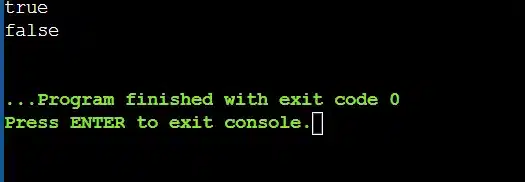
System.out.println(s1!=s2);
// Comparing The First & Third Strings And Printing The Output
System.out.println(s1!=s3);
}}
n("Comparing Between S1 & S3: "+ s3.equalsIgnoreCase(s1));
}}
matrixData[i][j] = scanner.nextDouble();
} else {
throw new RuntimeException("Insufficient data in the file.");
}
}
}
Matrix matrix = new Matrix(matrixData);
matrix.print(); // Output the read matrix
} catch (FileNotFoundException e) {
System.err.println("File not found.");
}
}
Since s1 and s2 in the above example are different, hence the (!=) operator will return the true value.
Let us confirm this below:
Where Students Use String Comparison In Java Beyond Homework?
Now, if you are thinking that, other than only in homework and assignments, there is no use in Comparing Two Strings in Java, then you are thinking wrong. There is a list of Real-world applications on it.
In this section, we will shed some light on the Real-world applications of Comparing Two Strings in Java. Let us check them one by one in the following list.
1. User Authentication System:
When we are developing any User Login or Signup System using Java, we will feel a high need to compare two string values. Without String Comparison, we cannot verify User Credentials.
- The Entered Usernames and Passwords are compared with the stored values to avoid repetition.
- During the Login Verification, it helps to compare the Password stored for the username.
2. Search and Filter Features:
In any Java Application, if we want to add search functionality, then we have to use the String Comparison Techniques to get the proper output. Without it, searching and filtering data will not be possible.
- We can easily find a file stored in any folder or location of our Java Application using it.
- We can match the User Input with the Database Values to get other details.
3. File and Data Synchronization:
When we are performing Data Synchronization, the use of String Comparison in Java becomes very necessary. This helps to make consistency between different Systems and Files.
- We can Compare File Names, Content Snippets, or Metadata using it.
- During Data Integration, we can handle and remove Duplicate Records using such operations.
Performance Considerations When Comparing Strings In Java For Assignments:
We hope, from the above discussion, that you are now ready to compare two or more strings in Java. However, before practicing such problems, we should keep in mind some Performance Implications.
- If we are comparing Two Large Strings, then the Program Speed might slow down.
- If we are doing a Comparison inside a Nested Loop, then it will make the code inefficient.
- During String Comparison, New String Objects are created, which increases Memory Consumption.
- The Case Insensitive Methods are relatively slower than the Case Sensitive Methods, like Equals().
- If we Compare Strings in any High-Frequency Operation, then the App Speed will be impacted.
Common Mistakes Students Make While Comparing Strings In Java:
As we are approaching the end of our discussion, we would like to conclude this topic by stating some Common Mistakes made by students while comparing strings in their assignments.
- Sometimes, we try to compare strings with the (= =) Symbol in Java, which provides the wrong output. We should use Equals() instead of (= = ) Symbol to compare strings.
- Sometimes, we use the Equals() Method on some variables where No String Values are present. In that case, we can get NullPointerExpection. So, we have to be careful.
- We have a misconception that from CompareTo(), we can either get -1, 0, or 1. But, we should keep in mind that, from CompareTo(), we can get any Positive or Negative Value.
- While comparing strings in Java, sometimes, we forget the Case-Sensitive Issue and try to solve that problem with Equals(). So, we have to use the proper method at the proper place.
- During String Comparison, sometimes we change the String Value, which gives the wrong output. So, it should not change the string in between the comparison.
Conclusion:
As we saw comparing two strings in Java is very important to know.
When we are learning how to code as beginners, we have to clear the basics of the Java programming language to understand the concept in a good manner.
As per the choice of the individual, they can use any method mentioned above. It is a very useful implementation.
So, hope you have liked this piece of article. Share your thoughts in the comments section and let us know if we can improve more.
Takeaways:
- Equals(), Equals-To(==), and CompareTo()are some String Comparison Methods in Java.
- Use equals() when you want to check whether two strings have the same text.
- Use equalsIgnoreCase() when uppercase and lowercase letters should be treated as the same.
- Use compareTo() when you need to check alphabetical order or sorting.
- Avoid using == for text comparison in exams and assignments.
Frequently Asked Questions
Why does == sometimes return true when comparing strings?
The == operator compares memory references, not the actual text of the strings. In some cases, Java stores identical string literals in the same memory location (called the String Pool), which makes == return true.
What does the value returned by compareTo() actually mean?
The compareTo() method returns an integer value. A result of 0 means both strings are equal. A negative value means the first string comes before the second alphabetically, and a positive value means it comes after.
Is equalsIgnoreCase() safe to use in all programs?
equalsIgnoreCase() ignores uppercase and lowercase differences. It is useful in login systems or user input validation. It should not be used when case matters, such as password validation or file name comparison.


