

Description
Data Tables Generator by Supsystic
A powerful table builder plugin for WordPress — with built-in charts and graphs. Think of it like Excel spreadsheets for WordPress websites, where your data lives in structured tables and can also be visualised with charts when needed.
Data Tables Generator by Supsystic is a flexible WordPress table plugin that lets you create clean, interactive tables and datatables, with integrated charts and graphs to present structured data clearly — without writing code.
If your content makes more sense in rows and columns — but benefits from visual insights too — this plugin was built for you.
📊 Turn Data Into Usable Tables (and Visuals)
Create:
* Simple and complex data tables
* Comparison and pricing tables
* Lists, schedules, directories, and datasets
* Large tables built from spreadsheet-style data
* Charts and graphs generated directly from table data
Tables are responsive by default and remain readable on all devices.
🧩 A Serious Table Builder — Not Just a Block
This is a dedicated table builder, designed for real data.
Built for table-heavy content where structure and usability matter:
- Sorting, searching, and pagination
- Column control and visibility options
- Reliable performance with large datatables
- Visual charts to highlight trends and comparisons
You get structured tables and visual storytelling in one plugin.
📥 Import From Spreadsheet & Database Sources
Create tables manually or import data from:
* CSV files
* Excel spreadsheets
* Google Sheets
* MySQL databases
Ideal if your data already lives outside WordPress.
🔄 Work With Dynamic Data
Data Tables Generator supports tables connected to external data sources.
When your source data changes — such as a spreadsheet or database — tables can be updated without rebuilding them from scratch. This makes it suitable for data that evolves over time, not just static content.
For example:
If you manage a product list, pricing table, availability sheet, or catalogue in a spreadsheet, you can connect it to a table on your site.
When prices, descriptions, or other data change in the source file, the table can be updated without manually editing it inside WordPress.
🎨 Style Tables to Match Your Site
Customise tables and charts visually:
* Fonts, colours, borders, and spacing
* Row and column formatting
* Links, images, icons, and tooltips
* Optional custom CSS is available for advanced users.
Table cells can also include images and video, allowing you to build richer layouts — such as:
* Product or feature comparison tables with short demo videos
* Staff or team directories with profile media
* Data lists where visuals explain context better than text
📘 Learn as You Go
Data Tables Generator includes a growing library of step-by-step tutorials.
From your first table to more advanced setups with charts and larger datasets, the guides focus on practical, real-world use cases.
⚡ Fast, Stable, and Actively Maintained
Built to handle real-world data without slowing down your site. The plugin is regularly updated to stay compatible with the latest versions of WordPress and modern themes.
⚙️ Beginner Friendly. Developer Capable.
- Visual table builder UI
- Insert tables using shortcodes or blocks
- Extend behaviour with custom CSS or JavaScript
Suitable for site owners, agencies, and developers alike.
🔓 Free Version + Pro When You Need More Power
The free version covers most common table use cases Upgrade to Pro and is ideal for getting started.
As your data grows or requirements become more advanced, the Pro version unlocks tools designed to save time and reduce manual work, including:
- Formula calculations and computed values
- Advanced filtering and search logic
- Front-end table editing
- Additional import and export options
- Enhanced chart and visualisation features
❤️ Real Support From People Who Know the Plugin
Data Tables Generator is actively maintained and supported by a team that builds, uses, and supports the plugin every day.
When you need help, you’ll be talking to Get support who live and breathe tables.
❓Frequently Asked Questions
How do I create my first table?
After installing the plugin, go to Data Tables Add New in your WordPress dashboard.
You can start with a blank table or import data from a spreadsheet. The table editor works much like a spreadsheet, so adding rows, columns, and content should feel familiar.
How can I edit table data after it’s created?
You can edit table data at any time from the table editor in the WordPress admin area.
For more advanced workflows, the Pro version also supports front-end table editing, allowing authorised users to update data directly from the site interface.
Can I style tables to match my site design?
Yes. Tables can be styled visually to match your theme.
You can control fonts, colours, borders, spacing, and layout options directly in the plugin. Advanced users can also apply custom CSS if needed.
Can I import data from Excel, CSV, or Google Sheets?
Yes. Data Tables Generator supports importing data from CSV files, Excel spreadsheets, Google Sheets, and MySQL databases.
This makes it easy to turn existing spreadsheet data into interactive tables on your WordPress site.
How do I add a table to a page or post?
Tables can be added to pages or posts using shortcodes or blocks.
Once inserted, the table will automatically reflect any updates made in the table editor.
Can I add images, links, or media inside tables?
Yes. Table cells can include images, links, icons, videos, and other HTML elements.
This allows you to create richer tables such as product comparisons, staff directories, or feature lists with visual elements.
Does the plugin support formulas and calculations?
Yes — formula calculations and computed values are available in the Pro version.
This is useful for totals, percentages, and other calculated fields that update automatically when table data changes.
Does the plugin support dynamic or updating data sources?
Yes. Tables can be connected to external data sources such as spreadsheets or databases.
When the source data changes, tables can be updated without rebuilding them from scratch. This makes the plugin suitable for data that evolves over time, not just static content.
Is Data Tables Generator fast and compatible with modern WordPress sites?
Yes. The plugin is designed to handle real-world datasets while maintaining good performance.
It is actively maintained and regularly updated to stay compatible with current versions of WordPress, modern themes, and common page builders.
Where can I find tutorials, documentation, and support?
You’ll find step-by-step documentation and tutorials on the Supsystic website.
Some guides are written walkthroughs, while others are available as video tutorials.
If you need help, support is provided by real people who build and use the plugin every day.
📘 Documentation & tutorials: https://supsystic.com/docs/data-tables/
🛟 Support: https://supsystic.com/support/
Screenshots
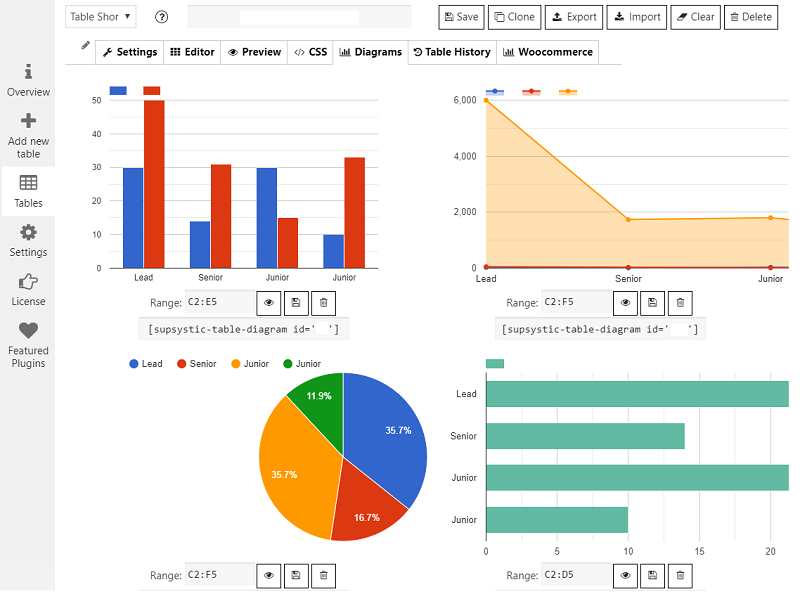
Charts and graphs created directly from table data 
Data Tables with Sorting, Searchin, Pagination; Images, Video & Links; Collapsible rows on front-end (pro); Front-end Editing (pro) and more. 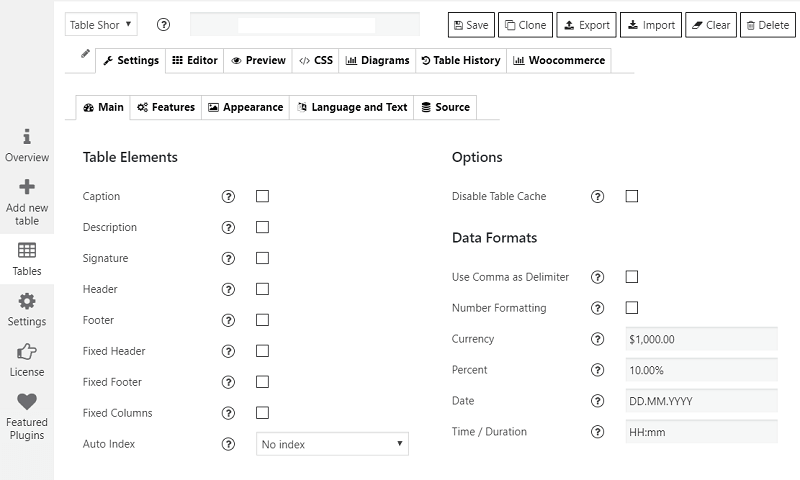
Data Tables Plugin admin panel. Main Settings 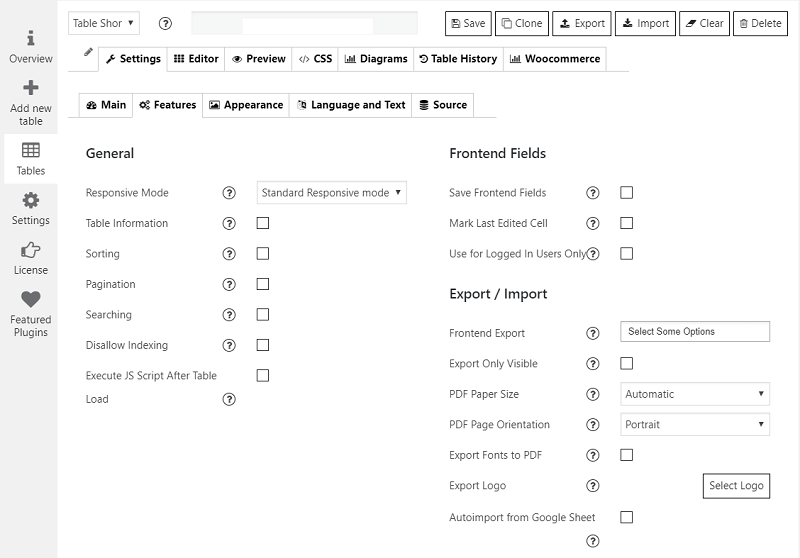
Data Tables Plugin admin panel. Features 
Data Tables Plugin admin panel. Appearance
Reviews


Contributors & Developers
“Data Tables Generator by Supsystic” is open source software. The following people have contributed to this plugin.
Contributors
Translate “Data Tables Generator by Supsystic” into your language.
Interested in development?
Browse the code, check out the SVN repository, or subscribe to the development log by RSS.
Changelog
1.10.47 / 19.01.2026 =
* Maintenance and compatibility update tested with WordPress 6.9 and PHP 8.4.
* Includes a fix for a cache-related issue and additional stability improvements.
* Includes security hardening and stability fixes
1.10.46 / 12.11.2025 =
* Minor fixes
* Security fix
* Add fix for cleanCache vulnerability
1.10.45 / 17.06.2025 =
* Minor fixes and overview update
1.10.44 / 11.06.2025 =
* Minor fixes
1.10.43 / 14.05.2025 =
* Minor fixes
1.10.42/ 06.05.2025 =
* Minor fixes
1.10.41/ 16.04.2025 =
* Add fix for init textdomain
1.10.40 / 08.04.2025 =
* Fixes for UI/UX
1.10.39 / 05.04.2025 =
* Fixed fatal error Installation
1.10.38 / 05.04.2025 =
* Fixed loadTextDomain
* Minor fixes
1.10.37 / 20.11.2024 =
* Fixed security bug in promo module
1.10.36 / 13.06.2024 =
* Update overview-trial button
1.10.35 / 10.06.2024 =
* Fix import for conditional formatting styles for cellIs logic
1.10.34 / 20.03.2024 =
* Add expertise level for AC form fix
1.10.33 / 31.01.2024 =
* Add expertise level for AC form
1.10.32 / 31.01.2024 =
* Security fix
* custom text for prev,next btn
1.10.30 / 26.09.2023 =
* Add love link feature and checks
1.10.29 / 20.06.2023 =
* Add fix for quotes in links
1.10.28 / 13.06.2023 =
* Add fix for slashes PHP 8.2
* Fix for preview
* Add fix for Init extensions
1.10.27 / 27.04.2023 =
* Fixes for export option
* Minor fixes
1.10.26 / 17.03.2023 =
* Securityfix for nonces.
* Changed overview ads
* Fix free migration
1.10.25 / 08.11.2022 =
* WP fixes
* Add support WP 6.1
1.10.24 / 01.09.2022 =
* Notice FOR USER’s with PRO version.
With the new update free version from 1.10.23 and PRO 1.7.12 – you should have the latest versions installed.
The new free version 1.10.23 will not be compatible with old PRO version. – less then 1.7.12
Same applies to the PRO version.
The new PRO is not compatible with the old Free version.
* Fixed warnings
1.10.23 /30.08.2022 =
* REQUIRED PRO version min 1.7.12
1.10.22 /30.08.2022 =
* BEFORE update please deactivate PRO version. Only after that update Free version.
* REQUIRED PRO version min 1.7.13
1.10.21 /30.08.2022 =
* BEFORE update please deactivate PRO version. Only after that update Free version.
* REQUIRED PRO version min 1.7.13
* Major update
* Fixes for PHP 8.1
* Fixes for WordPress 6.0
* interface updates
1.10.20 /19.06.2022 =
* XSS security fix
1.10.19 /17.06.2022 =
* Fixes for Installation
1.10.18 /10.06.2022 =
WP fixes
1.10.17 /09.06.2022 =
1.10.16 /07.06.2022 =
* Change own moment.js to wordpress
1.10.15 /07.06.2022 =
* Add support WordPress 6.0
* Add fix for stripslashes
* Update moment.js library
1.10.14 / 02.12.2022 =
* Migrating to mPDF from dompdf, for export PDF feature.
* Remove temp fonts from mpdf
* Set mPDF to download PDF file instead of opening in a window.
1.10.13 / 06.12.2021 =
* Fix for RuleJS
* Fix in license.mod
* Add fix for contact form
1.10.12 / 21.09.2021 =
* Fixes for Contact Form Integration
1.10.11 / 24.05.2021 =
* Add support PHP 8
1.10.9 / 26.03.2021 =
* Fixes for recent update issue
1.10.8 / 26.03.2021
- Add fix OVH
1.10.7 / 19.03.2021
- Add fix for import
1.10.5 / 11.03.2021
- Fix for table-layout add option
- Add fixed table layout
1.10.4 / 02.03.2021
- Revert changes to table-layout fixed.
1.10.3 / 01.03.2021
- Add fix for dataTables
- Update kses
- Fix for columnWidth feature
- Add fix for notice
1.10.2 / 15.02.2021
- Change <> in formula to @less@ @more@ for wp_kses only for JS now
- Add fix for export @more@@less@
- Replace < > symbols in import
- Fix iterations for preg replace
- Fix IMG in formula
1.10.1 / 10.02.2021
- Fixes to XSS
1.10.0 / 10.02.2021
- Security Fixes
1.9.99 / 25.01.2020
- fix for dtgs_nonce
1.9.98 / 20.01.2020
- Add fix for DataTables Export/Import library
- Migrating to new export/impor library PHP Spreadsheets from PHP Excel
- Add fix for compatibility with 4.9.16 WP
- Add fix for external connection
- add compatibility fix for wp < 5 for dtgs_nonce
1.9.97 / 08.12.2020
- Add security fixes
1.9.96 / 15.09.2020
- Add fix for sprintf
- Add fix for WP 5.5
1.9.95 / 29.06.2020
- Fix For TWIG
1.9.94 / 23.06.2020
- Fix for DGTS_NONCE Problem
- Rename TWIG library for compatibility with other plugins
- Create universal TWIG library for supsystic plugins
- add fix for ClassLoader
- Add fix for TWIG
1.9.93 / 23.04.2020
- Add support WP 5.4
- Change gateway server
1.9.92 / 23.03.2020
- Add fix for user roles
- Add fix for pagination styles
1.9.91 / 28.02.2020
- Add fix for importer
- Add hotfix for XSS and CSRF
- Add fix wp_role for XSS and CSRF
- Add fix for view tables
- Add fix for nonce stack
- Add fix for diagram notice
- Add fix for FREE version for php 7.4.2
1.9.90 / 25.02.2020
- Minor fixes
1.9.89 / 24.02.2020
- Add for Charts
- Add security fix for XSS and CSRF
1.9.88 / 14.02.2020
- Fix issue with js contextmenu
1.9.87 / 12.02.2020
- Add fix for SUMIFS formula
- Problem with currency format
- Fix for SSP option
1.9.86 / 15.01.2020
- Fix query issue
1.9.85 / 14.01.2020
- Minor fixes;
- Add fix for sort table by data column
- remove phpmailer code
- Add fix for JS with aoColumns