
描述
Pin CTA is a powerful WordPress plugin that helps you encourage Pinterest sharing with stylish, customizable call-to-action buttons. Available as both a Gutenberg block and shortcode, it’s perfect for food bloggers, DIY websites, and any content creator wanting to boost their Pinterest engagement.
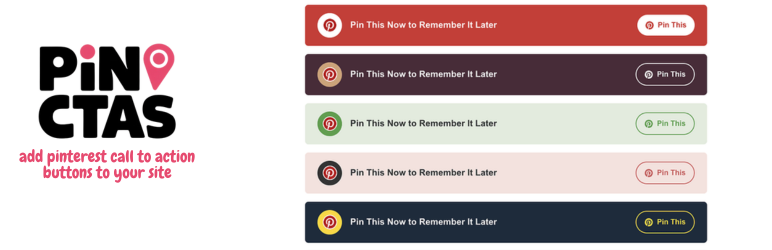
The plugin includes ten professionally designed styles, ranging from classic Pinterest red to elegant color combinations that will match any website theme.
Join our Traffic Alchemy community to discover proven strategies for growing and monetizing your websites and social media profiles. Get insider tips on driving traffic, maximizing ad revenue, and mastering affiliate marketing straight to your inbox!
Key Features
- 10 beautiful pre-designed styles
- Available as both Gutenberg block and shortcode
- Inline or block layout options
- Custom text support
- Automatic image detection (uses featured image, first content image, or custom selection)
- Responsive design for all devices
- No tracking or external dependencies
- SEO-friendly implementation
Usage
Gutenberg Block
- Add the “Pin CTA” block to your post
- Customize the style, layout, and text in the block settings
- Optionally select a custom Pinterest image
Shortcode
Use the following shortcode format:
[pin_cta_button style=”style1″ inline=”false” custom_text=”Pin This Recipe”]
Available Styles
- Classic Red & White:
style="default" - Burgundy & Gold:
style="style1" - Fresh Green & White:
style="style2" - Soft Pink & Rose:
style="style3" - Navy & Gold:
style="style4" - Sage & Cream:
style="style5" - Royal Purple & Lavender:
style="style6" - Ocean Teal & Coral:
style="style7" - Midnight Blue & Silver:
style="style8" - Autumn Orange & Cream:
style="style9" - Forest & Mint:
style="style10"
Shortcode Parameters
style: Choose from style1 through style10 (default: “default”)inline: Set to “true” for inline layout (default: false)custom_text: Your custom call-to-action textmedia_id: Specify a custom image ID for Pinterest sharing
Screenshots ==s
- How it looks on site
- Options page
- Color options
License
This plugin is licensed under the GPL v2 or later.
Credits
- Pinterest logo used with permission under Pinterest’s brand guidelines
- Icons: Dashicons (WordPress native)
屏幕截图

Plugin in use on a post. 
Options Panel 
All colors available. 
Image Pin button
区块
该插件提供了 1 个区块.
- Pin CTA
安装
- Upload
pin-cta.zipthrough the Plugins > Add New > Upload Plugin screen - Activate the plugin through the Plugins menu
- Use either the Gutenberg block or shortcode to add buttons to your content
常见问题
-
Can I customize the colors or styles?
-
The plugin includes 10 pre-built styles. For custom colors, you can edit the CSS or contact us for custom development.
-
Which image will be used for Pinterest sharing?
-
The plugin follows this priority:
1. Custom selected image (if specified)
2. First image in post content
3. Featured image
4. SEO meta image (Yoast or Rank Math) -
Does this work with page builders?
-
Yes! You can use the shortcode in any page builder that accepts shortcodes.
-
Will this slow down my site?
-
No, the plugin is lightweight and uses native WordPress functions. No external scripts are loaded.
评价
此插件暂无评价。
贡献者及开发者

更新日志
= 1.2.0
* disable the buttons on all page except single post
* added themes for pin it button
* updated previews in admin panel
= 1.1.1
* added image overlay buttons
= 1.0.6
* fixed automatic insertion
* fixed color constrast
* fix inline layout
= 1.0.5
* fix automatic placement bug
= 1.0.4
* fix automatic placement bug
= 1.0.3
* fix automatic placement bug
= 1.0.2
* fix display on posts
1.0.1
- Fixed sanitization in plugin settings
- Improved escaping of URLs for better security
- Removed hidden files from plugin package
- Updated “Tested up to” format in readme
- Added 6 new style variations
- Introduced inline layout option
- Added Gutenberg block support
- Improved image detection logic
1.0.0
- Initial release