NIO之SocketChannel,SocketChannel ,DatagramChannel解读

NIO之SocketChannel,SocketChannel ,DatagramChannel解读

一个风轻云淡
发布于 2023-10-15 10:41:35
发布于 2023-10-15 10:41:35
基本概述
(1)SocketChannel 就是 NIO 对于非阻塞 socket 操作的支持的组件,其在 socket 上 封装了一层,主要是支持了非阻塞的读写。同时改进了传统的单向流 API,,Channel同时支持读写。
(2)socket 通道类主要分为 DatagramChannel、SocketChannel 和 ServerSocketChannel,它们在被实例化时都会创建一个对等 socket 对象。要把一个 socket 通道置于非阻塞模式,我们要依靠所有 socket 通道类的公有超级类: SelectableChannel。就绪选择(readiness selection)是一种可以用来查询通道的 机制,该查询可以判断通道是否准备好执行一个目标操作,如读或写。非阻塞 I/O 和 可选择性是紧密相连的,那也正是管理阻塞模式的 API 代码要在 SelectableChannel 超级类中定义的原因。
(3)设置或重新设置一个通道的阻塞模式是很简单的,只要调用 configureBlocking( )方法即可,传递参数值为 true 则设为阻塞模式,参数值为 false 值设为非阻塞模式。可以通过调用 isBlocking( )方法来判断某个 socket 通道当前处于 哪种模式。
AbstractSelectableChannel.java 中实现的 configureBlocking()方法如下:

ServerSocketChannel
ServerSocketChannel 是一个基于通道的 socket 监听器。它同我们所熟悉的java.net.ServerSocket 执行相同的任务,不过它增加了通道语义,因此能够在非阻塞 模式下运行。
由于 ServerSocketChannel 没有 bind()方法,因此有必要取出对等的 socket 并使用 它来绑定到一个端口以开始监听连接。我们也是使用对等 ServerSocket 的 API 来根 据需要设置其他的 socket 选项。
同 java.net.ServerSocket 一样,ServerSocketChannel 也有 accept( )方法。 ServerSocketChannel 的 accept()方法会返回 SocketChannel 类型对象, SocketChannel 可以在非阻塞模式下运行。
以下代码演示了如何使用一个非阻塞的 accept( )方法:
public class FileChannelAccept {

    public static final String GREETING = "Hello java nio.\r\n";

    public static void main(String[] argv) throws Exception {
        int port = 1234; // default
        if (argv.length > 0) {
            port = Integer.parseInt(argv[0]);
        }
        ByteBuffer buffer = ByteBuffer.wrap(GREETING.getBytes());
        ServerSocketChannel ssc = ServerSocketChannel.open();
        ssc.socket().bind(new InetSocketAddress(port));
        ssc.configureBlocking(false);
        while (true) {
            System.out.println("Waiting for connections");
            SocketChannel sc = ssc.accept();

            if (sc == null) {
                System.out.println("null");
                Thread.sleep(2000);
            } else {
                System.out.println("Incoming connection from: " +
                        sc.socket().getRemoteSocketAddress());
                buffer.rewind();
                sc.write(buffer);
                sc.close();
            }
        }
    }
}
打开 ServerSocketChannel
通过调用 ServerSocketChannel.open() 方法来打开 ServerSocketChannel.
ServerSocketChannel serverSocketChannel = ServerSocketChannel.open();
关闭 ServerSocketChannel
通过调用 ServerSocketChannel.close() 方法来关闭 ServerSocketChannel.
serverSocketChannel.close();
监听新的连接
通过 ServerSocketChannel.accept() 方法监听新进的连接。当 accept()方法返回时候,它返回一个包含新进来的连接的 SocketChannel。因此, accept()方法会一直阻塞 到有新连接到达。
通常不会仅仅只监听一个连接,在 while 循环中调用 accept()方法. 如下面的例子:

阻塞模式
会在 SocketChannel sc = ssc.accept();这里阻塞住进程。
非阻塞模式
ServerSocketChannel 可以设置成非阻塞模式。在非阻塞模式下,accept() 方法会立 刻返回,如果还没有新进来的连接,返回的将是 null。 因此,需要检查返回的 SocketChannel 是否是 null.如:

SocketChannel
SocketChannel 介绍
Java NIO 中的 SocketChannel 是一个连接到 TCP 网络套接字的通道。
A selectable channel for stream-oriented connecting sockets.
以上是 Java docs 中对于 SocketChannel 的描述:SocketChannel 是一种面向流连接 sockets 套接字的可选择通道。从这里可以看出:
SocketChannel 是用来连接 Socket 套接字
SocketChannel 主要用途用来处理网络 I/O 的通道
SocketChannel 是基于 TCP 连接传输
SocketChannel 实现了可选择通道,可以被多路复用的
SocketChannel 特征
- 对于已经存在的 socket 不能创建 SocketChannel
- SocketChannel 中提供的 open 接口创建的 Channel 并没有进行网络级联,需要使 用 connect 接口连接到指定地址
- 未进行连接的 SocketChannle 执行 I/O 操作时,会抛出NotYetConnectedException
- SocketChannel 支持两种 I/O 模式:阻塞式和非阻塞式
- SocketChannel 支持异步关闭。如果 SocketChannel 在一个线程上 read 阻塞,另 一个线程对该 SocketChannel 调用 shutdownInput,则读阻塞的线程将返回-1 表示没有 读取任何数据;如果 SocketChannel 在一个线程上 write 阻塞,另一个线程对该 SocketChannel 调用 shutdownWrite,则写阻塞的线程将抛出AsynchronousCloseException
- SocketChannel 支持设定参数
- SO_SNDBUF 套接字发送缓冲区大小
- SO_RCVBUF 套接字接收缓冲区大小
- SO_KEEPALIVE 保活连接
- O_REUSEADDR 复用地址
- SO_LINGER 有数据传输时延缓关闭 Channel (只有在非阻塞模式下有用)
- TCP_NODELAY 禁用 Nagle 算法
创建 SocketChannel
方式一:
SocketChannel socketChannel = SocketChannel.open(new
        InetSocketAddress("www.baidu.com", 80));
方式二:
SocketChannel socketChanne2 = SocketChannel.open();
socketChanne2.connect(new InetSocketAddress("www.baidu.com", 80));
直接使用有参 open api 或者使用无参 open api,但是在无参 open 只是创建了一个SocketChannel 对象,并没有进行实质的 tcp 连接。
连接校验
socketChannel.isOpen(); // 测试 SocketChannel 是否为 open 状态
socketChannel.isConnected(); //测试 SocketChannel 是否已经被连接
socketChannel.isConnectionPending(); //测试 SocketChannel 是否正在进行连接
socketChannel.finishConnect(); //校验正在进行套接字连接的 SocketChannel是否已经完成连接
读写模式
前面提到 SocketChannel 支持阻塞和非阻塞两种模式:
socketChannel.configureBlocking(false);通过以上方法设置 SocketChannel 的读写模式。false 表示非阻塞,true 表示阻塞。
读写
SocketChannel socketChannel = SocketChannel.open(
                new InetSocketAddress("www.baidu.com", 80));
ByteBuffer byteBuffer = ByteBuffer.allocate(16);
socketChannel.read(byteBuffer);
socketChannel.close();
System.out.println("read over");
以上为阻塞式读,当执行到 read 出,线程将阻塞,控制台将无法打印 read over
SocketChannel socketChannel = SocketChannel.open(
        new InetSocketAddress("www.baidu.com", 80));
socketChannel.configureBlocking(false);
ByteBuffer byteBuffer = ByteBuffer.allocate(16);
socketChannel.read(byteBuffer);
socketChannel.close();
System.out.println("read over");
以上为非阻塞读,控制台将打印 read over 读写都是面向缓冲区,这个读写方式与前文中的FileChannel 相同。
DatagramChannel
正如 SocketChannel 对应 Socket,ServerSocketChannel 对应 ServerSocket,每 一个 DatagramChannel 对象也有一个关联的 DatagramSocket 对象。正如 SocketChannel 模拟连接导向的流协议(如 TCP/IP),DatagramChannel 则模拟包 导向的无连接协议(如 UDP/IP)。DatagramChannel 是无连接的,每个数据报 (datagram)都是一个自包含的实体,拥有它自己的目的地址及不依赖其他数据报的 数据负载。与面向流的的 socket 不同,DatagramChannel 可以发送单独的数据报给 不同的目的地址。同样,DatagramChannel 对象也可以接收来自任意地址的数据包。 每个到达的数据报都含有关于它来自何处的信息(源地址)
打开 DatagramChannel
DatagramChannel server = DatagramChannel.open();
server.socket().bind(new InetSocketAddress(10086));
此例子是打开 10086 端口接收 UDP 数据包
接收数据
通过 receive()接收 UDP 包
ByteBuffer receiveBuffer = ByteBuffer.allocate(64);
receiveBuffer.clear();
SocketAddress receiveAddr = server.receive(receiveBuffer);
SocketAddress 可以获得发包的 ip、端口等信息,用 toString 查看,格式如下 /127.0.0.1:57126
发送数据
通过 send()发送 UDP 包
DatagramChannel server = DatagramChannel.open();
ByteBuffer sendBuffer = ByteBuffer.wrap("client send".getBytes());
server.send(sendBuffer, new InetSocketAddress("127.0.0.1",10086));
连接
UDP 不存在真正意义上的连接,这里的连接是向特定服务地址用 read 和 write 接收发送数据包。
client.connect(new InetSocketAddress("127.0.0.1",10086));
int readSize= client.read(sendBuffer);
server.write(sendBuffer);
read()和 write()只有在 connect()后才能使用,不然会抛 NotYetConnectedException 异常。用 read()接收时,如果没有接收到包,会抛 PortUnreachableException 异常。
DatagramChannel 示例
客户端发送,服务端接收的例子
    /**
     * 发包的 datagram
     *
     * @throws IOException
     * @throws InterruptedException
     */
    @Test
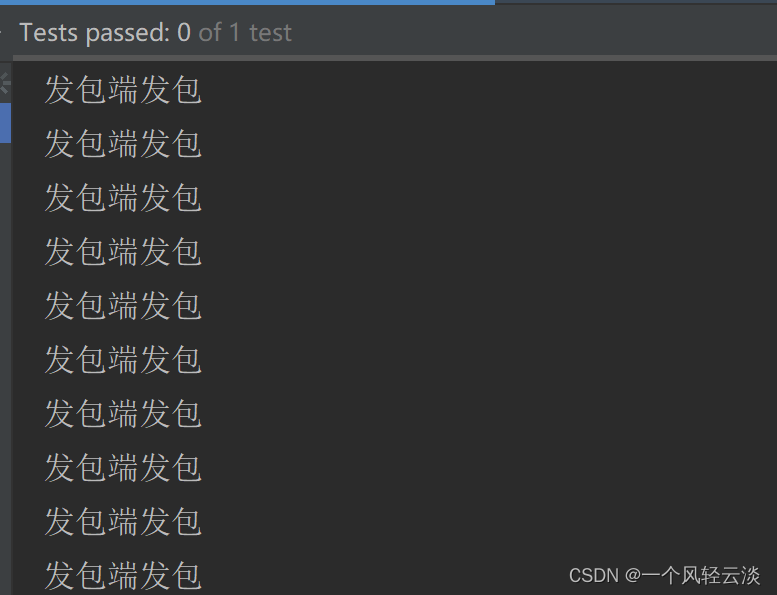
    public void sendDatagram() throws IOException, InterruptedException {
        DatagramChannel sendChannel= DatagramChannel.open();
        InetSocketAddress sendAddress= new InetSocketAddress("127.0.0.1",
                9999);

        while (true) {
            sendChannel.send(ByteBuffer.wrap("发包".getBytes("UTF-8")), sendAddress);
            System.out.println("发包端发包");
            Thread.sleep(1000);
        }
    }
   /**
     * 收包端
     *
     * @throws IOException
     */
    @Test
    public void receive() throws IOException {
        DatagramChannel receiveChannel= DatagramChannel.open();
        InetSocketAddress receiveAddress= new InetSocketAddress(9999);
        receiveChannel.bind(receiveAddress);
        ByteBuffer receiveBuffer= ByteBuffer.allocate(512);

        while (true) {
            receiveBuffer.clear();
            SocketAddress sendAddress= receiveChannel.receive(receiveBuffer);
            receiveBuffer.flip();
            System.out.print(sendAddress.toString() + " ");
            System.out.println(Charset.forName("UTF-8").decode(receiveBuffer));
        }
    }
    /**
     * 只接收和发送 9999 的数据包
     *
     * @throws IOException
     */
    @Test
    public void testConect1() throws IOException {
        DatagramChannel connChannel = DatagramChannel.open();
        connChannel.bind(new InetSocketAddress(9998));
        connChannel.connect(new InetSocketAddress("127.0.0.1", 9999));
        connChannel.write(ByteBuffer.wrap("发包".getBytes("UTF-8")));
        ByteBuffer readBuffer = ByteBuffer.allocate(512);

        while (true) {

            try {
                readBuffer.clear();
                connChannel.read(readBuffer);
                readBuffer.flip();
                System.out.println(Charset.forName("UTF-8").decode(readBuffer));
            } catch (Exception e) {
            }
        }
    }
本文参与 腾讯云自媒体同步曝光计划,分享自作者个人站点/博客。
原始发表:2023-09-15,如有侵权请联系 [email protected] 删除
评论
登录后参与评论
推荐阅读
目录
腾讯云开发者

Copyright © 2013 - 2026 Tencent Cloud. All Rights Reserved. 腾讯云 版权所有
深圳市腾讯计算机系统有限公司 ICP备案/许可证号:粤B2-20090059  粤公网安备44030502008569号
腾讯云计算(北京)有限责任公司 京ICP证150476号 | 京ICP备11018762号