

Descripción
Web oficial
Puedes encontrar más información en nuestra web (wpfastestcache.com)
Te damos la bienvenida a la página del plugin WP Fastest Cache, un plugin de caché para WordPress desarrollado para acelerar los sitios de WordPress.
En el mundo actual, donde cada segundo cuenta, optimizar el rendimiento de tu sitio web es muy importante. Conoce WP Fastest Cache, tu plugin de almacenamiento en caché que puedes usar para acelerar los sitios WordPress.
Optimiza el rendimiento de tu sitio web con WP Fastest Cache. Mejora la puntuación de Google PageSpeed, Core Web Vitals, GTmetrix y Pingdom con nuestro plugin de caché de wp.
Además, la velocidad de la página es un factor de clasificación en el algoritmo de búsqueda de Google. Por lo tanto, el uso de plugins de caché ayuda a mejorar tu clasificación SEO. Nuestro plugin de optimización de WordPress no solo acelera tu sitio, sino que también aumenta el posicionamiento SEO.
Características
- En este plugin se usa `Mod_Rewrite`, que es el método más rápido
- Todos los archivos en la caché son borrados cuando se publica una entrada o página
- El administrador puede borrar todos los archivos de la caché desde la página de opciones
- El administrador puede borrar archivos CSS y JS minimizados desde la página de opciones
- Bloquea la caché para una página o entrada específica con un shortcode
- Tiempo de espera de la caché – Todos los archivos en la caché son borrados en el tiempo determinado
- Tiempo de espera de caché para páginas específicas
- Opción para activar/desactivar la caché para dispositivos móviles
- Opción para activar/desactivar la caché para usuarios conectados
- Es compatible con SSL
- Compatibilidad con CDN: Mejora sin esfuerzo la velocidad y el rendimiento del sitio web con una perfecta integración de CDN, compatible con Bunny CDN, Cloudflare y varios otros proveedores de CDN líderes. La integración de CDN modifica las URL de los recursos estáticos, lo que permite que estos activos sean servidos desde tu proveedor de servicios de CDN.
- Compatibilidad con Cloudflare: La integración de Cloudflare activa el vaciado del caché en Cloudflare a través de API cuando se inicia una purga de caché. Como resultado, WP Fastest Cache y Cloudflare funcionan perfectamente en conjunto
- Precargar la caché: crear la caché de todo el sitio automáticamente
- Excluir páginas y agentes de usuario.
- Vaciado de la caché de WP-CLI
- Caché de proxy – Integración de Varnish Cache para vaciar el contenido del caché proxy automáticamente cuando se vacía el caché creado por WP Fastest Cache
Optimización de rendimiento
WP Fastest Cache no es solo un plugin de caché de wp, sino también un plugin de caché de optimización de velocidad de WordPress. Hay muchas características, como minimizar Html, minimizar CSS, activar compresión Gzip, aprovechar el almacenamiento en caché del navegador, agregar la cabecera de caducidad, combinar CSS, combinar JS, desactivar los emojis.
- Page Caching – Page caching feature generates and store static HTML files from your dynamic WordPress blog to reduce initial server response time, and improving page load time. Page cache and caching play a critical role in improving website speed and overall web performance. By storing frequently accessed data, effective caching reduces server workload and significantly improves cache performance, allowing pages to be delivered faster to users. This optimization directly lowers load time and enhances page speed, resulting in a smoother user experience and better SEO.
- Minify Html – Using an HTML minifier is an effective way to reduce HTML size and optimize HTML by removing unnecessary spaces, comments, and line breaks. A smaller HTML file helps reduce page size, which directly improves page speed and leads to a faster website experience for users. By focusing on web performance optimization, optimized HTML allows browsers to load and render pages more efficiently, helping to improve website speed, lower bandwidth usage, and deliver better overall performance across all devices
- Minify Css – CSS minify techniques play a crucial role in modern web development by reducing unnecessary characters through a reliable css minifier. With effective css compression, developers can compress CSS files and apply proper css minification to optimize CSS for production environments. This approach helps reduce CSS file size, which directly contributes to improve website speed and overall css performance optimization. As part of a broader page speed optimization strategy, these practices significantly enhance website performance optimization and lead to better website loading performance, especially on mobile and low-bandwidth connections
- Activar la compresión Gzip – Reduce el tamaño de los archivos enviados desde tu servidor para aumentar la velocidad a la que se transfieren al navegador
- Leverage browser caching – Browser cache plays a critical role in how efficiently a web browser cache stores static resources like images, stylesheets, and scripts, directly impacting page load speed. By allowing returning visitors to load files from their local browser cache instead of downloading them again, websites can significantly reduce server requests and improve website speed. Properly configured browser caching not only creates a faster and smoother user experience but also helps lower bandwidth usage and enhance overall site performance
- Combinar CSS: reduce la cantidad de viajes de ida y vuelta HTTP al combinar múltiples recursos CSS en uno
- Combine JS – Combining JavaScript files is a core technique in javascript optimization and js optimization, especially when the goal is to reduce requests and improve page load speed. By combine js assets or combine javascript files into a single bundle, developers can streamline how scripts are delivered to the browser. Whether you call it js combine or javascript combine, the idea is the same: fewer HTTP requests mean faster performance. Similarly, approaches that merge js or merge javascript—also known as js merge or javascript merge—help eliminate overhead caused by loading multiple separate files. When done correctly, combining and merging scripts leads to cleaner delivery, better caching, and noticeably faster websites
- Desactivar los emojis: puedes eliminar el CSS integrado de los emojis y el archivo “wp-emoji-release.min.js”
Optimización de rendimiento premium
The free version is enough to speed up your site but in the premium version there are extra features such as Mobile Cache, Widget Cache, Minify HTML Plus, Minify CSS Plus, Minify JS, Combine JS Plus, Defer Javascript, Optimize Images, Convert WebP, Database Cleanup, Google Fonts Async, Lazy Load and Delay JS for super fast load times.
- Caché móvil
- Widget de caché
- Minify HTML Plus
- Minify CSS Plus
- Minify Javascript – Minify JS is a core step in web performance optimization because js minify techniques remove unnecessary characters, comments, and whitespace, making files smaller and faster to load. Through proper javascript minification, developers can compress JavaScript assets and significantly reduce transfer size, which directly supports effective js optimization and overall javascript optimization strategies. When combined with caching and code splitting, minified scripts help improve website speed, lower bandwidth usage, and enhance user experience. As a result, page speed optimization becomes easier to achieve, leading to faster render times and better search engine rankings.
- Combine JS Plus
- Aplazar JavaScript – Eliminar los recursos de JavaScript que bloquean el proceso. Considera entregar JS crítico integrado y diferir todo JS no crítico
- Optimize Images – Optimized images load faster and consume less cellular data. Looking for an easy image compressor? Our tool lets you compress images instantly, including Compress JPEG and Compress PNG options. Enjoy fast image compression to reduce image size without losing quality. Perfect for quick image optimization with a smart image optimizer designed for all your needs.
- Convert WebP – Serve images in next-gen formats. Image formats like JPEG 2000, JPEG XR, and WebP often provide better compression than PNG or JPEG, which means faster downloads and less data consumption. A fast and reliable WebP converter helps you convert to WebP in seconds. Whether you need a WebP convert tool, a JPG to WEBP Converter, PNG to WEBP Converter, or a simple image to WebP option, you can easily optimize your images. Quickly handle JPG to WEBP, PNG to WEBP, jpg convert to webp, and png convert to webp tasks to reduce file size and improve web performance.
- Database Cleanup – To keep your system running smoothly, it’s important to clean database structures regularly and ensure you clean DB records that are no longer needed. A database cleaner is essential for effective database cleaning and long-term database optimization. By removing unused entries and organizing data efficiently, you can significantly improve database performance and speed up database operations. Modern db cleaner tools automate the entire db cleaning process, helping developers maintain fast, reliable, and scalable systems. The Database Cleanup feature clears out all of the garbage datas such as post revisions, trashed posts & pages, comments from trash & spam, trackbacks and pingbacks, transient options, orphaned post meta, comment meta, user meta, term meta, and term relationship etc.
- Fuentes asíncronas de Google
- Lazy Load – Lazy loading technique improve page speed and overall website loading time by loading content only when it is needed. Using lazy load images, lazy loading images, lazy load videos, and lazy load iframe helps reduce initial load size, enhances web performance, and delivers a smoother user experience. When implemented correctly, these methods make it easier to optimize website performance, lower bandwidth usage, and ensure faster, more efficient page delivery for both users and search engines.
- Delay JS – The Delay JavaScript feature helps reduce the ‘Reduce unused JavaScript’ warning in the Google PageSpeed Insights tool
Información
Es muy inconveniente usar varios plugins de almacenamiento en caché al mismo tiempo. Es por eso que necesitas desactivar plugins como LiteSpeed Cache, WP-Optimize, W3 Total Cache, WP Super Cache, SiteGround Optimizer, Breeze mientras usas WP Fastest Cache.
WP Fastest Cache es compatible con los plugins más populares, como Contact Form 7, Yoast SEO, Elementor Website Builder, Classic Editor, Akismet Spam Protection, WooCommerce, Contact Form by WPForms, Really Simple SSL, All-in-One WP Migration, Yoast Duplicate Post, Wordfence Security – Firewall & Malware Scan, WordPress Importer, UpdraftPlus WordPress Backup Plugin, MonsterInsights, All in One SEO, WP Mail SMTP de WPForms.
Idiomas compatibles
Aunque hoy en día se hablan más de 7000 idiomas en el mundo, nos sentimos muy afortunados de admitir 30 idiomas por ahora.
Sin embargo, localizar o adaptar un plugin a otro idioma o cultura lleva mucho tiempo y es una tarea exigente. Ahí es donde entra en juego el increíble equipo de colaboradores de traducción de WordPress. Estas personas desinteresadas gastaron su precioso tiempo sin esperar nada a cambio para que otras personas puedan usar los plugins más fácilmente. Agradecemos sinceramente a todos ellos.
Chino simplificado (China), chino tradicional (Taiwán), checo, holandés (Bélgica), holandés (Países Bajos), inglés (Sudáfrica), inglés (Reino Unido), finlandés, francés (Francia), gallego, alemán (Alemania), húngaro, indonesio, italiano, japonés, coreano (Corea), persa, ruso, eslovaco (Eslovaquia), esloveno, español (Argentina), español (Chile), español (Colombia), español (Ecuador), español (México), español (España), español (Venezuela), sueco, turco, ucraniano
Capturas de pantalla

Comparación del rendimiento 
Otra comparación de rendimiento 
Sin caché 
Con caché 
Página de ajustes principales 
Precargar 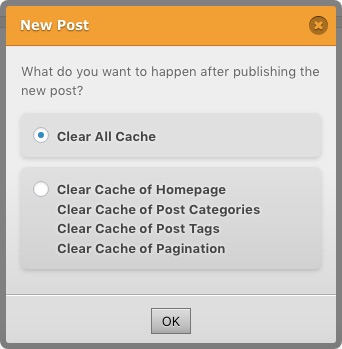
Nueva entrada 
Actualizar la caché 
Borrar la caché 
Todos los archivos en la caché son borrados en el tiempo determinado 
Bloqueo de la caché para entradas y páginas (TinyMCE) 
Limpia fácilmente los archivos de la caché a través de la barra de herramientas de administración 
Excluir página 
CDN 
Introducir información de CDN 
Tipos de archivo 
Especificar las fuentes 
Limpieza de la base de datos
Instalación
- Subir
wp-rapid-cacheal directorio/wp-content/plugins/ - Activa el plugin a través del menú “Plugins” en WordPress
- El permiso del archivo “.htaccess” debe establecerse en 644
- Activar este plugin en la página de opciones
FAQ
-
¿Cómo sé que mi blog se está almacenando en caché?
-
Necesitas actualizar una página dos veces. Si una página se almacena en la caché, en la parte inferior de la página hay un texto como “ ”.
-
¿Funciona con Nginx?
-
Sí, funciona con Nginx correctamente. Dado que Nginx no usa un archivo “.htaccess”, debes activar las funciones de compresión Gzip y almacenamiento en caché del navegador manualmente. Puedes seguir estos tutoriales: Cómo activar aprovechar el almacenamiento en caché del navegador en Nginx y Cómo activar Gzip en Nginx
-
¿Funciona con IIS (servidor de Windows)?
-
Sí, funciona con IIS correctamente.
-
¿Este plugin es compatible con multisitio?
-
Sí, es compatible con multisitio.
-
¿Este plugin es compatible con la instalación de subdirectorios?
-
Sí, es compatible con la instalación de subdirectorios.
-
¿Es este plugin compatible con HTTP seguro (https)?
-
Sí, es compatible con HTTP seguro (https).
-
¿Es este plugin compatible con AdSense?
-
Sí, es 100% compatible con AdSense.
-
¿Es este plugin compatible con CloudFlare?
-
Sí, lo es, pero debes leer los detalles. Haz clic aquí
-
¿Es este plugin compatible con qTranslate?
-
Sí, es 100% compatible con qTranslate.
-
¿Es este plugin compatible con WP Hide & Security Enhancer?
-
Sí, es compatible con WP Hide & Security Enhancer.
-
¿Es este plugin compatible con WP-PostViews?
-
Sí, es compatible con WP-PostViews. Las vistas de las entradas actuales aparecen en el panel de administración. Los visitantes no pueden ver las vistas de las entradas actuales. El desarrollador de WP-PostViews tiene que corregir este problema.
-
¿Es este plugin compatible con temas de WooCommerce?
-
Sí, es 100% compatible con temas de WooCommerce.
Reseñas


Colaboradores & Desarrolladores
“WP Fastest Cache – WordPress Cache Plugin” es software de código abierto. Las siguientes personas han contribuido a este plugin.
Colaboradores
“WP Fastest Cache – WordPress Cache Plugin” ha sido traducido en 39 idiomas. Gracias a los traductores por sus contribuciones.
Traduce “WP Fastest Cache – WordPress Cache Plugin” a tu idioma.
¿Interesado en el desarrollo?
Revisa el código, echa un vistazo al repositorio SVN, o suscríbete al registro de desarrollo por RSS .
Historial de cambios
1.4.6
- [Improvement] Elementor element cache and CSS Print Method detection logic [Details]
1.4.5
- Sanitized the cache file path by trimming whitespace
- [Improvement] Elementor element cache and CSS Print Method detection logic [Details]
1.4.4
- Updated caching behavior to serve URLs with Google Ads Click & Conversion Parameters query strings (e.g., /?gbraid) from the cache, improving performance
1.4.3
- Tested and confirmed full compatibility with WordPress 6.9 to ensure smooth and reliable plugin performance
1.4.2
- [Improvement] Updated the function modifying for url() paths in CSS
- [Improvement] Enhanced the <pre> tag replacement logic for more accurate matching and reliable content updates
1.4.1
- Added display of orphaned post meta, comment meta, user meta, term meta, and term relationship counts
- Added nonce verification and capability checks to the wpfc_db_fix AJAX action to prevent unauthorized database cleanup requests
- Added a validation to ensure Elementor’s CSS Print Method is set to “Internal Embedding,” displaying an error with a help link if misconfigured [Details]
1.4.0
- Fixed: support both old (elementor_experiment-e_element_cache) and new (elementor_element_cache_ttl) Elementor cache options for compatibility
1.3.9
- [Improvement] Replaced manual <script> output in print_my_inline_script() with wp_print_inline_script_tag() for better compatibility and cleaner code
- Fixed: RewriteCond syntax to correctly detect HTTPS connections
1.3.8
- Added a condition to exclude <script type="module"> tags from js combining
- Fixed: Issue where the cache was not being cleared when a page was deleted
- Fixed: PHP fatal error caused by an undefined function current_datetime() in cache.php on line 1130
- Added support for fetching and processing multiple pages of Cloudflare zones to ensure all potential matches are considered
1.3.7
- [Improvement] Serve cached content via .htaccess rules instead of PHP when URLs include the fbclid query string
- [FEATURE] Added support for Spanish (Chile) and Ukrainian languages
- para actualizar archivos de traducción
- to fix PHP Fatal error: Uncaught TypeError: method_exists(): Argument #1 ($object_or_class) must be of type object|string, array given in cdn.php:383
- [Improvement] Added specific handling for BunnyCDN 403 errors
1.3.6
- Prevented unnecessary cache deletion for pending comments marked as spam or moved to trash
- Updated caching behavior to serve URLs with Google Merchant Center query strings (e.g., /?srsltid) from the cache, improving performance
1.3.5
- Updated cache creation time display to follow WordPress date and time format settings
- Removed the ‘Static CSS File Generation’ warning when using the Divi theme.
1.3.4
- to fix PHP Fatal error: Class “VarnishWPFC” not found in preload.php
- to fix Undefined property: stdClass::$total in preload.php on line 753
1.3.3
- [Improvement] Toolbar style adjusted to align with WordPress standard for better consistency and user experience
- para cambiar la ruta de caché para el plugin Polylang-Pro
- [Improvement] Modified the toolbar menu of WP Fastest Cache plugin to improve usability and navigation
- [FEATURE] Added a filter that allows users to easily remove the WP Fastest Cache menu from the admin toolbar [Details]
1.3.2
- [Improvement] Added a new action to handle the addition of keyword items in the Preload Wizard
- Corrected typos in the Cloudflare CDN integration wizard and in the DB tab
- [FEATURE] Added a filter to define the token for preload functionality [Details]
1.3.1
- [FEATURE] Added a filter that allows users to easily remove the cache creation comment from the footer [Details]
- [Improvement] Added a warning notification to alert users if the “Element Caching” option in the Elementor plugin is not inactive [Details]
- Refactored
remove_url_parameters()for improved efficiency - Fix issue: Logic to determine the $number variable based on the WPFC_PRELOAD_NUMBER constant for preload when a sitemap is used
1.3.0
- Prevent caching of 403 Forbidden error pages
- Fix issue: Exclude JS files with the “data-no-minify” attribute from the combining process
- Fixed PHP Notice: Undefined index: HTTP_HOST in wpFastestCache.php on line 489
1.2.9
- Refactored ‘Clear Cache via URL’ feature
- Added feature to clear post cache triggered via URL [Details]
1.2.8
- refactoring for CSS minification feature
- refactoring for Cloudflare Integration
- para actualizar archivos de traducción
1.2.7
- to fix the issue of backslashes being removed in the <pre> tag after minifying HTML
1.2.6
- reprogramación para getABSPATH()
- para evitar que se vacíe el caché después de borrar el cupón creado por YITH WooCommerce Coupon Email System Premium
- para comprobar REDIRECT_QUERY_STRING para el plugin gtranslate
1.2.5
- para corregir la creación de caché para URL que terminan en .xml
- para usar la función nativa de WordPress current_time() en lugar de la función date()
- refactorizando la función purge_cache() de Varnish Cache
1.2.4
- reprogramación para getABSPATH()
- para arreglar PHP obsoleto: La creación de la propiedad dinámica CssUtilities::$url está obsoleta en css-utilities.php en la línea 348
- para arreglar PHP obsoleto: La creación de la propiedad dinámica CssUtilities::$url_for_fix está obsoleta en css-utilities.php en la línea 412
- to remove duplicate extensions in the <FilesMatch> directive for the browser caching feature
1.2.3
- Adiós StackPath y una cálida bienvenida a BunnyCDN
- para actualizar archivos de traducción
- para excluir el elemento del script de la minimización cuando se establece el atributo data-no-minify
- [CARACTERÍSTICA] para agregar el idioma esloveno
- refactronación de specificDeleteCache()
1.2.2
- Mejoras de seguridad
- para actualizar archivos de traducción
1.2.1
- refactronación de la condición que se agregó para el tema Divi.
- [CARACTERÍSTICA] Agrega un sistema de gancho para crear un caché de entradas por ID [Detalles]
- para corregir el problema de obtener la última versión del mapa del sitio después de reiniciar
- para comprobar si la extensión intl está disponible para la integración de Cloudflare
- para corregir Advertencia: Propiedad no definida: stdClass::$zone_id en cdn.php en la línea 227
1.2.0
- para que la característica de precarga sea compatible con el índice del mapa del sitio
- para ocultar la pestaña premium para los usuarios premium
- para mostrar una advertencia si la opción Generación de archivos CSS estáticos del tema Divi está activada
- para actualizar archivos de traducción
- para corregir Advertencia de PHP: “Mapas de sitio” de clave de matriz no definida en preload.php en la línea 62
- para cambiar la ruta de caché para el plugin Polylang-Pro
- para comprobar si el buffer tiene solo una línea (sin saltos de línea)
- reprogramación de checkHtml()
- para comprobar que el Aviso de cookies y el cumplimiento del RGPD/CCPA están activos o no
1.1.9
- para agregar el botón de engranaje para la característica de precarga
- para eliminar las URL de imágenes para la precarga del mapa del sitio
- para arreglar PHP obsoleto: Parámetro requerido en preload.php en la línea 576
- [CARACTERÍSTICA] Mover el elemento del menú en el menú de ajustes [Detalles]
- para corregir Advertencia: “Acción” de clave de matriz no definida en wpFastestCache.php en las líneas 378 y 395
1.1.8
- [CARACTERÍSTICA] para agregar la opción de Mapa del sitio para la característica de precarga [Detalles]
- para actualizar archivos de traducción
- para corregir Advertencia de PHP: Intenta leer la propiedad “term_taxonomy_id” en bool en wpFastestCache.php en la línea 1638
1.1.7
- para cambiar la ruta de caché para el plugin Polylang
- [CARACTERÍSTICA] para agregar el idioma coreano (Corea)
- para actualizar archivos de traducción
- reprogramación de “is_amp()”
- para reemplazar el carácter vacío que existe en la cookie de administrador con %20 para RewriteCond
1.1.6
- para actualizar archivos de traducción
- para corregir el problema de que la primera fuente js no se puede excluir
- reprogramación de set_cache_file_path()
- reprogramación del filtro de devolución de llamada del búfer [Detalles]
1.1.5
- para reemplazar wp_remote_get() con wp_safe_remote_get() en la función check_url()
- para actualizar archivos de traducción
- para corregir Advertencia de PHP: “Roles” de clave de matriz no definidos en wpFastestCache.php en la línea 962
- para eliminar múltiples barras de la URL
- para corregir Advertencia de PHP: Intenta leer la propiedad “wpFastestCacheLanguage” en la matriz en admin.php en la línea 23
1.1.4
- para comprobar la barra diagonal final para el caché de cadenas de consulta
- proceso de reprogramación para vaciar el caché de la página de inicio por tiempo de espera de caché
1.1.3
- para cambiar el sistema de traducción [Detalles]
- reprogramación de delete_author_page_cache()
- para agregar traducciones checo, holandés (Bélgica), gallego, húngaro, indonesio, japonés, persa, español (Colombia), español (Ecuador), español (Venezuela), español (Argentina), español (México)
- para activar el asistente de ajustes de la barra de herramientas para la instalación multisitio [Detalles]
- para corregir la vulnerabilidad de bajo nivel
1.1.2
- para vaciar el caché de las entradas siguientes/anteriores después de actualizar o publicar una entrada
- para corregir E_WARNING: file_get_contents(): No existe tal archivo o directorio en admin.php en la línea 377
- [CARACTERÍSTICA] Se agregó la capacidad de desactivar el sistema de gancho [ Detalles]
- para corregir PHP obsoleto: trim(): Pasar nulo al parámetro #1 ($cadena) del tipo cadena está obsoleta en preload.php en la línea 546
- para corregir Aviso: Constante WPFC_CACHE_QUERYSTRING ya definida
1.1.1
- [CARACTERÍSTICA] Integración de Varnish Cache [Detalles]
- para corregir E_WARNING: unlink(): No existe tal archivo o directorio en wpFastestCache.php en la línea 1530
1.1.0
- para mostrar el caché si la URL contiene un parámetro de Identificador de clic Yandex
- [CARACTERÍSTICA] Excluyendo el identificador de clic de Yandex [ Detalles]
- [CARACTERÍSTICA] Agregando la opción “Expresión regular” para la característica Excluir páginas [Detalles]
1.0.9
- para mejorar el estilo del asistente de exclusión de características
- para corregir ocultar la barra de herramientas al conectarse
- para corregir PHP Aviso: Desplazamiento indefinido: -1 en js-utilities.php en la línea 67
- para corregir el error fatal de PHP: Error no detectado: El método no estático no se puede llamar estáticamente en clearing-specific-pages.php en la línea 58
1.0.8
- para dejar de mostrar el comentario “DONOTCACHEPAGE está definido como VERDADERO” en el pie de página de las solicitudes ajax
- [CARACTERÍSTICA] Vaciar páginas específicas [Detalles]
- para corregir la URL del sitio en la página de exclusión
- para corregir PHP Aviso: La función WP_User_Query::query se llamó incorrectamente. Las consultas de los usuarios no deben ejecutarse antes del gancho plugins_loaded
1.0.7
- [CARACTERÍSTICA] Vaciar páginas específicas (BETA) [Detalles]
- para agregar la cabecera modificada por última vez cuando el caché se sirve a través de php
1.0.6
- para servir fuentes a través de la CDN para páginas excluidas si la CDN está activado
- para corregir PHP Aviso: Desplazamiento indefinido: -1 en js-utilities.php en la línea 48
1.0.5
- para corregir E_NOTICE: Variable no definida: ruta en wpFastestCache.php en la línea 2142
- para agregar una característica de exclusión para el filtro de devolución de llamada de búfer [Detalles]
1.0.4
- para agregar extensiones avif para cdn
- para agregar WPFC_SERVE_ONLY_VIA_CACHE [Detalles]
1.0.3
- Photon ya no será compatible [Detalles]
- para excluir la URL de categoría para la precarga si se produce algún error
1.0.2
- para agregar el comando WP-CLI para vaciar el caché de una entrada [Detalles]
- para corregir la Advertencia scandir() en wpFastestCache.php:302
- para corregir la advertencia file_put_contents(/cache/wpfc-minified/index.html) en cache.php:1090
- para corregir la advertencia de desvinculación (wp-cache-config.php) admin.php:885
1.0.1
- para vaciar solo el caché de la entrada/página incluso si la opción “actualizar entrada” está desactivada
1.0.0
- para definir la función save_settings() de la característica de precarga única como función estática
VERSIONES ANTERIORES
Para consultar el registro de cambios de versiones anteriores, consulta [el registro de cambios en wpfastestcache.com]