

Descripción
FukuroChat Connector seamlessly integrates your WooCommerce store with FukuroChat AI Assistant, providing an intelligent chatbot that helps customers find products, answer questions, and improve conversions.
Main Features:
- Automatic Product Synchronization – Products are automatically synced with FukuroChat when created, updated, or deleted
- Intelligent AI Chatbot Widget – Embed a customizable chat widget on your site to assist customers in real-time
- WordPress Theme Customizer Integration – Live preview and customize widget appearance
- OAuth-Style Connection – Secure one-click connection to your FukuroChat assistant
- Conversion Tracking – Track orders influenced by chatbot interactions
- Smart Product Validation – Ensures products have required fields (title, description) before sync
- Admin Notifications – Get feedback on sync operations directly in WordPress admin
- Text Cleaning – Automatically formats product descriptions for optimal AI processing
- Restore Support – Products restored from trash are automatically re-synced
- Lightweight & Performant – Minimal impact on site performance
How It Works:
- Setup – Enter your FukuroChat Assistant UUID (provided by FukuroChat)
- Widget – Enable and customize the chat widget via Theme Customizer
- Sync – Optionally enable automatic product synchronization with your API Secret
- Done – Your AI assistant is live and knows about your products!
Automatic Synchronization:
When enabled, the plugin automatically:
* Adds new products to FukuroChat when published
* Updates product information when edited
* Removes products when moved to trash or deleted
* Restores products when recovered from trash
Product Data Synced:
- Product ID (unique identifier)
- Product Title
- Product Description (cleaned and formatted)
- Product URL (direct link)
- Product SKU
- Regular Price & Sale Price
- Sale Dates
- Stock Status
- Product Attributes
- Categories
- Upsells & Cross-sells
- Alternative Products (custom field)
Widget Customization:
- Enable/disable widget toggle
- Custom bubble text (e.g., “Chat with us”)
- Custom target element ID for advanced placement
- Live preview in Theme Customizer before publishing
Additional Information
Support:
For support, feature requests, or bug reports, please visit:
* Website: FukuroChat.com
* Support: FukuroChat Support
Privacy & Data:
* This plugin does not collect or store any personal user data
* Product data synced with FukuroChat includes only publicly visible product information
* Conversion tracking uses anonymous session data to attribute sales
* Automatic sync uses secure API authentication with your API Secret
* All API communications use HTTPS encryption
* No tracking, analytics, or third-party data sharing beyond FukuroChat integration
Requirements:
* WordPress 5.0 or higher
* WooCommerce 3.0 or higher
* PHP 7.4 or higher
* HTTPS recommended for secure API communication
Language:
* Currently available in English only
* Translation support may be added in future versions
Capturas de pantalla

3-Step Setup Wizard – Easy configuration process 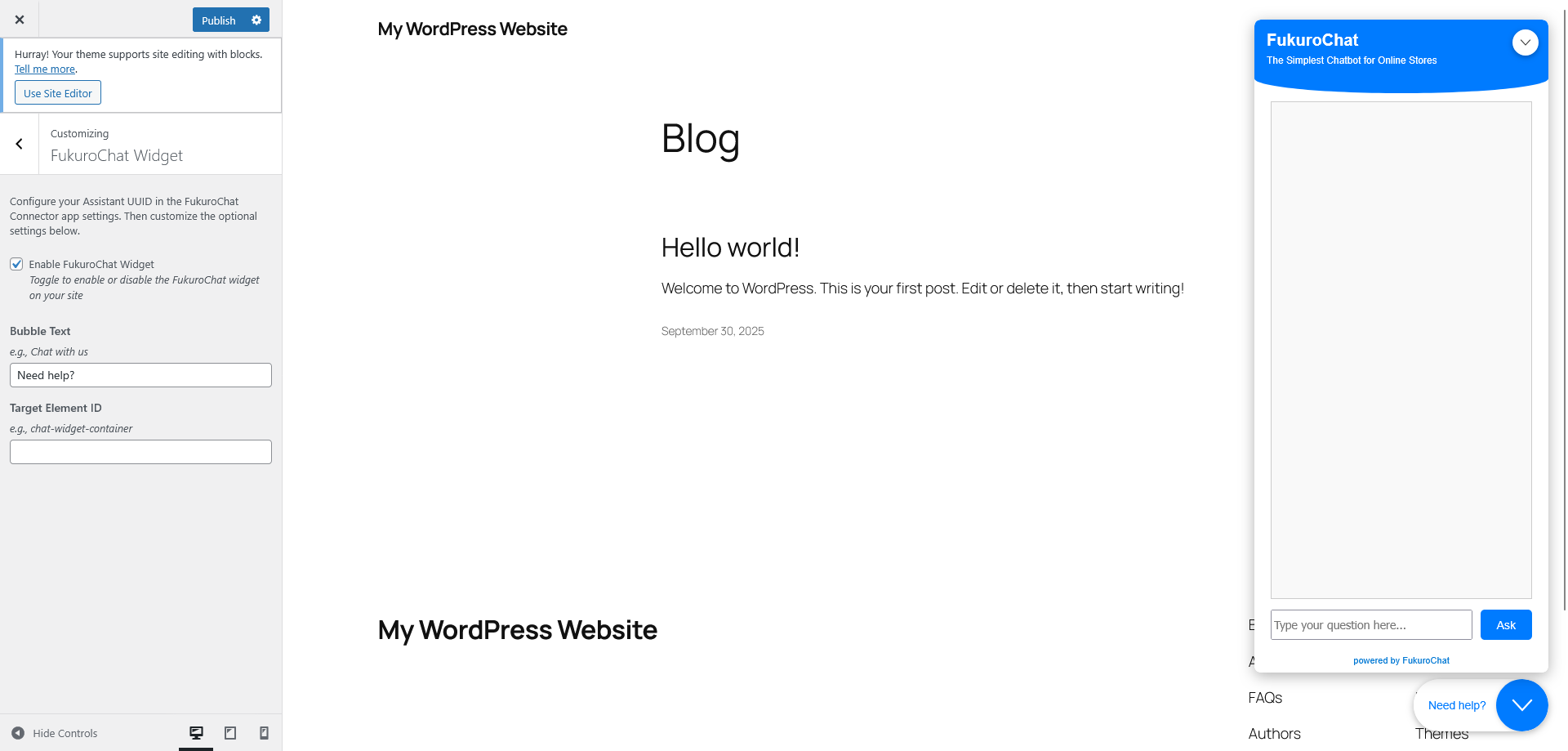
Theme Customizer Integration – Live preview of widget before publishing
Instalación
Automatic Installation:
- Log in to your WordPress admin panel
- Go to Plugins > Add New
- Search for “FukuroChat Connector”
- Click “Install Now” and then “Activate”
Manual Installation:
- Download the plugin zip file
- Upload the
fukurochat-connectorfolder to/wp-content/plugins/ - Activate the plugin through the ‘Plugins’ menu in WordPress
Setup:
- Ensure WooCommerce is installed and activated
- Go to “FukuroChat” in WordPress admin menu
- Follow the 3-step setup wizard:
- Step 1: Click “Connect with FukuroChat” to link your assistant
- Step 2: Enable automatic product sync (optional)
- Step 3: Open Theme Customizer to enable and customize the widget
- Done! Your AI assistant is now live on your store
FAQ
-
What is FukuroChat?
-
FukuroChat is an AI-powered chatbot platform that helps e-commerce businesses automate customer support, product recommendations, and sales through intelligent conversations. Learn more at FukuroChat.com
-
Do I need a FukuroChat account?
-
Yes, you need a FukuroChat account to get your Assistant UUID and API Secret. Sign up at app.fukurochat.com to get started.
-
Does this plugin require WooCommerce?
-
Yes, this plugin requires WooCommerce 3.0 or higher to be installed and activated.
-
How does automatic product sync work?
-
When enabled in Step 3, the plugin automatically syncs products with FukuroChat:
* New products are added when published
* Existing products are updated when edited
* Products are removed when trashed or deleted
* Products are restored when recovered from trash -
What product information is required for sync?
-
Products must have a title and description to be synchronized. SKU is optional but recommended for better product tracking. The plugin will show an admin notice if any required field is missing.
-
Can I preview the widget before publishing?
-
Yes! The plugin integrates with WordPress Theme Customizer, allowing you to see a live preview of the widget on your site before publishing changes.
-
How do I customize the widget appearance?
-
Go to Appearance > Customize > FukuroChat Widget, or click “Open Theme Customizer” in Step 2 of the setup wizard. You can customize bubble text, target element, and enable/disable the widget.
-
Will this slow down my site?
-
No, the plugin is lightweight and optimized for performance. Sync operations happen in the background, and the widget loads asynchronously without blocking page load.
-
What happens if a product sync fails?
-
The plugin will show an admin notice with details about the error on the product edit page. Common issues include missing required fields or API connection problems.
-
Can I disable automatic sync?
-
Yes, you can disable automatic sync at any time in Step 3 of the plugin settings. This won’t affect the widget or JSON endpoint.
-
Does the plugin work with product variations?
-
The current version syncs the main product information. Variable products are supported, but individual variations are not synced separately.
Reseñas
No hay reseñas para este plugin.
Colaboradores & Desarrolladores
“FukuroChat Connector” es software de código abierto. Las siguientes personas han contribuido a este plugin.
Colaboradores
Traduce “FukuroChat Connector” a tu idioma.
¿Interesado en el desarrollo?
Revisa el código, echa un vistazo al repositorio SVN, o suscríbete al registro de desarrollo por RSS .
Historial de cambios
1.0.10
- CRITICAL FIX: Removed fatal error on plugin activation caused by missing add_endpoint() method
- Fixed retry logic when edit_article fails – properly reconstructs JSON request
- Fixed session_start() warning – now checks session status before starting
- Improved ajax_toggle_sync to use update_option instead of direct SQL queries
- Removed deprecated /products.json endpoint
- Updated product sync requirements – SKU is now optional (only title and description required)
- Enhanced error handling and logging
- Code cleanup and optimization
1.0.9
- Batch product sync – all products sent in single API call for faster synchronization
- Reduced API calls during bulk operations
- Improved sync performance for large catalogs
- Stock status now synced as separate field for inventory-aware responses
1.0.8
- Optimized product embeddings – removed price and SKU from text for cleaner semantic search
- Moved structured data (price, SKU) to metadata for exact filtering
- Enhanced price filtering capabilities with metadata-based queries
- Improved product matching accuracy by focusing embeddings on descriptions and attributes
- Reduced token usage in AI embeddings
- Fixed currency symbol encoding issue (HTML entities properly decoded)
1.0.7
- Improved OAuth connection flow – now opens in popup window for seamless authentication
- Added inline assistant creation modal in connection window for new users
- Removed address bar from connection popup for cleaner user experience
- Enhanced security – connection page now restricted to popup access only
- Streamlined workflow – assistants can be created without leaving the connection flow
1.0.6
- Added customizable horizontal and vertical offset controls for widget positioning
- Smart conditional display of offset fields based on selected position
- Dynamic label updates in Customizer (e.g., “Distance from Right”, “Distance from Bottom”)
- Center positions (center-left, center-right) now only show horizontal offset control
- Improved widget placement precision with pixel-perfect control (0-500px range)
1.0.5
- Added widget position selector in Theme Customizer (bottom-right, bottom-left, center-right, center-left, top-right, top-left)
- Enhanced widget customization options for better user experience
1.0.4
- Fixed widget injection causing layout conflicts with some themes
- Improved widget script positioning for better compatibility
1.0.3
- Added source parameter to all API calls for better platform identification
- Fixed widget rendering issue with escaped JSON quotes
1.0.2
- Fixed problem with main icon
1.0.1
- WordPress rules adjustments
1.0
- Initial release
- 3-step setup wizard
- Assistant UUID configuration with validation (36 characters, UUID format)
- API Secret configuration with validation (64 characters)
- WordPress Theme Customizer integration with live preview
- Automatic product synchronization (create, update, delete, restore)
- Smart product validation (title, description, SKU required)
- Text cleaning for optimal AI processing
- Admin notifications for sync operations
- FukuroChat widget integration with customization options
- Widget customization: bubble text, target element ID, enable/disable toggle
- WooCommerce hooks integration (woocommerce_new_product, woocommerce_update_product)
- WordPress trash and delete hooks (wp_trash_post, before_delete_post)
- Product metadata tracking for sync status
- Form-data API integration with FukuroChat
- Conditional UI display based on configuration state
- Cross-field validation for settings
- Security: sanitization and validation of all inputs
- Performance: lightweight, async widget loading, minimal database queries