
Descripción
The Autocomplete Search Plugin enhances your WordPress search experience by providing an intuitive, fast, and responsive autocomplete feature. It searches across:
– Posts
– Pages
– WooCommerce Products
– Custom Posts
Features
- Real-time Autocomplete Search
- Supports Multiple Post Types
- Enable search onlu for specific post type or only for products
- AJAX-Powered Search
- Customizable Search Box
- Shortcode Implementation
- User-friendly and Accessible
- Custom Post Type Support
Developers
The plugin provides filters to allow theme and plugin developers to customize output:
atcl_autocomplete_search_placeholder– Filter the search input placeholder text.atcl_autocomplete_search_wrapper_class– Filter the wrapper CSS classes.atcl_autocomplete_search_input_class– Filter the input field CSS classes.
Shortcode attributes:
* class – Add a custom CSS class to the search wrapper.
Example:
[atcl_autocomplete_search class=”header-search”]
Capturas de pantalla
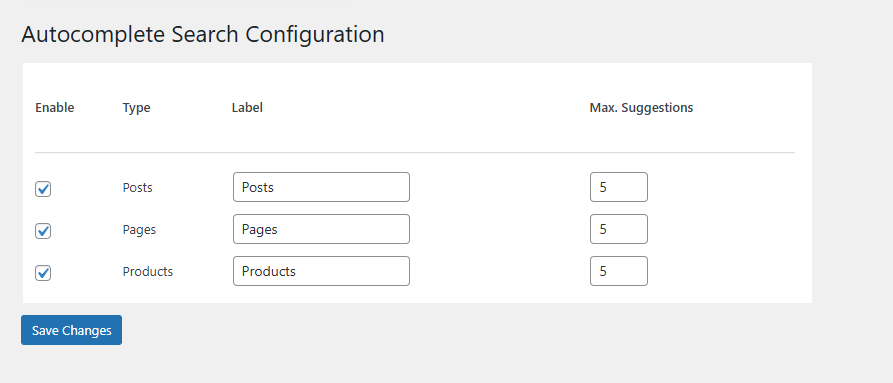
/assets/Screenshot-1.png 
/assets/Screenshot-2.png 
/assets/Screenshot-3.png
Instalación
-
Download the Plugin
Download the plugin zip file from the WordPress Plugin Repository or your provided source. -
Upload the Plugin
- Go to your WordPress Admin Dashboard.
- Navigate to Plugins > Add New.
- Click the Upload Plugin button at the top of the screen.
- Select the downloaded .zip file and click Install Now.
-
Activate the Plugin
Once the installation is complete, click Activate Plugin to enable the autocomplete search functionality. -
Add the Search Box
Use the [atcl_autocomplete_search] shortcode to display the search box on any post, page, or widget area.
You can also pass a custom CSS class to style the search box differently in your theme:
[atcl_autocomplete_search class=”header-search”]
This allows full control over the appearance using your theme’s CSS.
FAQ
-
A question that someone might have
-
Yes, the plugin fully supports WooCommerce and can search products, including their titles, and price.
-
Can I limit the search to specific post types?
-
Absolutely! You can Enable the post types to search by using the backend setting
-
Is this plugin compatible with all themes?
-
Yes, the plugin is designed to work with most WordPress themes. If you encounter style conflicts, you can adjust them with custom CSS.
-
Does the plugin work on mobile devices?
-
Yes, the autocomplete feature is fully responsive and works seamlessly on all devices, including desktops, tablets, and smartphones.
-
Can I add the search box to a widget area?
-
Yes! Simply use the [atcl_autocomplete_search] shortcode in a text widget.
-
How do I style the search box?
-
You can style the search box using your theme’s custom CSS or by adding your custom styles to the site’s stylesheet.
-
Is the plugin compatible with multilingual sites?
-
Yes, the plugin is compatible with multilingual sites and can work alongside popular translation plugins like Polylang and WPML.
-
Can I display search results on a custom page?
-
At this time, the plugin only provides autocomplete suggestions in the dropdown. However, you can customize your search experience using additional hooks or filters.
Reseñas

Colaboradores & Desarrolladores
“Autocomplete Search” es software de código abierto. Las siguientes personas han contribuido a este plugin.
Colaboradores
Traduce “Autocomplete Search” a tu idioma.
¿Interesado en el desarrollo?
Revisa el código, echa un vistazo al repositorio SVN, o suscríbete al registro de desarrollo por RSS .
Historial de cambios
1.0.0
- Initial release.
- AJAX-powered autocomplete search for posts, pages, WooCommerce products and custom posts
- Shortcode support for easy implementation: [atcl_autocomplete_search].
- Support for multiple post types, including custom post types.
- Fully responsive and works across all devices.
- WooCommerce integration for product search.
- Lightweight and optimized for fast performance.
- Currently supports English language only.
1.1.0
- Added multilingual compatibility (tested with Polylang and WPML).
- Enhanced shortcode output with better markup and accessibility improvements.
- Improved AJAX search performance and response time.
- Added text domain for full translation support.
- Fixed “Updating failed. The response is not a valid JSON response” issue in block editor.
- Updated settings page UI for better usability.
- Minor bug fixes and code optimizations.
1.2.0
- Added theme-level control for search box styling via filters and CSS classes.
- Added filter to customize the search input placeholder text.
- Added support for custom wrapper and input field CSS classes.
- Added shortcode attribute to allow custom CSS classes per search instance.
- Minor code refactoring and performance optimizations.