

Description
SRM Embed is a professional WordPress report builder plugin that allows you to easily and securely add MySQL reports, dashboards, charts, KPIs, and pivot tables to your site.
It is designed for businesses, developers, and analysts who need to create custom reports in WordPress directly from their MySQL or MariaDB databases.
SRM Embed allows you to add advanced reporting and business intelligence capabilities to WordPress in an easy-to-use and secure way by connecting it to Smart Report Maker.
Because everything is built directly on top of your database, you can create and display a wide range of reports depending on your data, including WordPress financial reports, WordPress inventory reports, and WordPress customer reports.
In this setup, SRM acts as a WordPress reporting plugin that brings structured database reporting into your site.
Depending on how you use it, it can serve as a WordPress reports plugin, a WordPress data analysis plugin, or a WordPress business intelligence plugin. This makes it a practical Power BI alternative for WordPress for teams that want full control over their data.
More information about the SRM Embed plugin
With SRM Embed, you can display the following directly inside your WordPress site:
- Professional, database-driven reports generated directly from your data, including sales, financial, inventory, and customer reports, making SRM suitable as a reliable WordPress reports plugin for real business use cases.
- Linked WordPress reports allow you to connect multiple reports within your WordPress site to form a report chain that delivers deeper insights. For example, you can seamlessly drill down from a customer report to their invoices, and then to their related support tickets.
- Interactive dashboards that bring reports, graphs, KPIs, and pivot tables together in a single view, inside your site.
- Visual charts and analytics, such as sales performance charts across any time period with drill-down capabilities, allowing you to drill into a specific day to view its sales performance. SRM can be considered a professional WordPress charts plugin that can create many chart types, such as bar charts, time-series charts, line charts, pie charts, donut charts, spline charts, scatter charts, area charts, and gauge charts.
- Key Performance Indicators (KPIs) that surface critical metrics and support ongoing monitoring and insights, making SRM useful as a WordPress data analysis plugin for data-driven decision making.
- Pivot tables for advanced data analysis, grouping, and summarization, implemented as a flexible WordPress pivot table plugin without the need to export data.
- Business intelligence visualizations rendered securely into WordPress pages and posts, allowing users to interact with live, database-driven data in real time through a complete WordPress business intelligence plugin experience.
Video Tutorials
📚 More video tutorials and screencasts
Why use SRM Embed for WordPress reporting?
SRM is more than just a WordPress report builder. While it enables you to create professional reports and link them together into report chains for deeper insights, it also offers much more:
- A powerful WordPress chart builder plugin that creates professional charts from multiple supported chart types, all powered directly by your database.
- A complete WordPress dashboard builder plugin that lets you create unlimited, interactive dashboards within your website.
- An advanced WordPress data analysis plugin featuring analytical tools such as KPIs, historical comparisons, and pivot tables.
All of this is delivered in one easy-to-use plugin, eliminating the need for multiple tools.
Fully Interactive Inside WordPress
Embedded SRM resources maintain all features:
- Drill-down & linking
- Filtering
- Paging & sorting
Smart Report Maker (SRM) is a professional PHP-based reporting platform that transforms raw MySQL and MariaDB data into meaningful insights.
When combined with SRM Embed, it acts as a secure integration layer that turns WordPress into a true reporting and analytics environment.
Learn more about Smart Report Maker
View plugin details and documentation
How it works
- Build reports, dashboards, charts, or pivot tables from your MySQL or MariaDB databases using Smart Report Maker (SRM).
If you do not have SRM yet, you can test the plugin using the official
Smart Report Maker online demo. - In SRM (your own installation or the demo), go to
Embed Manager SRM WP Plugin.
This single page contains everything related to the WordPress plugin, including access keys, resource URLs, and embed configurations. -
Copy the required information from this page and create the shortcode, then insert it inside any WordPress page or post to display the embedded content.
-
All embedded resources remain fully interactive inside WordPress, including filtering, paging, sorting, and drill-down.
Features
- Embed SRM reports, dashboards, pivot tables, KPIs, and charts
- WordPress report builder integration for MySQL databases
- Secure public and private embeds
- Token-based access control for protected data
- Encrypted storage using WordPress salts
- Gutenberg & Classic editor support
- Unlimited shortcodes for different dashboards and reports
- Zero coding required
License
This plugin is licensed under the GPLv2 or later license.
Smart Report Maker is a separate commercial product and not bundled with this plugin.
Screenshots
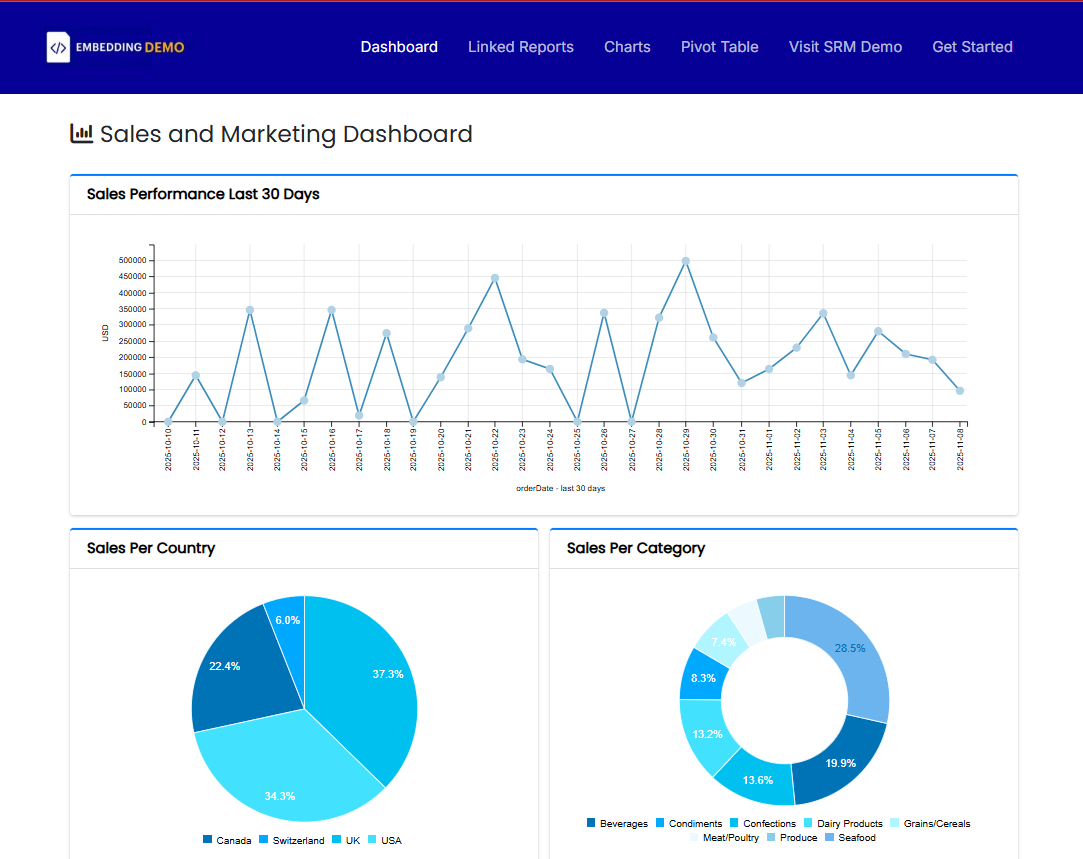
Interactive dashboard embedded directly inside WordPress. 
Dynamic SRM report integrated into a WordPress page 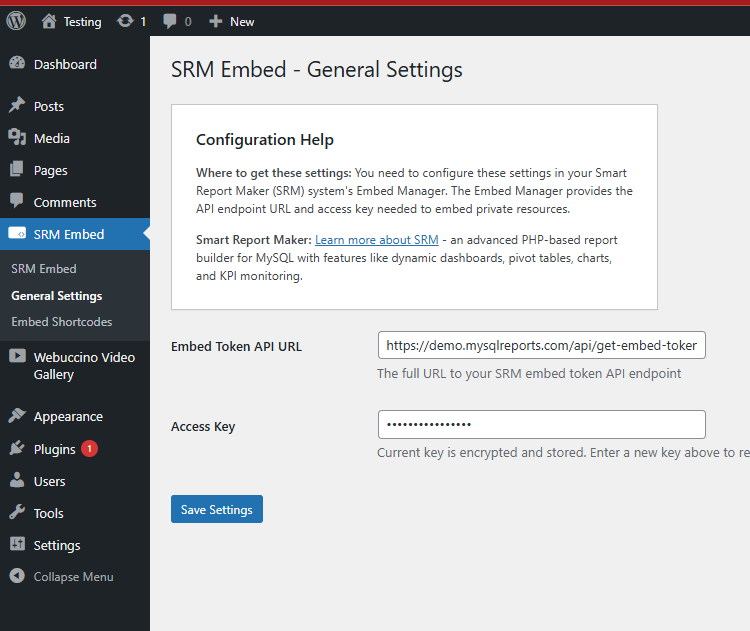
Configuration panel for SRM WordPress plugin 
Visual shortcode builder for embedding SRM reports
Installation
- Log in to your WordPress Admin Dashboard.
- From the left menu, go to Plugins Add New, then click the Upload Plugin button at the top of the page.
- Upload the plugin ZIP file. Once the upload is complete, activate it from Plugins Installed Plugins.
- Make sure you have a running copy of Smart Report Maker (SRM) on the same website.
If you are only testing the plugin, you can use the official Smart Report Maker online demo - In Smart Report Maker (either your own installation or the demo version), open the side menu and go to:
Embed Manager SRM WP Plugin. - From this page, copy the required Access Key and API Key.
This page is the central place for everything related to the WordPress plugin, including configuration and embed details. - Using the same SRM WP Plugin page in the Embed Manager, select the report, chart, or dashboard you want to embed and copy its resource URL.
Then, go to the plugin admin panel in WordPress and create the corresponding shortcode.
All plugin-related configurations and shortcode information are managed from this single SRM page, making the process simple and consistent. - Insert the generated shortcode into any WordPress page or post to display the embedded content.
If the embedded resource is private and intended for specific users only, make sure the WordPress page or post is set to Private or Password Protected to prevent unauthorized access.
FAQ
-
How can I see this plugin in action?
-
You can watch the official video tutorials that demonstrate how the plugin works inside WordPress:
📺 Overview Video
🎓 Step-by-Step TutorialYou can also try the plugin using Smart Report Maker online demo
In the SRM demo, go to Embed Manager WordPress Plugin to test embedding dashboards and reports.
-
What is Smart Report Maker?
-
Smart Report Maker (SRM) is a professional PHP-based reporting and dashboard platform for MySQL & MariaDB databases.
Learn more about Smart Report Maker -
Do I need Smart Report Maker to use this plugin?
-
Yes. Smart Report Maker (SRM) is required to embed your own private reports and dashboards.
However, you can test the plugin using the official
Smart Report Maker online demo. -
How do I configure the SRM Reports WordPress plugin?
-
All required plugin configurations can be found on the “SRM WP Plugin” page under the “Embed Manager” section in the left navigation panel of Smart Report Maker. This is available in both your own SRM installation and the Smart Report Maker online demo if you are testing the plugin.
-
Where can I read more about this plugin and view examples?
-
Detailed documentation, examples, and additional resources are available on the official
SRM Embed WordPress plugin page. -
Can users interact with embedded dashboards and reports?
-
Yes. Embedded dashboards and reports remain fully interactive, including filtering, drill-down, search, paging, and sorting.
-
Does the plugin store tokens securely?
-
Yes. Tokens are encrypted using WordPress salts.
Reviews


Contributors & Developers
“SRM Embed (Smart Report Maker)” is open source software. The following people have contributed to this plugin.
Contributors
Translate “SRM Embed (Smart Report Maker)” into your language.
Interested in development?
Browse the code, check out the SVN repository, or subscribe to the development log by RSS.
Changelog
1.10.0
- Version bump for WordPress.org resubmission
- Converted inline admin styling to stylesheet classes
1.9.1
- Version update
1.9.0
- Updated text domain to match plugin slug
- Updated all plugin URLs to new domain structure
- Code improvements and bug fixes