

Description
Cuerda-Feed-total is a powerful tool for media companies to distribute content from a WordPress site to multiple news portals.
It eliminates the need to develop separate RSS feeds for each partner’s specifications and makes automated content distribution simple.
To start using this plugin, first apply for a free trial license:
Trial Application Form: https://cuerda.org/trial_form/
After we review your application, we will issue a trial license and send you a guidance email within 1–3 business days.
The trial period is valid until the end of the month following the issue date (JST 23:59:59).
After the trial period ends, distribution-related features will be disabled unless a paid license is activated.
To continue using the plugin after the trial, apply for a paid license:
Paid License Application Form: https://cuerda.org/paid_form/
A paid contract is established when Cuerda reviews your application and activates the license (it is not auto-accepted upon form submission).
Billing is monthly in arrears (month-end closing, payment due by the end of the following month).
For an overview of the full process, see:
License purchase guide: https://cuerda.org/license/
Supported media:
* Yahoo! News(JAPAN)
* Yahoo! JAPAN Timeline(JAPAN)
* LINE NEWS(JAPAN)
* Gunosy, NewsPass, au Service Today(JAPAN)
* dmenu News(JAPAN)
* docomo Media(JAPAN)
* SmartNews(JAPAN)
* nordot (Use Smartformat for SmartNews)
* livedoor News(JAPAN)
* Rakuten Infoseek(JAPAN)
* TRILL(JAPAN)
* antenna*(JAPAN)
* SPORTS BULL(JAPAN)
Learn about the plugin through its design principles
See here.
Terms of Use
See here.
Privacy Policy
See here.
Uninstall
When Cuerda-Feed-total is uninstalled, it will remove all plugin data from the database.
Specifically, all options and transients with the cuerda_ prefix, as well as the post meta key cuerda_revision_status, will be deleted across all sites (including multisite networks).
Features
- Complies with the RSS feed specifications required by each media partner
- Automatically transforms post content into the required format for each partner
- Configure inclusion/exclusion rules per category, tag, or author
- Automatic related article links
- New posts, updates, and deletions are automatically reflected in partner feeds
- Parses post content to output standard regional codes
- Automatically distributes featured images set in posts
- Many other configuration options available
License
Cuerda-Feed-total requires a license (free trial available).
Start with a free trial application:
https://cuerda.org/trial_form/
After review, we will issue a trial license and notify you by email within 1–3 business days.
The trial is valid until the end of the month following the issue date (JST 23:59:59).
After the trial ends, distribution-related features will be disabled unless a paid license is activated.
To continue using the plugin after the trial, apply for a paid license:
Paid License Application Form: https://cuerda.org/paid_form/
A paid contract is established when Cuerda reviews the application and activates the license (not auto-accepted upon form submission).
For details, see:
https://cuerda.org/license/
Screenshots
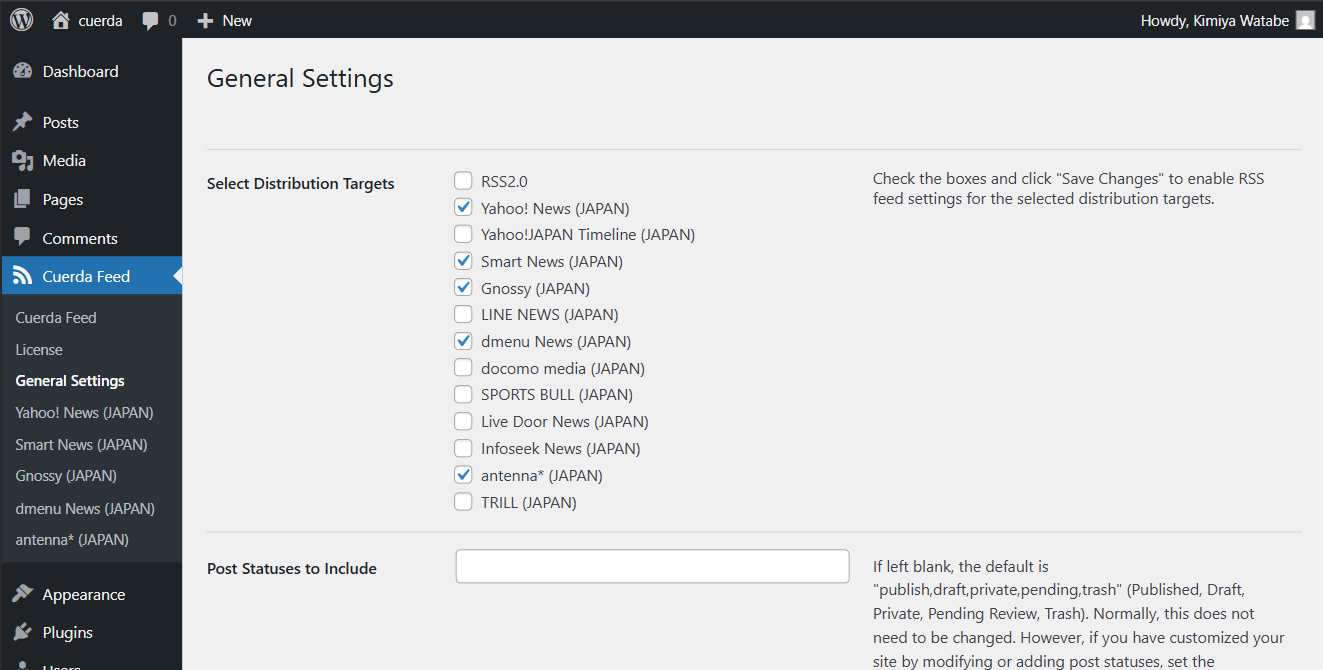
Cuerda distribution settings 
Cuerda main settings page 
Post edit screen – distribution control
Installation
- Go to the Plugins page in the WordPress admin and click Add New.
- Enter “Cuerda-Feed-total” in the search box and click Install.
- After installation, click Activate.
- Apply for a free trial license: https://cuerda.org/trial_form/
- After you receive confirmation that the trial license has been issued, the plugin’s distribution features become available.
- From the WordPress admin, go to Settings Cuerda Feed Settings to start configuration.
- To continue after the trial, apply for a paid license: https://cuerda.org/paid_form/
FAQ
-
How do I start using the plugin?
-
1) Install and activate the plugin.
2) Apply for a free trial license:
https://cuerda.org/trial_form/
3) After we review your application, we will issue a trial license (usually within 1–3 business days). -
What information is required for the trial application?
-
- Contact email address
- Production site URL (domain)
- Optional: One development environment URL (domain)
-
What information is required for the paid application?
-
- Production site URL (domain)
- Billing information for invoice delivery (company name, address, phone number, invoice PDF email, etc.)
- Optional: One development environment URL (domain)
-
Why is an application required?
-
It authorizes license validation for the specified domain and enables access to the external Cuerda management server.
This is required to use Cuerda-Feed-total’s distribution features. -
Is this plugin paid?
-
Yes. Cuerda-Feed-total is a monthly paid license service.
You can start with a free trial, and a paid license is required for continued use after the trial ends. -
Can I use it for free?
-
Yes. The trial license is free until the end of the month following the license issue date (JST 23:59:59).
After that, distribution-related features will be disabled unless a paid license is activated. -
When does billing start?
-
Billing start depends on when the paid license is activated:
– If activated during the trial period: billing starts at 0:00 (JST) on the day after the trial ends.
– If activated after the trial has ended: billing starts on the activation date (restart date). The first month may be prorated. -
How is the license fee calculated?
-
The license fee is JPY 10,000 per month (tax excluded) per production domain.
Billing is monthly in arrears (month-end closing, payment due by the end of the following month).
Bank transfer and credit card are accepted. -
Can I use it on a non-public development environment?
-
Yes. One development environment domain can be used for free while the production license remains active.
The development site must be access-restricted (e.g., IP restriction or Basic Authentication).If you push content to external partners from the development environment, use only the partner’s designated test FTP accounts and Cuerda pre-verification FTP accounts (do not use production FTP accounts).
-
What happens when the trial ends or the license becomes inactive?
-
Distribution-related features will be disabled.
You can still access the admin settings screens to check the license status and review configuration. -
Can I use it for a short period or cancel midway?
-
Yes. Mid-term cancellation is possible by notifying us via email.
The license fee for the cancellation month may be prorated depending on the contract status and billing start date. -
Is communication with an external server required for license validation?
-
Yes. Periodic communication with the external Cuerda management server is required.
If this communication does not occur, the plugin’s distribution features may be disabled. -
What information is sent for license validation?
-
The plugin accesses the external server via HTTP requests, along with referrer information from RSS feed crawlers when available.
License validity is determined by the HTTP status code returned by the management server (e.g., 200 OK). -
Where can I find terms and policies?
-
Terms of Use:
https://cuerda.org/legal/Privacy Policy:
https://cuerda.org/privacy_policy/ -
How can I get support?
-
The following free support is available by email or online meeting (Japanese only):
* Plugin configuration assistance
* Pre-distribution tests required by some partners
* License payment consultation
Reviews
There are no reviews for this plugin.
Contributors & Developers
“Cuerda-Feed-total” is open source software. The following people have contributed to this plugin.
Contributors
“Cuerda-Feed-total” has been translated into 1 locale. Thank you to the translators for their contributions.
Translate “Cuerda-Feed-total” into your language.
Interested in development?
Browse the code, check out the SVN repository, or subscribe to the development log by RSS.
Changelog
4.0.19
- Fixed an issue where Yahoo! News XML could include invalid characters depending on the server environment.
4.0.18
- Adjusted the placement of the “Cuerda Feed” item in the WordPress admin menu.
- Improved an issue where Yahoo! News XML could become garbled depending on the server environment.
4.0.17
- Fixed an issue where the DateId element in Yahoo! News XML could sometimes be output incorrectly.
4.0.16
- Optimized the image output processing in post content.
- Added security measures to prevent direct access.
- Improved handling of Instagram embed code.
4.0.15
- Optimized the pattern removal feature using regular expressions.
4.0.14
- Added an element for LINE NEWS feeds to explicitly indicate when an article was unpublished.
- Added an element for LINE NEWS feeds to explicitly indicate that the item is a published article.
4.0.13
- Improved the output of required elements.
4.0.12
- Fixed an issue where RSS feeds could return zero items after upgrading from v3 to v4.
- Fixed the date filter behavior when both “after published date” and “after modified date” are set.
4.0.11
- Fixed an issue where some distribution settings pages could show an “insufficient permissions” error after updating.
- Fixed an issue that could cause the cuerda_total feed endpoint to return a server error (500) in some environments.
4.0.10
- Improved in-content image rendering for LINE NEWS.
4.0.9
- Added a feature to include the latest posts as external links in LINE NEWS.
4.0.8
- Refined the logic for determining the number of related links to output.
4.0.7
- When outputting the featured image at the beginning of the content, you can now control the display of the image credit and the caption independently.
4.0.6
- Added an option to toggle whether to display the caption when showing the featured image at the beginning of the post content.
- Added an option to enable or disable output of the article summary for Yahoo! News.
4.0.5
- Added an option to display the featured image at the beginning of the content for Gunosy.
- Fixed incorrect output of analytics tracking tags.
- Improved behavior so that the gnf:modified element is still output even when delivery control is enabled.
4.0.4
- Fixed an issue where content after the site description was not output when the post body contained a “more” comment tag.
- Fixed an issue where the “Exclude tags from distribution” setting did not work.
- Fixed an issue with per-post distribution control.
- Improved Gunosy integration to keep the deprecated “Category selection” option available for the time being.
- Improved anchor (a ) link output control for Gunosy and SmartNews.
4.0.3
- Fixed a bug in the related link output for Yahoo! News.
4.0.2
- Added a notice indicating that a distribution specification document is required to confirm mutual agreement with distribution partners.
4.0.1
- Improved the plugin settings menu.
- Improved RSS feeds following the termination of goo News.
3.x series
For details of versions 3.x and earlier, please see the plugin’s documentation site:
https://cuerda.org/changelog/