
Descripció
Technoscore Hotjar Tracking is best plugin for WordPress to add Hotjar code to header part of Selected/All webpages.
More details are as follows:-
- It adds Hotjar trackng code to particular pages or all pages.
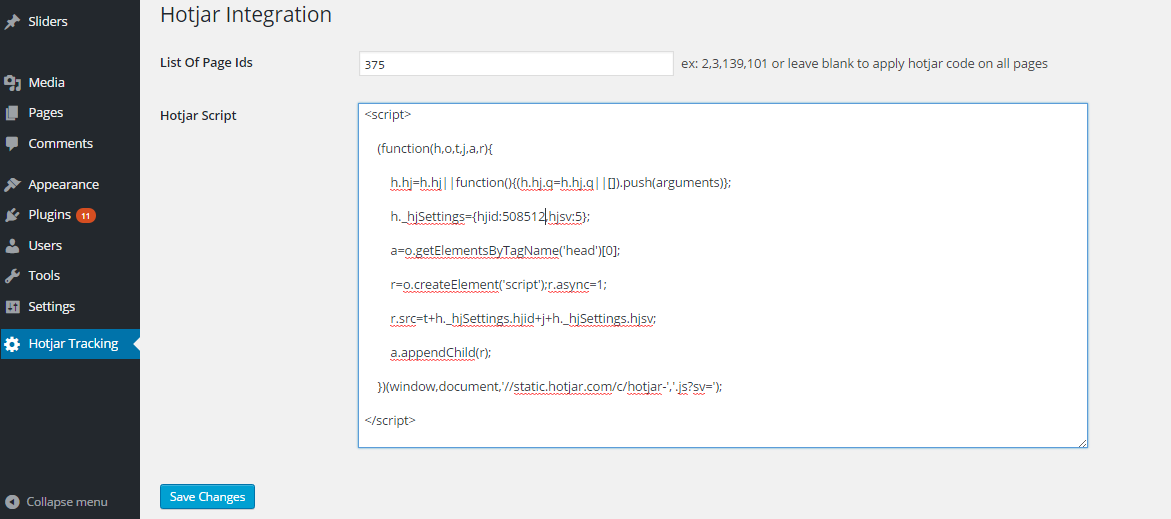
- Get your Hotjar code from your Hotjar account. Paste hotjar code in ‘Hotjar Script’ field under menu ‘Hotjar Tracking’ and click the ‘Save Changes’ button. Now, open up a page of your website, to trigger a page view in Hotjar.
Captures
Instal·lació
- Use WordPress’ built-in installer
- Download the ZIP file from WordPress website
- Extract the technoscore-hotjar-tracking directory to your computer
- Upload the technoscore-hotjar-tracking directory to the /wp-content/plugins/ directory
- Activate the plugin in the Plugin dashboard
PMF
- Installation Instructions
-
- Use WordPress’ built-in installer
- Download the ZIP file from WordPress website
- Extract the technoscore-hotjar-tracking directory to your computer
- Upload the technoscore-hotjar-tracking directory to the /wp-content/plugins/ directory
- Activate the plugin in the Plugin dashboard
Ressenyes

25 de maig de 2017
This is best to use with ease you can use this plugin with ease and its really impressive.
Col·laboradors i desenvolupadors
«Technoscore Hotjar Tracking» és programari de codi obert. La següent gent ha col·laborat en aquesta extensió.
Col·laboradors

Traduïu «Technoscore Hotjar Tracking» a la vostra llengua.
Interessats en el desenvolupament?
Navegueu pel codi, baixeu-vos el repositori SVN, o subscriviu-vos al registre de desenvolupament per fisl de subscripció RSS.
Registre de canvis
1.0.0
- Initial Version
1.0.0
1.0.1
- Change in page id field