

Descripció
Product Attribute Icons Display allows you to display beautiful, customizable icons for product attributes on single product pages. Perfect for showcasing platform compatibility (Windows, Mac, Linux), region availability, product features, or any other product attributes with visual icons.
The plugin uses WordPress Dashicons, which are built into WordPress and provide hundreds of icons to choose from. Each attribute can have custom colors, labels, and icons, and you can control exactly where the icons appear on your product pages.
Features
-
Icon Library Support
- WordPress Dashicons (built-in, no setup required)
-
Flexible Icon Placement
- Above Product Title
- Above Product Price
- Below Product Price
- Below Short Description
- Manual placement via shortcode
-
Customization Options
- Custom icon for each attribute term
- Custom labels for each attribute term
- Per-attribute color customization (background, text, border)
- Global default colors for all attributes
- Customizable border radius
- Toggle between default and custom colors per attribute
-
User-Friendly Admin Interface
- Intuitive settings page under WooCommerce menu
- Live icon preview in admin
- Expandable attribute details
- Color picker with visual preview
- Easy enable/disable per attribute
-
Developer-Friendly
-
Shortcode support:
[paiw_product_attribute_icons]- CSS variables for easy theme customization
- Translation ready (text domain: product-attribute-icons-display)
- WordPress coding standards compliant
- Hooks and filters for extensibility
-
Performance & Security
- Lightweight and optimized
- Proper data sanitization and escaping
- Nonce verification for all form submissions
- No external dependencies required
Icon Library Usage
Dashicons (WordPress Default)
* Format: dashicons dashicons-icon-name
* Example: dashicons dashicons-gamepad
* Reference: https://developer.wordpress.org/resource/dashicons/
* Note: Dashicons are built into WordPress and work automatically – no setup required.
Important Notes
Theme Compatibility: Icon positioning uses standard WooCommerce hooks. Some themes may modify or remove these hooks, which could affect automatic icon placement. If automatic positioning doesn’t work with your theme, use the shortcode [paiw_product_attribute_icons] for manual placement.
Icon Library: The plugin uses WordPress Dashicons, which are built into WordPress and don’t require any external resources or setup.
Performance: The plugin is lightweight and optimized. No external dependencies are required.
Support
For support, feature requests, or bug reports, please visit the plugin’s support forum on WordPress.org.
Credits
- WordPress Dashicons: Built into WordPress (https://developer.wordpress.org/resource/dashicons/)
Captures

Admin settings page showing attribute configuration with color pickers 
Icons displayed on single product page above product price 
Icons displayed on single product page below product price 2 
Icons displayed on single product page above product title 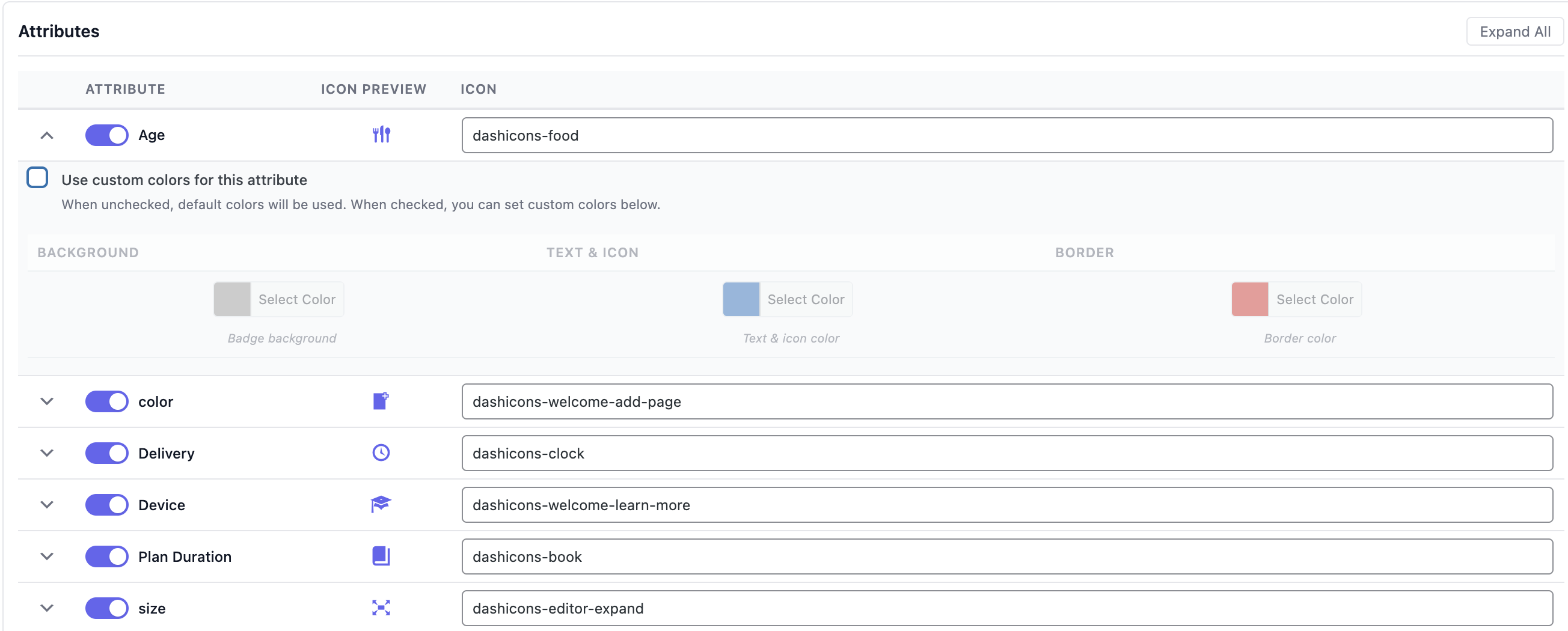
Custom color settings for individual attributes 
Different Attribute color and Style 1 
Different Attribute color and Style 2 
Different Attribute color and Style 3
Instal·lació
- Upload the plugin files to the
/wp-content/plugins/product-attribute-icons-displaydirectory, or install the plugin through the WordPress plugins screen directly. - Activate the plugin through the ‘Plugins’ screen in WordPress.
- Navigate to WooCommerce > Product Icons to configure your attribute icons.
- Enable attributes, set custom labels, and add Dashicons icon classes (e.g.,
dashicons dashicons-gamepad).
PMF
-
What icon library is supported?
-
The plugin supports WordPress Dashicons, which are built into WordPress. You can use any Dashicons CSS class format. Reference: https://developer.wordpress.org/resource/dashicons/
-
How do I use the shortcode?
-
Use
[paiw_product_attribute_icons]to display icons for the current product, or[paiw_product_attribute_icons id="123"]for a specific product ID. You can also add a custom CSS class:[paiw_product_attribute_icons class="my-custom-class"]. -
Can I customize the styling?
-
Yes! The plugin uses CSS variables that you can override in your theme’s CSS or through the WordPress Customizer. The main CSS variables are:
*--paiw-bg-color: Background color
*--paiw-text-color: Text and icon color
*--paiw-border-color: Border color
*--paiw-border-radius: Border radius
*--paiw-spacing: Spacing between icons -
Will the icon positioning work with all themes?
-
Icon positioning may vary depending on your theme’s structure. The plugin uses standard WooCommerce hooks, but some themes may modify or remove these hooks, which could affect icon placement. If automatic positioning doesn’t work as expected with your theme, you can use the shortcode
[paiw_product_attribute_icons]to manually place icons anywhere in your product template.The following positions are available:
* Above Product Title: May not work if your theme removes or modifies the product title hook
* Above Product Price: Works with most themes that use standard WooCommerce price hooks
* Below Product Price: Works with most standard WooCommerce themes
* Below Short Description: Works with most standard WooCommerce themesIf a position doesn’t work with your theme, try using the shortcode for manual placement.
-
Can I use custom colors for each attribute?
-
Yes! You can set global default colors for all attributes, and then enable custom colors for individual attributes. When custom colors are enabled for an attribute, you can set unique background, text, and border colors for that specific attribute.
-
Do I need to install icon libraries separately?
-
No! Dashicons are built into WordPress and work automatically – no setup required. Simply use the Dashicons format when configuring your icons (e.g.,
dashicons dashicons-gamepad). -
Is the plugin translation ready?
-
Yes! The plugin is fully translation ready with the text domain
product-attribute-icons-display. All user-facing strings are translatable.
Ressenyes
No hi ha ressenyes per a aquesta extensió.
Col·laboradors i desenvolupadors
«Product Attribute Icons Display» és programari de codi obert. La següent gent ha col·laborat en aquesta extensió.
Col·laboradors
Traduïu «Product Attribute Icons Display» a la vostra llengua.
Interessats en el desenvolupament?
Navegueu pel codi, baixeu-vos el repositori SVN, o subscriviu-vos al registre de desenvolupament per fisl de subscripció RSS.
Registre de canvis
1.0.0
- Initial release
- Support for WordPress Dashicons icon library
- Multiple injection positions (Above Title, Above Price, Below Price, Below Short Description)
- Admin settings page with intuitive interface
- Per-attribute icon and label customization
- Global and per-attribute color customization
- Color picker with visual preview
- Shortcode support for manual placement
- CSS variables for easy theme customization
- Translation ready
- WordPress.org coding standards compliant
- Mobile responsive design
- Live icon preview in admin