

Descripció
Provides shortcode and template tag to place a link to popup a login form at any place you want to.
Features:
- Modal form with overlay or simple popup form
- Shows a login link for not logged in users that pops up a login form on click
- Multiple instances possible: Place login form links to sidebar, header, and footer
- Fully customizable HTML, CSS and text lines ( but works completely out of the box )
- Reads your custom CSS file from your themes folder if existing
- Provides shortcodes for use in posts and widgets
- Template tags for easy use in template files
Languages so far:
- English
- German
- Nederlands by Sjoerd Lohuis
- French by Denis (Boulli)
If you like to provide a translation please drop me a line.
See Other Notes section for further information.
See flexibleplugins.com for usage examples.
See the experimental page for upcoming features.
How to use the Flexible Frontend Login shortcode on your site
On the widget settings page choose the Flexible Frontend Login and adjust the settings to your site.
In a post or page place [flexible-frontend-login]
By default the shortcode uses the settings set on the admin options page
You can override those default values with the following parameters and options:
vertical=top, bottomhorizontal=left, right
So your shortcode might look like this:
[flexible-frontend-login vertical=bottom horizontal=left]
If you want to use the centered login form with darkened overlay in the background
use [flexible-frontend-login-modal] without any parameters.
How to use the Flexible Frontend Login template tag on your site
In template files place:
<?php if ( function_exists('flexible_frontend_login') ) flexible_frontend_login( 'bottom', 'left' ); ?>
To change popups behavior you can use
- “bottom” or “top”
- “left” or “right”
For popup with overlay use:
<?php if ( function_exists('flexible_frontend_login_modal') ) flexible_frontend_login_modal(); ?>
Live examples
- For more examples see plugin’s website
How to add your own styling
- Place a folder
flexible-frontend-loginin your theme folder - Copy the files from
/wp-content/plugins/flexible-frontend-login/customization/into the newly created theme subfolder - Adjust the CSS to your theme. You’ll find all classes provided by the plugin in that file.
- If necessary change the HTML markup in the template file.
To Do
- Include option to delete options on deactivation
- Add option to display register link and form
- Add admin option for redirection on logout
- Add languages
- Add option for Gravatar display for logged in users
- Validate inside of modal window/current page without jumping to the basic wp-login.php
- redirect to a specific User Role accessible page after a succesful login, add shortcode options for this
Captures

Login link whereever you like it to have. 
Form pops up as overlay as default. 
Modal form popup. 
Options page general. 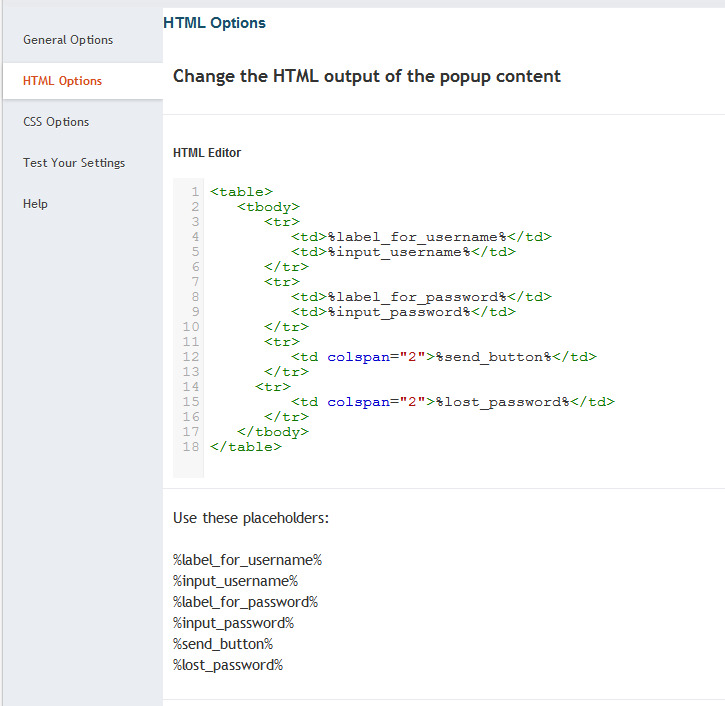
Options page HTML Editor 
Preview functions
Instal·lació
- Upload
plugin-name.phpto the/wp-content/plugins/directory - Activate the plugin through the ‘Plugins’ menu in WordPress
- For details on usage see Other Notes section
or:
- On your plugin’s installation page do a search for “Flexible Frontend Login”
- Click on “Install this plugin”
- Click on “Activate this plugin”
- For details on usage see Other Notes section
Ressenyes
No hi ha ressenyes per a aquesta extensió.
Col·laboradors i desenvolupadors
«Flexible Frontend Login» és programari de codi obert. La següent gent ha col·laborat en aquesta extensió.
Col·laboradors
Traduïu «Flexible Frontend Login» a la vostra llengua.
Interessats en el desenvolupament?
Navegueu pel codi, baixeu-vos el repositori SVN, o subscriviu-vos al registre de desenvolupament per fisl de subscripció RSS.
Registre de canvis
1.0.5
- Fixed bug in logged in user display
- Moved HTML and CSS manipulation from Admin Page to templating with custom files in theme folder
- Improved help section
1.0.4
- Added missing files for Admin Page
1.0.3
- Added more classes to access all elements easily by CSS
- Added Nederlands
- Added Français
1.0.2
- Added option to choose how to display username when logged in
1.0.1
- Update of the Settings page
- fixed localization issue
1.0
- Updated for WP 3.6
- Fixed popup behavior
0. 97.5
- Fixed the Markdown fix 🙂
0.97.4
- Fixed Markdown class inclusion ( if class_exists )
0.97.3
- Fixed reading stylesheet support order for template and child themes
0.97.2
- Fixed bug in default value storage
0.97.1
- Fixed redirection issue for login/logout links
0.97
- Added more options for further customization
- Beautified options page (Thanks to Ohad Raz for the awesome Admin Page Class)
-
- Editor for HTML
-
- Editor for CSS
-
- Extended preview function
0.96
- Fixed admin settings page, settings get stored again
0.95
- Added template tag and shortcode for modal form with overlay
- included a php class FrontendLogin for better handling
- Switched to JQuery instead of inline javascript
- Fixed a few bugs which could cause error notices
0.94
- fixed shortcode output
- whitelisted settings
- Added customizable widget
- Added option to pass parameters with the shortcode
- Added option to pass parameters with the template tag
0.93
- Fixed redirection issue for logout link
- Fixed CSS for Popup to be the highest layer
0.92
- Fixed an issue to make sure shortcodes get processed in text widgets
0.91
- Added missing files
0.9
- Initial release