

Descripció
Booking Calendar – Booking Plugin for Appointments, Reservations, Rentals, Events
WP Booking Calendar is a flexible WordPress booking plugin for appointments, reservations, rentals, and events. Add a responsive availability calendar and booking form to your website, accept online bookings, and manage them from a modern admin panel.
Use Booking Calendar for full-day bookings, time-slot appointments, service scheduling, event registration, inquiry forms, request forms, or even as a simple multi-steps contact form with built-in request listing and email notifications.
Features | See Demos | FAQ | Get Support
Best for appointments, service scheduling, property rentals, equipment rentals, consultations, classes, events, and availability management.
Key Features
- Block unavailable time intervals by resource and date range
- Create admin bookings from selected available time slots
- Configure global availability rules with live preview
- Accept full-day and time-slot bookings
- Show calendar availability on your website
- Create booking, contact, and inquiry forms
- Use the new Drag & Drop Booking Form Builder
- Build multi-step forms with rows and columns
- Customize form fields and email notifications
- Prevent double bookings
- Manage bookings in a clear admin panel
- Sync bookings with external services using .ics feeds
- Import Google Calendar events
- Works for properties, services, rentals, and events
New Time Slots Availability & Fast Admin Booking
Manage unavailable time intervals visually from Booking Calendar > Availability or directly from the bookings workflow using the new Time Slots Availability popup.
Administrators can choose a date range and block or unblock exact time intervals in an interactive timeline. The timeline clearly shows available, booked, unavailable, and full-day unavailable states, and full-day unavailable states, making it much easier to understand real availability at a glance.
Administrators can also create a new booking directly from an available time interval. Simply select an available time slot in the popup, open the booking form with the selected resource, date, start time, and end time already prefilled, and save it as a new booking.
This makes Booking Calendar especially useful for appointment scheduling, service bookings, consultations, rentals, and any workflow where administrators need to quickly review availability and create bookings from the WordPress admin panel.
New Drag & Drop Booking Form Builder
Create booking forms visually without manually editing complex shortcodes or form code. Simply drag fields from the sidebar, drop them into the canvas, organize them into rows and columns, edit settings in the sidebar, and preview changes instantly.
The new builder also makes it easy to create contact and inquiry forms where the calendar is optional.
With the new interface, you can:
- drag and drop fields into the form layout,
- organize fields into sections and columns,
- create multi-step form pages,
- resize columns for better layout control,
- edit field settings in the right sidebar,
- instantly preview the form while building.
This new functionality brings a more modern, user-friendly, and flexible way to create forms in Booking Calendar, making form setup faster, clearer, and much more convenient for website owners.
Perfect solution for any booking logic
As the first booking system for WordPress, we have created a huge number of features to match your specific booking needs.
Easily define available dates and allow your visitors to reserve your property or service for a full day or time-slot.
For those who need more advanced functionality, our premium versions offer an extensive system with multiple resources, seasonal prices, conditional dates selection, availability search, and even a multi-user system where users can independently manage their own availability, much like an Airbnb portal.
Full Day Bookings – Drag and Drop Booking Form Builder
Easily configure Booking Calendar for full-day bookings with the new Drag and Drop Booking Form Builder. The new Booking Calendar Form Builder makes it much easier to create flexible booking forms without manually editing form code. It is a simple and visual way to build booking forms for different use cases directly inside WordPress.
Appointment Forms with Time Slots or Start Time + Service Duration Selection
Create a time-slot booking form in just a few minutes with the new Booking Calendar Form Builder. Visually add the calendar, time fields, and contact fields, adjust the layout, and preview changes instantly — without manually editing form code.
Changeover Multi-Day Bookings – Setup Wizard (Pro)
Configure multi-day bookings with specific check-in and check-out days, clearly marked with diagonal or vertical lines. Perfect for bookings that require split days.
Available Pro versions.
Captures
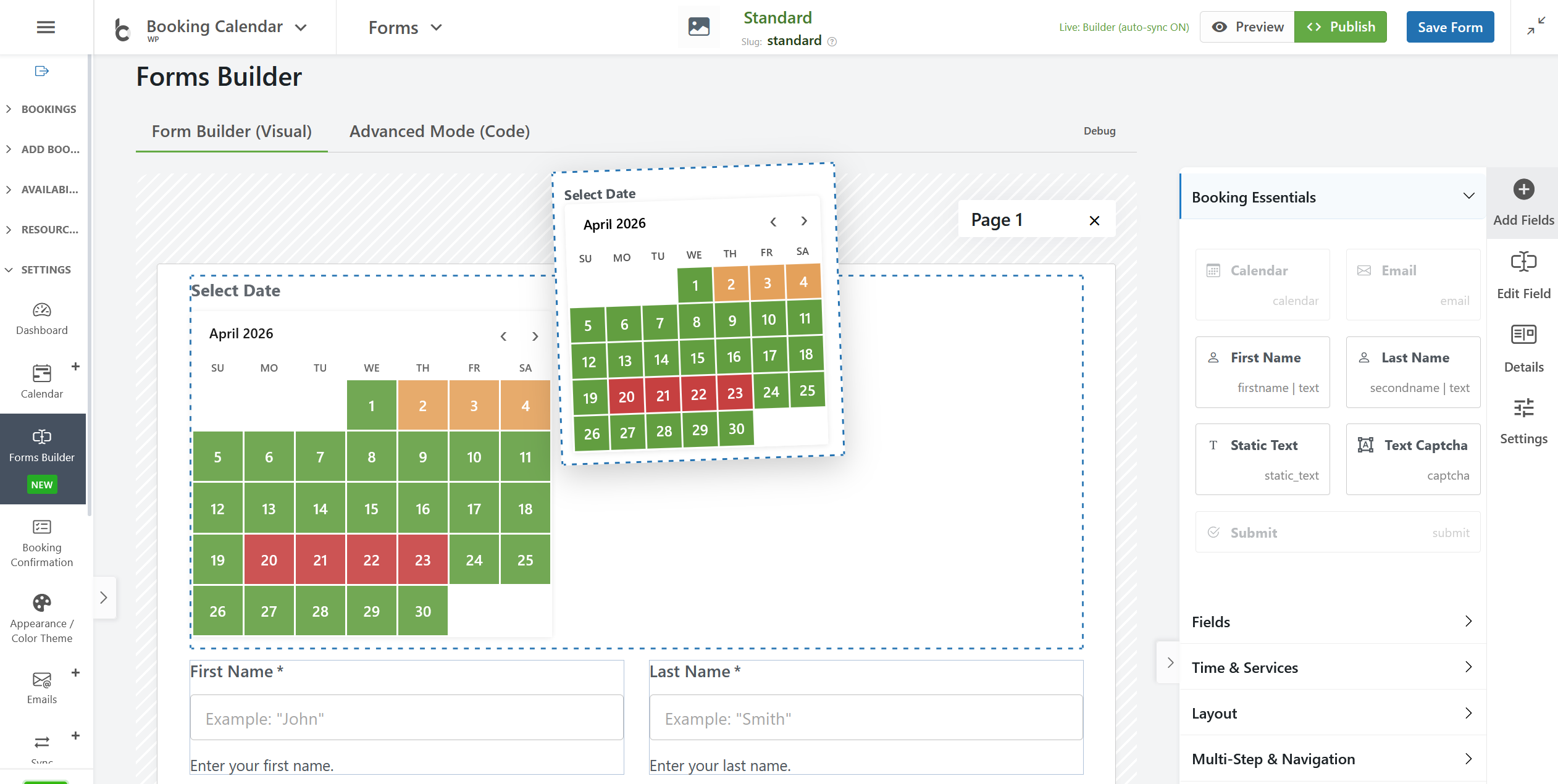
Drag & Drop Booking Form Builder: Create booking forms visually without manually editing complex shortcodes or form codes. 
Full-Day Bookings: In this screenshot, you can see the front-end booking form. It enables users to select and book multiple days in the calendar without time fields. 
Time-Slot Appointment Bookings: This screenshot displays the front-end booking form. It allows users to select single day in the calendar and times (time-slots or start time and duration of service) in the booking form. 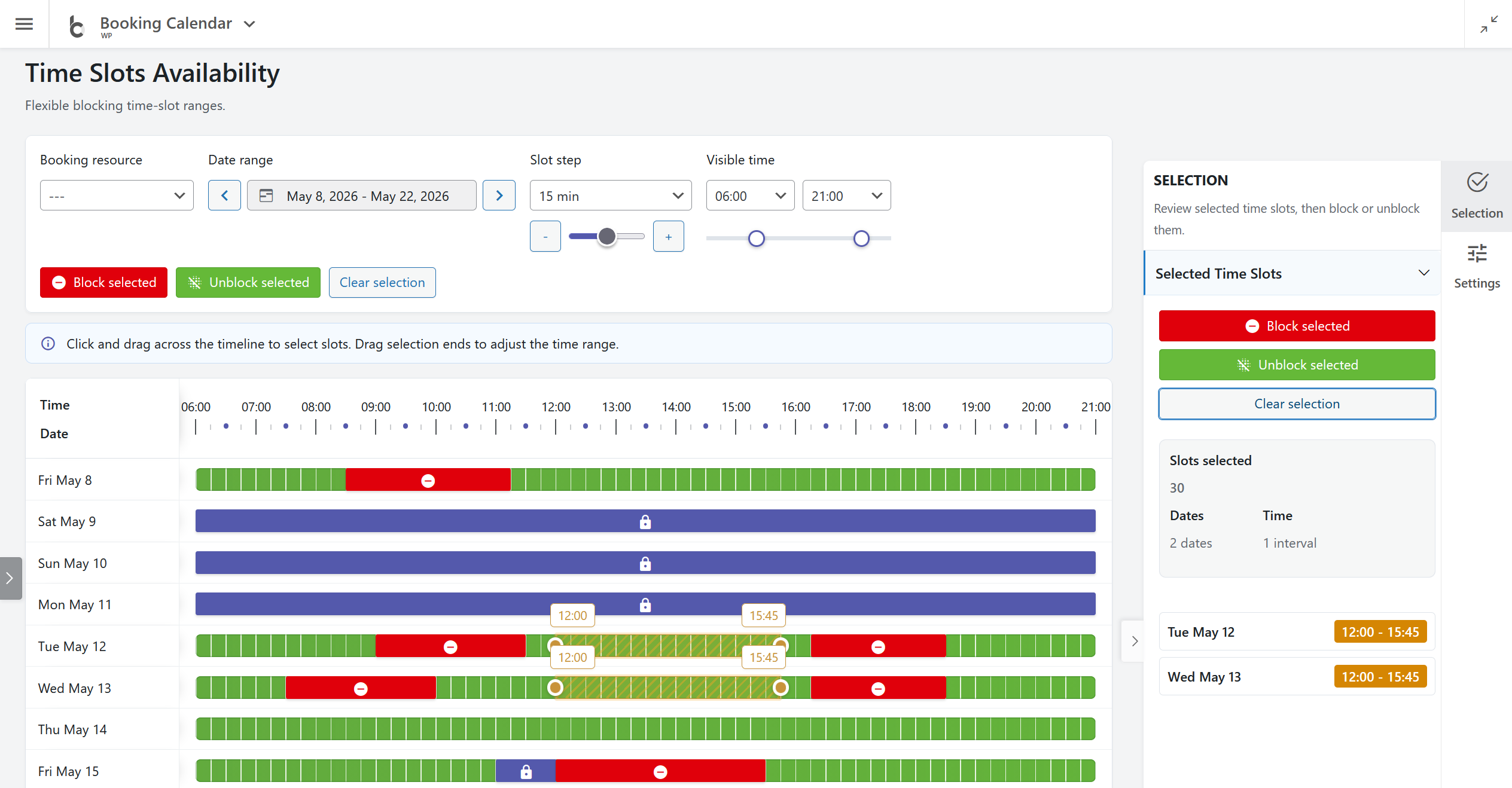
Time Slots Availability: Block or unblock unavailable time intervals by resource and date range using an interactive timeline with booked and unavailable states. 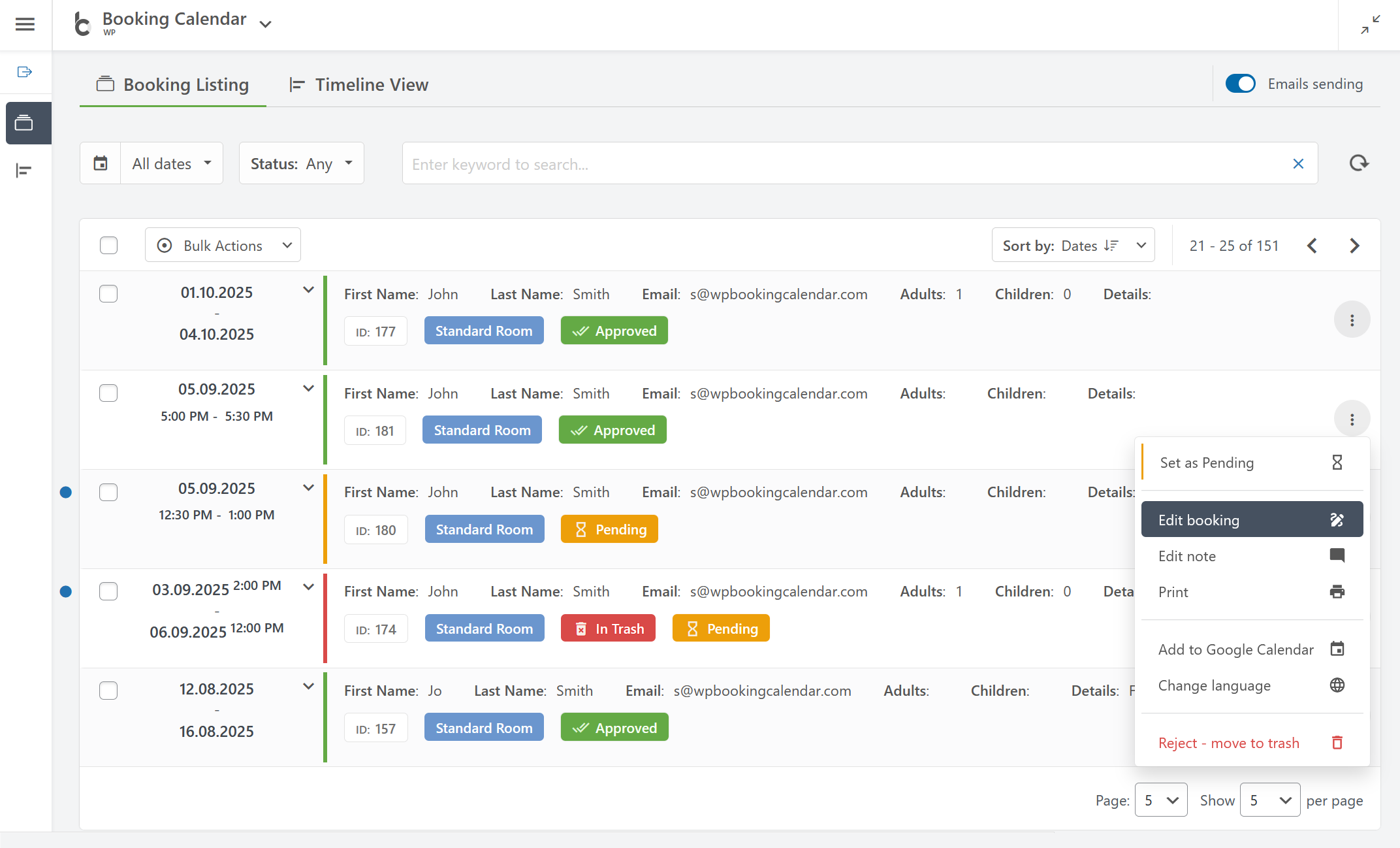
Booking Listing: You can easily manage all your bookings in one place by searching bookings by keyword, dates, status, and other parameters. 
Booking Listing panel provides a smooth user experience by working instantly without page refresh. 
Timeline View: Get a clear overview of all your bookings. 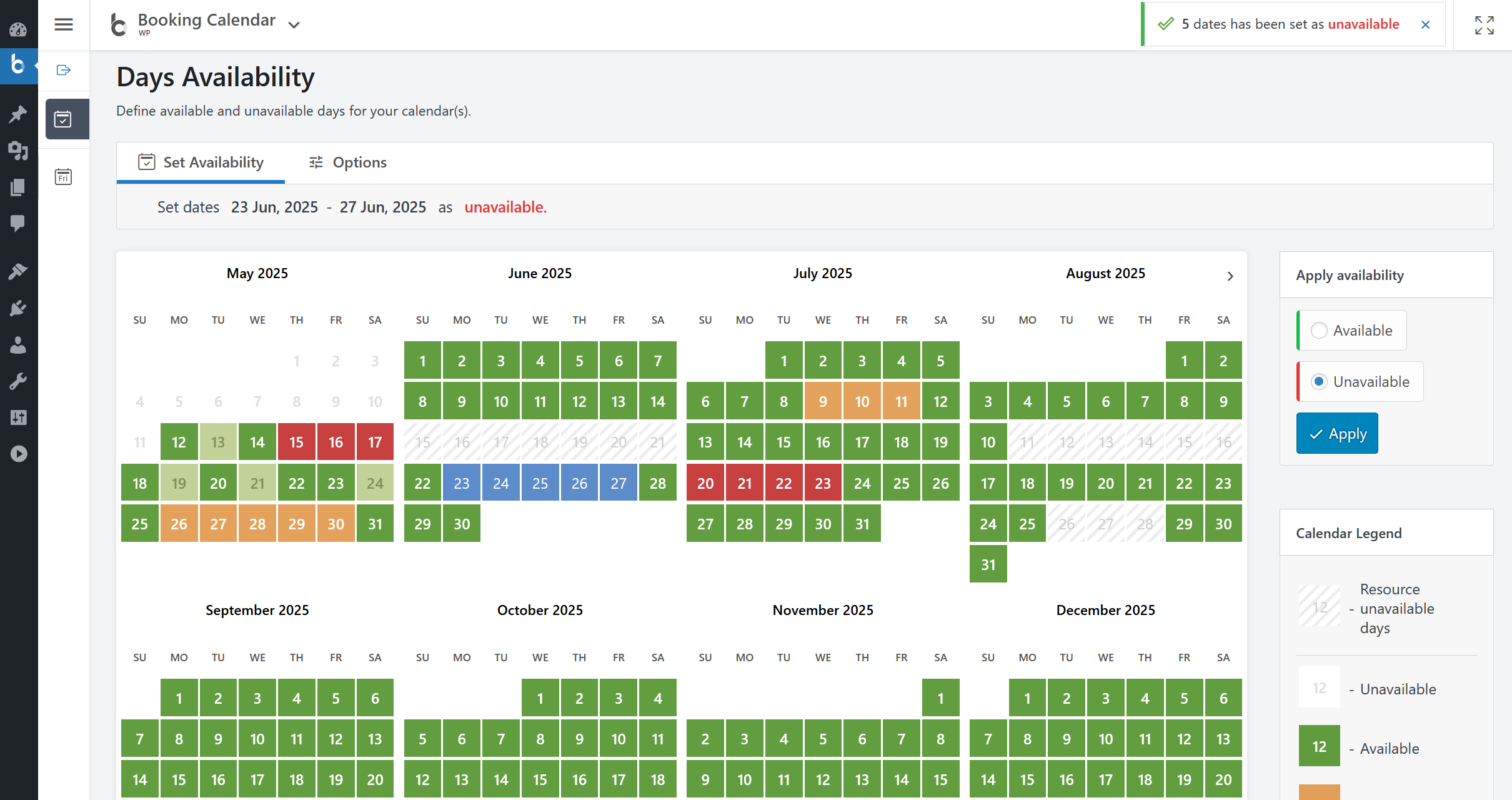
Calendar Availability: Super easily set available or unavailable dates in the calendar with just 3 mouse clicks. 
Publish Booking Form into a page. Alternatively you can easily publish a booking form or availability calendar from the WP Booking Calendar > Publish menu page into existing or new pages. 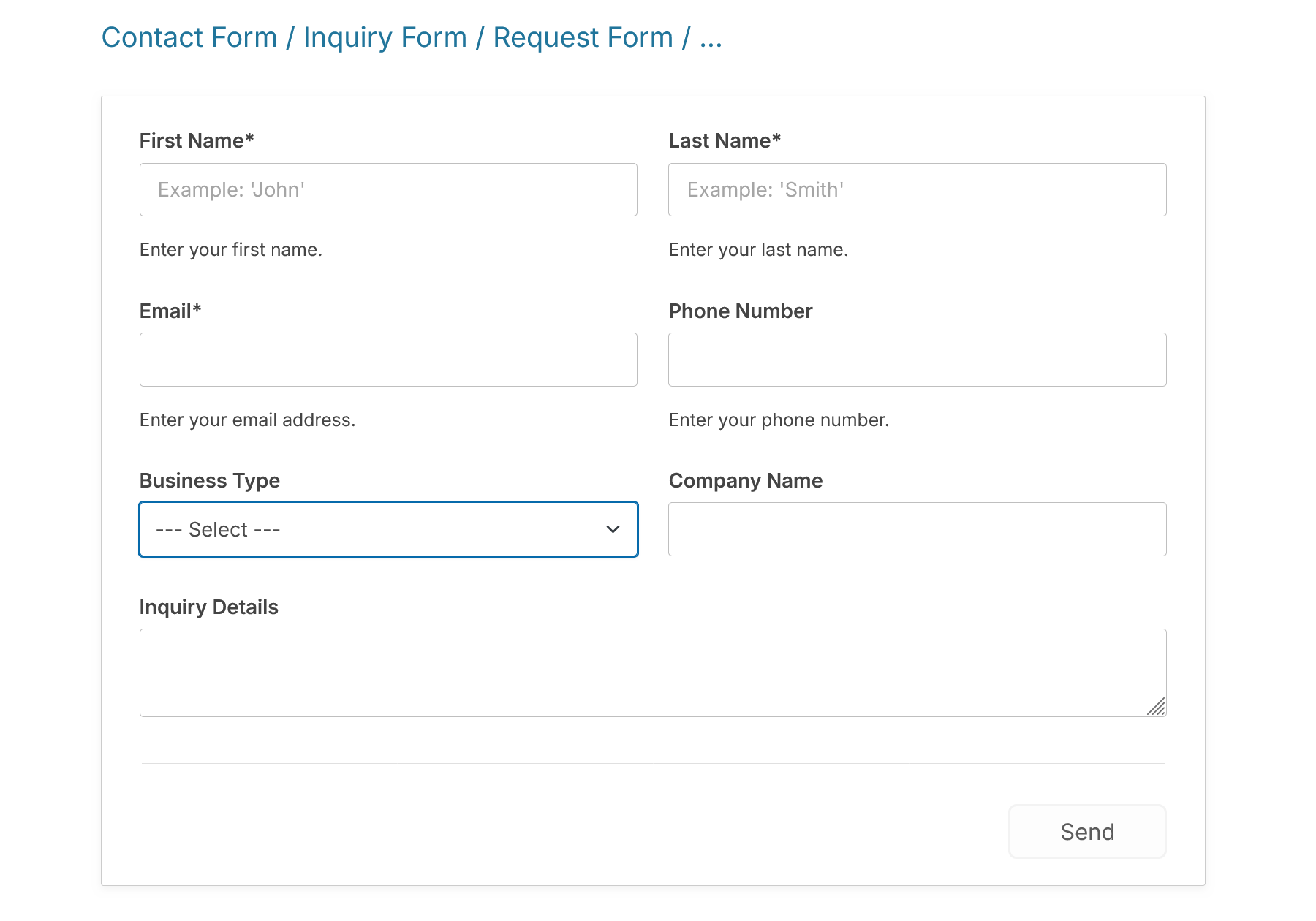
Contact Form. Easy to create contact form, request forms, inquiry forms … where the calendar is optional.
Blocs
Aquesta extensió proporciona 1 bloc.
- Booking Calendar
Instal·lació
Installing the plugin is easy. Just follow one of the following methods:
Install Booking Calendar from within WordPress
- Visit the plugins page within your dashboard and select ‘Add New’
- Search for «Booking Calendar by oplugins»
- Activate Booking Calendar from your Plugins page
- You’re done!
Install Booking Calendar Manually
- From the dashboard of your site, navigate to Plugins –> Add New.
- Select the Upload option and hit «Choose File.»
- When the popup appears select the booking.zip or booking-x.x.zip file from your desktop. (The ‘x.x’ will change depending on the current version number).
- Follow the on-screen instructions and wait as the upload completes.
- When it’s finished, activate the plugin via the prompt. A message will show confirming activation was successful.
That’s it! Just configure your settings and insert booking form shortcode into a page, and you’re on your way to receive the bookings. Need help getting things started? Check out our FAQ and video guides for help with settings and features.
PMF
Please see FAQ.
-
Booking Calendar is great for
-
Whether you’re renting a property or you’re a sole business owner looking to automate your service bookings, Booking Calendar can help you.
– Resource scheduling (bed & breakfast, houses, apartments, etc.)
– Client scheduling (photographers, lawyers, beauty salons, spas, etc.)
– Meeting scheduling (coaching, phone advice)
– Patient scheduling (doctor, dentists, clinic, medical)
– Equipment rentals (yachts, boats, cars, bikes, technics, etc.)
– Event scheduling (conference, course, fitness center, yoga class, gym)
– Or any other service where booking for a specific time is required -
All you need to know about booking process
-
Step 1: Select your desired date(s)
Customers can select the date(s) they would like to book. The Booking Calendar plugin provides an easy-to-use calendar system that displays the availability of your property or service for those dates.Step 2: Select a time-slot (optional)
If you offer appointments or reservations at specific times, you can configure the booking form to allow customers to select an available time-slot. To learn how to set it up, please watch this video.Step 3: Fill in Booking Form Fields
The form will ask for information such as your name, contact information, and other details needed to approve the booking. The booking form fields are customizable, allowing you to configure fields required for the booking.Step 4: Submit your booking and Receive Notification of New Booking
After filling out the booking form, customers can submit the booking. The Booking Calendar plugin will notify the administrator about the new booking and send a confirmation email to customers that their booking has been received.Step 5: Manage Bookings
Administrators can manage all reservations from the modern and easy-to-use admin booking panel. Easily find the required bookings, check the booking details, and modify the booking if needed, then approve or decline this reservation. Customers will receive an email confirmation about the approval or cancellation of their booking. -
Simple steps to get started
-
1. Add booking form or availability calendar to your page
Easily insert the booking form on any page of your website using WordPress blocks or Booking Calendar widgets for sidebars or configure shortcode block in page builders like Elementor. Read more here.2. Set initial unavailable days with just few clicks
You can define days availability in just a 3 mouse clicks at Booking > Availability page. Simply select a range of days on the calendar, choose ‘available’ or ‘unavailable’ status, and apply. It’s that simple!3. Configure booking form, email templates and other settings
Easily customize your booking form fields and add time slots if needed. Configure email notifications and other settings such as the calendar appearance, booking admin panel functionality, and more…4. Receive notifications and manage bookings
Get notified about a new appointments and manage them in a modern admin panel. Approve, decline, or edit specific bookings. Plus, you can get a complete picture of your schedule with the calendar overview in day, week, or month view mode.5. Configure syncing of bookings with other services
Import your Google Calendar events or make 2 ways sync of your events by using .ics feeds with various services such as Airbnb, Booking.com, VRBO, HomeAway, TripAdvisor, FlipKey, and more… Thanks to native integration with Booking Manager plugin. -
Awesome features:
-
Setup Wizard!
– Easy Time Appointments Configuration for your Bookings
– Set up appointment booking system in less than 2.5 minutes. Designed with a user-friendly flow, the wizard takes you step-by-step through key settings, including booking type selection, calendar appearance, availability preferences, and more. This step-by-step setup helps you get your booking system ready for your business quickly and easily.Set Days Availability
– Super easy set available/unavailable dates in calendar with just three mouse clicks.
– In Booking Calendar you can define days as available or unavailable in just a few clicks. Simply select a range of days on the calendar, choose ‘available’ or ‘unavailable’ status, and apply. It’s that simple!General
– Modern and easy to use interface.
– The plugin is designed to be a suitable for a vast array of businesses.
– 100% mobile-friendly and looks amazing on any device.
– All booking data is stored in your DB. You don’t need other accounts.
– Multi language support. Check all available languages at this page.Easy to start using
– Booking Calendar is an easy solution to start receiving bookings.
– You can quickly add the booking calendar to your posts or pages using WordPress blocks or shortcodes. Additionally, you can add the booking calendar as a widget to your site’s sidebar.
– Most of the settings come with predefined values and descriptions.Bookings
– Prevention of double bookings – one booking per day or time slot.
– Alternatively, you can allow unlimited bookings for the same date and time within the same calendar.
– You can enable pending bookings as available in the calendar, which lets you receive multiple bookings for the same date until you manually approve one of them. You can receive as many bookings as you need to and stop receiving bookings on specific dates once you have approved a booking.Timeslots bookings
– Time slot bookings** are available in the Booking Calendar Free version, which allows you to receive bookings for available time-slots during a selected day. Customers can select time slots either in a time picker or from a dropdown list, depending on your settings at Settings General page in «Time Slots» section.Calendar
Select a calendar skin that matches your website design.
Or customize the calendar colors by editing the CSS styles.
Choose to display one or several months in the calendar view.
Easily set the width of the calendar and the number of months in a row, such as 3×2 months.
Choose between single day or multiple days selection mode.
Set the number of unavailable days in the calendar, starting from today.
Specify particular weekdays as unavailable.
Show a legend on the calendar to help visitors understand the status of each day.Booking Form
Easily customize your booking form fields to capture all the necessary information for each booking. Choose which fields are required and which are optional, and customize field labels as needed. Plus, the booking form includes CAPTCHA support to prevent spam submissions.Timeline
Timeline view allows you to display all your bookings in a yearly, monthly, or daily view on the front-end of your website, giving your visitors a quick and comprehensive overview of your schedule.Booking Admin Panel
– Easily manage your bookings with a modern and clear Booking Listing panel or with the intuitive Calendar Overview mode.
– The Booking Listing makes it very simple to find the required reservations. It provides searching by different criteria and immediate results based on keywords.
– Get a complete picture of your schedule with the Calendar Overview in day, week, or month view mode.
– Approve, decline, or edit details in required bookings.
– Print a list of your bookings.
– Get the number of new bookings on the booking dashboard section.Google Calendar Integration
– Import events from your Google Calendar to the Booking Calendar plugin.
– With just one click, add bookings to Google Calendar from the Booking Listing page using export button near each booking(s).Sync bookings
– Easily import and export events using .ics feeds or files with native integration with our Booking Manager plugin.
– Import events from various sources, such as Airbnb, Booking.com, HomeAway, TripAdvisor, VRBO, FlipKey, and any other calendar that uses the .ics format.
– Customize parameters such as date conditions and maximum number of items to import in the import shortcodes.
– Export bookings by configuring custom URL for your.ics feed. This feed can then be imported into services that use the .ics (iCal) format, such as Google Calendar or Airbnb, etc…Email Notifications
Configure email confirmation to be sent to the site administrator and visitors for specific booking actions, such as new booking creation, approval or decline of bookings. You can customize the content and format of the emails, and also change the administrator email address to receive notifications.Other settings
Customizable date format for your bookings.
Restriction of access to plugin menus for standard WordPress user roles.And much more… Check ton of features in premium versions of plugin.
-
Booking Calendar Personal (or higher versions)
– Multiple booking resources (calendars) – create an unlimited number of booking resources (calendars), which can be your services, properties, or any other items that can be booked by visitors in separate unique calendars.
– Advanced configuration of booking form and emails – fully customize the appearance of your booking form and email templates.
– Manage bookings – perform various actions such as CSV export, adding notes, editing, duplicating, changing resources, and much more…Booking Calendar Business Small (or higher versions)
– Online Payments – accept online payments for your bookings, with support for various payment gateways like Stripe, PayPal, Authorize.Net, Redsys, and more.
– Changeover Days – enable split bookings marked by vertical or diagonal lines, allowing visitors to check out and check in on the same date.
– Range days selection – easily enable week(s) or any specific number of days selection with 1 or 2 mouse clicks, and configure minimum and maximum number of days, as well as specific start weekdays for selections.
– Auto Approval / Cancellation – set up automatic cancellation of unpaid pending bookings after a specific time, or enable auto-approval for incoming bookings.
– Advanced Hourly Bookings – increase the flexibility of your Booking Calendar by allowing visitors to book specific start and end times or duration of time, ensuring precise scheduling for your services.Booking Calendar Business Medium (or higher versions)
– Seasonal Prices – customize the daily cost (rates) for different seasons or week days with fixed costs per day or as a percentage from original daily cost.
– Multi-Day Pricing – set different cost of booking based on the number of selected days, and the ability to apply these costs only if the «Check In» day falls within a specific season.
– Last Minute Booking Discount – offer a discount for bookings, if the difference between the booking date and the check-in date is less than a specified number of days.
– Early Booking Discounts – set a discount for bookings made in advance, if the difference between the booking date and the check-in date is greater than a specified number of days.
– Advanced cost – configure the booking cost based on the options selected in the form, by adding extra charges such as taxes, additional services, or by adjusting the cost based on the number of visitors.
– Deposit payments – allows visitors to pay a part of the booking cost such as a fixed deposit value or percentage of the original booking cost after creating a booking.
– Multiple Custom Forms – create multiple form configurations, allowing you to use different forms with different form fields for each of your booking resources.
– Advanced days selection – customize the specific number of days that can be selected on specific weekdays or during certain seasons or allow specific start week days on certain season.
– Different time-slots on different days – configure different time slots for different week days or seasons.
– Advanced Season Availability – set unavailable days for specific seasons, such as holidays or weekends during summer, using conditional season filters.
– Availability from Today – limit or define the number of available/unavailable days starting from today.
– Unavailable time before or after a booking – setting the number of minutes, hours, or days needed for cleaning or other services, applicable to bookings with time slots or change-over days feature.Booking Calendar Business Large (or higher versions)
– Capacity and Availability – set the the maximum number of bookings that can be made per full day or time slots in calendar, and ensure that dates in the calendar are only available until the capacity is reached.
– Search Availability – allows your website visitors to quickly search for available booking resources such as properties or services by entering check-in/out dates and other criteria like the number of guests or specific amenities.
– Coupons for Discounts – offer discounts to your visitors by creating coupon codes that can be entered in the booking form.
– Auto-Cancel Pending Bookings – enable automatic cancellation of pending bookings for specific dates when you approve booking for the same resource.Booking Calendar MultiUser version
– MultiUser Booking Admin Panels – enable each registered WordPress user to have their own individual booking admin panel, where they can see and manage only their own bookings, resources, and settings. This includes the ability to configure their own booking form, receive notifications to own separate emails, and activate payment gateways for their own payment accounts. -
Privacy Notices
-
- Please note, Booking Calendar plugin saving all booking details at your WordPress database at your server. Its does not transfer your booking details to our servers and does not store such info about booking details at our server(s). Please check more detail about this here
- Additionally please note, you can add the «required checkbox» to your booking form at the Booking > Settings > Form page, to accept your terms and conditions.
-
Support Languages (local)
-
- Anglès
- French (France) 92.72% [ 3352 / 3615 ], fuzzy 182, not translated 81
- Danish 70.57% [ 2551 / 3615 ], fuzzy 476, not translated 588
- Dutch 62.93% [ 2275 / 3615 ], fuzzy 753, not translated 587
- Norwegian (Bokmål) 58.34% [ 2109 / 3615 ], fuzzy 517, not translated 989
- German 58.31% [ 2108 / 3615 ], fuzzy 860, not translated 647
- Hungarian 53.86% [ 1947 / 3615 ], fuzzy 942, not translated 726
- Korean 53.83% [ 1946 / 3615 ], fuzzy 938, not translated 731
- Spanish (Spain) 49.54% [ 1791 / 3615 ], fuzzy 957, not translated 867
- Portuguese (Brazil) 46.75% [ 1690 / 3615 ], fuzzy 1063, not translated 862
- Greek 46.45% [ 1679 / 3615 ], fuzzy 1072, not translated 864
- Turkish 45.84% [ 1657 / 3615 ], fuzzy 1088, not translated 870
- Italian 44.67% [ 1615 / 3615 ], fuzzy 994, not translated 1006
- Spanish (Mexico) 42.93% [ 1552 / 3615 ], fuzzy 1141, not translated 922
- Finnish 42.68% [ 1543 / 3615 ], fuzzy 1150, not translated 922
- Polish 42.63% [ 1541 / 3615 ], fuzzy 1137, not translated 937
- Romanian 42.27% [ 1528 / 3615 ], fuzzy 1151, not translated 936
- Swedish 42.05% [ 1520 / 3615 ], fuzzy 1160, not translated 935
- Arabic 41.63% [ 1505 / 3615 ], fuzzy 1177, not translated 933
- Russian 41.58% [ 1503 / 3615 ], fuzzy 1404, not translated 708
- Bulgarian 40.33% [ 1458 / 3615 ], fuzzy 1191, not translated 966
- Slovenian 40.22% [ 1454 / 3615 ], fuzzy 1196, not translated 965
- Chinese (Taiwan) 39.14% [ 1415 / 3615 ], fuzzy 1236, not translated 964
- Portuguese (Portugal) 38.84% [ 1404 / 3615 ], fuzzy 1220, not translated 991
- Japanese 38.28% [ 1384 / 3615 ], fuzzy 716, not translated 1515
- Chinese (China) 37.57% [ 1358 / 3615 ], fuzzy 1221, not translated 1036
- Ukrainian 37.29% [ 1348 / 3615 ], fuzzy 1231, not translated 1036
- Catalan 36.68% [ 1326 / 3615 ], fuzzy 1157, not translated 1132
- Thai 36.60% [ 1323 / 3615 ], fuzzy 1268, not translated 1024
- Hebrew 36.38% [ 1315 / 3615 ], fuzzy 1256, not translated 1044
- Galician 35.44% [ 1281 / 3615 ], fuzzy 1308, not translated 1026
- Slovak 32.95% [ 1191 / 3615 ], fuzzy 1224, not translated 1200
- Croatian 31.89% [ 1153 / 3615 ], fuzzy 1240, not translated 1222
- Czech 31.78% [ 1149 / 3615 ], fuzzy 1188, not translated 1278
- Chinese (Hong Kong) 18.81% [ 680 / 3615 ], fuzzy 505, not translated 2430
Please recheck the status of each translation, before using plugin.
We open for your help in new translations or correcting existing ones. You can translate to new language or update exist one, using this tutorial of translation -
Tech support
-
If you have some questions, which you haven’t found at FAQ you can post them at technical help board
Ressenyes


Col·laboradors i desenvolupadors
«Booking Calendar» és programari de codi obert. La següent gent ha col·laborat en aquesta extensió.
Col·laboradors


“Booking Calendar” s’ha traduït a 25 configuracions regionals. Gràcies als traductors per les seves aportacions.
Traduïu «Booking Calendar» a la vostra llengua.
Interessats en el desenvolupament?
Navegueu pel codi, baixeu-vos el repositori SVN, o subscriviu-vos al registre de desenvolupament per fisl de subscripció RSS.
Registre de canvis
11.1
- Changes in all versions:
- New: Added Working Time availability rules for time-based booking forms on the WP Booking Calendar > Availability > General Availability page . Administrators can now define allowed working hours for bookings that use time fields, including rangetime, start/end time, and start/duration time.
- New: Working Time restrictions affect only time-based bookings and do not mark dates as partially booked unless all selectable time slots for that date become unavailable.
- New: Improved Time Slots Availability to display time outside configured Working Time as read-only unavailable intervals, with direct links back to General Availability settings.
- Improvement: Improved the Add Booking popup so administrators can create bookings for past dates when needed, and can edit existing bookings that already contain past dates.
- Improvement: Added the ability to create a new booking directly from a selected interval in the Time Slots Availability interface. The Add Booking popup now shows the selected start/end time fields and includes a toggle to use or ignore the selected timeline interval for the new booking.
- New: Add new dark calendar skin 26_5__dark_1.css
- Fix: Fixed an issue where bookings with selected start/end times from the Time Slots Availability popup could still be rejected as unavailable when booking in the past was allowed.
- Fix: Fixed editing of existing bookings with past dates and times, including forms using range time, start/end time, or start time with duration fields.
- Fix: Fixed an issue where an invalid “specific number of days” value in dynamic range date selection could generate malformed JavaScript and prevent Booking Calendar front-end variables. Error could look like this: [WPBC][GLOBAL-ERROR] can’t access property 0, _wpbc.get_other_param(…) is undefined TypeError: can’t access property 0.
- Changes in Personal / Business Small / Business Medium / Business Large / MultiUser versions:
- New: Added support for default Working Time rules and per-booking-resource overrides. Each resource can inherit the default schedule, use its own custom working hours, or be excluded from Working Time restrictions.
11.0
- Changes in all versions:
- New: Added Time Slots Availability page under Booking Calendar > Availability, allowing administrators to define unavailable time intervals for specific booking resources and date ranges.
- New: Added a reusable Set Times Availability popup to the Booking Listing page, so unavailable time intervals can be managed without leaving the bookings workflow.
- New: Added the ability to create a new booking directly from a selected time interval in the Time Slots Availability popup.
- New: Added interactive timeline selection for blocking or unblocking time intervals, including multi-day selection, adjustable time ranges, and visible booked/unavailable states.
- New: Added support for showing unavailable days in the Time Slots Availability timeline, including days blocked by Days Availability, Season Availability, unavailable weekdays, unavailable time from current time, and limit available days from today settings.
- New: Added quick links from unavailable full-day timeline bars to the related availability settings page, helping administrators identify and adjust the rule that made a date unavailable.
- Improvement: Added Add Booking popup integration, with selected booking resource, date, and start/end time prefilled from the selected timeline interval.
- Improvement: Improved Time Slots Availability controls with date range navigation arrows, visible time range controls, slot step selection down to 5 minutes, and sticky timeline headers for easier work with long date ranges.
- Improvement: Added progress indicators while loading, blocking, unblocking, and saving time availability changes.
- New: Added a faster Add Booking popup to the Booking Listing and Timeline pages. Users can now create bookings without leaving the current view, choose the booking resource and custom form inside the popup, edit existing bookings in the same popup, and jump directly to edit the selected booking form.
- Improvement: Improved booking navigation: the Add Booking page is now available under the Bookings section, while Booking Listing and Timeline include a clearer “New booking” quick-action button for opening the popup without leaving the current view.
- New: Added a new General Availability settings page for defining global front-end availability rules across all calendars and booking resources. The page includes a live calendar preview, unavailable weekday toggles, availability limits from the current date, booking buffer controls where supported, AJAX saving, reset-to-default preview controls, and a shared right-side palette layout consistent with the Availability and setup wizard interfaces.
- Fix: Fixed calendar booking status detection. Fix improves how the front-end calendar reads approved and pending booking statuses for capacity-based resources, including parent/child resources and change-over dates. This should make the front-end booking form calendar reflect the real availability more clearly.
- Fix: Fixed availability calculation for Booking Form Builder forms with time-slot fields. This ensures dates are marked as fully unavailable when all booking form time slots are already booked, instead of incorrectly appearing as partially available. (10.15.8.2)
- Fix: Fixed a fatal error on some hosts by reading the local PRO meta.json file directly instead of using WordPress FTP filesystem access.
- Changes in Personal / Business Small / Business Medium / Business Large / MultiUser versions:
- Improvement: Added resource-level exceptions for changeover days, so selected booking resources can use their own same-day times instead of global check-in/check-out times across front-end, admin, and edit flows.
10.15.7
- Changes in all versions:
- New: Added Calendar Skin selection to the Calendar field inspector in the Booking Form Builder, including live Canvas preview, Preview iframe support for unsaved changes, manual saving, and automatic saving when the booking form is saved. (10.15.7.2)
- New: Added Calendar Legend configuration to the Calendar field inspector in the Booking Form Builder. The inspector now supports enabling the legend, activating individual legend items, editing item titles, showing date numbers, and switching legend layout between row and column display. These settings are saved as global calendar options. (10.15.7.2)
- Improvement: Added a flexible global option autosave workflow in the Booking Form Builder, allowing inspector-based global options to be automatically saved when the booking form is saved. (10.15.7.2)
- Improvement: Added automatic global saving support for the “Show as time picker” option in time field packs. (10.15.7.2)
- Improvement: Updated the Calendar field Canvas preview to start from the next month, improving the visual preview near the end of the current month. (10.15.7.2)
- Improvement: Added validation in the Booking Form Builder to prevent using the standard rangetime field and conditional weekday time slots field in the same booking form, because both fields use the same rangetime booking form value.
- Improvement: Refactored global option saving into an extensible option save policy system, keeping the generic save/load option handler cleaner and easier to extend. (10.15.7.2)
- Compatibility: Restricted Calendar Skin, Calendar Legend, and time-slot global option controls for regular users in the Booking Calendar MultiUser version, because these users do not have access to global options. (10.15.7.2)
- Changes in Personal / Business Small / Business Medium / Business Large / MultiUser versions:
- New: Added a new Weekday Time Slots field pack in the Booking Form Builder for configuring different rangetime selections for specific weekdays, such as separate time slots for weekdays, weekends, or individual weekday groups. (10.15.7.1)
- New: Added a new Season Time Slots field pack in the Booking Form Builder for configuring different rangetime selections for selected season filters. The field pack lists available season filters and generates conditional booking form shortcodes for season-based time-slot availability. (10.15.7.1)
10.15.6
- Changes in all versions:
- New: Added Free version support for live booking form hint shortcodes: [check_in_date_hint], [check_out_date_hint], [selected_dates_hint], [days_number_hint], [start_time_hint], and [end_time_hint]. These hints now update after date/time selection using the existing Booking Calendar AJAX flow. (10.15.6.2)
- New: Created 4 default pages with different forms: Full-Day bookings, 20-minute time-slot bookings, service appointment bookings, and a simple contact form.
- Improvement: Updated the Booking Calendar top menu to show direct links to all 4 default booking pages created during plugin activation, instead of only one generic booking form page.
- New: Added a new Full-Day / Advanced / 3 Steps Review with Hints booking form template. This template provides a guided three-step booking flow: date selection with live booking, availability, nights, and cost hints; customer and guest details; and a final review step with booking summary, terms acceptance, and submit action. (10.15.6.1)
- New: Added a new three-step 20-minute time-slot booking wizard with date and time selection, live date/time hints, customer details, and a final review step before sending.
- New: Added a new three-step service appointment booking wizard with service duration, date and start time selection, live date/time hints, customer details, and a final review step before sending.
- New: Added a new calendar skin, 26_4_green_1.css, for full-day bookings.
- Fix: Fixed section appearance selection in dark mode.
10.15.5
- Changes in all versions:
- New: Added the new Accept Terms and Conditions field to the Drag & Drop Booking Form Builder. Create a required consent checkbox and define one or multiple custom links to your Terms, Conditions, Privacy Policy, or other related pages.
- Fix: Prevent showing error message, if no email fields, and emails because of that is not sending. (10.15.5.1.)
- Fix: Support PHP 8.4 – Resolved isue: TypeError: Unsupported operand types: string * int (10.15.5.3.)
- Fix: Improved compatibility with older PHP versions by fixing a PHP parse error in the Form Builder AJAX controller. (E_PARSE error on line 222 in ../page-form-builder/ajax/bfb-ajax.php.) (10.15.5.6.)
- Changes in Personal / Business Small / Business Medium / Business Large / MultiUser versions:
- New: Added new hint field packs to the Drag & Drop Booking Form Builder, including selected dates/times, check-in/check-out dates, start/end time, number of days/nights, cancellation/pre-check-in dates, booking resource info, capacity, and cost-related hints. These fields make it easier to insert supported hint shortcodes directly from the builder palette.
- Improvement: Prevents start day selection on check in date of existed another booking, if activated change-over days feature. (10.15.5.8.)
10.15.4
- Changes in all versions:
- Fix: Showing options for the «Booking Quantity Control» field, regarding custom booking forms in the new Forms Builder. This fix related to the Booking Calendar Business Large or higher version. (10.15.4.1)
10.15.3
- Changes in all versions:
- Fix: Exclude the Preview page from nav menus (10.15.3.1)
10.15.2
- Changes in all versions:
- Fix: Force a safe template for the BFB Preview page. (10.15.2.1)
10.15.1
- Changes in all versions:
- New: 3 new shortcodes for email templates on the WP Booking Calendar > Settings > Emails page: [days_count], [nights_count], [days_count_plus1day] for showing number of booked dates/nights. (10.15.1.3.)
- Fix: Responsive columns for rows section in booking form for mobile devices. (10.15.1.1.)
- Support: Improved CSS for compatibility with latest WordPress 7.0 release. (10.15.1.7.)
10.15
- NEW / BETA Introduced the new Drag & Drop Booking Form Builder for visually creating booking forms without manually editing form code.
- Build forms by dragging fields directly into the canvas.
- Edit layouts visually with instant live preview.
- Create modern booking forms faster and more easily.
- NEW Added support for Contact Forms / Inquiry Forms / Request Forms — the calendar is now optional.
- Create forms without booking dates when you only need contact, inquiry, or request submissions.
- Use Booking Calendar as a flexible alternative to traditional contact form plugins.
- Keep all submissions managed inside Booking Calendar with a powerful request listing and admin workflow.
- NEW Booking Calendar now supports multiple custom booking form configurations in all versions, including the Free version.
- Create and use different forms for different pages, services, or booking scenarios.
- Manage multiple form layouts from one place more easily.
- NEW Added ready-to-use form templates for faster form creation.
- Start with predefined templates for booking, contact, and inquiry forms.
- Or begin with a blank canvas for full flexibility.
- NEW Added support for importing existing legacy booking forms into the new Form Builder.
- Helps you move existing form setups into the new visual editing workflow more easily.
- NEW Added preview page / live front-end preview for testing forms before publishing.
- Check how the form looks and works on the front end before using it on your website.
- NEW Booking Form Builder supports both Builder mode and Advanced Form mode (Pro).
- Work visually in the Builder, or use manual form configuration when needed.
- Gives more flexibility for different workflows and advanced customizations.
- NEW The Drag & Drop Booking Form Builder includes powerful layout and editing tools:
- Drag & drop fields from the Fields palette directly into the form canvas.
- Live visual preview while building and editing the form.
- Multi-page forms for creating step-by-step wizard-style booking forms.
- Rows and columns layout for clean and structured form designs.
- Nested sections (up to 5 levels) for advanced multi-row and multi-column layouts.
- Ready section layouts with 1, 2, 3, or 4 columns.
- Column resizing with visual resizers for precise control of field and layout widths.
- Drag & drop sorting of sections to quickly reorder the form layout.
- Move Up / Move Down controls for easier section management.
- Field usage limits that automatically prevent adding one-time fields, such as the Calendar field, more than once.
- Right sidebar inspector for easy editing of field and section settings.
- Responsive-friendly column width control with layout protection for better form structure.
- Improved visual editing controls for easier field, section, and layout management directly inside the canvas.
- NEW Added flexible form configuration management tools.
- Save and restore complete form layouts, including pages, sections, columns, and fields.
- Load previously saved form structures with full layout restoration.
- Duplicate existing form configurations to create similar forms faster.
- Use Save As to create a new form based on an existing layout and settings.
- Organize and preview custom form setups more easily.
- NEW Added support for form details management.
- Set a custom form title, slug, description, and image.
- Use media library integration to select a custom image for each form configuration.
- NEW Added support for blank form creation in Builder mode.
- New forms can now start immediately in the visual Builder workflow.
- NEW Added section presets for faster layout building.
- Quickly insert commonly used layout structures into the form.
- NEW Added support for a modern visual form editing workflow instead of manual shortcode-based configuration.
- IMPROVED Easier creation of complex booking forms with a more user-friendly and modern builder interface.
- IMPROVED Faster form setup and editing thanks to visual drag & drop controls and instant preview updates.
-
NOTE This beta feature can still be disabled at any time in this update. You can return to the previous legacy booking form configuration via Form Builder > Settings in the right sidebar by disabling the “Drag & Drop Form Builder” option.
-
Find more at this page