

Descripció
Ubuntu sidebar is made to promote Ubuntu.
Parts of code from Social sidebar and logo from Ubuntu pictogram are used for make Ubuntu sidebar.
Plugin add Ubuntu media buttons to the right side of your website with style and ease.
The plugin is custimizable and lets you change the icons if you have fancier ones.
In serbian at Željko Popivoda blog plugin page.
My other plugins:
Captures

What the plugin looks like once installed on your blog or website. 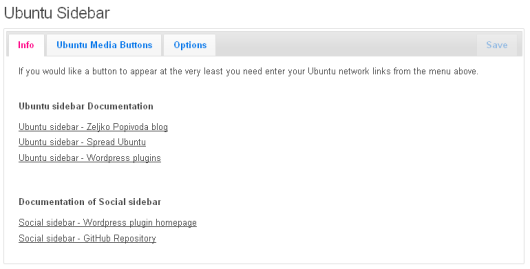
Info. 
Ubuntu media Buttons. 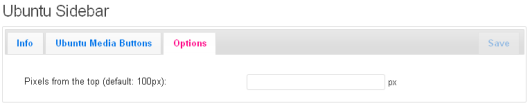
Options.
Instal·lació
- Upload folder
ubuntu-sidebarin WordPress plugin directory/wp-content/plugins/. - Activate the plugin through the ‘Plugins’ menu in WordPress.
- Find the ‘Ubuntu Sidebar’ menu under the Settings panel.
- Input Ubuntu network links in the Link fields, e.g.:
– Ubuntu Link: http://www.ubuntu.com
– Ubuntu LoCo Link: http://loco.ubuntu.com
– Why use Ubuntu Link: http://www.ubuntu.com/ubuntu/why-use-ubuntu
– Ubuntu online tour: http://www.ubuntu.com/tour
– Download Ubuntu Link: http://www.ubuntu.com/download
– Get Ubuntu CD/DVD Link: http://shop.canonical.com/index.php?cPath=17 - Input Ubuntu images links in the Image Link fields, e.g.:
– Ubuntu Image Link: wp-content/plugins/ubuntu-sidebar/images/ubuntu-com.png
– Ubuntu LoCo Image Link: wp-content/plugins/ubuntu-sidebar/images/ubuntu-loco.png
– Why use Ubuntu Image Link: wp-content/plugins/ubuntu-sidebar/images/why-ubuntu.png
– Ubuntu online tour Image Link: wp-content/plugins/ubuntu-sidebar/images/ubuntu-tour.png
– Download Ubuntu Image Link: wp-content/plugins/ubuntu-sidebar/images/download-ubuntu.png
– Get Ubuntu CD/DVD Image Link: wp-content/plugins/ubuntu-sidebar/images/ubuntu-dvd.png
and if you like specify custom images input link to images, otherwise the defaults images will be used. - Click on Save.
- Your done!
PMF
If you have any questions, ask them on Željko Popivoda blog plugin page.
Ressenyes
No hi ha ressenyes per a este complement.
Col·laboradors i desenvolupadors
«Ubuntu sidebar» és programari de codi obert. La següent gent ha col·laborat en este complement.
Col·laboradors
Traduïx «Ubuntu sidebar» a la teua llengua.
T’interessa el desenvolupament?
Revisa el codi , dona una ullada al repositori SVN o subscriu-te al registre de desenvolupament per RSS.
Registre de canvis
0.4
- Minor changes in code.
- Add new icon.
- Add CSS style for admin panel.
0.3
- Minor changes.
0.2
- Minor changes.
0.1
- First version.