
Opis
Debug Bar Cron adds information about WP scheduled events to a new panel in the Debug Bar. This plugin is an extension for
Debug Bar and thus is dependent upon Debug Bar being installed for it to work properly.
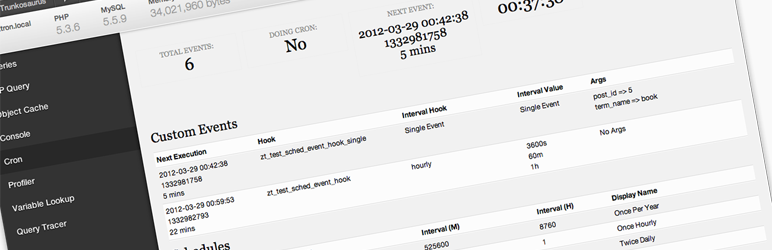
Once installed, you will have access to the following information:
- Number of scheduled events
- If cron is currently running
- Time of next event
- Current time
- List of custom scheduled events
- List of core scheduled events
- List of schedules
Slike ekrana

The Debug Bar Cron panel
Instalacija
- Install Debug Bar if not already installed (https://wordpress.org/extend/plugins/debug-bar/)
- Upload the
debug-bar-cronfolder to the/wp-content/plugins/directory - Activate the plugin through the ‘Plugins’ menu in WordPress
- View the WP schedule events information in the “Cron” panel in Debug Bar
ČPP
- Is debugging cron easier with this plugin?
-
Yes
Recenzije

24. Oktobra 2016.
This has been great for checking if WordPress's scheduled events are firing. Good for checking if you need to setup a real cron job or if that real cron job is failing. Very clear presentation.
Saradnici i programeri
“Debug Bar Cron” is open source software. The following people have contributed to this plugin.
Doprinositelji


Prevedi “Debug Bar Cron” na vaš jezik.
Zainteresirani za razvoj?
Pregledajte kôd, pogledajte SVN spremišteili se pretplatite na dnevnik razvoja od RSS.
Zapis promijena
0.1.3
- Fixed ‘Array to string conversion’ error when Cron job arguments are in a multi-dimensional array – props Jrf, ethitter, and mintindeed.
- Fixed a number of HTML validation errors – props Jrf.
0.1.2
- Added indicators for missed events
0.1.1
- Readme updates
0.1
- Initial release