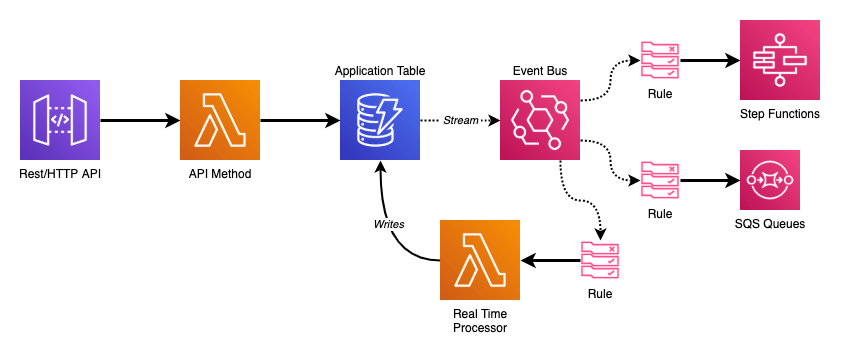
Whenever I start a new serverless application there are always three core technologies that form the basis: API Gateway APIs, Lambda Functions, and DynamoDB Tables. They’re the bread and butter of most AWS developers in this day and age.
From there, as my application grows in complexity, I inevitably end up adding in EventBridge Event Bus for triggering my downstream business logic and automation in reaction to the API.
Many of my APIs are designed to be RESTful where I am writing, reading, and updating data in the backend. My Lambda Functions are mainly focused on validation of the requests – which can simple schema validation or include complex logic around related records that may or may not exist – and the DynamoDB operation the resource and method map to.
Ensuring that my API functions have one, and only one, job to perform keeps them simple and easy to understand. The data layer of my application- the DynamoDB table primarily- is the source of truth for the service. Rather than have sequential operations at the API layer to trigger automation or business logic I instead want that trigger to be the action of the change in my data.
This is where marrying DynamoDB Streams to Event Bus comes in.
DynamoDB Streams and Lambda
When enabled, DynamoDB streams contain records of modifications to your table. These records are in the order they occurred and appear only once (no duplicates). This all occurs in near-real time which makes it an extremely attractive tool to turn on.
But, there are some gotchas. When you add a DynamoDB Stream as an event source to your Lambda Function it will receive batches of records serially (either from the start or the end of the stream). Lambda will not scale out horizontally as it must ensure records are processed in order. This means you need to be very careful about the business logic you put into those stream processor functions. Your stream will only be as fast as what is executing it, and if you introduce any bugs your entire pipeline will come grinding to a halt until you push a fix (I learned this the hard way).
There are a features for DynamoDB event sources that allow you to work/design around these issues. See the BisectBatchOnFunctionError and DestinationConfig options for more info.
My DynamoDB tables are almost always of a single table design. I have various types of records I store in a single table with generic keys for my indexes to enable the queries I require.
| MyTable: | |
| Type: AWS::DynamoDB::Table | |
| Properties: | |
| BillingMode: PAY_PER_REQUEST | |
| AttributeDefinitions: | |
| – AttributeName: pk | |
| AttributeType: S | |
| – AttributeName: sk | |
| AttributeType: S | |
| – AttributeName: gsi1_pk | |
| AttributeType: S | |
| – AttributeName: gsi1_sk | |
| AttributeType: S | |
| KeySchema: | |
| – AttributeName: pk | |
| KeyType: HASH | |
| – AttributeName: sk | |
| KeyType: RANGE | |
| GlobalSecondaryIndexes: | |
| – IndexName: GSI1 | |
| KeySchema: | |
| – AttributeName: gsi1_pk | |
| KeyType: HASH | |
| – AttributeName: gsi1_sk | |
| KeyType: RANGE | |
| Projection: | |
| ProjectionType: ALL | |
| StreamSpecification: | |
| StreamViewType: NEW_AND_OLD_IMAGES |
If I could be storing any kind of record in my table that makes writing logic on where to dispatch stream records in my Lambda Function more precarious. To me, the best solution is to dispatch ALL of my DynamoDB stream records to a centralized location that I can then build my business logic from.
EventBridge Event Bus
EventBridge is something I jumped onto during re:Invent 2019. Up until the introduction of the EventBridge Event Bus all serverless applications relied on AWS’s event sources for automated triggers. With Event Bus we now have our own custom eventing framework that plugs right into serverless applications.
There are a lot of features with EventBridge that do cool things around direct SaaS partner integrations (like Datadog), cross account eventing, and event discovery by pointing whatever you want at it, but don’t let those big use cases deter you from implementing one into small services.
We pay $1.00 for every 1,000,000 events we publish into a Bus, and we don’t pay for the rules that we attach to it.
We don’t pay for the rules we attach to our Event Bus.
Those rules enable patterns in your applications that before required all kinds of additional work and scaffolding to make happen. At a minimum a rule must define the source that triggers it. Past that, rules can become as fine grained as we desire. Emitting events with JSON payloads opens up the ability to drill into the details (effectively the body) and match against the content.
Rules are then able to invoke a wide range of AWS services. Beyond other Lambda Functions, you can pass events on to SQS Queues, SNS Topics, directly invoke Step Functions, call downstream HTTP endpoints… And then consider that you can have multiple rules triggering off the same events allowing parallel processing and workflows.
This flexibility and power dwarfs most other AWS offerings.
DynamoDB Events
As shown in the diagram at the start of this post; the goal is to emit changes to the DynamoDB table into an Event Bus where we can take full advantage of its Swiss army knife nature to plug in all of the business logic we want.
To this end, our DynamoDB stream processor has only one job to do:
| from datetime import datetime | |
| import json | |
| import os | |
| import boto3 | |
| EVENT_BUS = os.getenv("EVENT_BUS") | |
| events_client = boto3.client("events") | |
| def lambda_handler(event, context): | |
| """This Lambda function takes DynamoDB stream events and publishes them to an | |
| EventBridge EventBus in batches (DynamoDB streams can be submitted in batches of a | |
| maximum of 10). | |
| """ | |
| events_to_put = [] | |
| for record in event["Records"]: | |
| print(f"Event: {record['eventName']}/{record['eventID']}") | |
| table_arn, _ = record["eventSourceARN"].split("/stream") | |
| events_to_put.append( | |
| { | |
| "Time": datetime.utcfromtimestamp( | |
| record["dynamodb"]["ApproximateCreationDateTime"] | |
| ), | |
| "Source": "my-service.database", | |
| "Resources": [table_arn], | |
| "DetailType": record["eventName"], | |
| "Detail": json.dumps(record), # Gotcha here: Decimal() objects require handling | |
| "EventBusName": EVENT_BUS, | |
| } | |
| ) | |
| events_client.put_events(Entries=events_to_put) | |
| return "ok" |
This function takes a batch of DynamoDB stream records from the event source and translates them into the Event Bus event structure.
In my code example I treat the Source as something descriptive. For internal application events I tend to follow the pattern of service-name.component-name for labeling my sources. In this case it is simply my-service.database with the implication being if I end up with multiple tables they’re all the same source but different Resources – the table ARN here – that I can use as a part of my rule to filter out what I’m executing on. I map the DynamoDB action (INSERT, MODIFY, REMOVE) to DetailType and I pump the entire record into the Detail as JSON.
Now when I go to take action on changes in my table I can add complex rules looking for those specific attributes and details.
| MyFunction: | |
| Type: AWS::Serverless::Function | |
| Properties: | |
| Runtime: python3.8 | |
| CodeUri: ./src/my_function | |
| Handler: index.lambda_handler | |
| Events: | |
| TableChanges: | |
| Type: EventBridgeRule | |
| Properties: | |
| EventBusName: !Ref EventBus | |
| InputPath: $.detail | |
| Pattern: | |
| source: | |
| – my-service.database | |
| resources: | |
| – !GetAtt MyTable.Arn | |
| detail-type: | |
| – INSERT | |
| – MODIFY | |
| detail: | |
| dynamodb: | |
| Keys: | |
| pk: | |
| S: [{ "prefix": "OID#" }] | |
| sk: | |
| S: [{ "prefix": "UID#" }] |
By preserving the entire DynamoDB stream record I am able to match on key patterns to enable rules for specific record types.
The example above is taken from a Lambda Function that listened for the creation and modification of records that described customer integrations and then wrote back a historical record stating what keys were changed and by whom.

I could take this same rule, change it to listen for INSERT and REMOVE on those same key prefixes, and pipe matching events into a SQS FIFO Queue that manages aggregate records for customers tracking overall counts for things like the number of integrations or device counts (which would be a separate event rule going into the same queue).

This framework allows the service now to scale out, adding in automation and workflows on DynamoDB events without having to do anything to the stream, the stream processor, or anything that is already hooked up to a rule as they’re all completely independent components.
Drawbacks?
This design pattern isn’t without its inefficiencies which tend to pop out at large/high scale.
The amount of data being emitted by your table into the Stream isn’t necessarily a major issue. Past the free tier, GetRecords request will only run you $0.20 per million assuming your records aren’t very large. If they are, you can switch to KEYS_ONLY instead of sending the entire item into the stream which should still allow focused event rules.
That free tier covers 2,500,000 stream read request units every month. You may not notice it for quite some time.
You also run the risk of having a large amount of wasted events. At $1.00 per million on our Event Bus maybe we don’t care too much as small scale. Once throughput ratchets up and millions of table events are going through every day that becomes a different story. Ensuring our systems are designed around internal eventing should cut down on e-and-billing-waste.
Lastly, I’m going to make mention of service quotas – which might be a bit of bike-shedding but I’m gonna do it anyway.
EventBridge’s PutEvents API ranges from 600-2,400 requests per second depending on which region you’re operating in. These are limits you can increase, but you could quickly spike into them before you realized it. Batching events (like shown in our stream processor function above) is your best friend to stave this off.
This is not a limit you would (likely) be able to hit off a single DynamoDB stream (you’re more likely to back up on the stream while having plenty of overhead for events). Add in multiple sources for your Event Bus and it’s something you could spike into quickly.
 Bryson Tyrrell