
Build better websites – faster and without limitations
Bricks offers countless powerful features that make building your dream website not just possible, but effortless. Build what you envision with Bricks.
Unleash creative freedom with visual full site editing
Drag and drop elements around the canvas and structure panel. Create headers, sections, single posts/pages, archives, menus, WooCommerce products, cart, checkout, and popups. All through the same interface. Enjoy the intuitive live text editor, unlimited responsive editing with custom breakpoints, and the flexibility of a desktop or mobile-first approach.
Craft highly customizable menus
Design fully customizable & accessible desktop and mobile menus with our nestable nav menu builder. Tweak your menus to your exact requirements, providing seamless site navigation for every device.
Explore the menu builder

Design your entire WooCommerce store visually
Craft visually stunning WooCommerce stores with ease. Enhance user experience and boost sales with seamless store designs.
Explore the WooCommerce builderEngage audiences with targeted popups
Create captivating popups without relying on additional plugins. Deliver the right message at the right time by designing attention-grabbing popups that captivate your audience.
Explore the popup builder

Visualize and query data effortlessly
Unlock the power of data with the Query Loop Builder. Query any data from your WordPress database visually, including posts, users, media, and custom fields. Easily retrieve and display the information you need.
Explore the query loop builderPowerful features for highly efficient & modern workflows
CSS classes & variables for modular & scalable websites
Combine the power of CSS classes and variables for streamlined, scalable designs.
Use externally defined classes or create your own directly in the builder. Manage class with tools like search, rename, duplicate, and copy&paste—even between websites. Any pseudo element and pseudo class is supported, too.
Easily manage your CSS classes and variables utilizing the Class & Variable Manager. Duplicate, rename, lock, or categorize them individually or in bulk. Import/export and resolve naming conflicts during the import with ease.


Dynamic content and custom fields supercharged
Populate any part of your website with custom fields. Bricks’ dynamic content support is unparalleled and deeply intergrates with the most popular custom field plugins such as Advanced Custom Fields (ACF), Meta Box, JetEngine, Toolset, Pods, and ACPT.
Take full control with components
Create truly dynamic, reusable elements with components and component slots. Use style variants to manage multiple visual styles from a single base component—streamlining design consistency and boosting efficiency across your projects.


Build custom Gutenberg Blocks with Bricks
Bridge the gap between designers and editors. Build complex, reusable components in Bricks, then let content editors insert and configure them in Gutenberg—no canvas access needed. Maintain consistent design while giving clients a familiar editing experience.
Customizable breakpoints & mobile-first support
Craft pixel-perfect sites that look stunning on every device. Use & customize default breakpoints. Extend your site's responsiveness by adding your own breakpoints. Desktop or mobile-first approach. Preview your design changes in real-time, right in the builder. Improving SEO & user experience, and ensure maintainability and scalability as your site adapts to future devices automatically.
118+ ready-to-use elements
Build websites faster than ever with an extensive library of 118+ pre-built elements.
Incorporate professionally designed headings, texts, images, galleries, sliders, post grids, breadcrumbs, pagination, and more into your layouts.
Disable certain elements for a more streamlined, productive workflow or to remove the elements that you won’t want to be used on your site.
Turn static code into fully editable Bricks layouts
Paste HTML & CSS code directly into the builder. Bricks intelligently converts your HTML structure into native elements and applies your CSS as styles—giving you a fully functional, editable layout in seconds.
Effortless content refinement
Enjoy real-time content filtering and sorting without additional plugins and page refreshes. Create advanced facets to filter WordPress content by taxonomy terms or custom fields, enhancing your shop archives, listings, custom post type archives, and more.
All details in the Bricks Academy
Create dynamic and interactive websites with conditions and interactions
Customize your website’s behavior with Bricks’ flexible conditions and interactions. Personalize content visibility based on various criteria and incorporate interactive elements for a dynamic user experience.
Speed up your search results
Live search provides instant, real-time results as users type, significantly enhancing the overall user experience by eliminating page reloads and accelerating the search process.
At the same time, it offers complete control over how search operates on your site. With advanced Search Criteria, you can precisely define which data sources are included—posts, terms, users, or custom meta fields—and assign weighted relevance to prioritize the most important results.
All details in the Bricks Academy
Elevate your website designs with advanced typography
Revolutionize your website’s visual appeal with cutting-edge font integrations.
Seamlessly integrate Google Fonts & Adobe Fonts, or upload your own custom fonts through the font manager. All with variable font support.
Elevate your design with limitless type flexibility and GDPR conformity.

Fast, flexible icon management
Build a tailored icon set without extra plugins. Bulk-add SVGs, group them into categories, and search in seconds.
SVGs stay razor-sharp at any size, load lightning-fast, and keep file sizes tiny.
Perfect for modern, responsive, and high-performance websites.

Craft tailored login experiences
Craft unique login experiences tailored to your brand with personalized authentication pages for a seamless user journey.
Explore all form features
Maintenance & coming soon pages
Craft “under construction” and “coming soon” pages without extra plugins. Control site availability during updates or construction through role-based access and HTTP status codes.

Built-in Google Maps & OpenStreetMap
Display single or multiple locations with your choice of mapping solution—Google Maps for a familiar, feature-rich experience, or Leaflet (OpenStreetMap) for a fast, free, and privacy-friendly alternative. Customize markers, popups, and styling directly inside the builder and keep performance in your control.
Maximize productivity with pre-made templates
Speed up your workflow with class- and variable-based wireframes for clean layouts and quick prototyping. Then level up to fully styled design sets that transform your structure into a finished, professional design in just a few clicks.

Maximize productivity with templates
Streamline your website creation with Bricks’ versatile template engine. Create, organize, import, and export templates while improving organization with automtically generated full-page screenshots, tags, and categories.
Access & insert your templates from any other public Bricks installation through unlimited Remote Template URLs.

Save time with automated template screenshots
Automatically generate full-page screenshots of your templates every time you save. Need to do it in bulk? No problem—just a few clicks, and you’re set!
Create & edit content from the front end
Let users or clients create and update posts right from the front end—no WP-admin access or custom code required. With Create Post & Update Post actions plus new Rich Text and Image fields, you can map inputs to titles, content, taxonomies, or custom fields. Empower safe, structured publishing for directories, job boards, or any user generated content driven site.
Explore front end forms in the AcademyInject section templates across your site
Effortlessly integrate 'Section' templates at any point within your website's layout using any WordPress hook, whether it's before the header, within your plugin markup or after the content.
All details in the Bricks AcademyCreate your own custom elements
Use Bricks Element API to programmatically create your own, unique elements for all your website projects using PHP, HTML, CSS, and JavaScript.
All details in the Bricks AcademyUse and tweak our ready-made templates to get started in no time
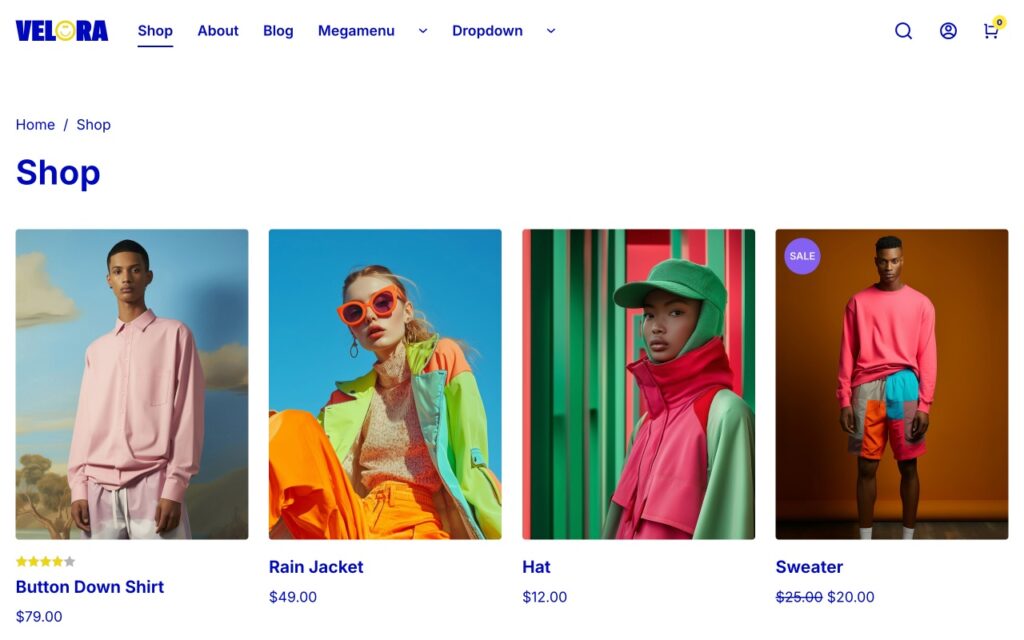
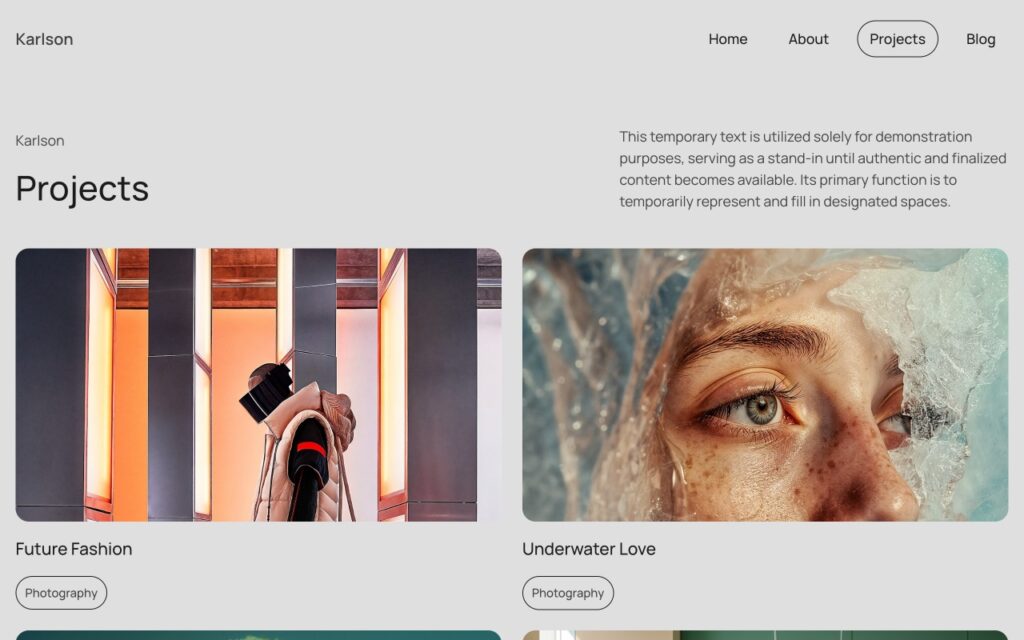
Jumpstart projects with pre-made wireframes and design sets – free of charge in every Bricks plan. Adjust them to your needs and embark on a swift creative journey.







There are many more features to explore
Build sites that rank
Optimize your website’s visibility and social media presence with SEO and Open Graph functionality backed right into the builder.
Utilize SEO settings to enhance your search engine rankings while leveraging custom Open Graph tags to optimize your website’s appearance and performance on various social media platforms. Without having to rely on yet another plugin.
Native SVG support
Explore new design possibilities through native SVG support. Add custom icons and graphics in scalable, retina-ready SVG format while optimizing file sizes for exceptional website performance.
Never lose your progress again
Safeguard and browse through your work in time with revisions and customizable autosave.
Undo/redo steps, customize autosave settings, and access revision history from the toolbar for added peace of mind.
Connect your website with powerful API integrations
Supercharge your website with API integrations. Connect to popular services such as Adobe Fonts, Google Maps, Google reCaptcha, Unsplash, Facebook, Mailchimp, and SendGrid to unlock enhanced functionality.
Lock down your content with ease
Tailor individual pages
Craft unique and engaging landing pages through page-specific settings. Incorporate custom code, one-page navigation, and specific body classes. Disable headers & footers as needed.
Go global with a multilingual site
Seamlessly translate your entire website into multiple languages with full integration for WPML and Polylang plugins. Effortlessly localize strings, media, and content.
Translated in 20+ languages
Available in the most popular languages, and with full RTL support. Translate Bricks into any language thanks to its full localization. Language & direction can be set individually for the builder.
Full control with builder access levels
Set builder access levels to maintain control over your layouts. Define specific access permissions for user roles or individual users to allow for collaboration while safeguarding the integrity of your designs.
Fine-tuned control with builder capabilities
Create your own builder capabilities where you can fine-tune permissions for a specific user or user role in a visual interface.
Make the builder interface your own
Customize the builder UI with versatile builder modes. Select from light or dark. You can even create your very own custom theme by setting a couple of CSS variables. To create an immersive environment that matches your designs, and fuels your creativity.
Learn more about builder modesTime-saving features to speed up your workflow
Keyboard-first control for power users
Stop breaking your flow. The Command Palette gives you instant, keyboard-driven access to everything inside the builder: edit posts, jump into settings, manage fonts, icons, and templates, or add elements with Emmet-like syntax. Work smarter, faster, and distraction-free.
All details in the Bricks AcademyYour controls, always within reach
Meet your new productivity sidekick: the Quick Access Bar. Switch between Content, Layout, or Typography in an instant—either by clicking an icon or using handy keyboard shortcuts. Setting indicators keep you informed on what’s active at each breakpoint, making your workflow smoother than ever.
Cross-domain copy and paste
Copy and paste elements, classes, or entire layouts across pages or websites, streamlining your process and saving valuable time.
Keyboard shortcuts
Add, delete, copy, paste, save, undo/redo and navigate between breakpoints, elements, and classes.
All with a few single keystrokes.
Duplicate anything instantly
Bulk actions
Browse the built-in Bricks Academy, how-to guides, videos, and insightful tips to enhance your skills right inside the builder.
Custom context menu
Not a fan of keyboard shortcuts? No problem. Access the most common actions by right-clicking on an element in the canvas and structure panel.
Quick search
Use Bricks' keyboard-shortcut accessible element & settings search instead of navigating through the entire interface.
Pinned elements
Pin your most used elements at the top of the elements panel to access them even faster.
Manage your posts in the builder
Create new posts and pages and navigate between your Bricks-enabled post types right in the builder.
Real-time preview
Visualize your final designs in real-time with auto-reloading preview tabs or right in the builder with a single click.
Built-in documentation
Browse the built-in Bricks Academy, how-to guides, videos, and insightful tips to enhance your skills right inside the builder.