

Descrição
O plugin de backup e migração UpdraftPlus tem a confiança da comunidade WordPress quando se trata de fazer backup, restaurar e migrar seus sites WordPress. O UpdraftPlus está instalado ativamente em mais de 3 milhões de sites em todo o mundo.
Faça backup com o UpdraftPlus
O UpdraftPlus é o plugin de backup e migração agendada mais popular e com melhor classificação do mundo. Faça backup para o seu local de armazenamento de sua preferência e restaure com apenas três cliques.
Faça backup para o Dropbox, Google Drive, Amazon S3 (ou compatível), Rackspace Cloud, FTP, DreamObjects, Openstack Swift ou e-mail.
A versão paga também permite fazer backup para o Microsoft OneDrive, Microsoft Azure, Google Cloud, Backblaze B2, SFTP, SCP, pCloud, WebDAV ou UpdraftVault, que é a nossa opção de armazenamento integrada ao UpdraftPlus.
Faça backup manualmente ou agende para ser executado a cada 2, 4, 8 ou 12 horas, diariamente, semanalmente, mensalmente ou quinzenalmente.
Restaure com o UpdraftPlus
Seu site WordPress está vulnerável. Ele pode ser hackeado. Algo pode dar errado com uma atualização, ou seu servidor pode travar. Você pode precisar reverter uma alteração feita, ou um erro causado por falha humana.
Seja qual for o motivo, você pode restaurar seu site WordPress com apenas alguns cliques usando o UpdraftPlus. Escolha quais componentes quer restaurar (ex. plugins, temas, banco de dados e outros) e clique novamente para restaurar. Em seguida, clique mais uma vez para voltar à tela principal.
Migre com o UpdraftPlus
Com a versão gratuita do UpdraftPlus, é fácil migrar seu site WordPress para outro provedor de hospedagem, servidor ou domínio.
Para migrar, basta baixar seu banco de dados, plugins, temas e outros itens do site de origem e, em seguida, enviá-los para o site de destino.
Durante a migração, um mecanismo integrado de pesquisa e substituição, identifica as strings antigas e as substitui para refletir o novo local. O UpdraftPlus economiza seu tempo e reduz o risco de links quebrados ou arquivos ausentes, como acontece nas migrações manuais.
Por que usar o UpdraftPlus?
É difícil criar um plugin de backup e migração confiável que funcione de maneira consistente em milhões de diferentes instalações do WordPress. O UpdraftPlus é conhecido por fazer exatamente isso. Somos confiáveis e estamos ativamente instalados em mais sites ao redor do mundo do que qualquer outro plugin de backup e migração do WordPress.
UpdraftPlus:
- Faz backup, migra e restaura
- Oferece um grande número de locais de armazenamento remoto
- Permite agendar backups, para que você possa “configurar e esquecer”
- É completo e fácil de usar
- Comprovadamente funciona em mais de 3 milhões de sites.
UpdraftPlus Premium
A versão gratuita do UpdraftPlus faz o backup e a migração do seu site sem problemas. No entanto, se você precisar de mais recursos e opções, pode adquirir nossa versão Premium.
Faça backup e migre com o UpdraftPlus Premium e:
-
Faça backups automáticos antes das atualizações. Restaure a versão mais recente se uma atualização do WordPress ou de um plugin quebrar seu site.
-
Faça backups incrementais. As alterações são adicionadas ao backup principal, economizando recursos do servidor em comparação com backups completos feitos repetidamente.
-
Tenha mais opções de armazenamento remoto, incluindo o Microsoft OneDrive, SFTP, Microsoft Azure, WebDAV, Google Cloud, SCP, Backblaze e pCloud.
-
Tenha 1 GB de armazenamento integrado, com o UpdraftVault, que oferece 99,999% de confiabilidade, redundância e escalabilidade.
-
Tenha mais controle sobre quantos backups são armazenados em um determinado intervalo.
Restaure a partir de outros plugins de backup, incluindo o BackWPup, BackupWordPress, Simple Backups e outros. -
Execute backups em horários definidos. Exemplo: durante períodos de baixo tráfego.
-
Faça backup em mais de um local para ter mais proteção.
-
Receba relatórios detalhados. Inclui somas de verificação criptográficas, para que você possa verificar a integridade dos arquivos de backup e muito mais.
-
Adquira a migração Premium. A migração para o site de destino é mais direta e pode ser feita a partir do site de origem.
-
Tenha compatibilidade com multisite/várias redes.
-
Faça backup de arquivos e bancos de dados que não sejam do WP, como tabelas da sua loja virtual ou personalizações nos arquivos básicos do WordPress.
-
Tenha criptografia do banco de dados.
-
Gerencie seus backups e migrações a partir do WP-CLI.
-
Tenha suporte Premium.
Saiba mais em nossa página de comparação. O UpdraftPlus Premium está disponível para compra aqui.
Gerencia vários sites?
O UpdraftCentral é um poderoso painel para controlar remotamente o WordPress, que permite gerenciar seus backups, atualizações, usuários, páginas, posts, plugins e temas a partir de um único local centralizado. Escolha entre:
- UpdraftCentral (gratuito, auto-hospedado)
- UpdraftCentral Premium (pago, auto-hospedado)
- UpdraftCentral Cloud (pago, totalmente hospedado)
Otimize seus sites de forma centralizada, combinando o poder do WP-Optimize e do UpdraftCentral, ou gerencie seus backups de forma centralizada, combinando o poder do UpdraftPlus com o UpdraftCentral.
Precisa criar um clone temporário do seu site?
O UpdraftClone torna rápido e fácil criar um ambiente temporário para testar as alterações que você quer experimentar. Basta selecionar as versões do WordPress e do PHP que você quer, e faremos o resto. Saiba mais sobre o UpdraftClone
O pacote completo de plugins da equipe Updraft e amigos
-
UpdraftPlus.
Faça backup, migre e restaure. Classificado com 5 estrelas no diretório de plugins e tem a confiança de mais de 3 milhões de donos de sites WordPress -
WP-Optimize.
Limpe o banco de dados, compacte imagens e armazene em cache. Otimize seu site WordPress. Avaliação de 5 estrelas dos usuários. Mais de 1 milhão de instalações ativas. -
All-In-One Security (AIOS).
Proteja seu site WordPress. Completo, rico em recursos e fácil de usar. Classificação de 5 estrelas dos usuários, com mais de 1 milhão de instalações ativas. -
WP Overnight.
Extensões de qualidade para sua loja WooCommerce. Soluções com classificação de 5 estrelas para faturamento, gerenciamento de pedidos e produtos, gerenciamento de clientes e muito mais. -
Easy Updates Manager.
Assuma o controle das atualizações. Muitos recursos gratuitos e uma versão Premium com ainda mais recursos. Mais de 300.000 usuários. -
Internal Link Juicer. Melhore o seu SEO. Automatize os links internos dentro do seu site WordPress. Economize tempo e tenha uma classificação mais alta nos mecanismos de pesquisa.
Para conhecer outros plugins úteis e gratuitos, consulte o perfil do nosso desenvolvedor líder aqui.
Você é multilíngue? Consegue traduzir?
Quer ajudar as pessoas que falam o seu idioma a fazer backup, migrar e restaurar seus sites WordPress?
O plugin de backup, migração e restauração UpdraftPlus está pronto e disponível. O processo de tradução é fácil e feito pela internet. Acesse aqui para ver as instruções: https://updraftplus.com/translate/.
Ou, se você já é um tradutor experiente do WordPress, basta selecionar o arquivo .pot no diretório wp-content/plugins/updraftplus/languages/. Se for examinar manualmente as strings traduzíveis, terá que usar as seguintes funções: _x(), __(), _e(), _ex(), log_e().
Muito obrigado aos nossos atuais tradutores.
Licença
Copyright 2011-24 David Anderson

This program is free software; you can redistribute it and/or modify
it under the terms of the GNU General Public License as published by
the Free Software Foundation; either version 3 of the License, or
(at your option) any later version.

This program is distributed in the hope that it will be useful,
but WITHOUT ANY WARRANTY; without even the implied warranty of
MERCHANTABILITY or FITNESS FOR A PARTICULAR PURPOSE.  See the
GNU General Public License for more details.

You should have received a copy of the GNU General Public License
along with this program; if not, write to the Free Software
Foundation, Inc., 51 Franklin St, Fifth Floor, Boston, MA  02110-1301  USA
Os tradutores de outros idiomas que não sejam o inglês são voluntários, e o wordpress.org não dá aos desenvolvedores de plugins controle sobre suas traduções. Portanto, confiar nelas é por sua conta e risco. O UpdraftPlus não pode garantir que as traduções feitas a partir do inglês original sejam precisas.
Reconhecemos e agradecemos às pessoas mencionadas em https://updraftplus.com/acknowledgements/ pelo código e/ou bibliotecas usados e/ou modificados nos termos de suas licenças de código aberto.
Capturas de tela
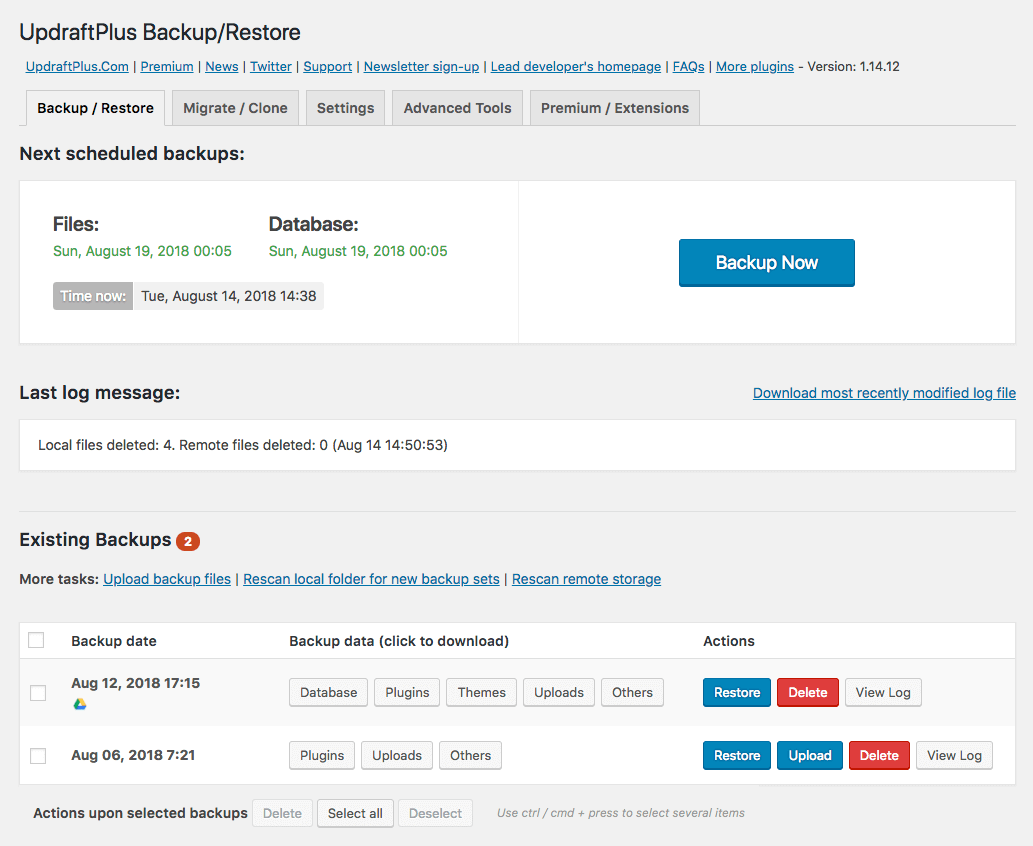
Painel principal: as capturas de tela são do UpdraftPlus Premium, portanto, podem fazer referência a alguns recursos que não fazem parte da versão gratuita
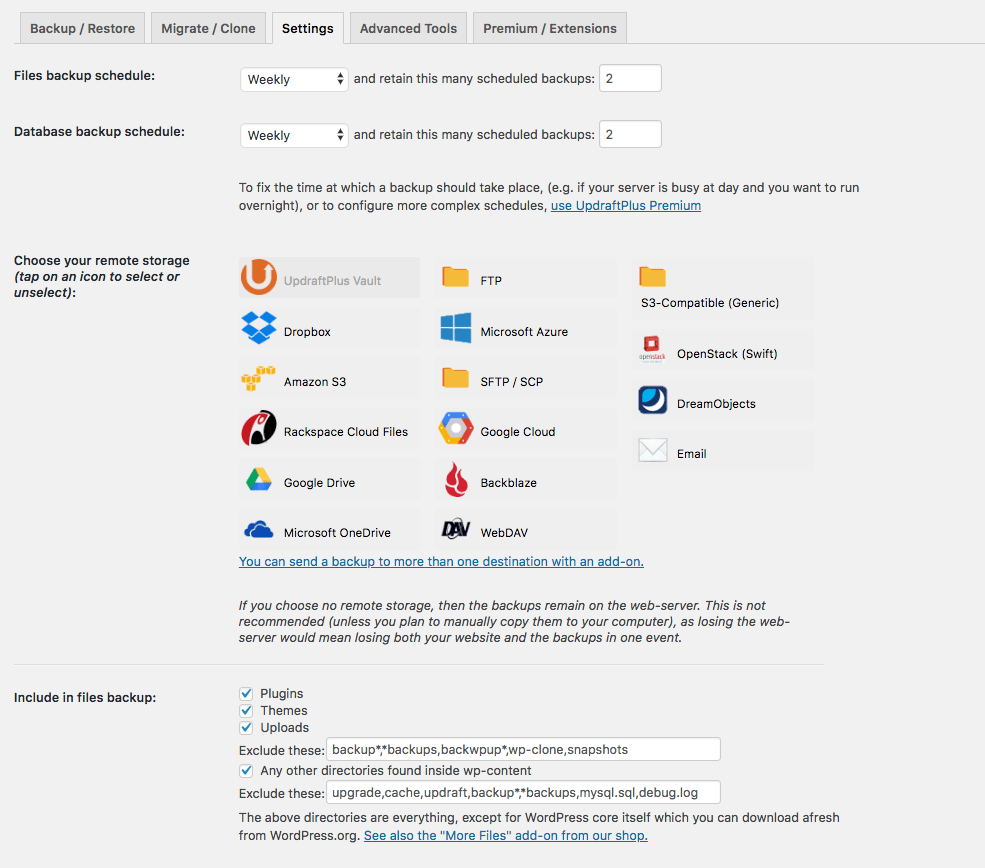
Configuração dos backups
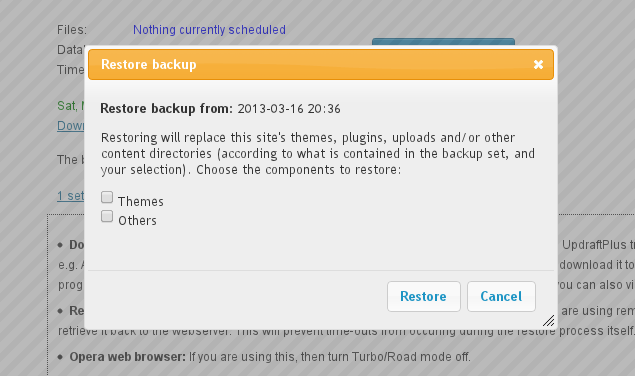
Fazer um backup

Escolha quais componentes restaurar
Perguntas frequentes
-
Como instalar o plugin de backup e migração UpdraftPlus?
-
Aqui estão as orientações de instalação do nosso canal do YouTube ou do nosso site.
-
E se eu tiver algum problema ou precisar de ajuda?
-
Se você está tendo dificuldades para fazer backup, migrar ou restaurar, há ajuda disponível.
Pesquise tópicos existentes no fórum de suporte do WordPress, ou publique um novo. Nossas equipes de suporte e desenvolvimento verificam e respondem às perguntas diariamente.
Os clientes do UpdraftPlus Premium, podem registrar um ticket diretamente com nossas equipes de suporte e desenvolvimento através do centro de suporte do UpdraftPlus.
Antes de falar com a gente, certifique-se de ter lido nossas perguntas frequentes e de ter atualizado para a versão mais recente do nosso plugin.
É muito útil se você puder incluir o registro de backups e o máximo de informações possível no seu relatório, por exemplo, a versão do PHP, o seu site, a descrição do erro, como você chegou à página que causou o erro, quaisquer outros plugins relevantes que você tenha instalado, além de qualquer outra informação que possa ser útil.
Para encontrar o registro de backups: há links no plugin para baixar os registros na página de configurações do UpdraftPlus, ou você pode recebê-los por e-mail. Caso contrário, acesse o diretório wp-content/updraft via FTP e procure por ele lá.
Se você souber como, envie seus registros de erros do PHP: apenas as poucas linhas que aparecem ao executar um backup, geralmente no arquivo chamado error_log, possivelmente no diretório wp-admin, que você pode verificar via FTP. Se você for um programador e puder depurar e enviar um patch, melhor ainda.
-
A migração no plugin gratuito envolve baixar os backups do site de origem e, em seguida, enviá-los para o site de destino.
Para encontrar o registro de backups: há links para baixar os registros na página de configurações do UpdraftPlus, ou você pode recebê-los por e-mail. Caso contrário, acesse o diretório wp-content/updraft via FTP e procure por ele lá.
Tanto o plugin gratuito quanto o Premium incluem um mecanismo integrado de pesquisa e substituição, para substituir as strings antigas pela nova localização.
Se a migração é tudo o que você precisa, e para migrações simples de um único site, o plugin gratuito provavelmente atenderá às suas necessidades. Se você tiver necessidades adicionais relacionadas a backups, por exemplo, o recurso de fazer backup antes de atualizações, se precisar de mais locais de armazenamento remoto ou se tiver um WordPress multisite, recomendamos o UpdraftPlus Premium pelos benefícios adicionais que ele oferece.
-
O UpdraftPlus está ultrapassando o tempo ao tentar fazer backup, após eu ter deixado por algum tempo para dar uma boa chance ao processo. O que posso fazer?
-
Provavelmente, esse problema é causado pela falta de recursos da sua conta, devido ao seu provedor de hospedagem (mais barato). Isso está longe de ser ideal. Embora o UpdraftPlus suporte retomar as execuções de backup desde o início, para evitar que tudo tenha que ser feito de uma só vez, ele tem suas limitações. O melhor é escolher um provedor de hospedagem mais confiável. Se isso não for possível, tente acessar as “Configurações avançadas” e reduzir o tamanho em que os arquivos zip são divididos. O UpdraftPlus é conhecido por realizar backups eficazes de sites que ocupam vários gigabytes em servidores que não têm falta de recursos.
Avaliações


Colaboradores e desenvolvedores
“UpdraftPlus: Plugin de backup e migração para WP” é um programa de código aberto. As seguintes pessoas contribuíram para este plugin.
Colaboradores


UpdraftPlus: Plugin de backup e migração para WP” foi traduzido para 36 localidades. Agradecemos aos tradutores por suas contribuições.
Traduzir o “UpdraftPlus: Plugin de backup e migração para WP” para seu idioma.
Interessado no desenvolvimento?
Navegue pelo código, consulte o repositório SVN ou assine o registro de desenvolvimento por RSS.
Registro de alterações
The UpdraftPlus backup blog is the best place to learn in more detail about any important changes.
N.B. Paid versions of UpdraftPlus Backup / Restore have a version number which is 1 higher in the first digit, and has an extra component on the end, but the changelog below still applies. i.e. changes listed for 1.16.32.x of the free version correspond to changes made in 2.16.32.x of the paid version.
1.26.5 – 05/Jun/2026
- SECURITY: Previous versions contained a defect allowing sites with an active Migrator key (paid versions only) or UpdraftCentral key (free and paid versions) to have unauthorised operations carried out on them. All users should update immediately.
- TWEAK: Added explicit HTTP timeout of 60 seconds to pCloud chunk upload requests to prevent cURL error 28 on slow server connections
- TWEAK: Guard curl_close(), finfo_close() and xml_parser_free() calls with a PHP version check to prevent deprecation warnings on PHP 8.5+
- TWEAK: Update the bundled common-libs version
- AJUSTE: substituidas todas as ocorrências de wpdb::esc_like() por UpdraftPlus_Database_Utility::esc_like() em todo o código, para manter a consistência.
- AJUSTE: adicionado o guia de orientação “backup automático antes da atualização”
1.26.4 – 07/May/2026
- FIX: In version 1.26.2, a regression prevented the backup schedule, including the day name or number, as well as backup entity exclusion rules, from being saved.
- TWEAK: Alert users who wrongly enter URLs instead of an actual hostname for SFTP and FTP remote storage.
- TWEAK: Updated DreamObjects endpoints by removing the deprecated objects-us-west-1, marking objects-us-east-1.dream.io as unavailable (Nov. 12th, 2025), and adding admin notices to inform users of this change.
- TWEAK: get_structured_data() now accepts params to avoid timeouts.
1.26.3 – 23 de abril de 2026
- RECURSO: implementada a extração por streaming melhorada, para arquivos grandes durante a restauração, a fim de gerenciar casos em que o tamanho do arquivo exceda o limite de memória do PHP.
- FIX: Fix users role filter empty state shows generic “Failed to Fetch Data” error.
- CORREÇÃO: corrigidas falhas no backup de tabelas, que tinham colunas invisíveis e grandes volumes de dados.
- CORREÇÃO: Não era possível desmarcar todas as categorias de um post no painel do UDC
- AJUSTE: adicionado um novo comando interno, para acessar informações de instalação de determinados plugins.
- AJUSTE: garantia de que a notificação de backup automático seja sempre uma string, para evitar a obsolescência no PHP 8.1+ na função wp_kses()
- AJUSTE: correção dos erros de JavaScript, que ocorrem ao excluir as últimas chaves UDC geradas.
- AJUSTE: foram implementados ajustes para corrigir problemas de desalinhamento da interface do usuário, causados pela atualização do design visual do WordPress 7 no painel administrativo. A interface do plugin agora está corretamente alinhada com os padrões de design atualizados.
- AJUSTE: prevenção de páginas de configurações com erros em outros plugins em multisite, quando o UpdraftPlus estiver ativo, devido aos URLs de menu modificados.
- TWEAK: Update all links in the addons folder to use teamupdraft.com instead of updraftplus.com.
- AJUSTE: foi substituído esc_html_e() por esc_html__() nos casos em que a concatenação de strings estava descartando silenciosamente o separador de dois pontos na mensagem de falha de conexão SFTP e na notificação de alerta de JavaScript do noscript
- AJUSTE: alterada para a API/função phpseclib nativa, para a descriptografia de tokens do Dropbox, substituindo a função mcrypt_decrypt, que está obsoleta desde o PHP 7.1 e foi removida no PHP 7.2.
- CORREÇÃO: correção da notificação “Deslocamento indefinido” do PHP, que ocorria durante a restauração de um backup de um site único para um multisite. Isso acontecia durante a operação de busca e substituição, devido à ausência das tabelas users e usermeta.
- AJUSTE: melhorada a função de descompressão de arquivos, para processar mais inclusões/exclusões de pastas
- TWEAK: Update all links in the methods folder to use teamupdraft.com instead of updraftplus.com.
- AJUSTE: adicionados campos de status e data do post à resposta da API get_posts para o UDC
1.26.2 – 03 de março de 2026
- TWEAK: Added PHP 8.5 support to UpdraftClone
- AJUSTE: correção de alertas de obsolescência no PHP 8.4, para a integração com o Dropbox
- AJUSTE: tornar o ícone de alerta de cancelamento de backup responsivo, com dimensionamento baseado em porcentagem
- AJUSTE: prevenção de alertas de PHP suprimidos de serem exibidos no registro de backup e restauração no PHP 8.0+
- AJUSTE: em um site onde o proprietário restringiu os (super)administradores (de modo que eles não possam restaurar backups), é necessário definir primeiro uma constante, para usar a ferramenta de depuração de HTTP para endereços IP internos.
- AJUSTE: atualização de todos os links na pasta de configurações, para usar teamupdraft.com em vez de updraftplus.com.
- AJUSTE: ao excluir conjuntos de backup criados através de uma migração direta de site para site, a caixa de seleção “Excluir também do armazenamento remoto” é desnecessária.
1.26.1 – 19 de janeiro de 2026
- CORREÇÃO: os envios fragmentados do Google Drive não retomavam de onde haviam parado, mas começavam do início, resultando em arquivos duplicados
- AJUSTE: adicionado um comando do WP-CLI, para registrar uma chave do produto (versão premium)
- AJUSTE: adicionado link para cadastro do produto na versão premium
- AJUSTE: correção do erro de JS no modal de conexão do UpdraftCentral Cloud.
- AJUSTE: correção de erro gramatical na notificação administrativa sobre espaço insuficiente no disco.
- AJUSTE: atualizados os links, para melhorar a experiência do usuário
- AJUSTE: atualizados os links premium na página de configurações
- AJUSTE: atualizados todos os links nas pastas includes/notices/central, para usar teamupdraft.com em vez de updraftplus.com.
- AJUSTE: atualizada a versão da tag common-libs
1.25.9 – 12 de novembro de 2025
- CORREÇÃO: Um problema que fazia com que a lista de tabelas nas ferramentas “Tamanho do banco de dados” não fosse exibida, devido à reformulação do código implementada na versão 1.25.8.
- AJUSTE: Adicionada função para retornar dados do menu de ferramentas avançadas em um formato estruturado.
- AJUSTE: corrigida a regressão na versão 1.25.2, que fazia com que a notificação administrativa “Ainda não conectado à licença” redirecionasse para teamupdraft.com em vez de para a aba UpdraftPlus premium/extensões.
- AJUSTE: Reformulação da função de dados das chaves de conexão para remover duplicações e ler a partir de uma única fonte
- AJUSTE: Restaurado o ícone do pop-up de confirmação de backup ausente nas versões mais antigas do WordPress.
- AJUSTE: Removido HTML indesejado da notificação em texto simples e adicionadas novas linhas após cada frase na mensagem da oferta de venda.
- AJUSTE: Atualização do URL/link da promoção sazonal da Black Friday
- AJUSTE: Atualização dos links “confira o Premium” e “fazer backup de tabelas e bancos de dados externos que não sejam do WP” para evitar erros HTTP 404 (não encontrado).
- AJUSTE: Atualização da detecção do charset do banco de dados para ser compatível com as sintaxes CHARSET= e CHARACTER SET em dumps SQL
- AJUSTE: Substituída a conversão (booleana) obsoleta
1.25.8 – 07 de outubro de 2025
- CORREÇÃO: erro fatal no UpdraftCentral ao tentar gerenciar posts, quando não existem posts.
- CORREÇÃO: durante uma falha no processo de cópia de arquivos ao restaurar, era criado um diretório com o mesmo nome do arquivo, e o processo de restauração continuava quando deveria ter sido interrompido
- CORREÇÃO: erro fatal do PHP nos comandos do WP CLI ao listar ou examinar backups existentes no PHP 8.0+ após uma nova varredura
- AJUSTE: Adicionado suporte ao UpdraftCentral à função import_settings com valores de retorno
- AJUSTE: Adicionado suporte para novas regiões do Amazon AWS S3
- AJUSTE: Adicionadas estatísticas do Burst à lista de plugins da família
- AJUSTE: Ajustada a lógica de backup para reconhecer colunas invisíveis e, quando isso ocorrer, usar uma consulta que especifique explicitamente as colunas necessárias, em vez de depender de “SELECT *”.
- AJUSTE: Garantir que o processo de restauração seja encerrado com um erro quando houver falha na cópia/movimentação de arquivos
- AJUSTE: Melhoria do relatório de e-mails de backup, para refletir melhor os tipos e o status dos backups.
- AJUSTE: Novo ponto de extremidade (endpoint), para a coleta de dados de configurações bloqueadas do UpdraftCentral
- AJUSTE: Realizar uma pesquisa e substituição em __PHP_Incomplete_Class para que funcione com unserialize() quando a desserialização de objetos não for permitida.
- AJUSTE: Reestruturação da seção de informações do site, para remover a duplicação e ler a partir de uma única fonte
- AJUSTE: Resolvido um alerta de PHP acionado ao carregar o plugin através da página WP Plugins — causado por funções de tradução (ex. __()) sendo chamadas muito cedo.
- AJUSTE: Parte do texto foi omitida do arquivo POT de tradução, o que fazia com que determinados plugins e bibliotecas de tradução não conseguissem encontrar o texto, impossibilitando a tradução.
- AJUSTE: Atualização da função db_size para permitir o retorno de dados ou HTML, dependendo do argumento que for passado.
1.25.7 – 07 de agosto de 2025
- CORREÇÃO: correção de um problema que impedia a verificação da presença de pastas antigas no diretório de backup. As pastas antigas criadas durante a restauração da entidade “Outros” não eram detectadas corretamente.
- CORREÇÃO: as entradas de bloqueio por backup não eram removidas, o que causava um acúmulo dessas entradas no banco de dados ao longo do tempo. (Inclui a limpeza de entradas antigas).
- AJUSTE: adicionado o IDrive e2 e o MEGA à lista de armazenamentos compatíveis com S3
- AJUSTE: chamada de função interna, para evitar uma notificação de obsolescência do PHP 8.1 em novas instalações do WordPress
- AJUSTE: adicionado o wp-staging à lista padrão de exclusão de envios
- AJUSTE: adicionado o gerenciador do UpdraftCentral, para solicitações de envio de ícones do site.
- AJUSTE: adicionada compatibilidade com o dashicon da visualização do banco de dados nas versões do WordPress anteriores à 5.5.
- AJUSTE: incluidas informações sobre o ícone do site na resposta ‘get_site_icon’ do módulo principal do UpdraftCentral.
- AJUSTE: solucionado o problema da lista vazia nos relatórios de e-mail de backup, criados pela versão gratuita do UpdraftPlus
- AJUSTE: a caixa de seleção “Acessar todos os recursos do UpdraftPlus Premium” não deve ser exibida após a ativação da compra
- AJUSTE: remoção das notificações de promoções sazonais (Ano Novo, verão, primavera e coleção de plugins)
- AJUSTE: gerenciamento dos conjuntos de caracteres não compatíveis definidos nos campos da tabela durante a pré-restauração do banco de dados.
- AJUSTE: atualizados os links na aba “Extensões premium” da página do menu administrativo do plugin.
1.25.6 – 27 de maio de 2025
- CORREÇÃO: solucionado um problema que impedia a atualização do rótulo de armazenamento remoto
- CORREÇÃO: solucionado um problema que podia causar um comportamento indesejado ao restaurar arquivos especiais
- CORREÇÃO: resolvido um erro fatal ao executar um script de backup PHP independente com “do_action(‘updraft_backup_all’)”.
- CORREÇÃO: resolvido um problema que causava o mau funcionamento de certos recursos (ex.: informações do PHP), devido à falta de um atributo HTML no elemento acionador.
- CORREÇÃO: problema que causava falha na migração de sites que usavam o plugin Performance Lab, ou outros plugins que implementavam um cache de objetos plug-and-play
- AJUSTE: gerenciados os erros não fatais na renomeação de arquivos durante a restauração
- AJUSTE: o recurso de backup automático, agora vem desativado por padrão em novas instalações
- AJUSTE: retornado o status do post e a data formatada da API de posts do UDC
- AJUSTE: substituída uma chamada à função unserialize() na biblioteca de armazenamento do Dropbox
- AJUSTE: validação do endpoint DreamObjects, para garantir que apenas os formatos esperados de endpoint DreamObjects possam ser aprovados.
- AJUSTE: posicionada a opção “inclui todas as tabelas não listadas abaixo” no início da primeira tabela identificada, no widget de restauração do banco de dados.
- AJUSTE: adicionado um novo endpoint padrão no DreamObjects, juntamente com uma interface de usuário, para permitir que os usuários adicionem endpoints personalizados no formato “s3..dream.io”.
- AJUSTE: o complemento Azure Storage Service, agora requer o PHP 5.6 ou superior, para oferecer compatibilidade com o uso obrigatório do TLS 1.2, que entra em vigor a partir de 31 de agosto de 2025.
1.25.5 – 17 de abril de 2025
- CORREÇÃO: um erro que impedia a abertura da caixa de diálogo “Criar novo usuário de API e contêiner” do Rackspace.
- AJUSTE: um cabeçalho HTTP destinado a encerrar a conexão do navegador recebia incorretamente um valor que o cabeçalho não aceita.
- AJUSTE: possibilidade de escolher automaticamente a página de finalização de compra correta, quando o usuário estiver prestes a adquirir produtos do TeamUpdraft a partir do plugin
- AJUSTE: limpeza do cache do CSS do tema Divi ao final do processo de restauração
- AJUSTE: solucionado um alerta do PHP no complemento do pCloud ao atualizar da versão gratuita para a premium.
- AJUSTE: atualizadas as mensagens de erro, quando o usuário não consegue se conectar à sua conta do TeamUpdraft na aba “Premium/Extensões”.
1.25.4 – 24 de março de 2025
- CORREÇÃO: solucionado um problema na versão 1.25.3, em que faltava o campo de entrada para criptografia do banco de dados, devido ao uso da função “wp_kses_post”, que não permite a renderização da tag “”
- AJUSTE: adicionados novos campos ao gerenciador do UpdraftCentral
1.25.3 – 21 de março de 2025
- FIX: An issue that prevented an UpdraftClone backup from sending when attempting to boot an UpdraftClone from WP_CLI
- CORREÇÃO: problema que impedia a alteração da região padrão do UpdraftClone ao tentar iniciar o UpdraftClone a partir do WP_CLI
- AJUSTE: o cabeçalho de solicitação “x-amz-content-sha256”, agora é assinado e incluído na assinatura S3 versão 4. Alguns provedores baseados em S3, exigem a assinatura desse cabeçalho para um cálculo preciso da assinatura.
- AJUSTE: introduzida uma nova constante denominada “UPDRAFTPLUS_S3_EXCLUDE_SIGV4_CONTENT_SHA256_HEADER”. Essa constante permite excluir os cabeçalhos “x-amz-content-sha256” da assinatura, se necessário. Ela aceita um valor booleano, sendo o padrão “false”.
- AJUSTE: adicionados os recursos “noopener, noreferrer” à chamada window.open() do JavaScript, para impedir que a página de destino altere o conteúdo da página original
- AJUSTE: recurso de coleta de favicons para o UpdraftCentral
- AJUSTE: pequeno ajuste no módulo “atualizações”, para incluir ícones de plugins e URLs de capturas de tela nos itens de atualização de temas
- AJUSTE: novo módulo do UpdraftCentral para coletar dados em segundo plano
- AJUSTE: revisado o texto encontrado nas configurações avançadas, referente à exclusão de arquivos de backup locais
- TWEAK: Update seasonal notices
- AJUSTE: melhoradas as notificações, para indicar a introdução de outros plugins que pertencem à mesma família de plugins.
- AJUSTE: para evitar problemas de CORS e garantir que o plugin UpdraftPlus funcione corretamente e seja acessível pelo painel do UpdraftCentral, o nome do servidor e/ou o domínio de origem foram alterados de updraftplus.com para teamupdraft.com.
- COMPATIBILIDADE: solucionados os alertas de obsolescência do PHP no arquivo lockadmin.php, eliminando o uso de propriedades dinâmicas
1.25.2 – 26 de fevereiro de 2025
- FEATURE: Added a “Cron events” tab in the Advanced Tools section to check for the presence of the UpdraftPlus cron job.
- FIX: Resolve the issue of uploads to pCloud failing after a folder name change by resetting the “folderid” whenever the folder name is updated.
- TWEAK: Add site information for WooCommerce and HPOS support to the database backup header.
- TWEAK: Create a log entry when a bot verification page appears during the file upload in the migration procedure.
- TWEAK: Improve error message clarity for failed connection tests in migration.
- TWEAK: Include details in the backup log file about the status and availability of the proxy configured in the system.
- TWEAK: Update the Google library to support the WP_PROXY_HOST and WP_PROXY_PORT constants.
- TWEAK: Update the link for Onedrive and Azure app creation
- COMPATIBILITY: Got rid of PHP 8.4 deprecation messages caused by the E_STRICT constant usage
1.25.1 – 11/Jan/2025
- SECURITY: Fix a non-persistent reflected XSS vulnerability due to a missing nonce combined with missing sanitisation. This could allow an attacker, who persuaded you to click a personally-crafted link to your site’s dashboard whilst you were logged in, to once run JavaScript code in your dashboard. Thanks to Asaf Mozes for finding and responsibly disclosing this issue.
- FIX: Prevent the restoration from failing when there is a ‘sync-xhr=()’ permission policy on the response header.
- FIX: Improve the approach of acquiring a suggested region for Amazon AWS S3 if a failure arises during the getBucketLocation() call, particularly when the XML response fails to provide a field for the suggested region – this resolves issues with regions (e.g. us-east-2) which recently changed their response behaviour
- TWEAK: Broaden the support to incorporate the “ap-southeast-4” region of Amazon AWS S3 and additional recently updated regions
- TWEAK: A regression in the paid version update checker to version 4.13.2, resulting in non-appearance of notices concerning subscription status or WP version compatibility.
1.24.12 – 23 de dezembro de 2024
- FIX: The pre-restoration stage failed to properly address the tables that were to be excluded, which caused a logical error that misread the checked “include all tables not listed” option as an instruction to restore every table
- FIX: Update PHPSecLib library to version 2.0.48 which has the fixes for the “gmp_pow(): base and exponent overflow” on certain PHP versions and could cause backups to fail on the SFTP remote storage
- TWEAK: Complete the review and removal of calls to the unserialize() PHP function allowing class instantiation begun in 1.24.7. (The final removal involved a theoretical security defect, if your development site allowed an attacker to post content to it which you migrated to another site, and which contained customised code that could perform destructive actions which the attacker knew about, prior to you then cloning the site. The result of this removal is that some search-replaces, highly unlikely to be encountered in practice, will be skipped).
- TWEAK: Drop search and replace feature for PHP 5.2 users (to fulfil the preceding item)
- TWEAK: Tweak UpdraftCentral media module to add “has_image_editor” property to each media item
- TWEAK: On the restoration screen in a multisite configuration, the dropdown labeled “which site to restore” was covering other HTML elements, which caused some buttons to be positioned at the bottom instead of at the top
- TWEAK: Avoid deregistering jQuery-UI CSS if already printed by other plugins to prevent compatibility issues
- TWEAK: In the context of database restoration, the execution of LOCK and/or ALTER SQL statements must be avoided for any tables that are part of the “skipped tables” list
- TWEAK: openssl_free_key() is only needed on PHP < 8
- TWEAK: Various coding style changes to comply with “Plugin Check” rules
1.24.11 – 15 de novembro de 2024
- TWEAK: Do not request drive.readonly scope on Google Drive connections, due to Google’s app permissions review (unannounced and requires us to create a Youtube video for their review process) – this means that (until the review completes) new connections to Google Drive can only access backups created by UpdraftPlus directly, and not backups which you manually upload to Google Drive. This restores the ability to make new connections to Google Drive.
- TWEAK: Adjustment of the UpdraftPlus_S3_Compat class to preserve compatibility with the external UpdraftPlus AWS SDK plugin (https://github.com/DavidAnderson684/updraftplus-aws-sdk).
1.24.9 – 14 de novembro de 2024
- FIX: A regression in 1.24.8 when handling restoration of wp-config.php
- TWEAK: The changes in handling of loading text domains in 1.24.8 did not cover most cases
- TWEAK: Introduce the “updraftplus_use_builtin_wpcore_restoration” filter which can be used to restore WP-Core entity using a different WP-Core restoration mechanism especially in a case that the admin-ajax.php file couldn’t be deleted during the restoration
1.24.8 – 13 de novembro de 2024
- TWEAK: Add descriptions for the ‘Clone Package’ dropdown when creating a clone.
- TWEAK: Move the “load_plugin_textdomain” call from being called through “plugins_loaded” action to being called via “init” action
- TWEAK: Update the log message to specify that backup files are marked as “processed” when no remote storage is selected, and as “uploaded” when remote storage is selected.
- TWEAK: Some code tidying in the restore class
1.24.7 – 04 de novembro de 2024
- TWEAK: Include the .part file extension into the cleanup list, guaranteeing that files associated with this extension are regularly deleted from the backup directory
- TWEAK: The update functionalities in the WordPress plugin information box (6.5 and later) have been adjusted to stop updates from taking place in the same window, ensuring that the “auto-backup before update” dialog appears as intended
- TWEAK: Add customized “unserialized” method into the UpdraftPlus class which can handle the use of the “options” argument or its absence when running across different PHP versions
- TWEAK: Add the UPDRAFTPLUS_SEND_UNWRITABLE_BACKUP_DIRECTORY_EMAIL constant to disable the sending of unwritable backup directory emails to users.
- TWEAK: Clearer notifications to users regarding unconfigured remote storage settings and/or the selection of remote storage that are not part of their UpdraftPlus version
- TWEAK: During the resumption of OneDrive’s chunk uploads, the authorisation header and bearer token should not be included as it may lead to an unauthenticated error due to a different upload URL.
- TWEAK: Implement code to enable automatic activation of the UpdraftPlus plugin during the migration process from a multisite setup to a standalone site
- TWEAK: In a multisite environment, ensure that users can access the UpdraftPlus plugin page even in the absence of the WP_ALLOW_MULTISITE constant
- TWEAK: UpdraftClone now supports PHP 8.4
- TWEAK: Prevent a potential PHP deprecation notice when zip creation fails
1.24.6 – 25 de setembro de 2024
- TWEAK: In 1.24.5, the browser title wrongly displayed as “UpdraftPlus” when accessing an unrelated plugin page using the main menu.
1.24.5 – 24 de setembro de 2024
- FIX: Incorrect regular expression for DigitalOcean Spaces endpoint
- FIX: CSS conflicts with the LearnDash LMS Instructor Role Add-on plugin which caused some UI elements to disappear
- TWEAK: Reorganize UpdraftPlus in left-hand menu and rename it to “UpdraftPlus”; to disable it, follow this guide: https://updraftplus.com/new-location-of-updraftplus-in-the-wordpress-dashboard/
- TWEAK: Add span wrapper to UpdraftCentral connection failed message
- TWEAK: Add the “Go here to complete your settings” link into the appropriate admin notice that when clicked will jump to the UpdraftVault configuration if no settings are specified.
- TWEAK: Adjust regex patterns that didn’t match some temporary files, causing them to not be automatically removed
- TWEAK: After a restoration, clicking “Delete old folders” will also remove the wp-config-pre-ud-restore-backup.php file
- TWEAK: On the settings page/tab; prevent the floating “Save changes” button from getting clicked multiple times and/or sending multiple AJAX requests
- TWEAK: Remove pCloud from the add-ons list on the “Premium / Extensions” tab (there is no change in its availability)
- TWEAK: Renamed wp-config-backup.php to wp-config-pre-ud-restore-backup.php to clarify its purpose as a backup file created before restoring WordPress core entities, and it will only be generated if the user does not select the “Over-write wp-config.php” option during restoration, as the previous name was too generic and could cause confusion
- TWEAK: The popup modal for automatic plugin updates fails to retain the backup checkbox selection when the “remember” option is enabled in a Multisite environment.
- TWEAK: Updated autobackup selector to resolve issues caused by the missing “update-link” class in WPForms Pro plugin
1.24.4 – 02 de julho de 2024
- FIX: Case-sensitive issue of bit field type names in a table.
- FIX: Resolved issue where backup files could not be deleted from remote storage when either the root directory was active or no directory was specified in the OneDrive configuration form.
- FIX: When users attempt to update a plugin using the “View Version x.x.x Details” link instead of choosing “Update Now,” the plugin is successfully updated; however, the UI incorrectly displays an “Update Failed” message
- FIX: Conflict with the Gravity Forms plugin when there was an older version of jQuery UI presented on the “Installed Plugins” page.
- TWEAK: Ensure compliance with Google Granular Consent and check for required permissions during storage access authorisation of Google Drive and Google Cloud
- TWEAK: Prevent PHP warning and deprecation messages after completing access authorisation to Google Drive storage.
- TWEAK: Prevent PHP warning when Dropbox remote storage has been authenticated and the page is refreshed.
- TWEAK: Added filter updraftplus_working_dir_localpath to allow temporary unzip path to be modified by developers
- TWEAK: Modify the displayed title of the plugin from “WordPress Backup & Migration Plugin” to “WP Backup & Migration Plugin” as required by the plugin directory team
- TWEAK: Parse certain php events and log proper error messages
1.24.3 – 30 de abril de 2024
- FIX: Regression in 1.23.16 for improving logs which then caused incorrect_offset error reported by Dropbox wasn’t properly handled.
- TWEAK: The UpdraftVault remote storage can handle Wasabi as well as Amazon S3 storage in the background.
- TWEAK: Fix WP_Theme_JSON_Resolver::theme_has_support deprecation warning for UpdraftCentral
- TWEAK: Prevent “PHP Warning: Undefined property: UpdraftPlus_BackupModule_pcloud::$description” during rescan remote storage.
- TWEAK: Prevent PHP deprecation warnings during database backups when encountering null values in bit field types.
- TWEAK: Show a warning message when the WP_ACCESSIBLE_HOSTS constant is defined and updraftplus.com is not permitted by its value
- TWEAK: Update notices
- TWEAK: Split multiple sentences into separate translation function calls.
- TWEAK: Trim spaces from S3-Compatible (Generic) endpoint.
1.24.2 – 26 de março de 2024
- FIX: The “Continue restoration” and “Dismiss” buttons on the unfinished restoration dialog were not responsive to being pressed due to a recent regression
- FIX: Conflict with other plugins due to different version of third party library (Guzzle) and the composer autoload.php was called too early
- FIX: Undefined “NET_SCP_LOCAL_FILE” constant when SCP was in use for the SFTP/SCP remote storage
- TWEAK: Add compatibility fields when returning plugins and themes to UpdraftCentral
- TWEAK: Due to issues in some cURL versions 7.x in handling HTTP/2 connections, all HTTP connections to the OneDrive API are now forced to use HTTP/1.1 version, on cURL versions after 7.61 and before 8.0. Also, a constant named UPDRAFTPLUS_ONEDRIVE_CURL_HTTP_VERSION can be set in the wp-config.php file to change the default HTTP version to another preferred version
- TWEAK: Adjust margin to fix broken UI for the ‘View logs’ button on backups.
- TWEAK: Ensure all “SET SQL_MODE” statements in the database backup file are internally handled and are subjected only to a restoration outside UpdraftPlus plugin
- TWEAK: Prevent PHP 8.2 coding style deprecation notices in the autobackup addon
- TWEAK: In the context of OneDrive’s chunk upload, authorisation header and bearer token should not be included during upload session as it may lead to 401 HTTP status due to different upload URL
- TWEAK: Remove default value for updraftplus_https_to_http_additional_warning and updraftplus_http_to_https_additional_warning filters.
- TWEAK: Set the SQL_MODE to ‘NO_AUTO_VALUE_ON_ZERO’ in the database backup file.
- TWEAK: Seasonal notice content update for 2024
- TWEAK: During the operations that require phpseclib, include the composer autoload.php only when the phpseclib is really needed
1.24.1 – 21 de fevereiro de 2024
- FEATURE: Implement Backblaze Object Lock support (Premium version)
- FIX: The email backup and basic report setting didn’t work causing notification email confirming backup status couldn’t be delivered to admin’s email address (free version)
- FIX: Fix WP-Optimize premium discovery for UpdraftCentral
- FIX: Regression in 1.23.16 for correcting calls to translation functions which then caused some HTML attributes to be empty
- FIX: Restoring backup sets via Migrate/Clone tab had caused all associated backup entities being downloaded immediately ignoring user preferences about the entities they wanted to restore
- FIX: Third-party library conflict (phpseclib) with WP All Import Pro and AIO WP Migration plugins that caused failure in testing SFTP credentials and backing up to the SFTP remote storage
- FIX: Restore compatibility with WordPress multisite running on versions < 4.9 caused by use of function not present before then
- TWEAK: Add new translation entries for UpdraftCentral
- TWEAK: Got rid of PHP 8.2 deprecation messages caused by a null value being passed to the htmlspecialchars() function and creation of dynamic property
- TWEAK: Got rid of PHP 8.3 deprecation messages caused by calling get_class() without arguments.
- TWEAK: Refactor methods in UpdraftPlus_Database_Utility class
- TWEAK: Send an email if the backup directory is not writable.
- TWEAK: Add and set the
filename_onlyparameter to reduce search times when looking for specific backup files in Dropbox. - TWEAK: Autoload PHP secure communication library (phpseclib) in a better way that would prevent already-loaded phpseclib classes (by other plugin) from being used in certain operations
- TWEAK: Add updraftplus_backup_db_header_append filter to allow site owners to include arbitrary content in their database backup header
1.23.16 – 23 de dezembro de 2023
- TWEAK: Added demo link for the family plugin in advertisement
- TWEAK: Removed https / http prefix from s3generic endpoints
- TWEAK: Resolve PHP 8.0 compatibility with ob_implicit_flush function
- TWEAK: Dropbox error logs improvement
- TWEAK: As required by the wordpress.org plugin team, all UpdraftPlus news is forbidden to be displayed in the “WordPress News” section of the dashboard for users of the free plugin even if consent is first given.
- TWEAK: Fix some incorrect calls to translation functions
1.23.14 – 30 de novembro de 2023
- FIX: Resolved Google Cloud remote storage authentication flow
- TWEAK: Changed updraftvault links functionality to open in different tab
- TWEAK: Clarify significance of warnings in report emails
- TWEAK: Make the news-consent’s layer fit with the confirmation text thus removing empty space that can reveal some of the UpdraftPlus news
- TWEAK: Declare a shim “php_uname” function when it’s found to be undefined to prevent a fatal error in the phpseclib library (which calls it)
1.23.13 – 22 de novembro de 2023
- FIX: An issue that prevented incremental backups from running via WP-CLI or Cron when the option to backup mu-plugins was enabled but no mu-plugins existed
- FIX: OneDrive remote storage authentication was giving the error “Invalid input.”
- FIX: The option to back up additional, user-chosen files (i.e. the morefiles entity) was no longer present in the UI
- TWEAK: Remove unused “migrator-lite.php” string during search and replace operations
- TWEAK: Replace remaining hardcoded text domain with UPDRAFTCENTRAL_TEXT_DOMAIN placeholder within the central folder
- TWEAK: LiteSpeed admin dashboard warning is now displayed upon completion of migration on the destination site, even after dismissing the message on the source site.
- TWEAK: Do not show UpdraftPlus news in the WordPress events and news widget section without first gaining user consent
- TWEAK: Change order of checks when seeing if cPanel is present/accessible for asking about disk quota in order to prevent unwanted an PHP notice when safe_mode is active
- TWEAK: Prevent potential fatal error if something has modified an updates check’s ‘translation’ property to be invalid before passing on to UpdraftPlus
- TWEAK: Update bundled cacert.pem file
1.23.12 – 08 de novembro de 2023
- FIX: Issue that prevented some database restores from completing due to a change in wpdb in WordPress 6.4
- TWEAK: Replace Javascript onchange event with oninput event to detect changes made for HTML tags on the settings page, also to add to the event handler so that unsaved changes can be detected
1.23.11 – 03 de novembro de 2023
- SECURITY: Fix a vulnerability which could, if you had Google Drive storage enabled, and if an attacker targetted a logged-in administrator on your site and persuaded them to access a specific URL that the attacker creates, add the attacker’s own Google Drive account to the saved storage methods. Thanks to Nicolas Decayeux of Patrowl for finding and disclosing this issue.
- FEATURE: Add JSTree for Google Drive to select existing folder
- FEATURE: The “Must-use plugins” backup entity can be backed up and restored separately in a normal WordPress site
- FIX: OneDrive folder case sensitivity issue (successfully uploaded backup files to the remote storage but failed in pruning old backup files due to different letter capitalisation; also happened in manual deletions)
- FIX: When two instances of WebDav remote storage were sequentially added in the Premium version, filling some fields of the latest instance would break the WebDav URL of the previous instance
- AJUSTE: atualização da biblioteca phpseclib da versão 1 para a 2. Conforme recomendado anteriormente, isso também…