

ཞིབ་བརྗོད།
You’ll be able to confirm various variables of PHP as well as receive the notifications, warnings and fatal errors on WordPress by using this plugin.
Usually WordPress users have to turn on the “WP_DEBUG” setting for debugging, but edump will show the information without needing it to be turned on, so you can recognize various notifications, warnings and errors on your production stage of WordPress. You can resolve and detect some issues easily by using this plugin.
Let’s collaborate with edump
Please check this website.
https://www.edump.net/
གཏུབ་རེིས།
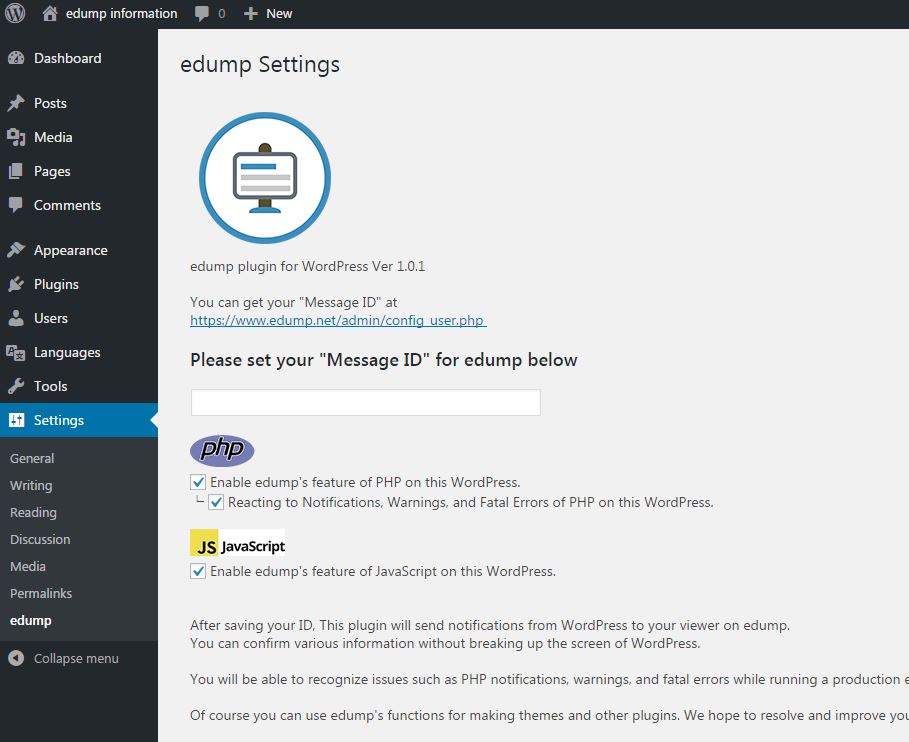
Setting your “Message ID” of edump in the Settings 
Showing the information of PHP on your WordPress environment.
སྒྲིག་འཇུག
You can install this plugin directly from your WordPress dashboard:
- Go to the Plugins menu and click Add New.
- Search for edump.
- Click Install Now next to the edump plugin.
- Activate the plugin.
-
Set your “Message ID” in edump in the Setting menu.
ex). Register for an account on the edump website in advance. It’s free of charge.
https://www.edump.net/
གདེང་འཇོག
There are no reviews for this plugin.
བྱས་རྗེས་འཇོག་མཁན། & གསར་འབྱེད་པ།
“edump” is open source software. The following people have contributed to this plugin.
བྱས་རྗེས་འཇོག་མཁན།
ཁྱེད་ཀྱི་སྐད་ཡིག་ནང་ལ་ “edump” ཡིག་སྒྱུར་བྱོས།
Interested in development?
Browse the code, check out the SVN repository, or subscribe to the development log by RSS.
དག་བཅོས་ཉིན་ཐོ།
1.0
* 2017-04-20
* First version released.
1.0.1
* 2017-05-04
* it has been equipped with a JavaScript module.
1.0.4
* 2017-05-11
* it has been equipped with a Japanese language.
1.0.5
* 2017-05-20
* Equipping jQuery has been changed for the compatibility.
1.0.6
* 2019-08-24
* Updating http rquest method and Handling WordPress5 and above.
1.0.7
* 2020-04-26
* Updating for WP5.4