
Description
Restrictly™ delivers professional-grade access control without compromising your site’s speed or reliability.
It enforces rule-based visibility across pages, posts, menus, Full Site Editing (FSE) blocks, search results, and REST API responses, while maintaining full compatibility with themes and page builders.
In the free version, access rules are driven by user roles and login status, providing a clean and reliable foundation for content and navigation control.
Includes Extended Visibility Filtering, which automatically hides restricted content from search results, archives, and public listings.
For full documentation, setup guides, and developer notes, visit the official Restrictly™ website.
Features
- Full Site Editing (FSE) Integration – Add block-level visibility directly inside the Site Editor.
Choose who can see each block (Everyone, Logged-In, Logged-Out, or Specific Roles) with optional color-coded indicators. - Navigation Block Support (FSE Menus) – Manage visibility for navigation links, submenus, and page lists directly within the Site Editor.
- Extended Visibility Filtering – Automatically hides restricted content from:
- Search results
- Category, tag, and author archives
- Home listings and custom queries
- REST API Enforcement – Applies Restrictly™ visibility rules to REST API responses, automatically filtering restricted content for unauthorized users.
- Dynamic Menu Visibility (Classic Menus) – Control menu item visibility by login state or user role in the classic menu editor.
- Full, Quick, and Bulk Edit Support – Manage restrictions from any editor interface.
- Sortable, Filterable Columns – Instantly see and organize restricted items in list tables.
- Administrator Override – Allows administrators to bypass restrictions for testing.
- Divi & Page Builder Compatibility – Works perfectly with Divi and other builders.
- Performance-Focused & Secure – Built entirely on WordPress core APIs with strict sanitization and escaping.
- Translation Ready – Includes a
.potfile for localization. - Clean Uninstall – Removes all plugin data and options when uninstalled.
Usage
Restricting Content
Restrictly™ lets you limit access to any page or post using intuitive controls:
– Login-Based Restrictions – Limit visibility to Logged-In or Logged-Out users.
– Role-Based Restrictions – Allow access only to specific user roles.
– Enforcement Actions – Display a custom message or redirect unauthorized users.
– Administrator Override – Admins can always access restricted content when enabled.
Restricting Blocks (FSE)
Restrictly™ integrates directly with the WordPress Site Editor (FSE) to provide per-block visibility:
– Choose Everyone, Logged-In, Logged-Out, or Specific Roles.
– Instantly preview restrictions using colored visibility indicators.
– Restrictions are enforced server-side for full security and consistency.
Restricting Navigation (FSE Menus)
Restrictly™ also controls FSE Navigation menu visibility:
– Show or hide individual links, submenus, and page lists by login status or role.
– Works natively inside the block-based Navigation editor.
REST API Enforcement
Restrictly™ applies identical access logic to REST API endpoints.
Unauthorized users see redacted content instead of restricted data — ensuring privacy across your site.
Search & Archive Filtering
Restricted content is automatically excluded from:
– Search results
– Category, Tag, and Author archives
– Home and custom queries
Restricting Menu Items (Classic Menus)
- Login-Based Visibility – Show menu items only to Logged-In or Logged-Out users.
- Role-Based Visibility – Display menu items only to selected roles.
- Conflict Detection – Highlights mismatched menu vs. page restrictions for easy correction.
Privacy
Restrictly™ does not collect user data, track activity, or transmit information externally.
Contributing & Support
Development happens on GitHub — pull requests and issue reports welcome:
https://github.com/bobbyalcorn/restrictly
For full documentation and support, visit:
https://restrictlypro.com
Screenshots

Access Control Settings – Manage global restriction behavior and user role options. 
Pages List Columns – Instantly see which pages are restricted. 
Quick Edit (All Logged-In Users) – Restrict access directly from the Quick Edit panel. 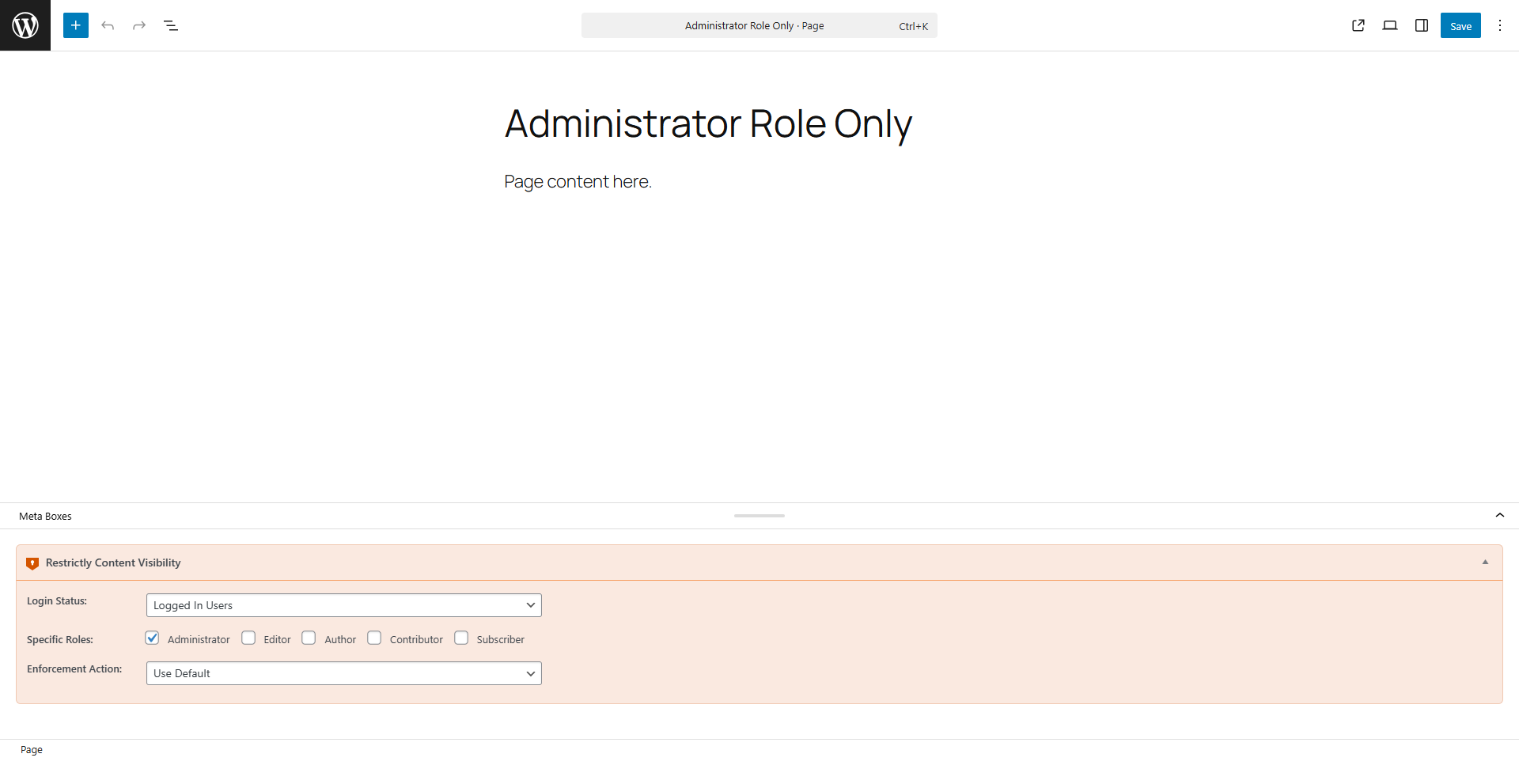
Quick Edit (Specific Role + Redirect) – Assign roles and custom redirects. 
Standard Edit Screen – Restrict content via Restrictly’s sidebar meta box. 
Bulk Edit – Apply restriction settings to multiple items at once. 
Menu Setup Notice – Prompt to assign a navigation menu for Restrictly to manage. 
No Menus Found – Friendly onboarding message to create a menu. 
Matched & Mismatched Menu Items – Visual markers for items with Restrictly data. 
Menu Validation (All Good) – Confirms all menu items are synced. 
FSE Visibility Indicator – Shows block-level visibility inside the Site Editor. 
Theme Compatibility Notice – Appears when a theme does not support standard menus.
Installation
Requirements
- WordPress: 5.2 or higher (tested up to 6.9)
- PHP: 7.4 or higher (tested up to 8.3)
- Stable Version: 0.1.1
Automatic Installation
- Go to Plugins Add New in your WordPress dashboard.
- Search for Restrictly.
- Click Install Now, then Activate.
Manual Installation
- Download the latest version from GitHub.
- Upload it via Plugins Add New Upload Plugin.
- Activate Restrictly™ from the Plugins page.
Quick Start
- Activate Restrictly™ from the WordPress Plugins menu.
- Configure global rules under Restrictly Settings.
- Apply restrictions in the page, post, or FSE block editor.
- Control menu visibility under Appearance Menus.
FAQ
-
Can I restrict custom post types?
-
Not yet. Restrictly™ currently supports Pages, Posts, and Blocks (FSE).
Custom post type (CPT) restrictions will be available in Restrictly™ Pro. -
Does this work with Divi and Elementor?
-
Yes. Restrictly™ uses native WordPress APIs and is fully compatible with popular page builders.
-
No. Restrictly™ only manages menu visibility, never structure or markup.
-
Will this slow down my website?
-
No. Restrictly™ is optimized for performance and runs lightweight logic only when required.
-
Can I restrict WooCommerce products?
-
Not yet. WooCommerce and CPT restrictions will be part of Restrictly™ Pro.
Reviews
There are no reviews for this plugin.
ডেভেলপার এবং কন্ট্রিবিউটর
“Restrictly – Access Control” is open source software. The following people have contributed to this plugin.
কন্ট্রিবিউটর
Translate “Restrictly – Access Control” into your language.
ডেভেলপমেন্ট এ আগ্রহী?
Browse the code, check out the SVN repository, or subscribe to the development log by RSS.
Changelog
0.1.1
Observability and internal lifecycle hooks added for Restrictly™ Pro debugging and diagnostics.
- Added gated debug event emission across all access enforcement paths.
- Added evaluation start, evaluation end, and final decision signals.
- Added administrator override observability (always-allow behavior).
- Added query influence detection for search, archive, and home queries.
- Added Full Site Editing (FSE) block, navigation, and query observability hooks.
- No behavior changes to access control logic.
- No overrides introduced.
- Fully backward compatible.
0.1.0
Initial public release of Restrictly™, a lightweight, performance-focused access control system for WordPress.
- Role-based and login-based restrictions for pages, posts, and FSE blocks.
- FSE Navigation visibility controls.
- Extended Visibility Filtering for search, archives, and queries.
- REST API content redaction for unauthorized users.
- Dynamic menu visibility (Classic & FSE).
- Administrator Access Override.
- Divi and builder compatibility.
- Full, Quick, and Bulk edit support.
- Sortable admin columns.
- Complete uninstall cleanup.
- Fully compliant with PHPCS/WPCS, PHPStan, ESLint, and Stylelint.