এড়িয়ে কনটেন্ট -এ যান
WordPress.org

বাংলা

  • Themes
  • Plugins
  • News
    • Documentation
    • Forums
  • About
  • অনুবাদ প্রজেক্ট
  • অবদান রাখুন
  • যোগাযোগ
  • Get WordPress
ওয়ার্ডপ্রেস পান
WordPress.org

Plugin Directory

Login Logo

  • Submit a plugin
  • My favorites
  • Log in
  • Submit a plugin
  • My favorites
  • Log in

This plugin hasn’t been tested with the latest 3 major releases of WordPress. It may no longer be maintained or supported and may have compatibility issues when used with more recent versions of WordPress.

Login Logo

তৈরি করেছেন Mark Jaquith
Download
  • বিস্তারিত
  • রিভিউ
  • ইন্সটলেশন
  • ডেভেলপমেন্ট
Support

Description

This plugin allows you to customize the logo on the WordPress login screen. There is zero configuration. You just drop the logo file into your WordPress content directory, named login-logo.png and this plugin takes over.

Note that you should use a transparent background on the PNG image, crop it tightly (no padding pixels) and use a width of exactly 312 pixels for best results. Wider images will be downscaled in modern browsers, but it isn’t recommended to rely on that.

This plugin also works in the mu-plugins directory.

Screenshots
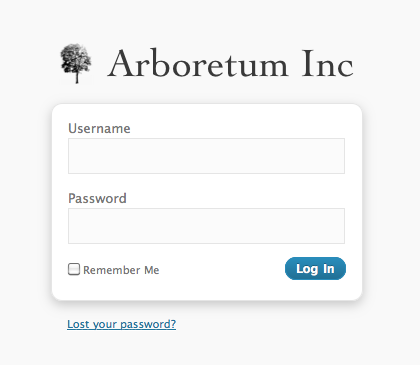
  • A login screen with a custom logo

  • A source image

Installation

  1. Install the plugin and activate it.

  2. Create a PNG image with a transparent background, tightly cropped, with a recommended width of 312 pixels.

  3. Upload the PNG image to your WordPress content directory (/wp-content/, by default), and name the file login-logo.png.

  4. If you have a multisite install with more than one network, you can also use login-logo-network-{NETWORK ID}.png to assign a different login logo to each network.

  5. If you have a multisite install, you can also use login-logo-site-{$blog_id}.png to assign a different login logo to each site.

  6. Done! The login screen will now use your logo.

Reviews

UPDATE: Now working with 6.7.1

paywall নভেম্বর 21, 2024
Plugin is no longer working after 6.7. Doesn’t appear to be supported any longer. UPDATE: Plugin is now working with 6.7.1.

Not Working in WordPress 6.7

creoideas নভেম্বর 20, 2024
Not Working in Wordpress 6.7

Do not work on WordPress 6.7

botwan নভেম্বর 14, 2024 1 reply
I uploaded as usual the login-logo.png in wp-content folder, but on wordpress 6.7 do not work anymore.

Me encanta

javigandia মার্চ 8, 2022
Muchas gracias por el trabajo realizado.

Works flawlessly on WP v4.x

ellencarnahan নভেম্বর 14, 2017
Until WP drastically revamps their login structure, I predict this plugin will work seamlessly for many many versions yet to come. Since I found this plugin via Password Protected, it seems only fair to give that one a shout out as well. They work perfectly in sync together. Site access and dashboard login pages both look nice and neat, just the way I like it 🙂 Thank you!

Nice Job

jPapadi নভেম্বর 27, 2016
Welldone
সব রিভিউ পড়ুন

ডেভেলপার এবং কন্ট্রিবিউটর

“Login Logo” is open source software. The following people have contributed to this plugin.

কন্ট্রিবিউটর
  • Mark Jaquith

“Login Logo” has been translated into 4 locales. Thank you to the translators for their contributions.

Translate “Login Logo” into your language.

ডেভেলপমেন্ট এ আগ্রহী?

Browse the code, check out the SVN repository, or subscribe to the development log by RSS.

Changelog

0.10.2

  • Bumped supported version

0.10.0

  • Updated depreciated filter “login_headertitle” to “login_headertext” with compatibility for older WordPress versions
  • Tested with WordPress 5.2.1

0.7

  • The “title” attribute of the header link matches the WordPress site title instead of saying “Powered by WordPress”.
  • The URL for the login logo includes “versioning” based on last file modification date, for browser cache flushing.

0.6

  • You can provide login-logo-site-{$blog_id}.png to have a different logo per multisite site.
  • Support for WordPress 3.4
  • Changed the ideal image width to 312 pixels, and instituted a tighter crop policy.

0.5

  • Support for WordPress 3.3
  • Fix a bug in CSS resizing of oversized images

0.4

  • Use HTTPS if is_ssl() on the login page.

0.3

  • The login logo now links to your site, instead of WordPress.org
  • If you don’t have a custom login logo, the plugin does nothing.
  • You can provide login-logo-network-{NETWORK ID}.png to have a different logo per multisite network.

0.2

  • Do not use background-size unless the image is more than 326 pixels

0.1

  • Original version

মেটা

  • Version 0.10.3
  • Last updated 1 বছর আগে
  • Active installations 40,000+
  • WordPress version 5.1.2 or higher
  • Tested up to 6.6.4
  • Languages

    English (Canada), English (UK), English (US), Russian, এবং Turkish.

    Translate into your language

  • Tags
    custom logocustomizeloginlogin screenlogo
  • এডভান্সড ভিউ

Ratings

৫ ষ্টার এর মধ্যে 4.9।
  • 57টি 5-স্টার রিভিউ 5 তারকা 57
  • 3টি 4-স্টার রিভিউ 4 তারকা 3
  • 1টি 3-স্টার রিভিউ 3 তারকা 1
  • 0টি 2-স্টার রিভিউ 2 তারকা 0
  • 1টি 1-স্টার রিভিউ 1 তারকা 1

Add my review

See all reviews

কন্ট্রিবিউটর

  • Mark Jaquith

Support

Got something to say? Need help?

View support forum

ডোনেট

Would you like to support the advancement of this plugin?

এই প্লাগিনে ডোনেট করুন

  • সম্পর্কে
  • খবর
  • হোষ্টিং
  • গোপনীয়তা
  • প্রদর্শনী
  • থিমসমূহ
  • প্লাগইনস
  • প্যাটার্নগুলো
  • শিখুন
  • সাপোর্ট
  • Developers
  • WordPress.tv ↗︎
  • সম্পৃক্ত হন
  • ইভেন্টগুলি
  • দান করুন ↗
  • Five for the Future
  • WordPress.com ↗
  • ম্যাট ↗
  • বিবিপ্রেস ↗
  • বাডিপ্রেস ↗
WordPress.org
WordPress.org

বাংলা

  • Visit our X (formerly Twitter) account
  • আমাদের Bluesky অ্যাকাউন্টটি দেখুন
  • আমাদের মাস্টোডন অ্যাকাউন্টটি দেখুন
  • আমাদের থ্রেডস অ্যাকাউন্টটি দেখুন
  • আমাদের ফেসবুক পেজ দেখুন
  • আমাদের ইন্সটাগ্রাম অ্যাকাউন্ট দেখুন
  • আমাদের লিঙ্কডইন অ্যাকাউন্টে যান
  • আমাদের TikTok অ্যাকাউন্টটি দেখুন
  • আমাদের ইউটিউব চ্যানেলে যান
  • আমাদের টাম্বলার অ্যাকাউন্ট দেখুন
কোড কবিতার মত ।