

Description
Stop struggling with complicated form plugins. HT Contact Form is the WordPress form builder that gets out of your way and lets you create beautiful, functional forms in minutes – not hours.
Whether you need a simple contact form, a detailed application, or a complex survey with conditional logic, HT Contact Form has you covered. No coding required. No expensive add-ons. Just drag, drop, and publish.
Key Features
🎨 Drag & Drop Builder – Design forms visually with our intuitive builder. No coding needed.
📝 38+ Form Fields – Everything from basic text inputs to signatures, file uploads, and repeater fields.
🔗 21+ Integrations – Connect to Mailchimp, HubSpot, Zapier, Slack, and more – all included free.
💾 Save & Resume – Let users save their progress and complete forms later via unique link.
🔀 Conditional Logic – Show or hide fields based on user selections.
🛡️ Spam Protection – Built-in honeypot, reCAPTCHA v2/v3, and hCaptcha support.
📊 Entry Management – Store, search, filter, and export all submissions from your dashboard.
📧 Email Notifications – Instant alerts with 5 pre-designed email templates.
🏷️ Smart Tags – Dynamic field values that auto-populate from user data, URLs, or other fields.
📱 Fully Responsive – Forms look perfect on desktop, tablet, and mobile.
🎯 Form Styling – Customize colors, fonts, borders, and spacing to match your brand.
📤 Export Options – Download entries as CSV, Excel, ODS, or JSON.
What’s New
🔗 9 New Integrations – Connect forms to GetResponse, Drip, Moosend, iContact, MailPoet, Notion, Trello, HubSpot, and Zoho CRM.
📧 Email Marketing – GetResponse, Drip, Moosend, iContact, and MailPoet integrations for subscriber management.
💼 CRM Integrations – HubSpot and Zoho CRM for contact and lead management.
📂 Productivity Tools – Notion databases and Trello boards integration for workflow automation.
Build Any Form You Need
- 📬 Contact Forms – Simple inquiry forms with name, email, and message
- 🎯 Lead Generation – Capture leads with custom fields and send to your CRM
- 📋 Surveys & Feedback – Multi-question forms with ratings, NPS, and conditional logic
- ✅ Signup Forms – Collect user details for newsletters, events, or services
- 📄 Application Forms – Long forms with save & resume functionality
- 🎫 Support Requests – Ticket creation with file attachments and priority selection
38+ Form Fields
✏️ Basic Input
Text, Textarea, Email, Number, Phone, Password, Website, Name (with formats)
☑️ Selection
Dropdown, Radio Buttons, Checkboxes, Multiple Choice, Country List
⚙️ Advanced
Repeater (dynamic rows), Chained Select, Post Selection, Rich Text Editor
📅 Date & Time
Date/Time Picker (with calendar and time selection)
📎 Uploads
File Upload, Image Upload, Signature Capture
🧩 Layout
Section Break, Custom HTML, Shortcode Embed
🔐 Security
reCAPTCHA (v2 & v3), hCaptcha, GDPR Consent, Terms & Conditions
⭐ Special
Save & Resume, Star Rating, NPS Score, Color Picker, Range Slider, Mask Input, Hidden Field, Action Hook
21+ Integrations
📧 Email Marketing
Mailchimp, ActiveCampaign, MailerLite, GetResponse, Drip, Moosend, iContact, MailPoet, Constant Contact, Brevo
💼 CRM
HubSpot, Zoho CRM, Insightly, OnepageCRM
📂 Productivity
Notion, Trello, Slack, Discord
⚡ Automation
Zapier (connect to 5000+ apps), Custom Webhooks
🎫 Support
Support Genix (helpdesk tickets)
Why Choose HT Contact Form?
💰 Free & Powerful – Get features that competitors charge hundreds for. No form limits, no entry limits, no hidden costs.
⚡ Modern Interface – Built with React for a fast, smooth admin experience. No page reloads, instant previews.
🔗 All Integrations Included – 21+ integrations at no extra cost. Connect your forms to the tools you already use.
👨💻 Developer Friendly – Action hooks, custom HTML fields, and webhook support for unlimited extensibility.
🚀 Active Development – Regular updates with new fields, integrations, and features based on user feedback.
Other Projects
🛒 ShopLentor (Woolentor) – WooCommerce page builder with 125+ widgets, 36 modules including Shopify-style checkout, Quick View, Wishlist, and Compare features.
🎧 Support Genix – AI-powered helpdesk with ticketing system, knowledge base, and 24/7 chatbot support for customer service.
🎨 HT Mega For Elementor – Elementor addon with 135+ widgets, AI Content Writer, Theme Builder, Mega Menu Builder, and 790+ ready blocks.
📢 Hashbar WP Notification Bar – Create unlimited notification bars for announcements, promotions, and alerts.
Need Help?
Have a feature request or need assistance?
Contact Us
Screenshots
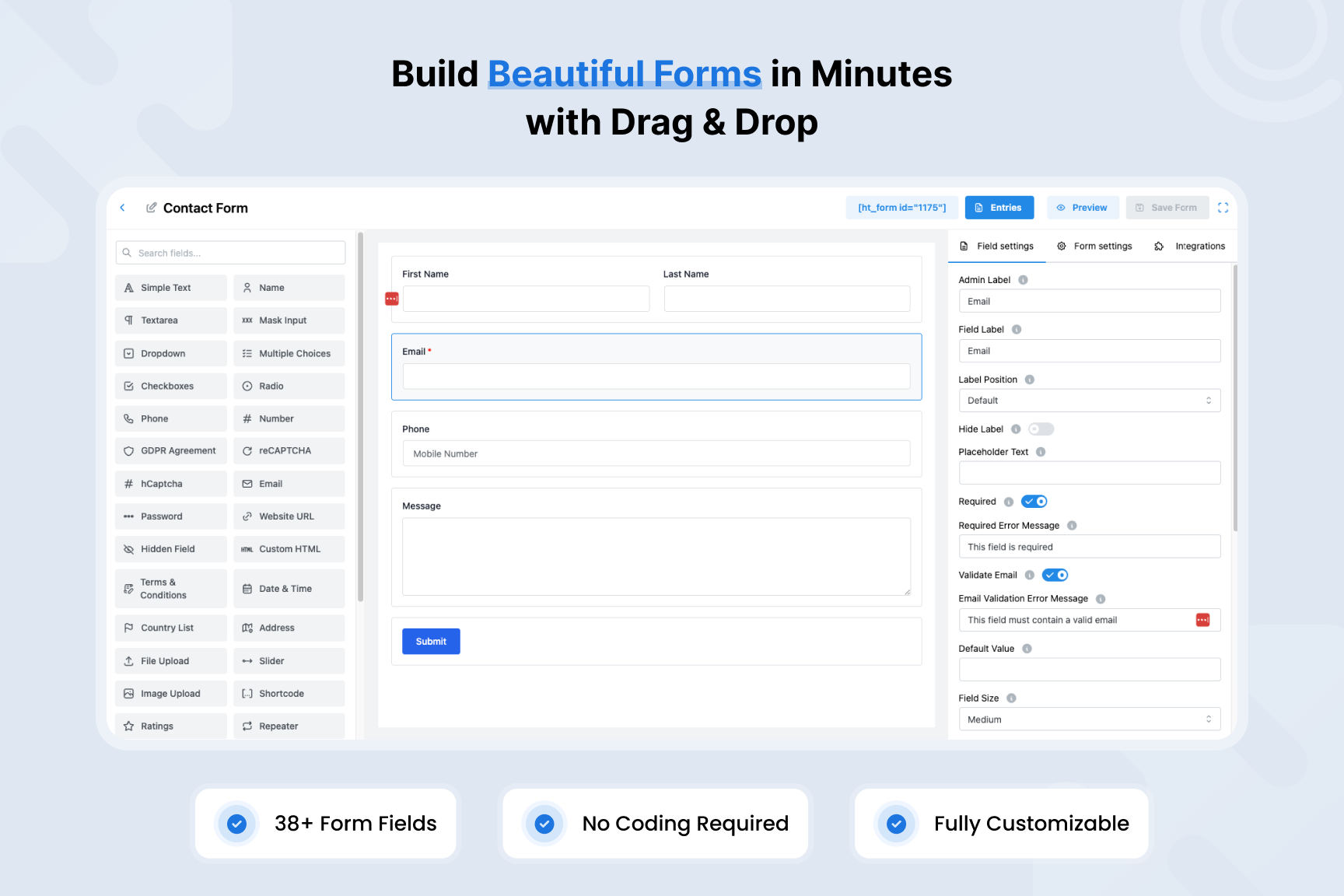
Drag & Drop Form Builder – Create beautiful forms with 38+ fields 
Responsive Form Preview – Forms look perfect on any device 
21+ Integrations – Connect to Mailchimp, HubSpot, Zapier & more 
Entry Management – Search, filter & export all submissions 
Entry Details – View complete submission information 
Email Notifications – Instant alerts with 5 email templates 
Conditional Logic – Show/hide fields based on user input 
Spam Protection – reCAPTCHA, hCaptcha & honeypot security 
Global Settings – Configure everything from one dashboard
Installation
From WordPress Dashboard
- Go to Plugins > Add New
- Search for “HT Contact Form”
- Click Install, then Activate
Manual Installation
- Download the plugin and unzip
- Upload the
ht-contactformfolder to/wp-content/plugins/ - Activate through the Plugins menu in WordPress
FAQ
-
Is HT Contact Form free?
-
Yes! HT Contact Form is completely free with no premium version required. All 38+ fields and 21+ integrations are included.
-
Does it work with my theme?
-
HT Contact Form works with any WordPress theme. Forms are fully responsive and can be styled to match your design.
-
Can I use it with Elementor or Gutenberg?
-
Absolutely. HT Contact Form includes both an Elementor widget and Gutenberg block for easy form embedding.
-
How do I prevent spam?
-
HT Contact Form includes multiple spam protection options: honeypot fields, minimum submission time, Google reCAPTCHA (v2 and v3), and hCaptcha.
-
Can users save and continue forms later?
-
Yes! The Save & Resume field lets users save their progress and receive a unique link to complete the form later.
-
Where are form submissions stored?
-
All submissions are stored in your WordPress database and accessible from the Entries page. You can search, filter, export, and delete entries.
-
Can I export form entries?
-
Yes. Export entries in CSV, Excel (XLSX), ODS, or JSON format with one click.
-
Does it integrate with my email marketing tool?
-
HT Contact Form integrates with 10+ email marketing platforms including Mailchimp, ActiveCampaign, GetResponse, MailerLite, Drip, Moosend, iContact, MailPoet, Constant Contact, and Brevo.
-
Can I connect forms to my CRM?
-
Yes. Native integrations are available for HubSpot, Zoho CRM, Insightly, and OnepageCRM. You can also use Zapier or webhooks to connect to any other CRM.
-
Is it GDPR compliant?
-
HT Contact Form includes GDPR consent fields, hCaptcha (privacy-focused), and stores data locally in your WordPress database.
Reviews


ডেভেলপার এবং কন্ট্রিবিউটর
“HT Contact Form – Drag & Drop Form Builder for WordPress” is open source software. The following people have contributed to this plugin.
কন্ট্রিবিউটর


Translate “HT Contact Form – Drag & Drop Form Builder for WordPress” into your language.
ডেভেলপমেন্ট এ আগ্রহী?
Browse the code, check out the SVN repository, or subscribe to the development log by RSS.
Changelog
Version: 2.8.0 – Date: 28-Jan-2026
- Added: Form Styler settings for Signature field (border, background, pen color, clear button styling).
- Added: Form Styler settings for Ratings field (star colors, sizes, gap).
- Added: Form Styler settings for File Upload field (dropzone border, background, button styling).
- Added: Form Styler settings for Section Break field (heading color/size/weight, divider styling).
- Added: Form Styler settings for NPS field (number colors, backgrounds, size, radius).
- Fixed: Duplicate Smart Tags button appearing in field settings.
Version: 2.7.0 – Date: 18-Jan-2026
- Added: GetResponse Integration – Email marketing with campaigns and custom fields support.
- Added: Drip Integration – Email marketing with subscriber management and tags.
- Added: Moosend Integration – Email marketing with mailing lists and custom fields.
- Added: iContact Integration – Email marketing with list management.
- Added: MailPoet Integration – WordPress newsletter plugin integration.
- Added: Notion Integration – Create database entries from form submissions.
- Added: Trello Integration – Create cards in Trello boards from form data.
- Added: HubSpot Integration – CRM with contacts, deals, and custom properties.
- Added: Zoho CRM Integration – Full CRM with leads, contacts, deals, and accounts.
Version: 2.6.0 – Date: 06-Jan-2026
- Added: Rich Text Editor field with Quill-based WYSIWYG and configurable toolbar options.
- Added: Signature field for capturing handwritten signatures using canvas.
- Added: Chained Select field for multi-level dependent dropdowns with CSV data import.
- Added: Color Picker field for color selection.
- Added: Net Promoter Score (NPS) field for 0-10 customer feedback rating.
- Added: Action Hook field for developers to trigger custom WordPress actions.
- Added: Section Break field for visual section dividers with title and description.
- Added: Save & Resume field allowing users to save form progress and continue later.
- Added: hCaptcha field as a privacy-focused alternative to reCAPTCHA.
- Added: reCAPTCHA multi-version support with separate v2 and v3 configuration.
- Added: Secret key verification for reCAPTCHA and hCaptcha in settings.
- Improved: Captcha fields now disabled in builder until properly configured.
- Fixed: Select dropdown freeze in form editor when flip positioning triggered.
Version: 2.5.1 – Date: 17-Nov-2025
- Fixed: Select 2 not loading for post select field.
Version: 2.5.0 – Date: 05-Nov-2025
- Added: Repeater Field – Create dynamic repeatable field groups.
- Added: Post Selection Field – Select WordPress posts and custom post types via dropdown.
- Added: OnepageCRM Integration – Full CRM integration with Contact, Deal, Note, and Action services.
Version: 2.4.1 – Date: 15-Sep-2025
- Added: Rich text editor for the notification email body builder.
- Improved: Integration settings drawer UI.
- Fixed: Hidden field not appearing in smart tags.
- Updated: Translation file (ht-contactform.pot).
Version: 2.4.0 – Date: 25-Aug-2025
- Added: Radio Field.
- Added: Website Field.
- Added: Custom HTML Field.
- Added: Hidden Field.
- Added: Terms & Conditions Field.
- Added: Brevo Integration.
- Added: Insightly Integration.
Version: 2.3.0 – Date: 22-Jul-2025
- Added: Image Upload Field.
- Added: ShortCode Field.
- Added: Rating Field.
- Added: Constant Contact Integration.
- Added: Zapier Integration.
- Added: Support Genix Integration.
- Added: Option to dynamically show/hide fields based on user input.
- Added: IP & Country Based form submission restrictions.
- Added: Option to automatically delete old form entries after a defined period.
Version: 2.2.2 – Date: 10-Jul-2025
- Improved: File upload handling by adding file type validation.
- Fixed: File name sanitization issue in file upload field.
Version: 2.2.1 – Date: 09-Jul-2025
- Updated language translation file: ht-contactform.pot
Version: 2.2.0 – Date: 23-Jun-2025
- Added: Phone field with auto country code.
- Added: Address field with autocomplete.
- Added: Country List field with autocomplete.
- Added: File Upload field.
- Added: Password field.
- Added: Date/Calendar Picker field.
- Added: per-form design settings to customize styling individually.
- Added: MailChimp Integrations.
- Added: Slack Integrations.
- Added: Discord Integrations.
- Added: ActiveCampaign Integrations.
- Added: MailerLite Integrations.
Version: 2.1.0 – Date: 13-May-2025
- Added: New Entries page to view all form submissions in one place.
- Added: Webhook integration to send form data to external URLs.
- Added: Smart Tags support in the “Send To Email” field for dynamic email routing.
- Improved: Data fetching performance across the plugin.
- Fixed: Issue where notifications were not sent to multiple email addresses.
- Fixed: JavaScript conflict with inputmask library and other plugins.
- Fixed: Various minor bugs and improvements for better stability.
Version: 2.0.0 – Date: 29-Apr-2025
- Added: HT Form Builder to Create Form.
- Added: New Elementor Widget for HT Form.
- Added: New Gutenberg Block for HT Form.
Version: 1.2.2 – Date: 18-Jan-2025
- Fixed: Escaping and sanitizing issues across the plugin to prevent potential security vulnerabilities.
- Fixed: A few minor issues.
- Tested: Compatibility with the latest version of Elementor.
Version: 1.2.1 – Date: 22-Sep-2024
- Fixed: Frontend assets loading issue.
- Compatibility with WordPress latest version.
- Compatibility With Elementor Latest Version.
Version: 1.2.0 – Date: 23-Oct-2023
- Updated: Elementor deprecated functions
- Compatibility with WordPress latest version.
- Compatibility With Elementor Latest Version.
Version: 1.1.9 – Date: 19-July-2023
- Fixed: Escaping issue in the recommended plugins
Version: 1.1.7 – Date: 04-July-2023
- Compatibility with WordPress latest version.
- Compatibility With Elementor Latest Version.
Version: 1.1.6 – Date: 01-Feb-2023
- Added: Nonce verification for recommended plugins
- Improved: Coding standards in some areas
Version: 1.1.5 – Date: 07-Nov-2022
- Compatibility with the latest WordPress version.
Version: 1.1.4 – Date: 26-Sep-2022
- Added: Recommendation Menu
- Compatibility with latest WordPress version.
Version: 1.1.3 – Date: 07-June-2022
- Compatibility with latest WordPress version.
Version: 1.1.2 – Date: 10-Feb-2022
- Compatibility with latest WordPress version.
Version: 1.1.1 – Date: 12-Dec-2021
- Solved : Block showing issue in widget block editor
- Solved : some minor css issue
- Solved : redirection issue after plugin activation
Version: 1.1.0 – Date: 21-Oct-2021
- Add Gutenberg block for Contact Form 7
Version: 1.0.9 – Date: 31-Aug-2021
- Compatibility With Elementor Latest Version
Version: 1.0.8 – Date: 25-July-2021
- Compatibility With WordPress Latest Version
- Compatibility With Elementor Latest Version
Version: 1.0.7 – Date: 12-July-2021
- Added Admin Menu.
Version: 1.0.6 – Date: 31-May-2021
- Elementor capability tag added.
Version: 1.0.5 – Date: 25-April-2021
- Capability With Latest Elementor Version.
Version: 1.0.4 – Date: 24-March-2021
- Capability With Latest WordPress.
Version: 1.0.3 – Date: 29-Dec-2020
- Capability With Latest WordPress.