

Description
Duplicate IT is a lightweight one-click duplicate plugin for WordPress that allows you to instantly clone posts, pages and custom post types.
The plugin automatically detects the website builder used on your site (such as Elementor or Gutenberg) and ensures the duplicated content works properly with that builder.
With Duplicate It, you can quickly duplicate any content and save it as draft, published, private or pending according to your preferred settings. It helps you reuse layouts, create templates or copy content without rebuilding everything from scratch.
Whether you want to duplicate a blog post, copy a landing page, or create multiple copies of content, Duplicate It keeps the process simple, fast and beginner-friendly.
Key Features
- Duplicate posts, pages and custom post types easily.
- One-click duplication directly from the WordPress dashboard.
- Bulk duplicate multiple posts or pages at once.
- Automatic detection of website builders like Elementor or Gutenberg.
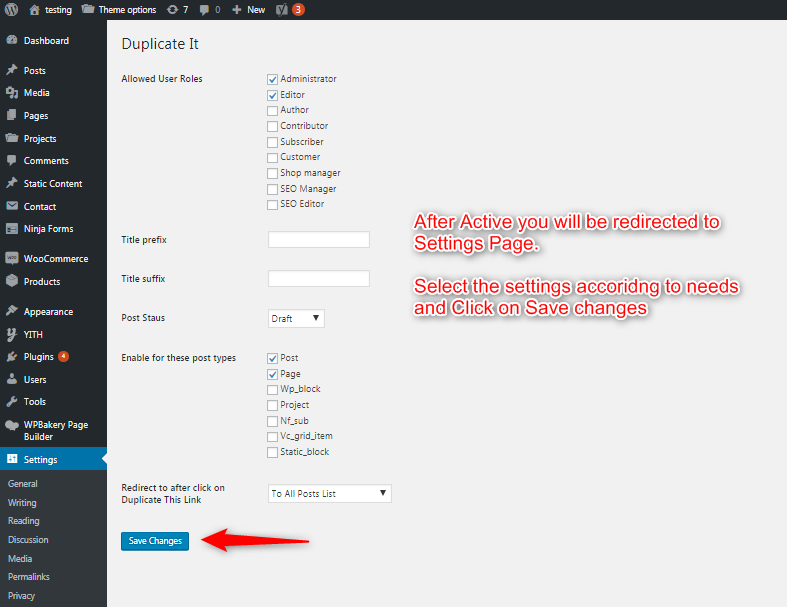
- Choose the status of duplicated content: draft, published, private or pending.
- Automatically add text before or after duplicated titles (like “Copy” or “Draft”).
- Create multiple copies of a post or page in one go.
- Option to stay on the list page or open the duplicated post directly.
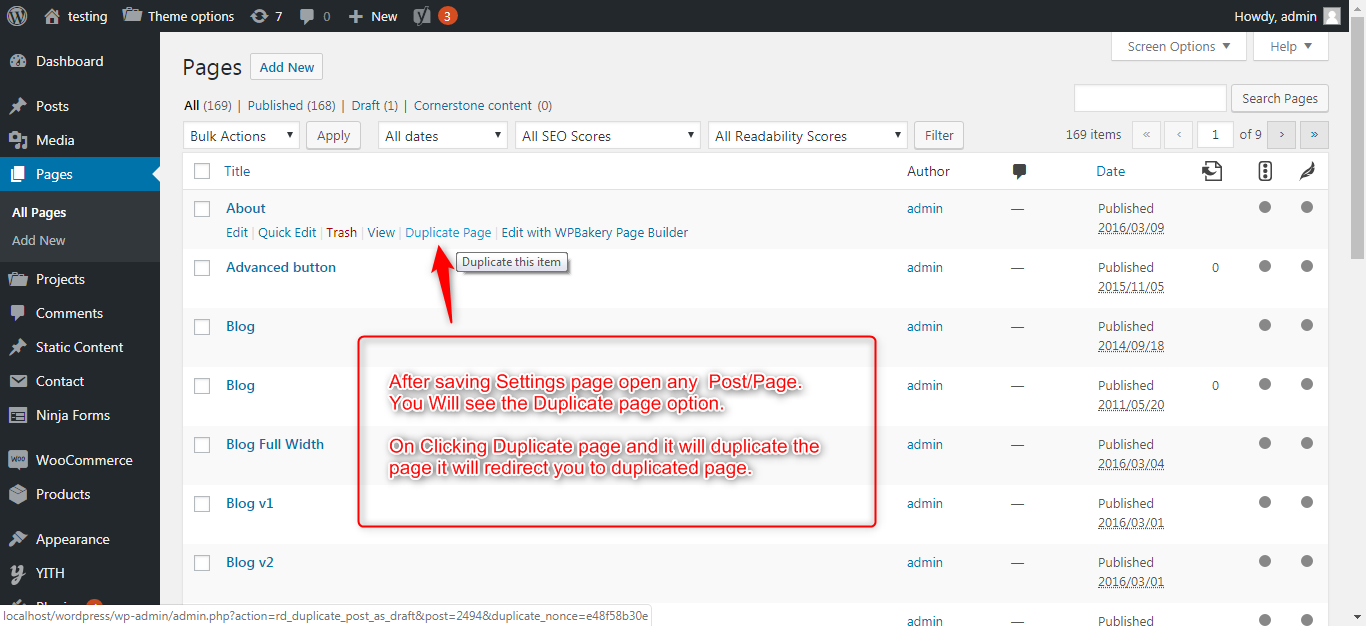
- Duplicate option available directly under posts and pages.
- Works for all allowed user roles.
Duplicate It is designed to be fast, lightweight and clutter-free.
Why Choose Duplicate It?
- Built to run smoothly without slowing down your WordPress website.
- No complex setup required. Install, activate and start duplicating instantly.
- Quickly duplicate posts, pages and custom post types.
- Duplicate multiple posts or pages in a single action.
- Automatically detects builders like Elementor or Gutenberg and duplicates content correctly.
- Set duplicated content status as draft, published, private or pending.
- Focused only on duplication without unnecessary features.
Our Positioning
Duplicate It is designed for users who want a clean and simple duplication tool. Unlike heavy duplicate plugins filled with ads and extra features, Duplicate It focuses on fast and reliable duplication.
How to Use
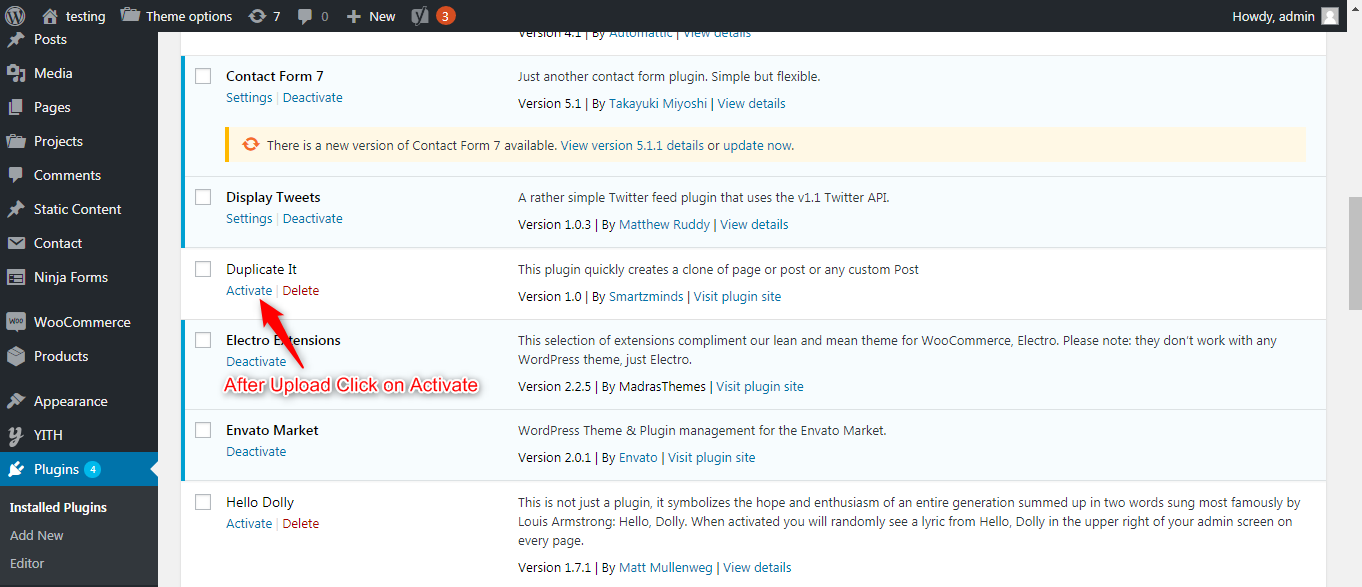
- Install and activate the plugin.
- Go to “Edit Posts” or “Edit Pages”.
- Click the “Duplicate” link below the post or page title.
- The duplicated item will be created according to your selected settings.
- For bulk duplication, select multiple items and choose “Duplicate” from the Bulk Actions dropdown.
Video Tutorial:
Minimum Requirements
- WordPress 3.4+
- PHP 5.x
- MySQL 5.x
If any problem occurs, please contact us at [email protected]
Screenshots

FAQ
-
How do I duplicate a post in WordPress?
-
After activating the plugin, go to “Edit Posts” and click the Duplicate link under any post. A copy will be created instantly.
-
How do I duplicate a page in WordPress?
-
Go to “Edit Pages” and click the Duplicate link below the page title. The duplicated page will be created immediately.
-
Can I duplicate custom post types?
-
Yes. The plugin supports duplication of custom post types along with posts and pages.
-
Does it support page builders like Elementor?
-
Yes. Duplicate It automatically detects website builders like Elementor or Gutenberg and ensures proper duplication.
-
Can I duplicate multiple posts at once?
-
Yes. Select multiple posts or pages, choose Duplicate from the Bulk Actions dropdown and click Apply.
-
Can I choose the status of duplicated content?
-
Yes. You can choose draft, published, private or pending.
-
Is this plugin lightweight?
-
Yes. Duplicate It is designed to be lightweight and fast.
Reviews


ডেভেলপার এবং কন্ট্রিবিউটর
“Duplicate It – Post & Page Duplicator for WordPress” is open source software. The following people have contributed to this plugin.
কন্ট্রিবিউটর
Translate “Duplicate It – Post & Page Duplicator for WordPress” into your language.
ডেভেলপমেন্ট এ আগ্রহী?
Browse the code, check out the SVN repository, or subscribe to the development log by RSS.
Changelog
= 2.3 (11th March, 2026)
* Added automatic website builder detection.
* Tested with latest WordPress version.
* Minor bug fixes and improvements.
= 2.2 (12th January, 2026)
* Tested with latest WordPress version.
* Minor bug fixes and improvements.
= 2.1 (24th November, 2025)
* Tested with latest WordPress version.
* Bug fixes.
= 2.0 (22nd September, 2025)
* Tested with latest WordPress version.
* Bug fixes.
= 1.9 (18th April, 2025)
* Tested with latest WordPress version.
* Bug fixes.
= 1.8 (28th January, 2025)
* Tested with latest WordPress version.
* Bug fixes.
= 1.7 (9th December, 2024)
* Tested with latest WordPress version.
* Bug fixes.
= 1.6 (25th July, 2024)
* Tested with latest WordPress version.
* Bug fixes.
= 1.5 (12th November, 2023)
* Tested with latest WordPress version.
* Bug fixes.
= 1.4 (7th June, 2023)
* Tested with latest WordPress version.
* Bug fixes.
= 1.3 (10th May, 2023)
* Tested with latest WordPress version.
* Bug fixes.
= 1.2 (3rd February, 2023)
* Tested with latest WordPress version.
* Bug fixes.
= 1.1 (28th October, 2021)
* Initial improvements and bug fixes.