New Year Deal 2026
up to 41% off
Offer ends in:
00

days day

00

hours hour

00

Mins Min

00

Secs Sec

bit integrations santa
  • Connect anything beyond native integrations

Unlock the Full Potential of Your Workflow Using Webhooks

Use webhooks to connect any platform you need, beyond 300+ integrations
Get Started Now
webhook integrations

Next-Level Webhook Management Made Simple

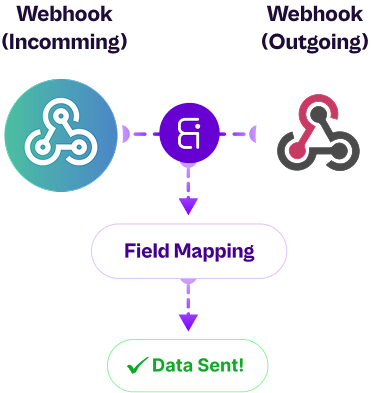
Connect and automate your entire data ecosystem easily. Manage webhooks from multiple sources, route them to any destination, and customize data flow in real time,  all without writing a single line of code.
Send Webhook to Individual Destinations
Forward webhook data to specific apps or endpoints with precision. Easily configure and send data exactly where it needs to go, powering smooth integrations.
send webhook
Manage Webhook from Different Sources
Send and receive webhooks from multiple sources, such as APIs, CRMs, or automation tools, all in one place. Receive, send, and process data easily without custom coding.
manage webhook
Filter Webhook Data Using Conditional Logic
Customize your webhook data flow with smart filtering. Use conditional logic to transform, clean, or segment webhook data before it’s sent to destinations.
filter webhook
Send Unlimited Webhooks in a Single Plan
Enjoy complete freedom with no hidden limits or throttling. Send unlimited webhooks under one pricing plan, ideal for growing businesses and automation, heavy workflows that demand consistent, high-volume performance.
send webhook data

Outgoing Webhooks Easily Send Unlimited Data to Any Platform

Using outgoing webhooks, Bit Integrations allows you to link WordPress to any app, even if it isn't one of our 159+ actions.
Real-Life Use Case
Easily Sync Your Form Data to Any CRM with Outgoing Webhooks
A blogger collects leads through a WordPress form but wants to send the form entries to Privyr CRM or any other platform that isn’t available in Bit Integrations. By using outgoing webhooks, they can send the form data directly to their chosen platform, ensuring seamless lead management and keeping their workflows fully automated

Incoming Webhooks Automate Data Import into Your Preferred Platform

Transfer external platform data to 159+ apps with ease, even if your desired platform isn’t listed in Bit Integrations.
Automatically Send Form Entries from WordPress to Your CRM with Incoming Webhooks
You’ve built a form using a third-party builder like Formester (not a WordPress plugin), and it’s not one of the native Bit Integrations actions. Usually, this means you’re manually exporting every form entry and importing it into your CRM—time-consuming and tedious, right? But with incoming webhooks in Bit Integrations, you can automatically send those form entries directly to your desired spreadsheet software (or any of 159+ supported apps). This keeps your leads organized, your spreadsheet updated in real time, and your workflow fully automated, with no manual work required
Real-Life Use Case

Explore More Features of Bit Integrations

Check out all the cool features of Bit Integrations that make automating tasks, connecting apps, and customizing workflows a breeze!

Real-Time Data Transfer

Works with any WordPress plugin that supports action hooks.

Conditional Logic

Captures multiple data parameters from events automatically.

Auto Syncing Data

Receive incoming data from external platforms (e.g., third-party form ) and automatically send to 159+ apps.

Flexible Integration

Connect incoming data from APIs, services, or other apps to update custom post types, WooCommerce, or other WordPress functionalities.

Multiple Platform Support

Integrate data from Google Sheets, Trello, Mailchimp, and more directly into WordPress.

Dive deeper into how Incoming and Outgoing Webhooks can smooth your workflow

Frequently Ask Questions

A webhook is like an instant message between apps. When something happens in one app (like a new order, form submission, or signup), it immediately sends that information to another app through a special link (HTTP request), no manual checking needed.

An incoming webhook is a way to bring data from any external platform, even if it’s not natively supported by Bit Integrations, directly into Bit Integrations. Once the data arrives, you can send it to any of your favorite connected apps and trigger automations automatically, all without writing a single line of code.

An outgoing webhook lets you send data from your WordPress plugins to any app, even if that app isn’t listed in Bit Integrations’ action list. By using a webhook URL, Bit Integrations pushes your plugin’s data to your desired app in real time, so you can keep everything connected without waiting for a native integration.

Yes! Outgoing webhooks in Bit Integrations let you configure payload format (JSON, form-data, etc.) and even map your own fields, giving you full control over the data structure.

Yes! This is one of the most powerful use cases for webhooks. Even if an app isn’t listed in Bit Integrations’ native integrations, you can still exchange data using webhooks, creating custom workflows without waiting for official integrations.

No! Bit Integrations makes webhooks simple and user-friendly. You just copy the provided URL (for incoming webhooks) or paste your target endpoint (for outgoing webhooks), no coding required.

Learn What New in Automation

Bit Integrations footer logo
Fastest Integration with 316+ Trigger & Actions
multiple-logo