Managing a WordPress site often means juggling dozens of plugins. You might use one plugin for email marketing, another for CRM, one for Slack alerts, and more. Each plugin adds features but also extra code, updates, and potential conflicts. Over time, this plugin overload fragments your workflows and can even slow down your site.
For example, a small business owner might install a Mailchimp connector plugin for email, a CRM plugin for lead management, a Slack notification plugin for orders, plus a coupon manager for WooCommerce. Each plugin works in isolation. Connecting them often requires paid add-ons, custom code, or manual steps. This creates maintenance headaches and gaps: if one plugin breaks, the whole process can stall.
Bit Flows changes that. It lets you build intelligent workflows that span all these tasks inside WordPress. Instead of separate plugins for email, CRM, notifications, and more, you create one drag-and-drop workflow. Bit Flows handles triggers, conditional logic, and integrations in one place. You gain a unified system that replaces many plugins and keeps your site lean.
The result is a smoother setup with fewer points of failure. Your WordPress site becomes more efficient, secure, and easier to manage. In this article, we explore how Bit Flows can reduce multiple plugins by automating common tasks through smart workflows.
WordPress plugins extend functionality, but too many can hurt performance. Installing multiple specialized plugins increases database queries and HTTP requests on each page load. Poorly coded or redundant plugins can slow a site or even cause crashes. Many site owners find that a single faulty plugin causes more harm than dozens of well-coded ones.
Beyond speed, having separate plugins means fragmented workflows. For example, a new contact form submission might need to:
With traditional plugins, this requires hooking together four or more plugins. Some plugins do multiple tasks, but often each step requires its own connector or API. This leads to complex setups and fragile chains.
Maintaining ten or fifteen plugins also means constant updates and compatibility checks. Every theme or PHP update risks breaking something. Plus, many plugins charge extra for features or usage.
For example, a free-form plugin might force you to pay for a Mailchimp add-on, or an email plugin might charge per email sent. In short, the plugin approach can become costly and error-prone.
What’s needed is a way to unify these tasks under one system. Instead of many isolated plugins, we want an integrated workflow engine. This is where Bit Flows shines. It lets you replace dozens of plugins with single visual workflows.
You set triggers (like form submission or new order), add logic (conditions, splits), and define actions (send email, update CRM) all in one visual canvas. This reduces plugin count and makes automation transparent.
Bit Flows also handles scheduling, retries, and error logging internally. You don’t need a separate cron manager or logging plugin. With Bit Flows, automation is built into WordPress in a clean, centralized way, avoiding the tangle of traditional plugins.
Bit Flows is an advanced automation plugin for WordPress. It offers a drag-and-drop workflow canvas similar to Zapier or n8n, but runs entirely on your own site. In other words, it feels like Zapier inside WordPress, with no arbitrary limits on workflows or steps. You can create multi-step workflows that connect WordPress events to external services and AI tools, all without writing code.
Because Bit Flows is self-hosted, all processing happens on your server. Your data flows only through your database and any APIs you call. There are no recurring usage fees as with cloud automators. You pay once or use the Bit Flows free version for basic needs and run unlimited tasks. Bit Flows even conditionally loads its code to minimize overhead. It doesn’t bloat your site when you’re not using it.
Key features include:
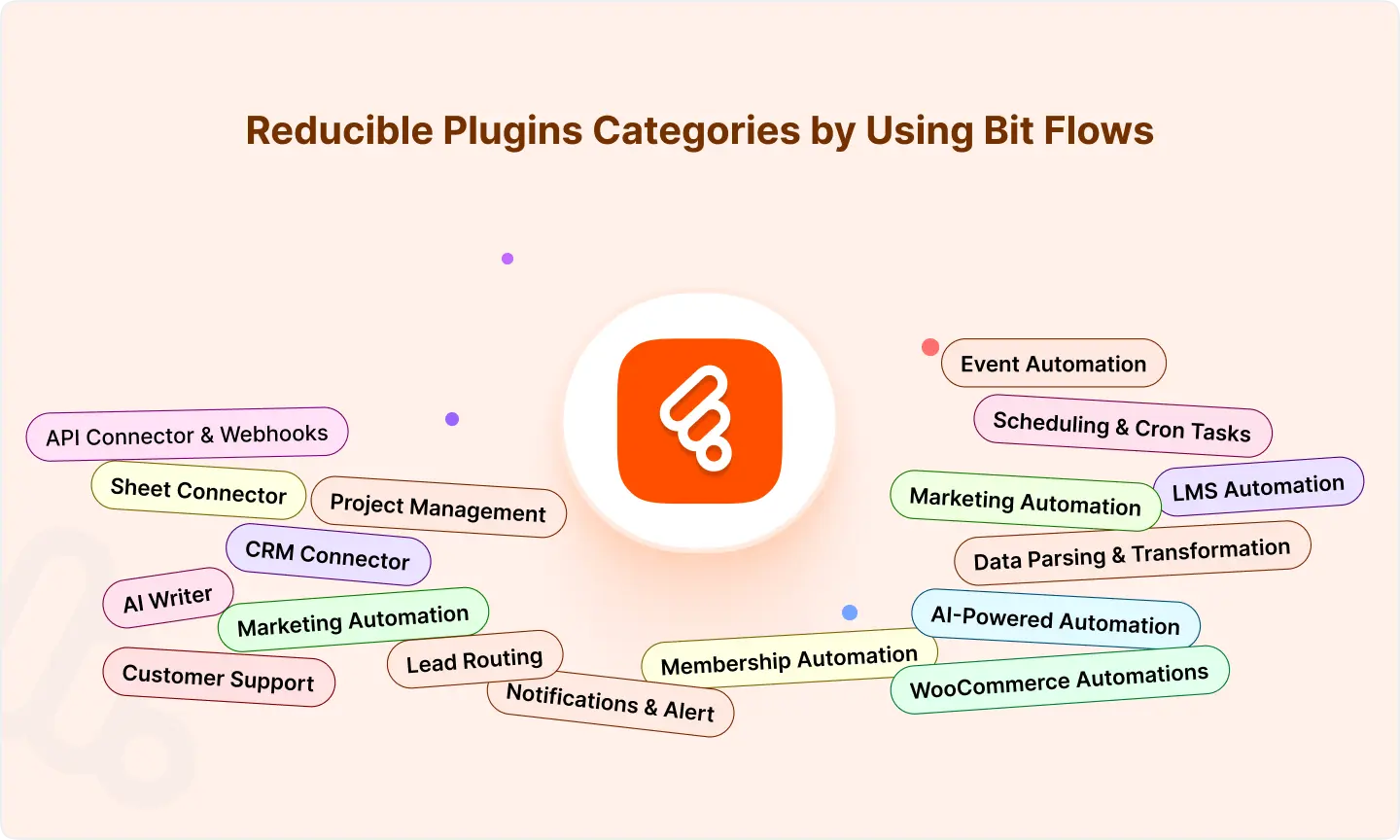
These features mean Bit Flows can replace whole families of plugins. It has built-in Mailchimp and Google Sheets support, Webhook and HTTP Request blocks, WooCommerce triggers (new order, product updated), and CRM connectors. You can even build your own Custom Apps with Bit Flows if a service isn’t pre-integrated.
In short, Bit Flows is not just another plugin. It’s a workflow automation platform inside WordPress. It unifies tasks that would otherwise require multiple plugins or external services, putting control in one visual interface.
Bit Flows can reduce or replace many popular plugins by using workflows. Here’s how it replace common plugin categories:
Traditionally, you might use a form plugin plus a separate newsletter plugin (Mailchimp for WP, Brevo, etc.). Each new lead needs to be sent to an email list via another connector plugin. Or you use an external service like Mailchimp and its WordPress integration. Bit Flows handles all of this in one flow.
For example, you set up a workflow triggered by a form submission (any form builder works via webhook or integration). In the same flow, you add steps to create or update a subscriber in your email platform, send a confirmation email, and even schedule follow-ups.
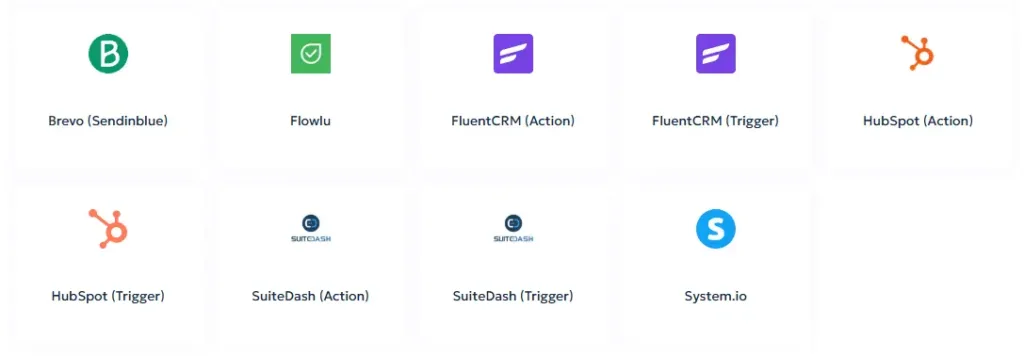
No need for a dedicated Mailchimp plugin in WordPress. Bit Flows has native actions for Mailchimp, Brevo (Sendinblue), HubSpot, and many others, which you can call directly.
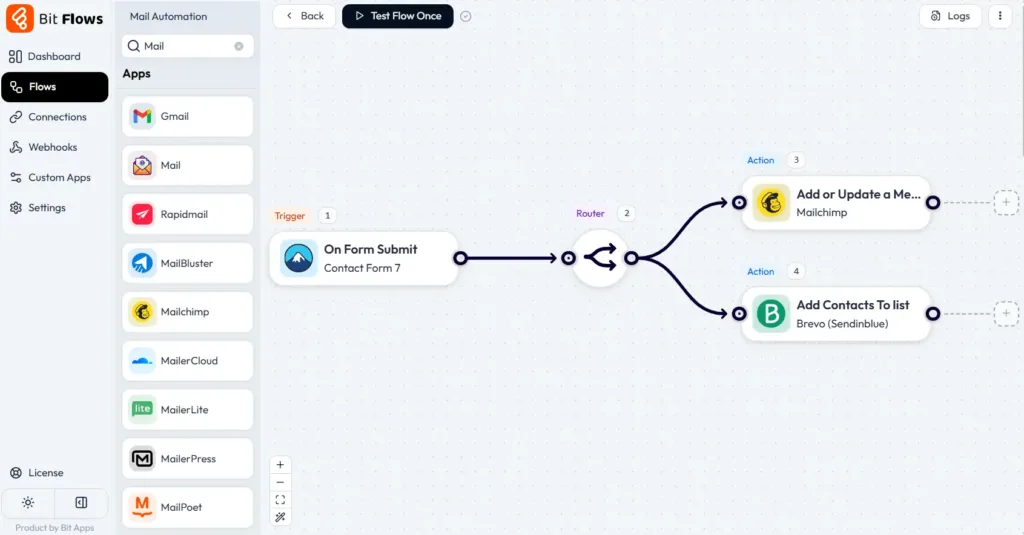
You can also add Delay steps. Say you want to send a second email three days after sign-up. Just insert a delay of 72 hours and add another email action. This reduces plugins that do drip campaigns or email sequencing. In short, Bit Flows becomes your email automation hub.
It manages lists, tags, segments, and email sends through the connected service, all within the WordPress dashboard. By consolidating these tasks into one workflow, you cut out multiple single-purpose plugins.
Many sites use a CRM plugin or a form-to-CRM connector to capture leads. Examples include HubSpot’s plugin, Salesforce connectors, or general tools like WP Fusion. These plugins often lack advanced logic. They might, for instance, send every lead to one list or tag everyone the same way.
Bit Flows excels at conditional routing. You can build a workflow that knows more about each lead. For example, when a contact form is submitted, Bit Flows can check the user’s selections or source. Based on this data, you can send the lead to different lists or tags in your CRM or email platform. You can update lead scores, add notes, or even create opportunities.
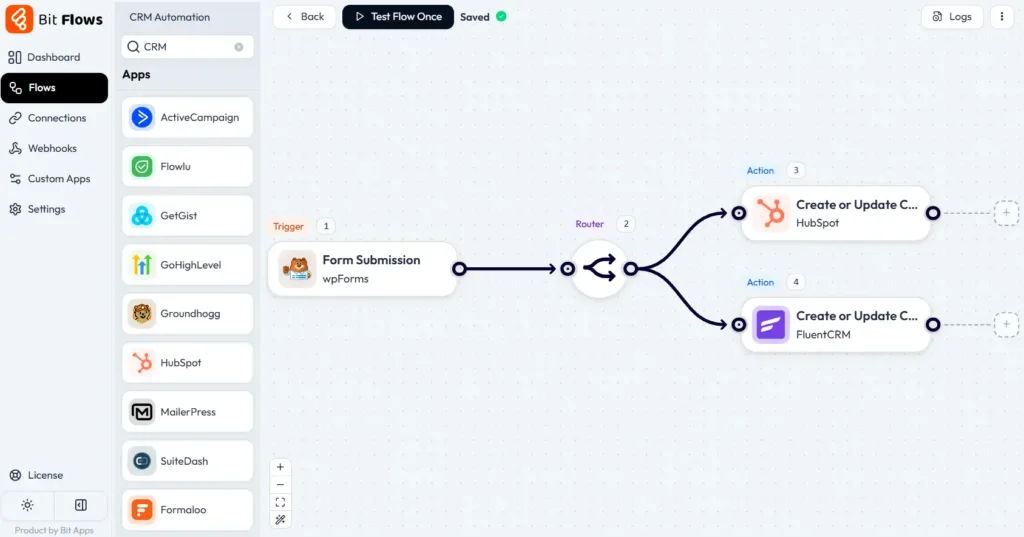
Bit Flows also integrates with popular CRMs directly (like HubSpot, Zoho, Fluent CRM, etc.). If a CRM isn’t built in, you can use a webhook or HTTP Request block to call the CRM’s API. In one flow, you might split leads by interest.
Those interested in product A go to Campaign X, while others get tagged for product B. All of this reduces multiple CRM plugins or connector addons. Bit Flows effectively becomes your unified lead-capture and routing engine.
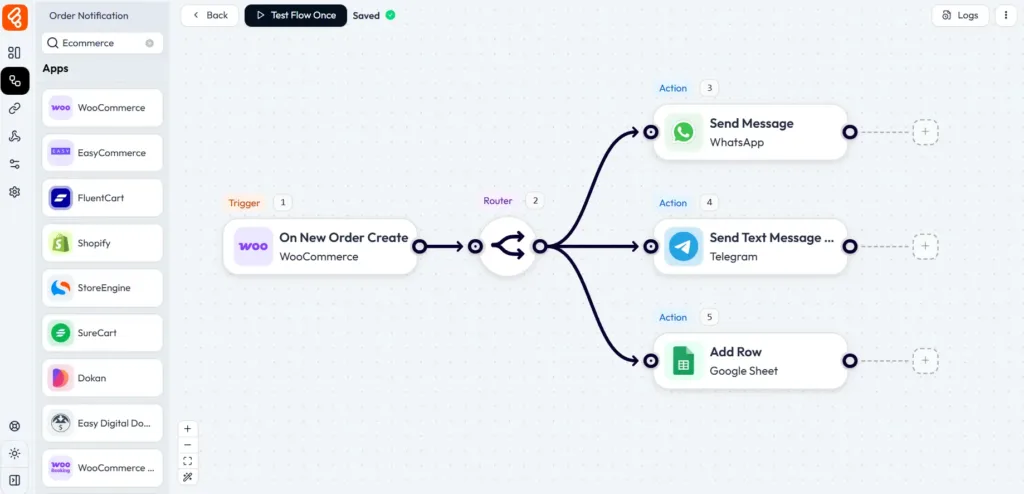
Suppose you want instant alerts when something happens on your site. New order, new user, low stock, etc. Many plugins exist to send Slack, Telegram, Discord, or SMS alerts for these events. With Bit Flows, you embed these notifications in your workflows.

For example, on a new WooCommerce order trigger, you can add actions to send messages to Slack, Telegram, WhatsApp, or email. Bit Flows has blocks for all of these services. You craft the message (order number, total, etc.) and send it right in the flow.
This reduces separate notification plugins for each channel. Similarly, form submissions can trigger a Slack message to support or an SMS to the admin, all in one flow.
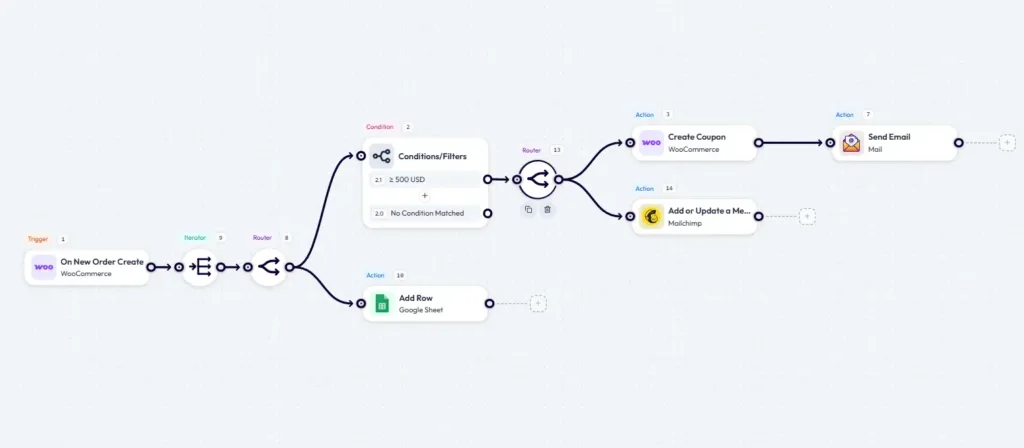
A real example: When an order is placed above $500, Bit Flows checks the amount, then sends a thank-you email to the customer and posts a summary message in a Slack channel for the sales team.
With one workflow, you cover email, Slack, and conditional logic. No extra plugins needed. This unified approach means you don’t juggle multiple notification plugins. The workflow handles everything together.
WooCommerce itself covers core e-commerce, but for special tasks, you often add extensions. For example, a Smart Coupons plugin, an order management plugin, or a follow-up emails add-on. Bit Flows can replicate many of these automations:
Coupon Creation: You can trigger Bit Flows on Order Created. Use a condition (e.g. if total > $500) and then use the Create Coupon action. You can define the discount, expiration, and who gets it. Finally, Bit Flows can email that coupon code to the customer. This replaces needing a special coupon plugin or custom code.
💡Explore this guide to generate WooCommerce coupons based on order total.
Inventory & Product Updates: Workflows can watch stock levels. If inventory is low, send an alert. If an order includes a certain product, auto-create a back-order item or reorder notification.
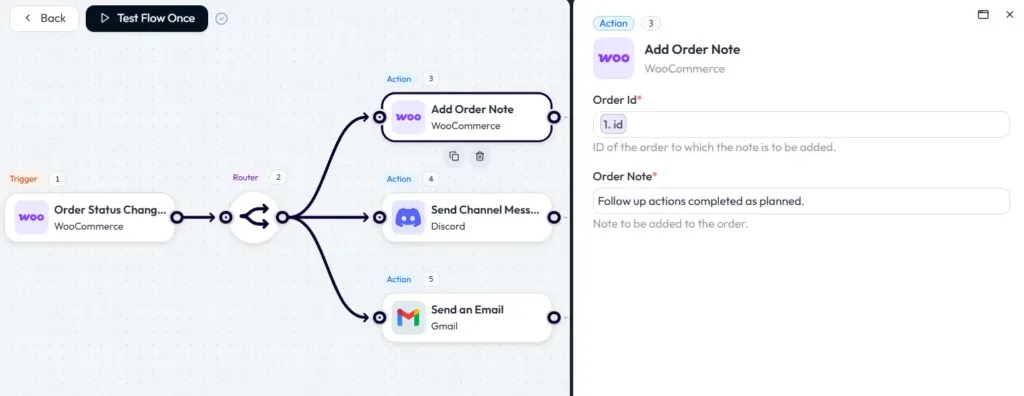
Order Tagging and Follow-ups: On order status changes, Bit Flows can tag the order, add notes, or notify team members. For instance, when an order completes, send an automated thank-you email and add the customer to a VIP list in your CRM.
Membership and Subscription: Bit Flows integrates with WooCommerce extensions like Subscriptions or Memberships. You could automate granting access when payment succeeds.
Essentially, any WooCommerce trigger and action that an extension might do can be built in Bit Flows. In the WooCommerce coupon example, the Bit Flows guide shows: When an order comes in, it checks the total amount.
Then, it creates a special coupon and emails it to the customer. This is all done in one visual workflow. Instead of layering on multiple WooCommerce plugins, you handle it with conditions and actions in Bit Flows.
Many plugin tasks run on a schedule. Sending weekly digests, cleaning up data, checking for updates. WordPress’s built-in cron can handle this, but often site owners use plugins like WP Crontrol to manage tasks. Bit Flows has built-in scheduling tools that cover these needs.
The Delay node lets you pause a workflow for minutes, hours, or days. The Schedule node (with optional cloud cron runner) can start a flow at a given time or repeat it daily or weekly.
For example, you could schedule a weekly report email. Create a workflow with a Scheduler trigger every Monday, gather data (via API actions), and send a summary email. No need for a separate scheduling plugin.
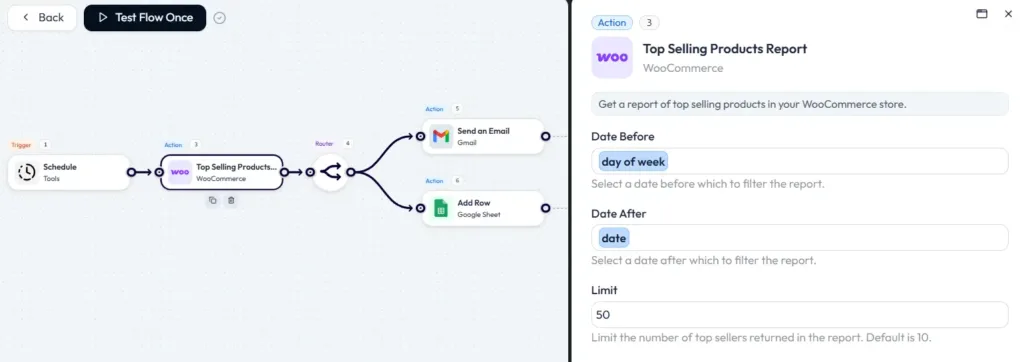
Performance-wise, Bit Flows can use WordPress cron (wp-cron) or its own cloud-based cron service to reliably trigger flows on time. The plugin conditionally loads its hooks, so it doesn’t burden every request. This means you get dependable scheduling without installing another plugin.
Tasks run when needed, and if a task fails, you get logs or email notifications. With Bit Flows, your timing tasks are handled in the same workflow system as everything else, rather than relying on a patchwork of schedulers and reminders.
If you’ve built custom integrations, you know plugins like WP Webhooks or HTTP Request can help connect to any API. Bit Flows has this built in. It offers an HTTP Request action and Incoming and Outgoing Webhook triggers.
You can send data to any service or accept data from it without coding. There’s also a Custom App builder to define new triggers or actions if needed.
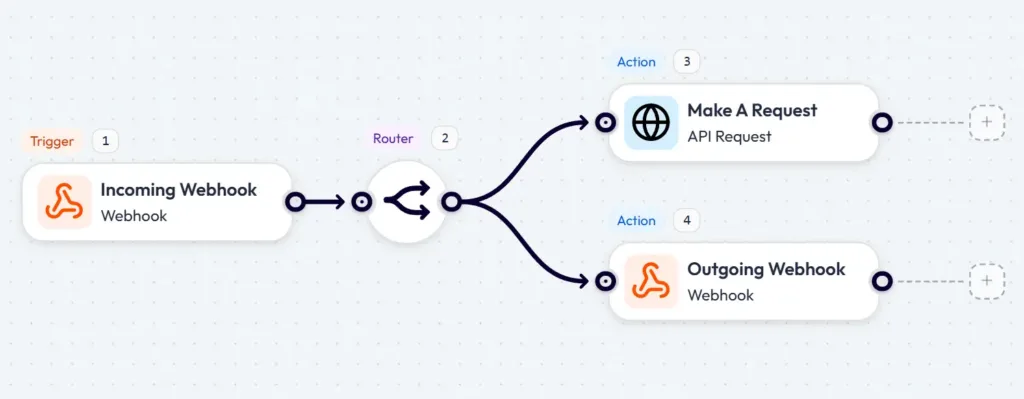
For example, suppose you use a CRM that isn’t on Bit Flows’ integration list. You can call its REST API via an HTTP Request block, passing JSON data.
Or if you run a SaaS form tool that supports webhooks, you configure it to call Bit Flows’ incoming webhook URL. The data comes in, Bit Flows parses it, and you continue the workflow.
This replaces the need for multiple connector plugins. Instead of adding a WordPress plugin for each service’s API, you make those connections in your workflows. Bit Flows treats APIs and webhooks as first-class citizens.
Its documentation emphasizes that it can send WordPress data to all types of platforms via webhook or API. In short, any time you’d install a plugin just to call an external API or receive data, Bit Flows can do it natively.
Handling data from APIs or complex forms often requires parsing. Normally, you might install a JSON, CSV, or XML import plugin or write custom code. Bit Flows includes built-in parsers and transformation tools. It can natively parse JSON or CSV payloads, and it has an Iterator to loop through lists.
For example, if a webhook sends an array of items, Bit Flows’ JSON parser can extract fields, and the Iterator can process each item in a loop. No need for a separate CSV to array plugin.
Similarly, if you fetch data from a third-party API, the JSON parser node will extract the elements you need. These tools help you automate your workflow management in more easier and orgranized way.
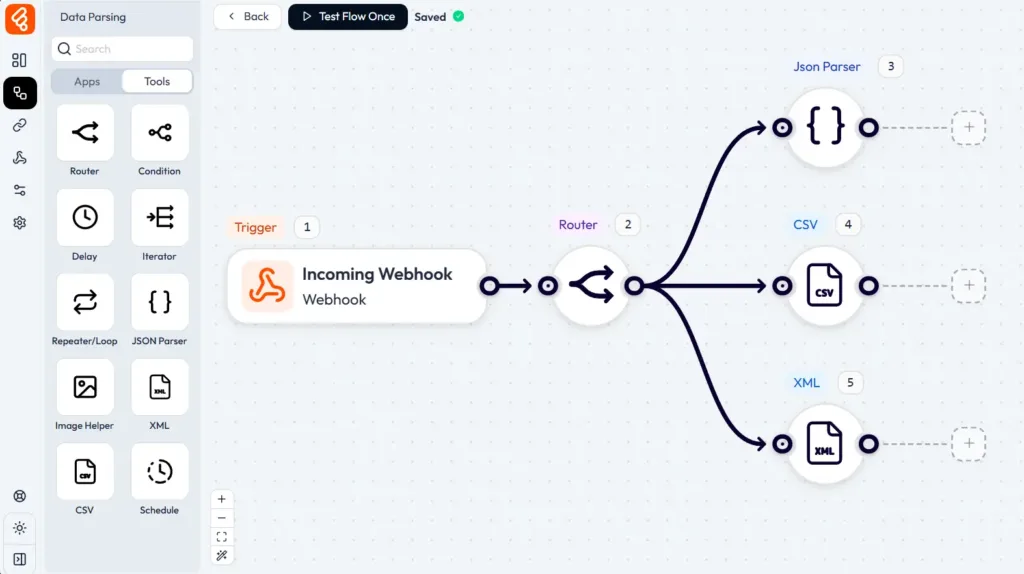
These tools let you restructure or map data between systems. The Bit Flows plugin page highlights JSON parser and Iterator as core features. By using these within workflows, you avoid multiple plugins that only do data mapping. Instead, the workflow handles any necessary data formatting on the fly.
Bit Flows also replaces niche AI automation plugins. There are auto-blog plugins or product description tools, but they often have limited integration and cost per use. Bit Flows integrates directly with AI models like OpenAI’s ChatGPT, Google Gemini, Anthropic Claude, and others.

This lets you create workflows where AI generates content, and then WordPress publishes it. For instance, one workflow could be: Scheduled Trigger, Call OpenAI with prompt (“Write a blog post about X”), Receive generated text, Create WordPress post, Publish. No manual intervention needed. You control the AI prompt, formatting, and publish schedule.
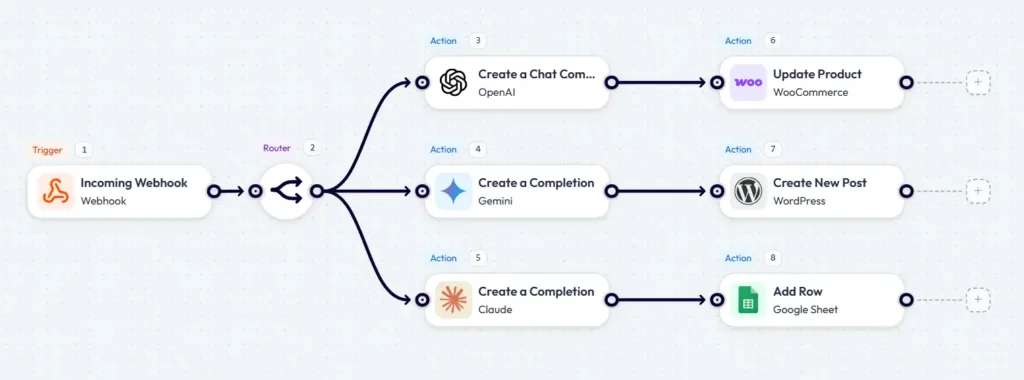
Similarly, for e-commerce: when a new WooCommerce product is added (or periodically), Bit Flows can call an AI to generate a product description. The text is returned and sent to WooCommerce via the Update Product action. All automated.
Bit Flows can also generate blog intros, product descriptions, SEO meta, summaries, and more. In practical terms, this eliminates the need for separate AI writing plugins. The AI is just another action block in your workflow. You can run as many such workflows as you want under one Bit Flows license.
Overall, by combining triggers, logic, and actions, Bit Flows handles the job of many plugins. The table below summarizes typical plugin categories and how Bit Flows provides the same or better functionality within workflows.
| Plugin Category | Example Plugin(s) | Bit Flows Workflow Capability |
| Email & Marketing | Mailchimp, MailerLite | Trigger on form leads or user registration and send data to email platforms. Flow handles list sync, tagging, and scheduled emails. |
| CRM & Lead Management | HubSpot, WP Fusion | On-site events (orders, forms, etc.), send customizable alerts to Slack, WhatsApp, email, Discord, etc., all from one flow. |
| Notifications & Alerts | Slack, Telegram plugins | On site events (orders, forms, etc.), send customizable alerts to Slack, WhatsApp, email, Discord, etc., all from one flow. |
| WooCommerce Automation | Smart Coupons, Order Status | Built-in JSON, CSV, and XML parsers extract and map data fields within workflows, replacing import or formatting plugins. |
| Scheduling & Cron | WP Crontrol, Scheduler | Use Bit Flows’ Delay and cloud cron. Schedule tasks or reminders without an extra plugin. Flows run on-time via WP-Cron or cloud cron. |
| API & Webhooks | WP Webhooks, REST plugins | Native HTTP Request and Webhook actions connect to any external API. Build custom app triggers for new integrations. |
| Data Parsing & Mapping | JSON or XML import plugins | Use Bit Flows’ Delay and cloud cron. Schedule tasks or reminders without an extra plugin. Flows run on time via WP-Cron or cloud cron. |
| AI Content Automation | AutoBlog, GPT plugins | Integrate ChatGPT, Gemini, Claude to generate blog posts or product descriptions. Publish content automatically via Bit Flows. |
Bit Flows brings additional long-term benefits beyond plugin reduction. Below are insights on key aspects:
1️⃣ Performance: Unlike adding more plugins, Bit Flows is designed to be lightweight. It conditionally loads hooks and runs tasks only when needed.
Also, because workflows run on your schedule or triggers, they don’t slow down front-end interactions. Bit Flows adds negligible load unless you’re processing large batches. This contrasts with some plugins that constantly poll or inject scripts.
2️⃣ Security & Data Privacy: Being self-hosted means your data never passes through a third-party server. All automation runs on your own WordPress server, using standard WordPress APIs. This enhances data privacy.
For example, customer info and API keys stay on your site’s database. Because you control the environment, you avoid exposing data to cloud services. In many cases, this is even more secure than using multiple plugins that each handle sensitive info.
3️⃣ Scalability: Bit Flows supports unlimited workflows, steps, and tasks. Whether you run a few tasks a day or thousands, Bit Flows doesn’t charge per task or throttle you.
This contrasts with platforms like Zapier that limit tasks even in higher plans. You can scale up your automation as needed without worrying about per-use costs. Workflows can handle high volumes, limited only by your hosting resources.
4️⃣ Cost Reduction: Because Bit Flows replaces multiple plugins and external services, it cuts costs. You avoid ongoing subscription fees for automation tools. Bit Flows itself offers a one-time license or annual plans for unlimited use.
Additionally, maintenance is simpler. One plugin to update instead of many. Agencies and site owners find this appealing. Bit Flows becomes a Swiss Army knife that eliminates dozens of smaller tools.
5️⃣ Reliability: With built-in logging and error handling, Bit Flows makes workflows transparent. Every execution is logged, and failures trigger alerts. This level of insight is often missing when stitching many plugins together.
If an email fails to send or an API key is wrong, Bit Flows will show you the broken step in the log viewer. You get notified of issues immediately. This reduces downtime compared to traditional setups, where a plugin error might silently break a chain.
WordPress automation shouldn’t mean a mess of plugins. Bit Flows offers a smarter path. One workflow engine instead of many add-ons. By centralizing tasks like email campaigns, CRM syncing, order alerts, and AI content in a single plugin, you gain clarity, performance, and control.
You’ll install fewer plugins, reduce maintenance, and build richer automations that were hard or impossible before.
Imagine handling email follow-ups, customer routing, and Slack notifications all in one flow. Or auto-generating coupons and blog posts without touching code. These transformations become routine with Bit Flows. The long-term payoffs are real. Better speed, stronger security, and lower costs.
For WordPress developers and site owners, Bit Flows is the turning point from scattered plugins to unified automation. It scales with your needs and removes limits.
If you’ve ever been frustrated by plugin overload or integration gaps, Bit Flows is worth exploring. Check out Bit Flows’ features or AI integrations to see how it can replace multiple WordPress plugins and streamline your workflows.
Bit Flows is a WordPress plugin for workflow automation. It lets you connect triggers (like form submissions or WooCommerce orders) to actions (like sending emails or updating CRM) using a visual drag-and-drop interface. It works self-hosted inside WordPress, acting like Zapier or n8n for your site.
Instead of using separate plugins for each task, you create a single Bit Flows workflow. For example, one flow can handle sending email newsletters, updating CRM contacts, and posting Slack alerts all in sequence. This eliminates the need for multiple plugin-to-plugin connectors. Essentially, Bit Flows replaces specialized plugins by doing their job in workflows. It integrates with 252+ apps and has built-in tools, so you often don’t need another plugin for the same function.
No coding is required. Bit Flows is a no-code automation platform. You configure workflows using a visual editor. All logic is set with dropdowns and blocks.
Bit Flows is designed to cover most automation tasks, especially those involving WordPress and common apps. It includes triggers and actions similar to Zapier or Make, with advanced logic and unlimited tasks. Unlike cloud tools, Bit Flows has no task limits or pricing per automation. It also offers an on-site cloud cron system so scheduled flows don’t get missed.
Yes. Bit Flows runs on your own WordPress server. All data is processed locally or through the APIs you call. This enhances security and privacy. Bit Flows also offers logging and retry mechanisms.
No. Bit Flows allows unlimited workflows, steps, and task executions. There are no pay-per-task fees.
Bit Flows can potentially replace many integration plugins. For example, Mailchimp connectors, Slack notification plugins, API connector plugins, JSON or cron plugins, and AI content tools. If a plugin’s purpose is to transfer or transform data, Bit Flows can usually do the same within a workflow.
Bit Flows is optimized to minimize impact. It only loads its code when needed. By replacing multiple plugins, it can even improve overall performance.
Use the built-in Delay or Scheduler nodes. They let you pause or run workflows at set times without extra plugins.
Yes. Bit Flows supports OpenAI, Google Gemini, Claude, and others. You can generate blog posts, product descriptions, and more automatically.
Yes. Bit Flows has a free version with basic triggers and actions. The Pro version unlocks advanced features like AI tools and premium integrations.


 EN
EN  DE
DE  ES
ES  NL
NL  IT
IT 