

Описание
This plugin adds a message before or after (or both) your post content when this post is outdated.
You visitor knows when a post is a little bit outdated and reads the content keeping its age in mind.
Features
- Choose the place where the message is displayed (before or after the content, or both)
- Choose which type of posts that are concerned
- Custom delay for each post
- Hide the message for a specific post (directly from the edition page)
- Shortcode and template function
- Lots of hooks (for developers)
A full documentation is coming.
If you find a bug, please, tell me!
You want to translate this plugin and have your name in this page? Find translation files here.
Снимки на разширението

The options page 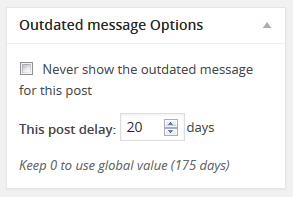
The metabox in a post edition (specific options) 
The message displayed before the content
Инсталиране
You can use one of both method :
Installation via your WordPress website
- Go to the admin menu ‘Plugins’ -> ‘Install’ and search for ‘Juiz Outdated’
- Click ‘install’ and activate it
- (optional) Configure the Plugin in Appearance
Manual Installation
- Download the plugin (it’s better :p)
- Unzip
juiz-outdated-post-messagefolder to the/wp-content/plugins/directory - Activate the plugin through the ‘Plugins’ menu in WordPress
- It’s finished !
ЧЗВ
-
No question for the moment
Отзиви


Сътрудници и разработчици
“Juiz Outdated Post Message” е софтуер с отворен код. Към разширението са допринесли следните хора:
Сътрудници
“Juiz Outdated Post Message” е преведено на 1 език. Благодарности на преводачите за техния принос.
Превеждане на “Juiz Outdated Post Message” на вашия език.
Имате интерес към разработване?
Преглеждане на кода, разглеждане на SVN хранилище, или абонамент към програмната история (log) чрез RSS.
Списък с промени
1.0.5
- Some security improvements
- Better output escaping
- Securing file direct access
- Tested on the latest WordPress version
1.0.4
- Bug fix / Compatibility
- Compatible with PHP8.
- Tested on the latest WordPress version
1.0.3
- Compatibility:
- Tested up to WordPress 4.5 (RC1)
- Tested up to PHP7
- Engine:
- Better code readability
- Some improvements in security (with translations)
- Information message bug fixed in settings page
1.0.2
- Tested in WordPress 4.4.1
- Interface:
- Admin icon post type displayed in settings page
- Improvements:
- PHP Notice removed
- Code error with shortcode fixed (
do_shortcode('[outdated]')should works better) - Code design improvement
1.0.1
- Notice in PHP 5.4 fixed
1.0.0
- The first stable version, tell me if you find something wrong.