

Апісанне
Is your WordPress login page secure? Does it look professional? Do users hate remembering passwords?
The default wp-login.php page is the #1 target for hackers, looks unbranded, and causes friction for users.
WPOrLogin is not just a customizer; it is a complete 7-Module Suite designed to secure, brand, and optimize the access point of your website. We combine forensic-grade security with pixel-perfect design and the new Google Social Login to boost conversions.
Stop installing 7 different plugins.
WPOrLogin does it all:
1. SOCIAL LOGIN MODULE (NEW!)
Why do you need it?
Passwords are the biggest friction point on the web. Over 30% of users abandon registration forms because they don’t want to create yet another account.
What it does:
-
Google Integration: Enable “One-Click Login” and Registration using Google Accounts. This drastically increases conversion rates for membership sites and shops.
-
Smart Avatar Sync (The “Wow” Factor): Unlike basic plugins, WPOrLogin automatically fetches the user’s high-quality Google profile picture and replaces the generic “Mystery Man” Gravatar. This provides an instant, personalized welcome experience across your entire site (comments, toolbar, author bio).
-
Intelligent Account Linking: If a user attempts to log in with Google but already has an account with the same email, the system securely links them, preventing duplicate accounts.
-
Force Social Registration (Anti-Spam Strategy):
- Option to hide the standard registration form completely.
- This forces users to sign up via Google, virtually eliminating bot registrations without needing captchas.
-
Full Identity Sync:
- We don’t just sync the email. WPOrLogin now imports the First Name and Last Name from Google.
- Say “Hello, John!” instead of “Hello, john123” in your emails and dashboard.
See how Social Login works:
2. HIDE LOGIN MODULE
Why do you need it?
Bots and scripts target wp-login.php thousands of times a day, slowing down your server and increasing vulnerability.
What it does:
-
Rename URL: Change your login address to a secret slug like
/access,/my-portal, or/private. -
Stop Attacks: Anyone visiting the old URL gets a “404 Not Found” error, rendering brute-force scripts useless.
-
Hybrid Email Strategy: Our unique technology ensures password reset emails never break, keeping your site functional even when the URL is hidden.
Tutorial: How to hide your login safely:
3. LIMIT LOGIN ATTEMPTS MODULE
Why do you need it?
Hackers use “Brute Force” to guess your password by trying millions of combinations.
What it does:
* Block Intruders: Automatically locks out IPs after too many failed attempts (e.g., 3 failures = 20-minute ban).
* High Performance Architecture: Now uses a custom database table to handle high-traffic attacks without slowing down your site.
* Forensic Report: Provides a live report of blocked IPs, attack times, and geolocation.
* Smart Warning: Warns real users before they get locked out to prevent frustration.
Watch how to block hackers instantly:
4. VISUAL DESIGNER & BRANDING MODULE (MAJOR UPGRADE)
Your login page is not just a formality; it is the digital front door to your business.
With WPOrLogin, we have democratized high-end design. You no longer need to hire a developer to achieve that “five-star reception” look.
Why do you need it?
A generic WordPress login confuses users and hurts your brand authority. You need a login page that looks like your business.
What it does:
-
Native Live Customizer: Forget about guessing CSS code. Design your login page using the native WordPress Customizer. What you see is exactly what you get.
-
Cinematic Video Backgrounds: Bring your login page to life with motion.
- Universal Support: Easily embed videos from YouTube, Vimeo, or upload your own MP4 directly to your Media Library.
- Smart Engine: Videos play automatically in a loop without sound (mute), creating an elegant, distraction-free atmosphere.
- Mobile Fallback: We automatically serve a lightweight image on mobile devices to ensure lightning-fast loading speeds.
-
Dynamic Slideshows: Can’t decide on a single photo?
- Select multiple images to create a beautiful, rotating background slideshow.
- Control the speed (duration) of the transitions to match your brand’s pace.
-
Smart Overlay & Readability:
- Ensure your logo and form are always readable, no matter how busy your background is.
- Apply a Color Overlay (tint) with adjustable Opacity over your videos or images. This creates that professional “dimmed” look found on top-tier apps.
-
Professional Gallery:
- Don’t have images? Use our built-in gallery of professional textures and landscapes with one click.
-
Conflict-Free Mode: Our “Smart Asset Cleaner” ensures that your theme’s styles don’t break your login design while you are editing.
Design your login page in minutes:
5. GOOGLE reCAPTCHA MODULE
Why do you need it?
To distinguish between a human user and an automated script instantly, preventing spam registrations.
What it does:
* Dual Support: Compatible with v2 (Checkbox) and v3 (Invisible).
* Full Coverage: Protects Login, Registration, and “Lost Password” forms.
How to configure reCAPTCHA keys:
6. REDIRECT MODULE
Why do you need it?
Sending a customer to the erratic “Dashboard” after login is bad User Experience (UX).
What it does:
* Login Flow: Send users directly to a Welcome Page, Shop, or Member Area upon login.
* Logout Flow: Redirect users to your Home Page or a special “Goodbye” offer page after logging out.
Setup custom redirects easily:
7. REMOVE LANGUAGE MODULE
Why do you need it?
The language dropdown added by WordPress can be distracting and break your custom design.
What it does:
* Clean Interface: Completely removes the language selector from the login screen with one click, keeping your design minimalist and focused.
Quick look: Clean up your interface:
Screenshots

Premium Design – Layout Example 
Premium Design – Layout Example 
Premium Design – Layout Example 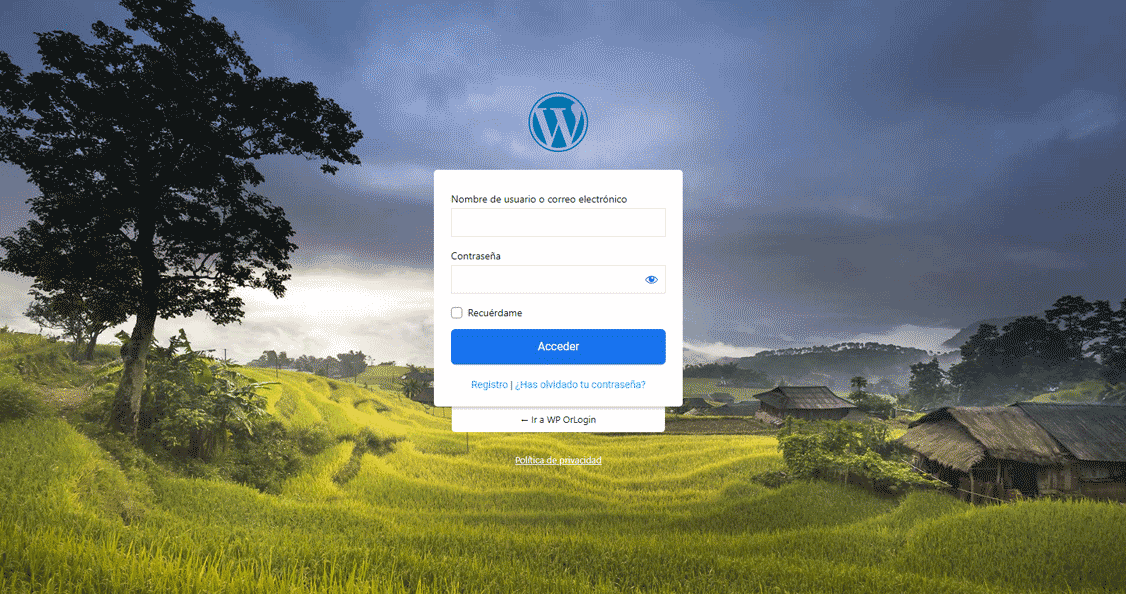
Premium Design – Layout Example 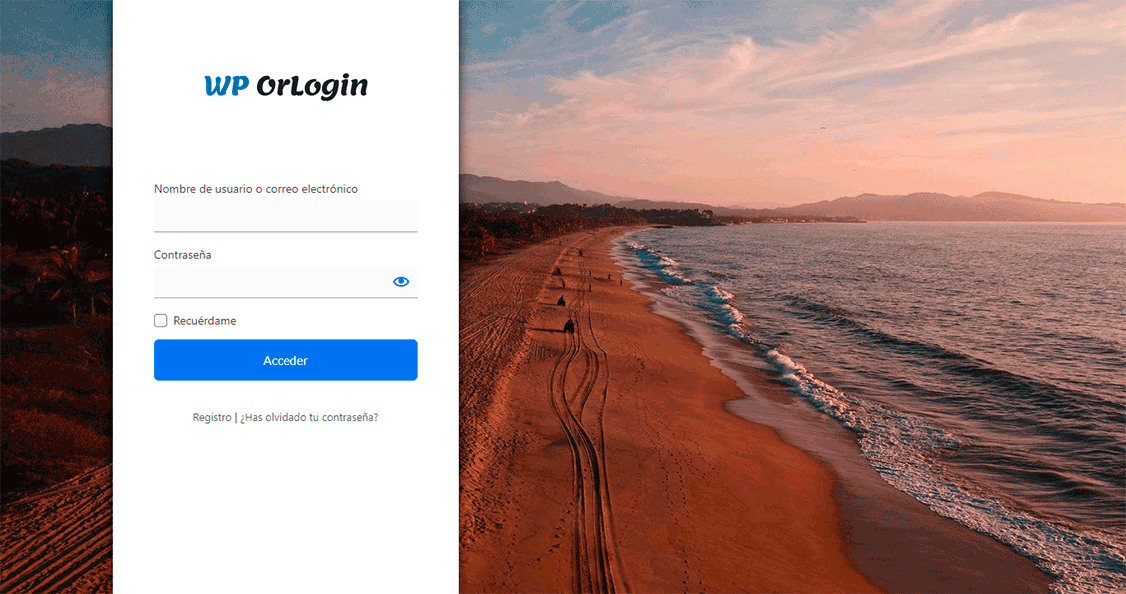
Standard Design Layout 
Basic Design Layout 
Module: Design Configuration 
Module: Standard Configuration 
Module: Premium Configuration 
Module: Google reCAPTCHA Settings 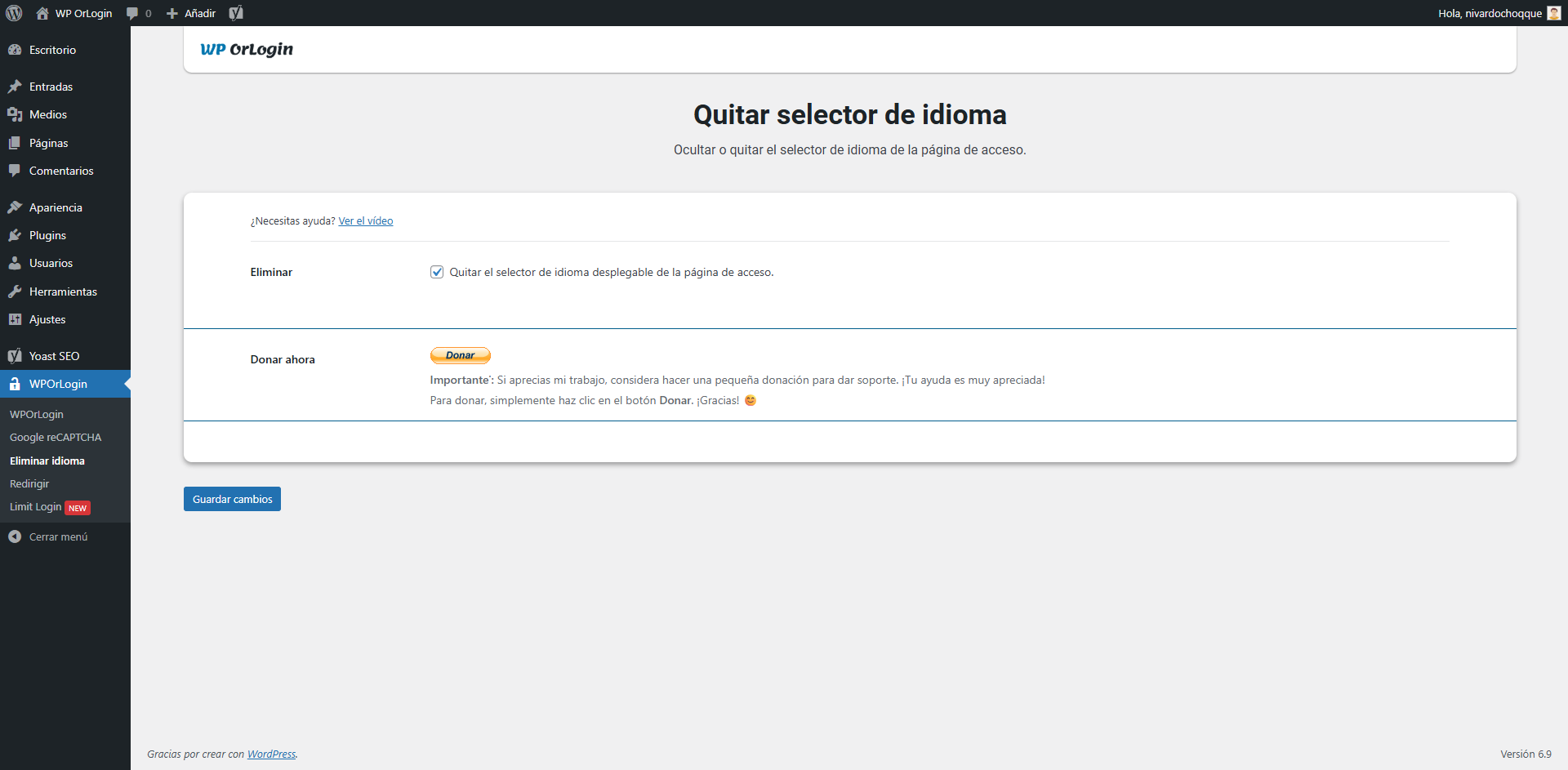
Module: Remove Language Selector 
Module: Redirect Settings 
Module: Limit Login (Security Report) 
Module: Hide Login (Custom URLs) 
Module: Social Login 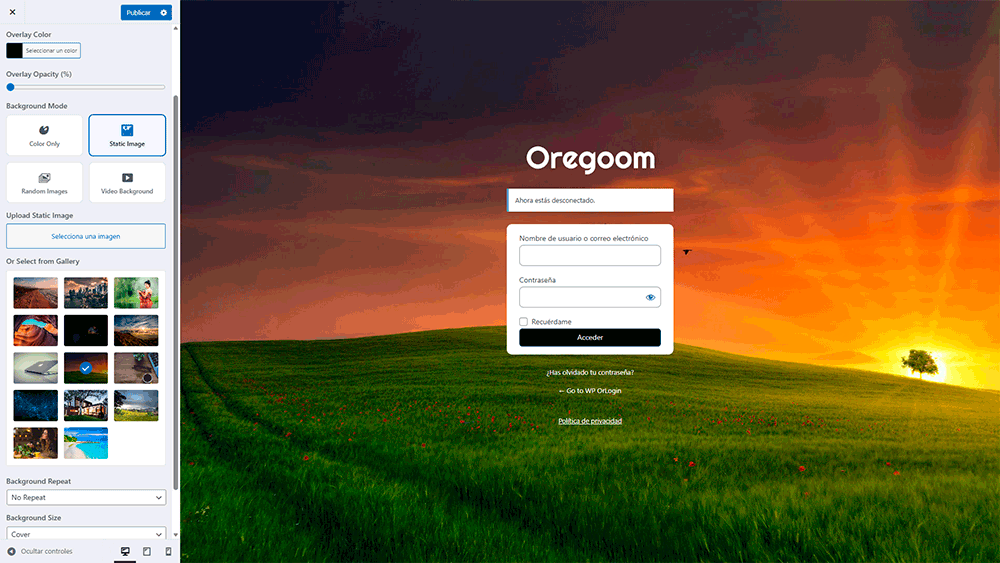
Custom: Custom Design
Ўсталёўка
Automatic Installation
1. Go to Plugins > Add New in your WordPress Dashboard.
2. Search for WPOrLogin.
3. Click Install Now and Activate.
4. Navigate to the “WPOrLogin” menu to configure your modules.
Manual Installation
1. Download the .zip file.
2. Go to Plugins > Add New > Upload.
3. Upload wporlogin.zip and activate.
Часта задаваныя пытанні
-
If a user logs in with Google, what happens to their Avatar?
-
WPOrLogin features “Smart Avatar Sync”. By default, we pull their Google profile photo to replace the WordPress default Gravatar. This creates a highly personalized experience. As an admin, you can disable this feature in the settings if you prefer standard Gravatars.
-
Yes! Existing users can still link their Google accounts to log in faster. However, new visitors won’t be able to create accounts if you have unchecked “Anyone can register” in WordPress General Settings.
-
If I hide my login, will I get locked out?
-
No. If you forget your custom URL, you can simply rename the
/plugins/wporlogin/folder via FTP to deactivate the plugin temporarily. Additionally, the plugin protects you from configuring a broken URL. -
Does “Hide Login” break caching plugins (WP Rocket, etc.)?
-
It works fine, but we recommend adding your new login slug (e.g.,
/access) to the “Never Cache” exclusion list of your caching plugin to ensure smooth performance. -
How does Limit Login differ from other security plugins?
-
WPOrLogin is lightweight. We don’t bloat your database with millions of logs. We use transient data to handle bans efficiently, keeping your site fast while secure.
-
Why remove the Language Switcher?
-
For membership sites or client portals, the language switcher often looks out of place or breaks the visual layout. Removing it creates a seamless “App-like” feel.
-
Can I use reCAPTCHA v3 (Invisible)?
-
Yes! We fully support v3. It analyzes user behavior behind the scenes without requiring them to click a checkbox, offering the best friction-less experience.
-
Does the Redirect module work for Administrators?
-
By default, we prioritize user experience for Subscribers, Customers, and Editors. We often prevent Admin redirection to ensure you always have access to the dashboard settings.
-
Will a video background slow down my login page?
-
Not at all. WPOrLogin is optimized for performance. We use asynchronous loading for YouTube/Vimeo APIs, meaning the login form appears instantly while the video loads in the background. Furthermore, on mobile devices, we automatically disable the video to save your users’ data and battery.
-
Why don’t I see the video on my mobile phone?
-
This is a feature, not a bug. Most mobile operating systems (iOS and Android) block auto-playing videos to save data and battery life. To ensure a fast and professional experience, WPOrLogin detects mobile devices and automatically displays the “Mobile Fallback Image” you selected instead of the video.
-
Will the video play sound? (I don’t want to annoy visitors)
-
No. By default, our Smart Video Engine forces the video to play in “Mute” mode. This ensures a professional, distraction-free environment appropriate for a business or membership portal.
-
My logo is hard to read over the video/image. What can I do?
-
Use the “Overlay” feature in the Customizer. You can add a black (or any color) layer over your background and adjust the opacity (e.g., 50%). This creates a “dimmed” effect that makes your logo and white text pop perfectly, regardless of how bright or busy the background video is.
-
Yes, absolutely.
This setting only affects the Registration form to stop spam. The Login form remains available for everyone, so old users can still sign in with their username and password as usual. -
Does WPOrLogin store private data from Google?
-
We only store the essentials required to create a user account on your site: Email, First Name, Last Name, and Profile Picture URL. We do not touch or store passwords, contacts, or any other private Google data.
Водгукі


Удзельнікі і распрацоўшчыкі
“WPOrLogin – Custom Login, Social Login, Limit Attempts, Hide Login & reCAPTCHA” is open source software. The following people have contributed to this plugin.
Удзельнікі
“WPOrLogin – Custom Login, Social Login, Limit Attempts, Hide Login & reCAPTCHA” has been translated into 6 locales. Дзякуй перакладчыкам за іх унёсак.
Зацікаўлены ў распрацоўцы?
Праглядзіце код, праверце SVN рэпазітарый, або падпішыцеся на журнал распрацоўкі па RSS.
Журнал змяненняў
3.0.2
- NEW FEATURE: Social Registration Only.
- Now you can disable the manual registration form. This effectively stops spam bots that try to create fake accounts via scripts.
- Users can only register using the secure “Sign in with Google” button.
- IMPROVEMENT: Real Name Import.
- The plugin now automatically fetches and saves the user’s First Name and Last Name from their Google Profile.
- Great for membership sites and shops that need real user data.
- UX: Improved the layout of the registration page when the manual form is hidden.
3.0.1
- NEW FEATURE: Video Backgrounds: Now you can turn your login page into a cinematic experience.
- Support for YouTube and Vimeo (just paste the URL).
- Support for Local MP4 videos (upload from Media Library).
- Includes “Smart Mobile Fallback” to replace video with an image on phones for speed.
- NEW FEATURE: Background Slideshow: Create a dynamic login screen with random rotating images.
- Includes a slider to control the duration (seconds) between images.
- NEW FEATURE: Smart Overlays: Added a color/opacity layer control.
- Now you can darken or tint your background videos/images to make your text and logo pop.
- IMPROVEMENT: Image Gallery: Added a built-in gallery with professional backgrounds ready to use.
- UX: Improved the Live Preview responsiveness when switching between Video, Static, and Random modes.
3.0
- MAJOR FEATURE! Full Visual Customizer: Now you can design your login page using the native WordPress Customizer. Change colors, borders, shadows, opacity, and backgrounds while viewing the result in real-time.
- NEW: Premium Design Gallery: We added new professional templates ready to use. Select your favorite and give your site a modern look in a second.
- IMPROVEMENT: Smoother design experience. We made the customizer smart so it doesn’t clash with your theme styles while you design.
- NEW: All-in-One Suite: All tools (Social Login, Security, Design) are consolidated into a single robust and easy-to-use panel.
- COMPATIBILITY: Ready to work perfectly with the latest WordPress themes (Full Site Editing).
2.12.2
- SECURITY: Enhanced protection algorithms for more accurate visitor detection (Cloudflare compatible).
- PERFORMANCE: Database optimizations to speed up the login process.
- FIX: Improved accuracy of the “Limit Login” timer and attempt counters.
- STABILITY: Fixed minor internal warnings and improved dashboard responsiveness.
2.12.1
- NEW: Redirect by Role: Send customers to the shop and editors to the dashboard automatically.
- SECURITY: “Stealth Mode”: Hides your dashboard login completely from bots.
- SECURITY: Stronger protection against brute-force attacks.
- FEATURE: Smart Avatar Sync: Automatically shows the user’s Google profile picture instead of a generic icon.
- UX: Added a simple “Add my IP” button to prevent locking yourself out.
- UX: You can now choose where to send strangers who try to access your hidden login page (404 Error, Home, etc.).
- FIX: Solved timezone issues with the lockout timer.
2.12
- NEW MODULE: Social Login. Let users sign in with one click using Google.
- FEATURE: Profile Picture Sync. Automatically updates user avatars from their Google account.
- COMPATIBILITY: Ready for the latest WordPress versions.
2.11
- NEW MODULE: Hide Login. Change your login URL (e.g., /my-access) to stop bot attacks instantly.
- FEATURE: “Smart Links” technology ensures password reset emails always work, even with a hidden login.
2.10
- NEW MODULE: Limit Login Attempts. Automatically blocks hackers who guess wrong passwords too many times.
- FEATURE: Live Security Report showing blocked intruders.
2.9.8
- Confirmed compatibility with WordPress 6.8.
2.9.7
- Improved review notice logic.
2.9.6
- Added color customization for buttons/links.
2.9.4
- Multi-language support added.
2.9.3
- Added Redirect Module functionality.
2.9
- Added Google reCAPTCHA v3 support.
2.7
- Added “Remove Language” module.
1.0
- Initial Release.