
Апісанне
Transform your long, forgettable Discord invite links into branded, professional vanity URLs on your own domain. Perfect for communities, gaming servers, content creators, and businesses.
🎯 Key Features
🔗 Branded Vanity URLs
* Create custom short links: yoursite.com/discord, yoursite.com/community, or any path you choose
* Professional and memorable – perfect for marketing materials, social media, and verbal sharing
* No external URL shorteners needed – everything on your domain
📊 Real-Time Analytics
* Track total clicks with beautiful visual stats dashboard
* Monitor last click timestamp
* Reset counters anytime for new campaigns
* Modern card-based analytics interface
🎨 Social Media Previews
* Customize rich embeds for Discord, Twitter, Facebook, WhatsApp, and more
* Upload server icons directly from WordPress media library
* Custom colors matching your brand (Discord blue #5865f2 by default)
* Live preview – see exactly how your embed will look before publishing
* Professional first impression when sharing your invite
🔔 Discord Webhook Notifications
* Get instant notifications in Discord when someone clicks your invite
* Easy OAuth integration – login with Discord to select channels
* Alternative manual webhook URL input
* Perfect for tracking engagement in real-time
💎 Modern Admin Interface
* Complete UI overhaul in version 2.6.0
* Clean card-based design matching WordPress standards
* Intuitive help toggles for every setting
* Responsive layout works perfectly on mobile
* WordPress media library integration for images
📸 Visual Examples
When you share your vanity URL, people see:
* Your server icon/logo
* Custom invitation message
* Server name and description
* Branded colors
* Professional, trustworthy appearance
Perfect for:
* Gaming communities and Discord servers
* Content creators and streamers
* Educational communities
* Business team coordination
* Open source projects
* NFT and crypto communities
🚀 How It Works
- Install & Activate – One-click installation from WordPress
- Configure Your Link – Set your Discord invite code and choose your vanity path
- Customize Appearance – Upload your server icon, write compelling descriptions
- Share Everywhere – Use your branded link in videos, social media, websites
- Track Performance – Monitor clicks and engagement from your WordPress dashboard
🔒 Privacy & Security
- No data sent to external servers (except Discord OAuth for webhooks)
- All analytics stored in your WordPress database
- Open source – inspect the code anytime
- Regular security updates
- Follows WordPress coding standards
📚 Documentation & Support
Disclaimer: This plugin is not affiliated with Discord Inc. Discord and related logos are trademarks of Discord Inc.
Credits:
* Logo crafted with love by Dawn Saju
* Developed by Sarvesh M Rao
Support
Need help? Here’s how to get support:
- Documentation: Check our comprehensive docs first
- Forum: Ask questions in the WordPress support forum
- GitHub: Report bugs or request features on GitHub
- Reviews: Love the plugin? Leave a review ❤️
Contribute
WP Discord Invite is open source! Contribute on GitHub:
- Submit bug reports
- Suggest new features
- Contribute code
- Translate the plugin
- Improve documentation
Support Development: If this plugin helps your community, consider buying me a coffee ☕
Screenshots

Modern settings page with card-based UI and live embed preview 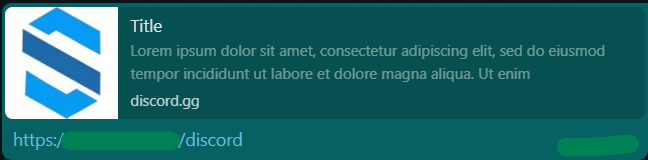
Click analytics dashboard with beautiful stat cards 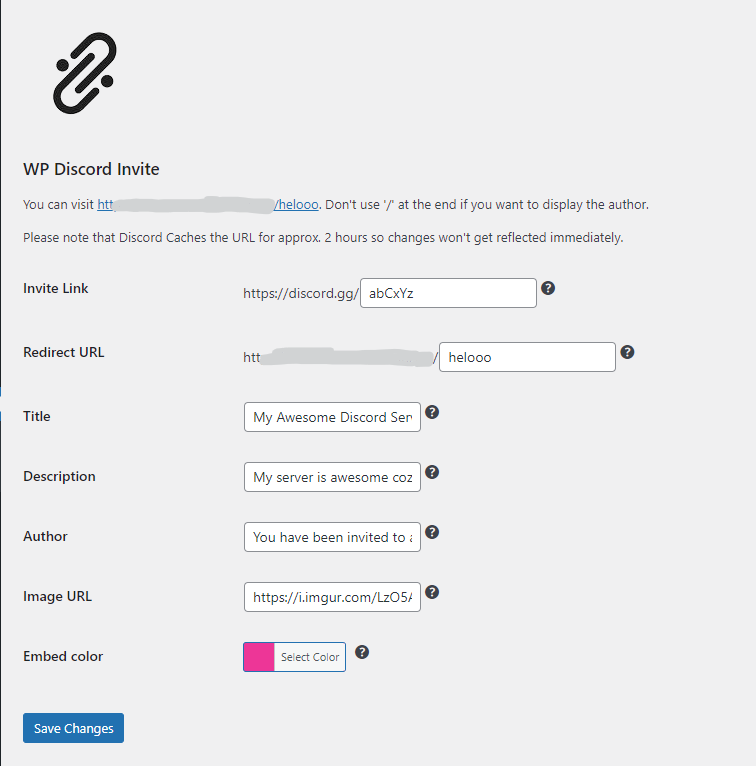
Rich embed preview in Discord showing custom branding 
Rich embed preview in WhatsApp Web 
WordPress media library integration for server icons 
Webhook configuration with Discord OAuth login 
Admin menu with Discord Invite sections
Ўсталёўка
Automatic Installation (Recommended)
- Log into your WordPress admin dashboard
- Navigate to Plugins > Add New
- Search for “WP Discord Invite”
- Click Install Now button
- Click Activate to enable the plugin
Manual Installation
- Download the plugin ZIP file
- Log into WordPress admin dashboard
- Navigate to Plugins > Add New > Upload Plugin
- Choose the ZIP file and click Install Now
- Click Activate Plugin
After Activation
- Find WP Discord Invite in your admin sidebar
- Go to Settings tab
- Enter your Discord invite code (e.g.,
abCxYzfromdiscord.gg/abCxYz) - Choose your vanity URL path (e.g.,
discordforyoursite.com/discord) - Customize your embed appearance
- Click Save Changes
- Your vanity link is ready to share!
Часта задаваныя пытанні
-
What is a vanity URL?
-
A vanity URL is a custom, branded web address that’s easy to remember and share. Instead of sharing
https://discord.gg/randomChars123, you can shareyoursite.com/discordoryoursite.com/community. -
Do I need a Discord server to use this plugin?
-
Yes, you need a Discord server and a permanent invite link. You can create a permanent invite in your Discord server settings under “Invites.”
-
Will the plugin slow down my website?
-
No. The plugin is lightweight and only loads when accessing admin pages or your vanity URL. It doesn’t add any scripts to your public pages.
-
Can I have multiple Discord invite links?
-
Currently, the plugin supports one invite link per WordPress installation. Multiple servers support is planned for future versions.
-
How do I create a permanent Discord invite?
-
In your Discord server: Server Settings Invites Create Invite Set “Expire after” to “Never” Save
-
Does this work with Pretty Permalinks?
-
Yes! The plugin requires Pretty Permalinks to be enabled in WordPress. Go to Settings Permalinks and select any option except “Plain.”
-
Can I track who clicked my link?
-
The plugin tracks total clicks and timestamps, but not individual user data. This respects user privacy while giving you useful analytics.
-
What happens if I deactivate the plugin?
-
Your vanity URL will stop working, but all settings are saved in your database. Reactivating the plugin restores everything.
-
Is the plugin translation-ready?
-
Yes! The plugin is fully internationalized and ready for translation. You can contribute translations on WordPress.org translate.
-
Can I customize the redirect behavior?
-
The plugin uses standard 302 HTTP redirects to Discord. For advanced customization, you can modify the code (open source on GitHub).
-
How do webhooks work?
-
When enabled, the plugin sends a notification to your Discord channel every time someone clicks your invite link. You can see real-time engagement!
-
Where do I report security bugs found in this plugin?
-
Please report security bugs found in the source code of the WP Discord Invite plugin through the Patchstack Vulnerability Disclosure Program. The Patchstack team will assist you with verification, CVE assignment, and notify the developers of this plugin.
Водгукі


Удзельнікі і распрацоўшчыкі
“WP Discord Invite” is open source software. The following people have contributed to this plugin.
Удзельнікі
Перакласці “WP Discord Invite” на вашу мову.
Зацікаўлены ў распрацоўцы?
Праглядзіце код, праверце SVN рэпазітарый, або падпішыцеся на журнал распрацоўкі па RSS.
Журнал змяненняў
2.6.0 – 2026-02-14
Major Update: Complete UI Overhaul + Security Hardening
Security Fixes:
* 🔒 Fixed Stored XSS vulnerability (CVE-2025-47638) – Enhanced input sanitization to prevent script injection
* 🛡️ Added wp_strip_all_tags() to all text field sanitization for additional security
* ✅ Strengthened hex color validation with fallback to safe default
* 🔐 All outputs properly escaped with esc_html(), esc_attr(), and esc_url()
New Features:
* 🎨 Complete modern UI redesign with card-based layout
* 📷 WordPress media library integration for server icons
* 🎯 Live embed preview with real-time updates
* 📊 Beautiful visual stats cards with gradient icons
* 🔄 Toggle switches for better UX
* 📱 Fully responsive design for mobile devices
* ℹ️ Inline help tooltips for every setting
* 🔗 Enhanced plugin meta links (Support, Changelog, GitHub, Donate, Translate)
Improvements:
* Modern WordPress admin styling matching WP 6.7 standards
* Better default values (Discord blue color, plugin icon as default image)
* Improved button layouts and spacing
* Enhanced form field organization
* Better visual hierarchy
Changes:
* Updated plugin description for better clarity
* Bumped version to 2.6.0
* Updated default embed color to Discord brand blue (#5865f2)
* Changed default image from external URL to plugin icon
2.5.3 – 2024-11-03
- WordPress version compatibility update
- Tested up to WordPress 6.6
- Note: Users should upgrade to 2.6.0 immediately for CVE-2025-47638 security fix
2.5.2 – 2023-10-11
Security Fixes:
* 🔒 Fixed Authenticated Stored XSS (CVE-2023-5181) – Added proper sanitization and escaping for all settings
* Enhanced output escaping throughout plugin
Other Changes:
* Various bug fixes
* Performance improvements
2.5.1 – 2023-09-24
Security Fixes:
* 🔒 Fixed CSRF vulnerability (CVE-2023-5006) – Added proper nonce validation to settings update
* WordPress Settings API now properly validates all form submissions
Bug Fixes:
* Fixed Discord OAuth login issue
* Fixed webhook posting problems
* Multiple stability improvements
2.4.0
- New feature: Discord OAuth integration for webhook creation
- Removed separate help page in favor of inline help
- Security updates
- Bug fixes
2.3.1
- New feature: Customizable vanity URL path
- Added help menu next to fields
- Improved user experience
1.1.2
- Minor bug fixes
1.1.0
- New feature: Click counter and stats
- New feature: Discord webhook notifications
- Initial analytics dashboard
1.0.0
- Initial stable release
- Basic vanity URL functionality
- Rich embed customization