

Апісанне
Sometimes it is useful to know if – or when – a user successfully logged in to WordPress. Loginpetze generates a notification mail for this incident. This is a conveniant way to e.g. monitor staging sites for customer logins. No need to regularly take a look at statistics or tracking tools. Mails are customizable with shortcodes. All texts are translatable.
Loginpetze 1.x is not compatible with WordPress Multisite.
Translations
If you wish to help translate this plugin, you are most welcome!
To contribute, please visit translate.wordpress.org
Keep in mind that if you’re not PTE or GTE for your language, you have to notify someone to approve your contributed strings. This can be done via Slack or by writing a request on https://make.wordpress.org/polyglots/
To find the translation team for your locale, please visit https://make.wordpress.org/polyglots/teams/
Credits
Special Thanks go to Bernhard Kau, Torsten Landsiedel, Bego Mario Garde and Thorsten Frommen.
Screenshots
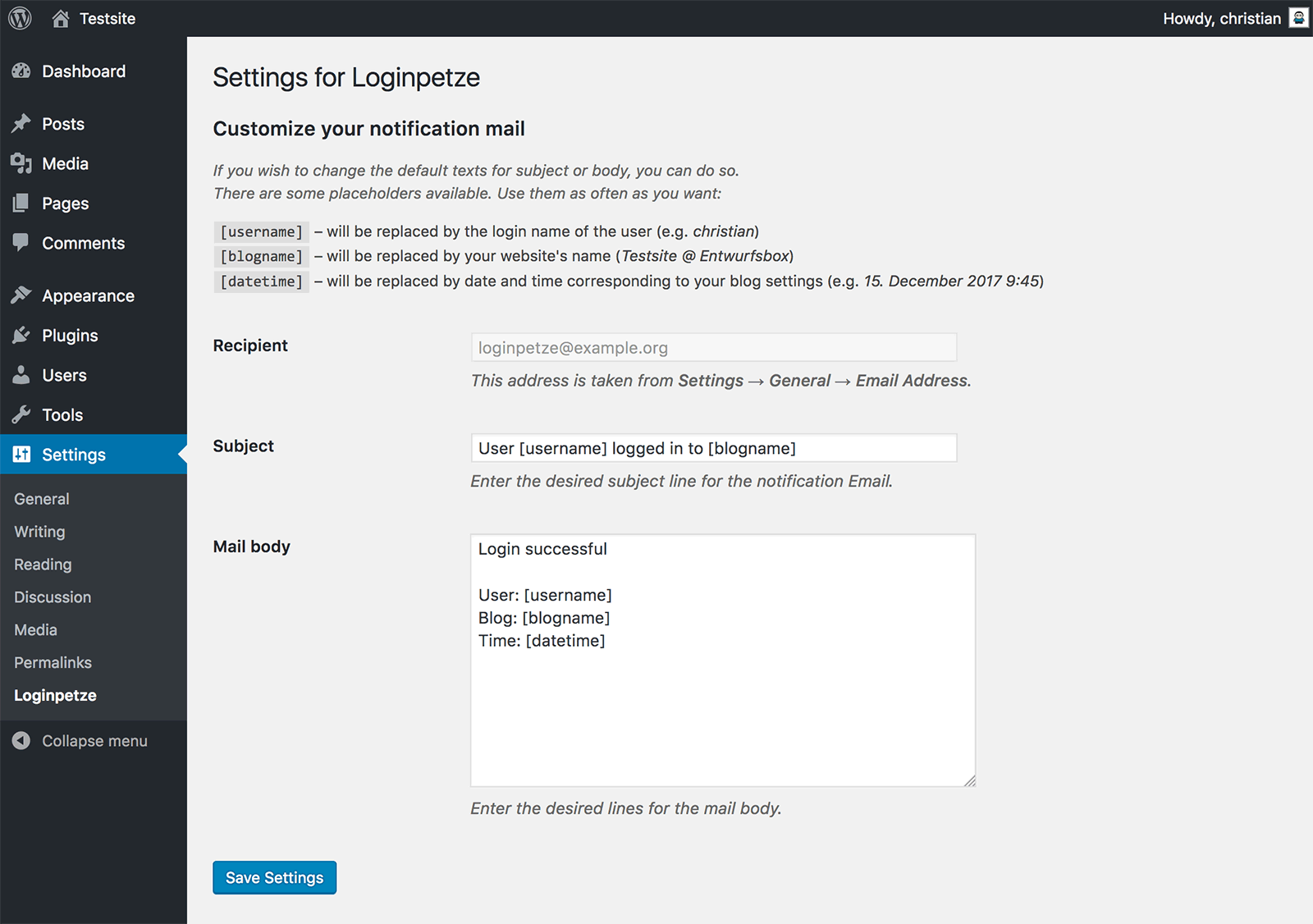
The only screen for Loginpetze. All texts are translatable.
Ўсталёўка
From WordPress Plugin Directory
- In your backend, go to Plugins → Add New to search for Loginpetze in the WordPress Plugin Directory.
- Click Install Now and then Activate.
- After activation go to Settings → Loginpetze to set up the few options this plugin offers.
Manual Installation
- Download loginpetze.zip to your desktop and extract the archive.
- Upload the folder loginpetze into the directory
/wp-content/plugins/on your webserver. - Activate Loginpetze via the Plugins menu in your WordPress Dashboard.
- After activation go to Settings → Loginpetze to set up the few options this plugin offers.
Часта задаваныя пытанні
-
«Loginpetze» – what kind of name is that?
-
It’s the german word for «login snitch».
-
How does it work?
-
In short: you install it, you select a user to receive the notification mails and you’re done.
If you like to, you can customize the subject and body of the mails. There are placeholders available that you can insert into your template: username, blogname, date and time.
-
Can I suppress notifications for certain users or roles?
-
Yes, there’s a filter for that. Add the following lines to your (child) theme’s
functions.phpand customize the array – you can provide usernames, IDs and roles (even mixed) in an array.add_filter( 'loginpetze_blockers', function ( $ignorelist ) { $ignorelist = array ( 'username', '123', 'administrator' ) ; return $ignorelist; } ); -
Is the plugin Multisite compatible?
-
Loginpetze 1.x does not work on Multisite installations, but we intend to add Multisite support to a future version.
-
Why did you develop this plugin?
-
Occasionally (especially when setting up websites for clients) we wanted to be notified if – or when – anybody logged in to the staging websites. For this purpose we used to add some lines to our
functions.phpfiles, which was not very comfortable. For conveniance, we turned our code into this plugin.It was also a good opportunity to learn and to completely play through the process of plugin creation.
-
What happens if I deactivate or delete the plugin via my Dashboard?
-
Deactivating the plugin will just stop the notification mails. Nothing will happen to your settings (which are stored in the database).
However, if you delete the plugin, this will remove your settings from the database. If you then re-install it, the default settings will be applied.
-
What happens if I just delete the files via FTP?
-
This will also stop the notification mails, but since the uninstall routine is not called, nothing will be removed from your database. If you re-install Loginpetze, your custom settings will still be available.
-
What happens if I or any other admin delete a user who is set up to receive the notification mails?
-
Loginpetze will warn you about this and you can check your settings. In case this warning is ignored, Loginpetze will automatically switch the recipient to the Standard Blog Admin.
-
I need more features. Is there a Pro Version available?
-
No 🙂
Водгукі

Удзельнікі і распрацоўшчыкі
“Loginpetze” is open source software. The following people have contributed to this plugin.
Удзельнікі

“Loginpetze” has been translated into 9 locales. Дзякуй перакладчыкам за іх унёсак.
Перакласці “Loginpetze” на вашу мову.
Зацікаўлены ў распрацоўцы?
Праглядзіце код, праверце SVN рэпазітарый, або падпішыцеся на журнал распрацоўкі па RSS.
Журнал змяненняў
1.4
- 2020-08-06
- Added: filter to suppress notifications for specific users, IDs or roles
- Tested up to WordPress 5.5
1.3
- 2020-01-14
- Added: some more placeholders
1.2
- 2018-10-08
- Tested up to WordPress 5.3
1.1
- 2018-01-16
- Added: support for Simple History
- Added: check for the required PHP version (5.5)
- Improved: tags for the WordPress Plugin Directory
1.0
- 2018-01-15
- Initial release