

Апісанне
Database Entries Form 7 automatically saves form submissions from Contact Form 7 directly to your database. This plugin provides an intuitive interface for viewing, searching, filtering, and managing all entries.
Supported Contact Forms
Features
- Centralized Entry Management: View all Contact Form 7 entries in a WordPress table format.
- Advanced Search: Quickly search entries by keyword across all fields.
- Form-Based Filtering: Filter entries by specific Contact Form 7 forms for easy management.
- Read/Unread Status Management: Mark entries as read or unread, and toggle between sections for organized handling.
- Trash & Restore Capabilities: Move entries to the trash with the option to restore them if needed.
- View & Edit Entries: Access and modify individual entries directly from the admin dashboard.
- Enhanced Privacy Options: Disable IP and user agent data collection to maintain GDPR compliance.
Why We Built This Plugin
Contact Form 7 is a highly popular contact form builder, but it lacks a system for managing submissions. Database Entries Form 7 enhances its capabilities by providing an organized and centralized solution for managing entries in WordPress.
GDPR Compliance
Database Entries Form 7 respects user privacy and GDPR requirements by allowing you to disable the collection of users’ IP addresses, browser information, screen resolution, and operating system data.
Screenshots

View Entries – Easily see all your form submissions in one place. 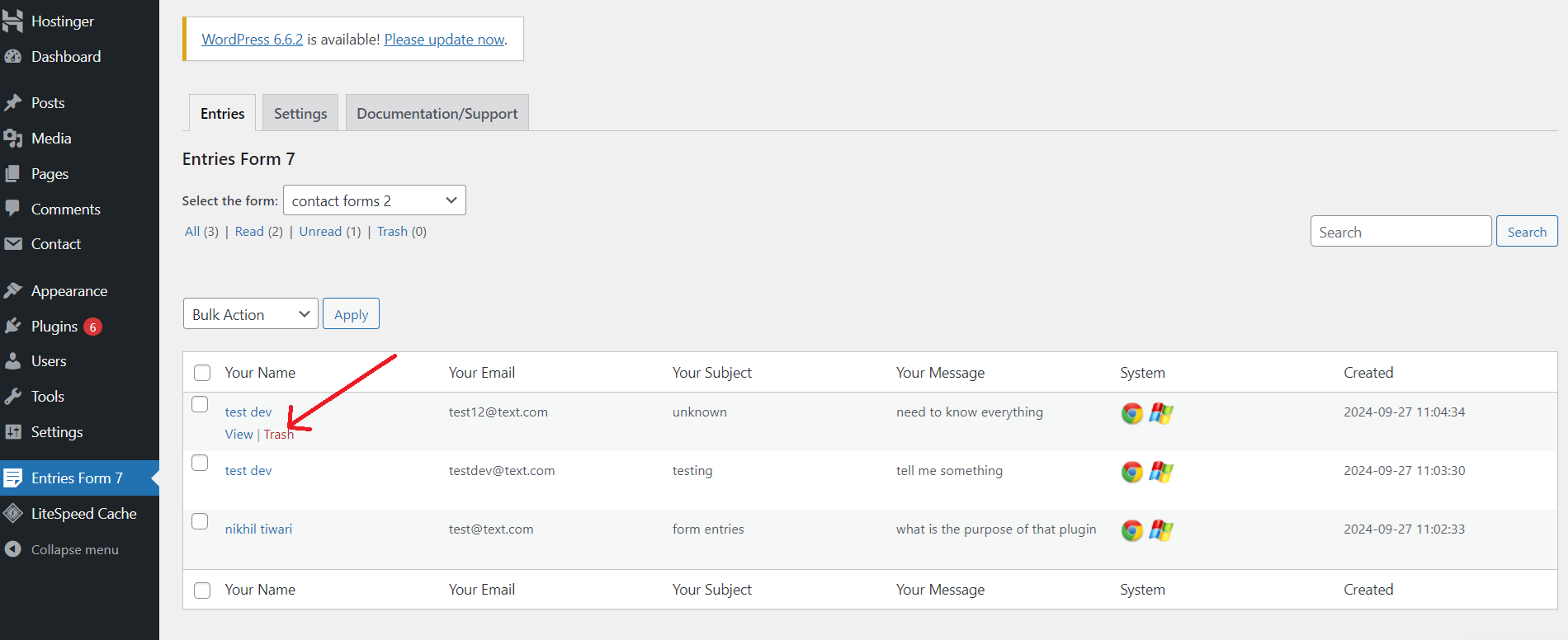
Trash Entries – Quickly move unwanted entries to the trash. 
Edit Entry – Modify entry details from the admin dashboard.
Ўсталёўка
-
Install from WordPress Repository:
- Go to Plugins > Add New in your WordPress dashboard.
- Search for “Database Entries Form 7”.
- Click Install Now, then Activate to enable the plugin.
-
Configure the Plugin:
- Once activated, go to Form Entries > Settings to configure your preferences, including options to disable IP address and user agent tracking if needed.
- Under Form Entries > Entries, you can begin viewing and managing all submissions.
Часта задаваныя пытанні
-
How can I view all Contact Form 7 entries in WordPress?
-
You can view all your Contact Form 7 entries directly in the WordPress admin dashboard. Entries are displayed in a table format, making it easy to manage and navigate the data.
-
Can I search form entries by specific keywords?
-
Yes, you can search form entries by keywords. The search function scans across all columns in the entries table.
-
Is it possible to filter form entries by a specific Contact Form 7 form?
-
Absolutely! You can filter entries by selecting the specific Contact Form 7 form you want to view, which is helpful for managing submissions from multiple forms.
-
How can I mark form entries as read or unread?
-
To mark entries as read or unread, click the read/unread icon next to each entry or use bulk actions to update multiple entries simultaneously.
-
Can I move form entries to the trash or restore them later?
-
Yes, you can move entries to the trash, and if needed, restore them from the trash. Data is only permanently deleted when you choose to delete it permanently.
-
Is it possible to view and edit form entries?
-
Yes, admins can view the full details of each entry and make edits. Simply click the “View/Edit” button next to an entry.
-
Can I disable the collection of users’ IP addresses and browser details?
-
Yes, you can disable the collection of users’ IP addresses and browser details. Go to plugin settings and toggle off the respective options.
Водгукі
На гэты плагін няма водгукаў.
Удзельнікі і распрацоўшчыкі
“Database Entries Form 7” is open source software. The following people have contributed to this plugin.
Удзельнікі
Перакласці “Database Entries Form 7” на вашу мову.
Зацікаўлены ў распрацоўцы?
Праглядзіце код, праверце SVN рэпазітарый, або падпішыцеся на журнал распрацоўкі па RSS.
Журнал змяненняў
1.4.0
- New Feature: Enhanced pagination for form entries, providing a more user-friendly and consistent experience.
- Added support for WordPress-style pagination with “First”, “Previous”, “Next”, and “Last” buttons.
- Users can now easily navigate through large sets of form submissions.
- Performance improvements and bug fixes.
1.3.0
- New Feature: Admins can now add notes or comments on any entries, providing more flexibility for managing form submissions.
- Performance improvements and bug fixes.
1.2.0
- New Feature: Added the ability to download all form entries as a CSV file.
- Users can now export form submissions with details like name, email, subject, message, and more.
- Performance improvements and bug fixes.
1.1.0
- New Feature: Added filtering options for custom date ranges and the ability to search by specific columns, enhancing entry management flexibility.
- Bug fixes and performance improvements.
1.0.1
- Minor improvements and adjustments for better user experience.
1.0.0
- Initial release.