

Description
Stop wrestling with complex shortcodes. Start building visually.
Video Gallery & Playlist for YouTube (YouTube Showcase) is the most intuitive way to transform your website into a professional WordPress video hub. Featured in WPBeginner’s Best YouTube Video Gallery Plugins, our all-new Visual Block lets you design high-impact grids and cinematic playlists directly inside the WordPress Block Editor with a real-time preview.
Whether you are a creator, blogger, or marketer, this plugin helps you display YouTube content in beautiful, mobile-ready layouts. No coding, no guesswork—just a seamless video experience for your visitors.
🔗 Quick Links
- Live Demo Site – See it in action.
- WPBeginner Featured Review – Rated as a top choice.
- Documentation – Easy step-by-step setup guides.
🚀 Key Features
- Visual Block Builder: Select your videos and watch your gallery update live in the sidebar—no more “save and refresh.”
- Optional Setup Assistant: Get up and running in seconds. Create ready-to-use gallery and grid pages with one click.
- Cinematic Playlists: A large featured player with a beautiful thumbnail navigation “playlist” below.
- Responsive Video Grids: Clean, 4-column layouts that automatically adjust for mobile and tablet devices.
- Automated Video Pages: Every video gets its own SEO-optimized page with WordPress comments enabled.
- Lightweight Performance: Optimized code ensures your page speed stays high.
- Full Customization: Change thumbnail quality (16:9 or 4:3) and adjust video URL slugs for better branding.
Getting Started & Details
How to Add Videos
Adding content is simple. The plugin uses the YouTube Video ID (the 11-character string at the end of a YouTube URL).
* Example: For youtube.com/watch?v=9K4uBRkFJEU, the ID is 9K4uBRkFJEU.
* Simply enter this ID in the Video editor, and the plugin fetches the rest.
Built-in Layouts
If you use the Optional Setup Assistant, it will create two ready-to-use pages for you:
1. YouTube Video Gallery: Features a main player with thumbnail navigation at the bottom.
2. YouTube Video Grid: A high-resolution 4-column responsive layout.
Customization Tips
- Thumbnail Quality: You can change dimensions (e.g., 4:3 instead of 16:9) in the settings to match your site’s design.
- Content & Excerpts: Add custom text for every video. The content appears on the single video page, while the excerpt appears right below the main video in the gallery view.
💎 Get More with YouTube Showcase Pro
Need more power? The Pro version includes Auto-Sync for channels, Lightbox popups, search filtering, and premium layouts (Coverflow, Masonry, and more).
👉 Upgrade to YouTube Showcase Pro
Technical Foundation
This plugin was developed using the WP App Studio design and development platform, ensuring a modular and maintainable code structure that follows WordPress standards.
Screenshots

The Visual Block Editor – Design your YouTube Showcase with a real-time preview directly in the sidebar. 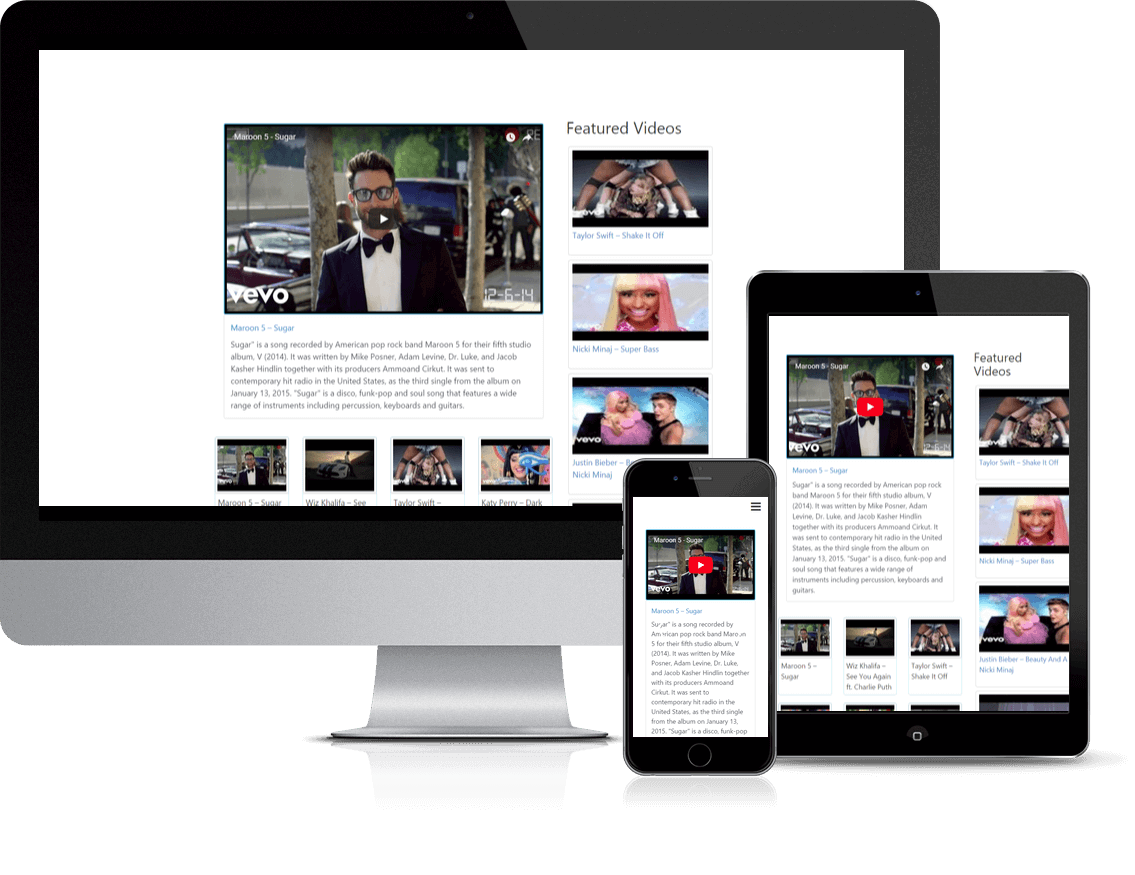
Automatic Setup Gallery – A responsive video gallery with thumbnail navigation created during setup. 
Mobile Optimized – Thumbnail navigation automatically hides on devices below 768px for better UX. 
Responsive Video Grid – A clean 4-column grid layout generated automatically by the setup assistant. 
Individual Video Pages – SEO-friendly pages with comments and optional Featured/Recent widgets. 
Intuitive Admin Interface – Easily add and manage your YouTube videos via the dedicated video editor. 
YouTube Showcase PRO – Unlock 40-65% faster page loads and advanced player configurations. 
Custom URL Slugs – Total control over your video permalinks for better branding and SEO. 
CSV Import/Export – Bulk manage your library with the eMD CSV Extension for high-volume sites.
Blocks
This plugin provides 1 block.
- YouTube Showcase
Installation
- Upload the
youtube-showcasefolder to the/wp-content/plugins/directory. - Activate the plugin through the ‘Plugins’ menu in WordPress.
- Use the Optional Setup Assistant to automatically create your core gallery pages, or skip to build manually.
- To build manually: Go to any Page/Post, click (+), and search for “YouTube Showcase” to start building visually!
FAQ
-
How do I add videos?
-
The plugin creates a “Video” menu in your dashboard. Simply enter the 11-character YouTube Video ID (e.g., 9K4uBRkFJEU), and the plugin handles the rest.
-
Does this work with the new Block Editor?
-
Yes! Version 4.0.0 is built specifically for the Block Editor. Search for the YouTube Showcase block to design your galleries visually.
-
Can I display a full channel or playlist?
-
In this free version, you can curate your channel content manually using categories. For automatic syncing of entire channels or playlists, check out YouTube Showcase Pro.
-
Is it mobile-friendly?
-
Absolutely. All layouts are fully responsive. On mobile, the playlist navigation automatically switches to an intuitive icon-based system for better usability.
-
Can I categorize videos?
-
Yes. You can assign categories to your videos and then use the Visual Block settings to filter and display only specific categories in your grids or galleries.
Reviews


Contributors & Developers
“Video Gallery – YouTube Gallery & Responsive Video Playlist” is open source software. The following people have contributed to this plugin.
Contributors

Translate “Video Gallery – YouTube Gallery & Responsive Video Playlist” into your language.
Interested in development?
Browse the code, check out the SVN repository, or subscribe to the development log by RSS.
Changelog
4.0.1
- FIXED YouTube “Error 153 – video player configuration error” by updating embed security and referrer policy.
4.0.0
- NEW Added a Gutenberg block to insert YouTube video galleries, grids, and search forms directly from the block editor.
- NEW Real-time preview within the editor sidebar.
- TWEAK tested with WP 6.9
3.5.4
- FIXED Updated title for trademark
- FIXED Updated internationalization
3.5.3
- FIXED Validate input for emd_form_builder_lite_pagenum function
3.5.2
- FIXED XSS vulnerability for noaccess_msg
- FIXED Validate input for emd_form_builder_lite_pagenum function
- FIXED Vulnerability related to emd_get_widg_pagenum
3.5.1
- TWEAK tested with WP 6.8
- FIXED XSS vulnerability when using custom fields
3.5.0
- FIXED WordPress dashboard accordions issue on setting and glossary pages due to changes in core code on WP 6.7.1
3.4.0
- FIXED Vulnerability on form submit
- FIXED Translation to one textdomain
3.3.6
** Fix CSRF in form settings
3.3.5
-
- FIXED widgets
3.3.4
-
- TWEAK tested with WP 6.0
3.3.3
- TWEAK tested with WP 5.9.1 and PHP 8
3.3.2
- TWEAK tested with WP 5.8.1
- TWEAK Added ability to set the maximum number of videos to show in multiple sidebar widgets.
- TWEAK Added ability to set pagination support with customization options for multiple sidebar widgets.
3.3.1
- TWEAK tested with WP 5.7
3.3.0
- FIXED Pagination bar not showing in mobile devices in the video gallery view.
3.2.9
- FIXED multi-select form component missing scroll bars when the content overflows its fixed height.
3.2.8
- TWEAK fixes and improvements for better performance and compatibility
3.2.7
- TWEAK updates to translation strings and libraries
- NEW Added version numbers to js and CSS files for caching purposes
- TWEAK tested with WP 5.5.1
3.2.6
- NEW Added previous and next buttons for the edit screens of videos
- TWEAK updates and improvements to libraries
3.2.5
- TWEAK updates and improvements to form library
- TWEAK Emd templates
3.2.4
- TWEAK Fix issue related to extensions
3.2.3
- TWEAK Remove unused code and additional hardening for security
3.2.2
- FIXED Paging issue on Video Gallery
- FIXED XSS related issues
3.2.1
- TWEAK Emd form builder upgrade messages
3.2.0
- NEW Added Emd form builder support
- FIXED Session cleanup workflow by creating a custom table to process records.
3.1.1
- TWEAK Misc. library updates for better stability and compatibility.
3.1.0
- NEW Created a new shortcode page which displays all available shortcodes. You can access this page under the plugin settings.
- TWEAK Emd templating system to match modern web standards
3.0.1
- FIXED the Jump from the selected video to the main video frame in Firefox.
3.0.0
- NEW Added a sidebar widget allowing to search videos by title, category or tag.
- NEW Added ability enable or disable any video search field in the plugin settings.
- NEW Added option to show login or register before searching videos – handy feature for private or customer only videos.
- NEW Added option to use captcha in video search submissions in the plugin settings.
- NEW Added option to set No results found and No access messages in the plugin settings.
- TWEAK Improved the emd templating system removing obsolete code.
- TWEAK Updated the third party code included in the plugin.
2.9.7
- TWEAK Misc. library updates for better stability and compatibility.
2.9.6
- TWEAK Fixed the issue related to video thumbnails not displayed correctly in the widgets when video image resolution field is set.
2.9.5
- NEW Demo site – https://ytshowcasecom.emdplugins.com/ – where the latest version of YouTube Showcase Starter edition is installed.
- TWEAK Featured and recent video widget now use Video Image Resolution field to set the video image thumbnail and defaults to medium quality resolution.
- TWEAK Video grid and Video Grid Gallery thumbnails now use Video Image Resolution field to set the video image thumbnail and defaults to medium quality resolution.
2.9.0
- FIXED paging css
- TWEAK library updates
2.8.0
- FIXED widget sidebar is not responding to screen size changes issue
- NEW YouTube Showcase introduction video
2.7.6
- FIXED video gallery paging issue
2.7.5
- TWEAK All gallery pages will show 6 columns on desktop, 4 columns on tablets, 3 columns on phones
- TWEAK Removed ellipsis for long video titles. It displays full titles for Video Grid.
2.7.2
- TWEAK Removed ellipsis for long video titles. It displays full titles
- TWEAK Made all video thumb images full width to cover all available space
2.7.0
- NEW Added custom JavaScript option in plugin settings under Tools tab
- NEW Added container type field in the plugin settings
- FIXED wpautop issue with br tags
- FIXED PHP 7 compatibility
- TWEAK Updated codemirror libraries for custom CSS and JS options in plugin settings page
2.6.0
- NEW Added ability to disable EMD Templating system and switch back to theme based system from plugin settings
- FIX PHP 7 compatability
- TWEAK Minor shortcode page navigation fixes and improvements
2.5.1
- Fixed deleting WordPress category and tags when clicked on “Remove All Data” checkbox under Video Settings > Tools and deleted the plugin from WordPress Plugin page
2.5.0
- NEW Added new templating sytem which allows changing page templates for video, video archive and taxonomy pages from plugin settings
- NEW Added Custom CSS area where one can put in plugin related CSS code specific to their own site
- NEW Ability to hide page navigation links from plugin settings
2.4.0
- NEW Added ability to rename videos slug in the settings
- NEW Added ability to enable/disable plugin Bootstrap css/js files
- Fixed search results issue
2.3.0
- Minor bug fixes and code improvements
2.2.0
- Compatibility with WordPress 4.5 and misc. bug fixes
- Added ability to disable/enable thumbs navigation in mobile devices
2.1.0
- Fixed video audio playing after the second video clicked issue in video gallery view.
2.0.0
- Changed the order of the videos Descending to display the new videos first in the gallery
- Enabled thumb navigation for tablets
- Changed the video displayed per page to 16 for Grid and Thumbs
- Adjusted grid column numbers 6(Large), 4(Medium) and 3(Small) devices
- Enabled page navigation on Video Grid Gallery
- Added title link to video single page in Video Gallery
- Added video title to video grid gallery
1.4.1
- Fixed the video navigation issue when WordPress is installed in subdirectory.
- Fixed setting translation issue
1.4.0
- Fixed the issue related to HTML5 video player not playing by default
- Fixed the issue related to videos not displayed on the gallery (Blank video was showing) when clicked on video thumbnail
1.3.0
- Added ability to enable or disable thumbnail navigation for the screens less than 768px
- Added ability to enable or disable video autoplay
- Removed unnecessary CSS rules
1.2.0
- Added video thumbnail quality selector which may help for the video thumbnail not coming from YouTube issue
- Removed unnecessary css
1.1.0
- Moved responsive arrow head icons closer to the video
- Improved compatibility with the other themes and plugins.
1.0.1
- Cleaned up the code related to Video Grid
- Fixed issue with Video Grid Gallery Navigation
1.0.0
- Initial release