
Description
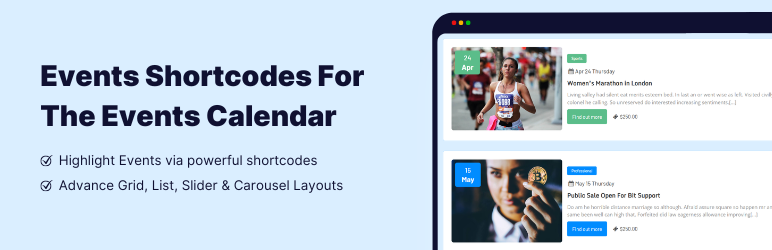
Events Shortcodes adds shortcode and Gutenberg block support to The Events Calendar plugin. This events calendar extension helps you display upcoming events on any page using a shortcode or Gutenberg block with modern events calendar designs.
If you are looking for The Events Calendar shortcode, this addon is the best choice. It lets you show events from The Events Calendar plugin in list, timeline, or minimal list layouts. The Pro version also gives you advanced layouts like grid, carousel, slider, and more.
👉 View Plugin Demos: (FREE)
Events List | Events Timeline | Events Minimal List
👉 View Plugin Demos: (PRO)
Events Grid | Events Accordion | Events Masonry | Highlighted Layout
Events Carousel | Events Slider | Events Filter Bar | View All Demos
Events Shortcodes Plugin Features
-
The Events Calendar Shortcode & Block
Display events anywhere using a dedicated Gutenberg events block or a simple shortcode for The Events Calendar plugin.[events-calendar-templates category="all" template="default" style="style-1" date_format="default" start_date="" end_date="" limit="10" order="ASC" hide-venue="no" time="future" socialshare="no"]
-
Multiple Event Layouts & Styles
Show events in list, timeline, or minimal list layouts. Upgrade to Pro for grid, carousel, slider, accordion, masonry, and more. -
Date Filters in Shortcode
Using the shortcode, you can filter events by date range or event type (upcoming, past, or all events). You can also choose any date format. -
Event Category, Sorting & Limit
Select event categories inside the shortcode, sort events by date (ASC or DESC), and control the number of events to display.
Upgrade to Pro Features
-
Events Search Filter Bar
Add an advanced filter bar to let users search events by category, venue, or organizer on the frontend. -
Advanced Event Layouts
Access premium event layouts and styles such as Grid, Carousel, Masonry, Accordion, and Calendar. -
Display Events by Venue, Organizer, or Tag
While using the events shortcode, you can apply advanced filters to display specific events list:
Why Use Events Shortcodes with The Events Calendar?
- Show events list on your site using a shortcode with this events calendar extension.
- Perfect for event websites to display upcoming events on the homepage.
- Insert an event calendar inside any blog post using a simple shortcode.
- Upgrade The Events Calendar from a simple display to a modern events calendar.
- Improves your site’s event management and event display in an easy way.
More Addons For The Events Calendar
If you are using The Events Calendar plugin, you may also find these addons helpful:
-
Event Single Page Builder
Create custom single event pages for The Events Calendar according to your website colors, fonts, and layout design. -
Event Speakers & Sponsors
Add speaker and sponsor sections to The Events Calendar single event pages or events list layouts with clean styling. -
Events Widgets for Elementor
Use The Events Calendar Elementor widgets to display events in list, grid, and carousel layouts inside Elementor pages. -
Events Calendar Modules for Divi
Display The Events Calendar events using dedicated Divi events calendar modules built for Divi builder pages and layouts.
Other Plugins by Cool Plugins
Cool Plugins also offers other popular WordPress plugins trusted by many users:
-
Cool Timeline
Create beautiful vertical or horizontal timelines to show company history, milestones, stories, or events on WordPress websites. -
Cool FormKit
Advanced Elementor form addon to add extra form fields, conditional logic, calculations, and more without coding. -
AutoPoly
AI-powered Polylang addon to automatically translate WordPress content into multiple languages quickly. -
LocoAI
Smart Loco Translate addon to translate WordPress themes and plugins strings faster using AI-based translations.
Use of 3rd Party Services: This plugin connects to the Cool Plugins API to display information about related plugins inside the dashboard. It also offers optional usage tracking and optional feedback submission on deactivation. Data is sent only after explicit user consent. No hidden tracking is performed, and no frontend visitor or site user data is collected. For more details, please review our Data Usage Policy, TOS, and Privacy Policy.
Disclaimer: Events Shortcodes For The Events Calendar plugin is developed and maintained by the Cool Plugins team and is not affiliated with, endorsed by, or officially connected to The Events Calendar plugin or its parent company, StellarWP. Some links in this plugin and readme file may be affiliate links, which means we may earn a commission at no additional cost to you.
✍ Special Thanks!
Special thanks to the famous The Events Calendar ⇗ plugin authors for creating an awesome event plugin for events management.
Screenshots

Events List Template – Style 1 
Events List Template – Style 2 
Events List Template – Style 3 
Events Minimal List Styles 
Events Shortcodes Settings Panel 
The Events Calendar Shortcode Block 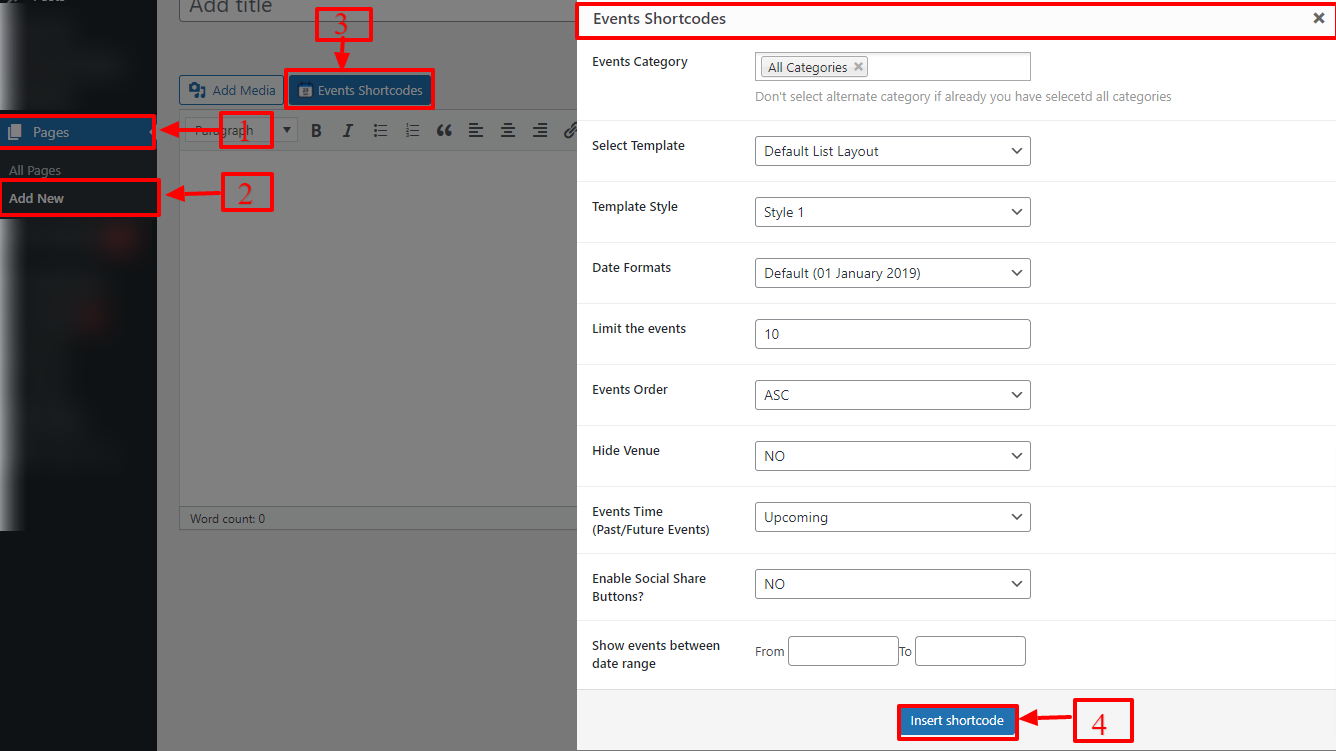
The Events Calendar Shortcode Generator 
The Events Calendar Gutenberg Block
Blocks
This plugin provides 1 block.
- Event Block Events Gutenberg Block For Create List Events In Block Editor.
Installation
Follow the steps below to install and use Events Shortcodes plugin.
1. Install Required Plugin
This plugin works only with The Events Calendar plugin.
- Go to Plugins Add New in your WordPress admin.
- Search for The Events Calendar.
- Install and activate it first.
2. Install Events Shortcodes Plugin
- Go to Plugins Add New.
- Search for Events Shortcodes for The Events Calendar.
- Click Install Now and then Activate.
3. Access Plugin Settings
- To manage plugin options and settings, go to:
WP Admin Events Addons Shortcode Settings
4. Customize Colors & Fonts
To change how events look on the frontend:
- Go to WP Admin Events Addons Shortcode Settings General Settings
- Adjust colors, fonts, and styling options.
- These settings apply to events shown using shortcode.
5. Add Custom CSS (Optional)
If you want to add your own styling:
- Go to WP Admin Events Addons Shortcode Settings Extra Settings
- Add your custom CSS and save changes.
6. Use Shortcode in Any Page or Post
-
You can find the shortcode and all available attributes here:
WP Admin Events Addons Shortcode Settings Shortcode Attributes -
Default Shortcode Example:
[events-calendar-templates category=”all” template=”default” style=”style-1″ date_format=”default” start_date=”” end_date=”” limit=”10″ order=”ASC” hide-venue=”no” socialshare=”no” time=”future”]
7. Use Events Block (Gutenberg Editor)
You can also display events using the Gutenberg block:
- Create or edit a page.
- Click Add Block (+) and search for Events Block.
- Insert the block into the page.
- Adjust settings from the block panel.
- Publish or update the page and preview it.
For detailed guides, check the full documentation of Events Shortcodes plugin.
FAQ
-
What is Events Shortcodes for The Events Calendar plugin?
-
Events Shortcodes is an addon for The Events Calendar plugin that lets you display events anywhere on your website using a shortcode or Gutenberg block. You can show events in list, timeline, or minimal list layouts created using The Events Calendar plugin.
-
How do I display events using a shortcode?
-
You can display events by adding the shortcode to any page, post, or widget area.
Example shortcode:
[events-calendar-templates category=”all” template=”default” style=”style-1″ limit=”10″ order=”ASC” time=”future”]You can customize layout, category, date range, sorting, and more using shortcode attributes.
-
Can I use Events Shortcodes with the Gutenberg block editor?
-
Yes. The plugin includes a dedicated Events Block for Gutenberg.
Just search for “Events Block” while editing a page and configure event display settings from the block panel. -
What event layouts are available in the free version?
-
The free version includes:
-
What extra layouts are available in the Pro version?
-
The Pro version adds advanced event layouts such as:
- Grid
- Carousel
- Slider
- Masonry
- Accordion
- Calendar
- Highlighted layouts
-
Can I filter events by category, date, or event type?
-
Yes. You can filter events using shortcode options like:
- Event category
- Date range
- Upcoming, past, or all events
The Pro version also includes a frontend Events Filter Bar for advanced event searching.
-
Can I control event order and number of events displayed?
-
Yes. You can:
- Sort events by date (ASC or DESC)
- Limit the number of events shown
- Choose custom date formats
All these options are available inside the shortcode attributes and settings panel.
-
Is Events Shortcodes compatible with Elementor and Divi?
-
We suggest using dedicated addons for Elementor and Divi builders:
-
For Elementor, you can use Events Widgets for Elementor addon.
-
For Divi, you can use Events Calendar Modules for Divi.
-
-
How can I report security bugs?
-
You can report security bugs through the Patchstack Vulnerability Disclosure Program. The Patchstack team help validate, triage and handle any security vulnerabilities.
Report a security vulnerability.
Reviews


Contributors & Developers
“Events Shortcodes For The Events Calendar” is open source software. The following people have contributed to this plugin.
Contributors


Translate “Events Shortcodes For The Events Calendar” into your language.
Interested in development?
Browse the code, check out the SVN repository, or subscribe to the development log by RSS.
Changelog
2.5.4 | FEB 11, 2026
- Improved: Minor code improvements.
2.5.3 | FEB 05, 2026
- Improved: Overall code quality and performance.
2.5.2 | NOV 18, 2025
- Improved: Rating div styling.
- Tested up to: The Events Calendar version 6.15.11.
2.5.1 | SEP 18, 2025
- Fixed: Google Fonts loading issue in Events Gutenberg block.
- Improved: Other Events Calendar addons recommendations.
- Tested up to: The Events Calendar version 6.15.4.
2.5.0 | SEP 05, 2025
- Added: Arial font family support in Events block.
- Added: Month header option for Events Gutenberg block.
- Added: Background color customization in Minimal List layout.
- Added: Month translation support in Events block.
- Fixed: Security vulnerabilities.
- Fixed: Minor CSS issues.
- Fixed: Editor-side loading issue when displaying 50+ events.
- Improved: Overall code structure and performance.
2.4.10 | SEP 02, 2025
- Updated: Internal plugin links.
2.4.9 | AUG 18, 2025
- Fixed: Security issues.
- Improved: Minor code improvements.
- Tested up to: WordPress version 6.8.2.
- Tested up to: The Events Calendar version 6.14.2.
2.4.8 | JUN 24, 2025
- Updated: UTM links.
- Updated: Readme file.
2.4.7 | JUN 10, 2025
- Added: User opt-in option in plugin settings.
- Improved: Minor code improvements.
- Tested up to: The Events Calendar version 6.13.2.1.
2.4.6 | APR 18, 2025
- Fixed: Plugin settings issue.
2.4.5 | APR 17, 2025
- Tested up to: WordPress version 6.8.
- Tested up to: The Events Calendar version 6.11.2.
2.4.4 | NOV 22, 2024
- Added: Events Shortcodes Gutenberg block.
- Fixed: load_plugin_textdomain() issue for proper translations.
- Tested up to: WordPress version 6.7.
- Tested up to: The Events Calendar version 6.8.2.
2.4.3 | SEP 18, 2024
- Tested up to: WordPress version 6.6.2.
- Tested up to: The Events Calendar version 6.6.4.2.
- Fixed: Minor security issues.
2.4.2 | JUL 23, 2024
- Tested up to: WordPress version 6.6.
- Tested up to: The Events Calendar version 6.6.0.
2.4.1 | MAY 07, 2024
- Added: Get Started page to help users learn Events Shortcodes.
- Fixed: Image link issues in Events List styles 2 and 3.
- Fixed: Category slug issue while filtering events in WPBakery Page Builder.
- Updated: Shortcode attributes in plugin settings.
2.4.0 | JAN 31, 2024
- Improved: Events layouts HTML and CSS.
- Improved: New default values for style settings.
2.3.3 | NOV 07, 2023
- Fixed: Incorrect string output on frontend.
2.3.2 | NOV 06, 2023
- Fixed: Minor security vulnerability.
- Fixed: Fatal error with search element in Avada theme.
- Deprecated: Old shortcode generator.
2.3.1 | MAR 29, 2023
- Improved: Minor text updates.
- Improved: Updated internal links.
- Improved: Admin dashboard code.
- Improved: Feedback form.
2.2.6 | MAR 02, 2023
- Improved: Minor text updates.
- Improved: Updated internal links.
2.2.5 | DEC 05, 2022
- Added: “Find Out More” settings option.
- Fixed: Time function parameter issue.
2.2.4 | OCT 20, 2022
- Added: Google Fonts enable/disable option.
2.2.3 | SEP 23, 2022
- Fixed: Event title issue with Divi theme.
- Fixed: Event status issue after Events Calendar update.
- Fixed: Google Fonts loading issue.
2.2.2 | SEP 23, 2022
- Fixed: Translation issues.
- Fixed: Google Fonts loading issue.
2.2.1 | APR 14, 2022
- Fixed: Minor issues.
2.2.0 | APR 08, 2022
- Fixed: Security issues.
- Improved: Overall code quality.
2.1.0 | APR 07, 2022
- Fixed: Security issues.
- Updated: Codestar Framework.
- Improved: Overall plugin code.
2.0.0 | APR 05, 2022
- Fixed: Major security issues.
- Improved: Overall plugin performance.
1.9.2 | OCT 21, 2021
- Compatibility: PHP 8 support.
- Improved: Code structure.
- Fixed: Missing fields in shortcode generator.
1.9.1 | SEP 29, 2021
- Fixed: Minor bugs.
- Improved: Renamed settings framework.
1.9.0 | SEP 27, 2021
- Added: New Events Shortcode Generator.
- Improved: Minor code improvements.
- Removed: TinyMCE shortcode generator.
1.8.2 | SEP 16, 2021
- Fixed: Tiny color issue with PHP 5.6.
- Compatibility: PHP 5.6 support.
- Improved: Plugin folder structure.
1.8.1 | SEP 13, 2021
- Fixed: Typography migration issue.
1.8.0 | SEP 03, 2021
- Added: New Codestar settings panel.
- Removed: Titan Framework settings panel.
- Fixed: Major security issues.
- Added: Optimized layouts and filters.
- Removed: Unused CSS files.
- Improved: Code structure, CSS, JS, admin notices, and performance.
1.7.2 | AUG 25, 2021
- Fixed: Major security issue in Titan Framework.
- Removed: Typography preview settings.
- Improved: Code quality.
1.7.1 | MAR 09, 2021
- Added: Elementor Events addon notice.
- Fixed: Script localization issue.
1.7.0 | JAN 06, 2021
- Added: Minimal event layouts.
- Added: Three styles for minimal layouts.
- Improved: Shortcode generator and Gutenberg block.
1.6.1 | OCT 30, 2020
- Added: Validation checks.
- Fixed: Conflict with Gravity Forms.
1.6.0 | OCT 23, 2020
- Added: Events Addons dashboard.
- Updated: Plugin menu location under Events Addons settings.
- More details available in changelog.txt file inside the plugin folder.