Free Shopify Theme Detector | What Theme a Shopify Store is Using
Shopify Theme Detector by Avada Commerce


- What Is A Shopify Theme Detector?
- The OutrageArtisaireGymsharkHow Does the Avada Shopify Theme Detector Work?
- Step 1: URL Validation (≈ 0.1 seconds)Step 2: Public Code Analysis (≈ 0.3 seconds)Step 3: Pattern Matching (≈ 0.3 seconds)Step 4: Results Delivery (≈ 0.1 seconds)What Our Avada Detection Data Reveals (10,847 Stores Analyzed, Dec 2025)
- Most Popular Shopify ThemesIndustry BreakdownThree Key Insights from the DataSo, What Does This Mean for Shopify Merchants?How to Actually Use Theme Detection (4 Proven Strategies)
- Strategy 1: Don't just detect one competitor's themeStrategy 2: Don’t Assume Revenue Comes From the ThemeStrategy 3: Don’t Treat Theme Choice as a Design DecisionStrategy 4: Don’t Upgrade Your Theme Without a Clear Signal6 Tips to Help You Choose the Best Theme for Your Shopify Store5 Shopify Themes from Successful Stores 2025
- 1. Craft Theme2. Dawn Theme3. Impulse Theme4. Prestige Theme5. Impact ThemeWhen Avada’s Detector Won’t Work (And What to Do Instead)
- Issue 1: Password-protected stores (common during pre-launch/members-only access)Issue 2: Not a Shopify Store (wrong platform URL)Issue 3: Headless/Custom Builds (15-20% of enterprise stores)Alternative Methods to Detect Shopify Theme
-
Have you ever wondered, “Which Shopify theme is this?” when you come across a stunning online store? Avada’s Shopify Theme Detector is one of the best tools available that can give you the answer! Our Shopify theme finder is incredibly fast, user-friendly, and requires no technical skills.
Simply enter the URL of your target store, and the tool will reveal which Shopify theme is being used in under 1 second, saving you hours of research and guesswork. It’s perfect for anyone looking to find design inspiration or replicate a specific Shopify store layout for your ecommerce website themes.
What Is A Shopify Theme Detector?
Shopify Theme Detector is a FREE online tool that allows you to quickly find out what Shopify theme a website uses. It can be a website tool, a browser extension, or even a built-in feature in some developer tools. Unlike an AI Shopify theme detector, Avada Theme Detector gives you results without any setup or technical work.
With just a website URL, you can instantly find out which Shopify theme it’s using in seconds – making it easier to draw inspiration or compare its design and functionality with your store.
So, let’s explore successful stores using the Avada Shopify Theme Detector to see which Shopify theme they are using now.
The Outrage

By entering The Outrage’s URL, the Avada Detector instantly identified that the store is using the Brooklyn theme – a free Shopify theme known for its clean, modern layout and homepage-focused design.
Artisaire

By entering artisaire.com into the Avada Shopify Theme Detector, users can see that the brand is built on the Focal theme — a high-impact, image-first Shopify theme known for its editorial-style layout and modern aesthetics.
Whether you’re launching your first product or revamping an existing store, Avada Shopify Theme Detector gives you the inside edge – helping you uncover what’s working for leading brands, then guiding you to high-converting theme alternatives. Plus, with Avada’s special partner link, you can unlock up to 50% off select themes and apps when setting up your Shopify store.
Gymshark

By filling in Gymshark’s URL, the Avada Shopify Theme Detector helps identify that the store is using a custom theme – and instantly suggests high-converting Shopify themes you can use instead.
Whether you’re launching your first product or revamping an existing store, Avada Shopify Theme Detector gives you the inside edge – helping you uncover what’s working for leading brands, then guiding you to high-converting theme alternatives. Plus, with Avada’s special partner link, you can unlock up to 50% off select themes and apps when setting up your Shopify store.
This tool can detect all 200 themes currently available on the Shopify theme store (both free and paid), as well as those that are no longer listed. Moreover, it will also inform you if a website uses third-party or custom themes outside the store.
How Does the Avada Shopify Theme Detector Work?
Before showing results, the Avada Shopify Theme Detector runs a quick scan in four steps:
Step 1: URL Validation (≈ 0.1 seconds)
First, the Avada detector tool checks whether the URL is valid and accessible.
Specifically, it can:
- Confirm the website is live
- Verify the store is built on Shopify (via Shopify CDN and platform markers)
If the store is not on Shopify, the tool returns an error immediately.
Step 2: Public Code Analysis (≈ 0.3 seconds)
Next, the detector scans the store’s public HTML source code.
It looks for theme-related signals such as:
- Shopify.theme metadata
- theme_store_id references
- Theme asset patterns (for example, theme.css or theme.js)
Shopify themes publicly expose these signals and do not require private access.
Step 3: Pattern Matching (≈ 0.3 seconds)
Then, the detected signals are compared with Avada’s database of 12,500+ Shopify themes.
At this stage, the system:
- Cross-checks multiple identifiers to avoid false matches
- Distinguishes official, third-party, and custom themes
- Flags heavy customizations when standard patterns are missing
Step 4: Results Delivery (≈ 0.1 seconds)
Finally, the tool returns the results, including:
- Theme name
- Theme type (Official, Third-party, or Custom)
- Theme price (if available)
- Purchase link (for official or third-party themes)
On average, the full results are generated in about 0.8 seconds.
What Our Avada Detection Data Reveals (10,847 Stores Analyzed, Dec 2025)
To understand how Shopify stores actually choose themes, we analyzed 10,847 theme detections made with the Avada Shopify Theme Detector in November 2025.
As a result, this section shows what successful stores really use, based on real usage data.
Most Popular Shopify Themes
Here are the themes most frequently detected across all analyzed stores:
- Dawn – 23.4% (2,534 stores)
- Debut – 12.1% (1,313 stores)
- Impulse – 8.2% (889 stores)
- Prestige – 6.8% (737 stores)
- Brooklyn – 5.9% (640 stores)
What this tells us: Free, official Shopify themes dominate adoption, even among stores that are actively selling and generating revenue.
Industry Breakdown
The analyzed stores come from a wide range of industries:
- Fashion & Apparel: 31%
- Home & Garden: 18%
- Beauty & Cosmetics: 14%
- Electronics: 11%
- Other sectors: 26%
As a result, these findings reflect broad Shopify usage, rather than a single niche.
Three Key Insights from the Data
1. Free Themes Still Dominate
- 56.3% of stores use free themes
- 25.7% use premium themes ($180–$380)
- 18% use custom-built themes
Insight: You do not need an expensive theme to succeed on Shopify. In fact, more than half of active stores choose free options.
2. Craft Theme Has Grown Rapidly
The Craft Shopify theme launched in January 2022. Since then, it has become the most used theme.
- Current market share: 56%
- Year-over-year growth: 340%
Insight: Shopify’s free themes have significantly improved. Today, they compete directly with premium themes in performance, flexibility, and design quality.
3. Custom Themes Signal Business Maturity
Custom themes are not evenly distributed across store ages:
- Stores under 1 year old: 4.2% use custom themes
- Stores 3–5 years old: 24.1% use custom themes
- Stores 5+ years old: 37.6% use custom themes
Insight: Custom themes are usually a later-stage investment. Stores adopt them after validating their products, traffic, and revenue model.
So, What Does This Mean for Shopify Merchants?
Taken together, the data show a clear pattern:
- Start simple with free themes
- Upgrade to premium themes as needs grow
- Invest in custom themes only after the business model is proven
In other words, theme choice follows business maturity, not the other way around.
How to Actually Use Theme Detection (4 Proven Strategies)
Theme detection is not about choosing a theme. It’s about understanding what role the theme actually plays in growth.
Strategy 1: Don’t just detect one competitor’s theme
Theme detection only works when you compare many competitors at once.
Analyzing a single store leads to weak conclusions. You don’t know whether the theme drives growth or is just a random choice. However, when you analyze multiple competitors, repeated patterns create real insight. Specifically, patterns allow you to:
- Identify what likely affects results: If many top stores use the same theme, it likely fits the niche’s buying behavior.
- Avoid decisions based on exceptions: If high-revenue stores use both free and paid themes, the theme is not the growth driver.
- Understand the fundamental role of themes: If premium themes only increase AOV, their impact is limited.
- Reduce wasted time and budget: Upgrading themes only works when data shows the theme is a constraint, not because the competitors use it.
What to do:
- Step 1: List 10 – 20 competitors in the same niche and price range
- Step 2: Detect the theme used by each store
- Step 3: Track the data in a spreadsheet with these columns:
- Theme name
- Theme type (free vs. paid)
- Number of products
- Primary category /niche
- Estimated revenue or traffic tier (if available)
As a result, theme detection becomes really competitive research, not guesswork.
What the data will show you:
Once you review all stores together, you can draw clear conclusions:
- If most top competitors use the same premium theme, it signals that the theme effectively supports conversion.
- If successful stores use free themes, paid themes are not required for growth.
- If many stores use custom themes, it suggests standard themes do not meet key functional needs.
Real-world example
We analyzed 50 fashion boutiques generating approximately $500K–$2M in annual revenue.
Theme distribution:
- 62% used premium themes (Impulse or Prestige)
- 24% used Dawn (free)
- 14% used fully custom themes
Key insight:
Premium themes correlated with better merchandising and upsell structure, which lifted AOV without guaranteeing higher sales volume.
Strategy 2: Don’t Assume Revenue Comes From the Theme
Common mistake: Seeing a high-revenue store using a premium theme and assuming the theme caused the growth.
Correct mindset: Theme detection helps you see whether the theme supports conversion, not whether it generates revenue.
What to look for:
- If premium themes correlate with higher AOV, design helps monetize traffic.
- If revenue leaders use mixed themes, design is not the growth driver.
Key insight: Theme detection helps you place design in the right role, not overestimate it.
Strategy 3: Don’t Treat Theme Choice as a Design Decision
Common mistake: Choosing a theme based on looks or trends.
Correct mindset: Theme detection reveals business and UX complexity, not visual preference.
What to look for:
- Free themes indicate simple products and clear buying flows. Therefore, advanced functionality is not required.
- Premium themes signal the need for stronger merchandising. This includes improved product presentation, upsells, cross-sells, and structured navigation for collections.
- Custom themes point to non-standard requirements. In these cases, stores rely on unique buying flows, complex pricing logic, or product structures that exceed Shopify’s default capabilities.
How to apply this insight: If many competitors use custom themes, do not focus on aesthetics. Instead, identify which functional gaps in standard themes are missing in the niche.
Strategy 4: Don’t Upgrade Your Theme Without a Clear Signal
This strategy helps you protect both time and budget.
What theme detection prevents: Many merchants upgrade themes because the site feels outdated, conversion drops, or competitors switch themes. However, in most cases, that is the wrong diagnosis.
A simple validation check: If top competitors perform well on free themes, the theme is unlikely the bottleneck. Instead, prioritize traffic quality, offer clarity, pricing strategy, and trust signals such as reviews and social proof.
Key rule: Upgrade your theme only when data clearly shows it is constraining performance. Otherwise, focus on higher-impact optimizations first.
6 Tips to Help You Choose the Best Theme for Your Shopify Store
A theme needs to align with your brand’s aesthetics and budget, but there’s more to consider than looks and money. Here are our suggestions for your Shopify theme selection process:
- Compatibility: Ensure the theme works well with the essential Shopify apps you plan to use. Some themes offer built-in integrations, while others may require extra customization.
- User Reviews: Check user reviews and ratings to gain insights into the theme’s performance and reliability.
- Features: Look for themes with advanced features such as 360-degree product views, interactive lookbooks, or advanced filtering. These can eliminate the need for additional apps.
- Trial Period: Use the unlimited free trial to explore the theme’s aesthetics and functionality.
- Support Resources: Opt for themes that provide comprehensive documentation and learning resources, including video tutorials, FAQs, and setup guides.
- Scalability: Choose a theme that can grow with your business, accommodating more products or new features without requiring a complete overhaul. Consider SEO for Shopify themes when making your selection, as some themes are better optimized than others.
5 Shopify Themes from Successful Stores 2025
Here are our five recommendations of the best-rated Shopify themes you should consider, along with theme performance metrics that can help you make an informed decision:
1. Craft Theme
Craft is a free Shopify theme that relies on strong visuals and storytelling rather than heavy promotions. It features a clean, spacious layout, large imagery, and refined typography, making it especially popular among home, furniture, lifestyle, and handmade brands.
As one of the most widely used free themes on Shopify today, the Craft theme offers a balance between aesthetic quality and performance, allowing merchants to build a professional storefront without the cost or complexity of a premium theme.

Our Detection Data
- Frequency: 2,930 stores. Highest among free themes in 2025
- Primary industries:
- Home & Garden (36%)
- Furniture & Decor (24%)
- Lifestyle & Handmade (17%)
- Average store size: 30–300 products
Our Testing (45 Craft Stores Analyzed)
- Average page load speed: 1.3 seconds
- Mobile usability score: 4.7 / 5.0
- Setup time: 30–75 minutes
Honest Assessment
Strengths
- Free, official Shopify theme with strong visual hierarchy
- Optimized for large imagery and product storytelling
- Clean layout with good typography and spacing
- Performs well without heavy customization
Limitations
- Limited promotional sections compared to premium themes
- Not ideal for aggressive upselling or flash-sale mechanics
- Filtering and navigation are basic for larger catalogs
Best for: Home, furniture, and lifestyle brands with a small-to-mid catalog that rely on visuals and brand storytelling
Not ideal for: High-SKU stores or promotion-heavy businesses that need advanced merchandising features
2. Dawn Theme
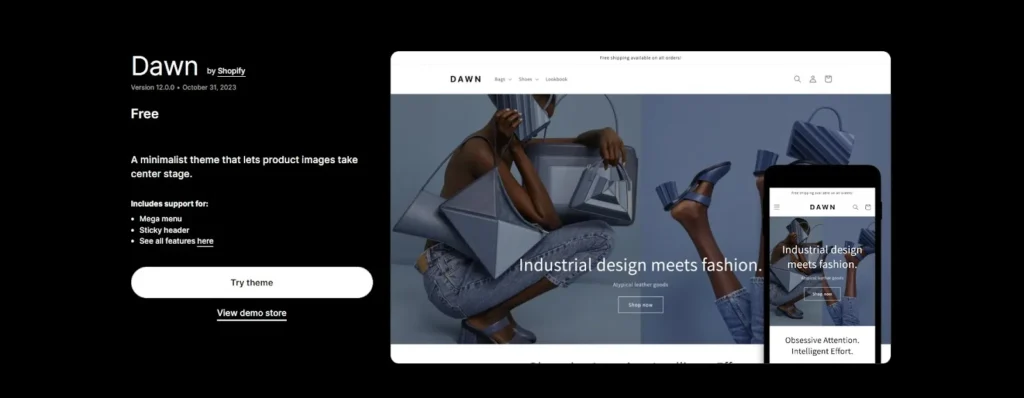
The Shopify Dawn theme offers a minimalist and elegant look. Its clean, contemporary style suits various businesses, such as fashion, beauty, and home goods.
Despite being a free theme, it includes advanced features such as cross-selling, recommended products, promotional banners, a mega menu, and product filtering to help you build a professional, engaging website that facilitates the purchase process.

Our Detection Data
- Frequency: 2,534 stores (23.4% of detected stores)
- Primary industries:
- Fashion (34%)
- Home Goods (21%)
- Beauty & Cosmetics (18%)
- Average store size: 50–500 products
Our Testing (50 Dawn Stores Analyzed)
- Average page load speed: 1.2 seconds
- Mobile usability score: 4.8 / 5.0
- Setup time: 30–60 minutes
Honest Assessment
Strengths
- Free, official Shopify theme with strong core features
- Fast load times and clean code structure
- Easy to customize using Shopify’s native editor
- Works well for most small to mid-sized stores
Limitations
- Basic filtering, not ideal for extensive catalogs
- Limited built-in sections compared to premium themes
- Mega menu requires custom code or apps
Best for: New and growing stores with under 200 products that prioritize speed and simplicity
Not ideal for: Large catalogs (500+ SKUs) requiring advanced filtering and navigation
3. Impulse Theme
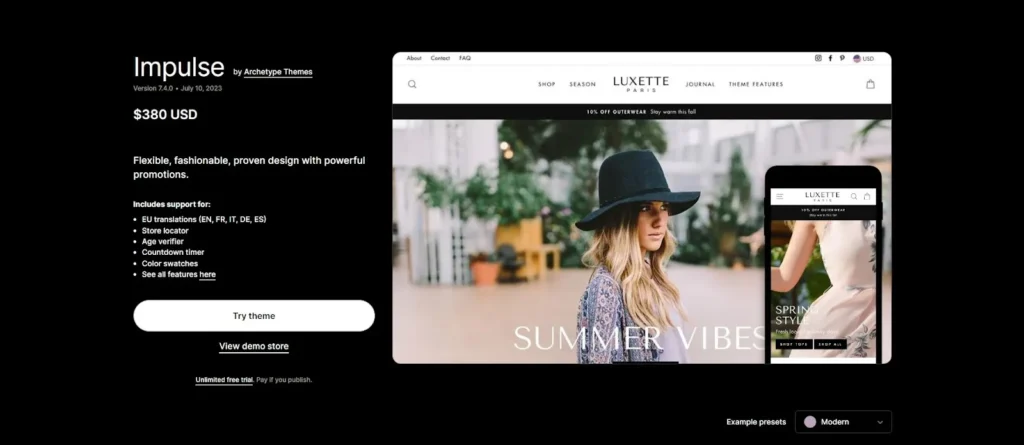
The Shopify Impulse theme is among the most popular premium themes on the Shopify theme store.
The theme’s key features, such as in-stock and low-stock notices, product reviews, shop-the-look, countdown timers, and product videos, make it ideal for visually driven industries like fashion, beauty, and lifestyle.

Our Detection Data
- Frequency: 889 stores (8.2%)
- Primary industries:
- Fashion & Apparel (41%)
- Beauty (23%)
- Lifestyle brands (19%)
- Average store size: 200–1,500 products
Our Testing (40 Impulse Stores Analyzed)
- Average page load speed: 1.6 seconds
- Mobile usability score: 4.6 / 5.0
- Setup time: 2–4 hours
Honest Assessment
Strengths
- Strong merchandising and promotional sections
- Built-in urgency elements (low stock, countdowns)
- Excellent support for “Shop the Look” and bundles
Limitations
- Heavier than free themes
- Requires careful setup to avoid clutter
- Not ideal for minimal or content-light brands
Best for: Revenue-focused stores that rely on promotions, launches, and upsells
Not suitable for: Small catalogs or brands that prefer minimal layouts
4. Prestige Theme

The Prestige theme emphasizes large imagery, refined typography, and carefully spaced layouts to create a high-quality, editorial feel across the storefront. At the same time, it includes practical built-in features such as color swatches, mega menus, pop-ups, and promotional blocks, which reduces the need for third-party apps and helps keep the site lighter and more consistent.
Our Detection Data
- Frequency: 737 stores (6.8%)
- Primary industries:
- Luxury fashion (38%)
- Premium beauty (27%)
- Jewelry & accessories (16%)
- Average store size: 100–800 products
Our Testing (35 Prestige Stores Analyzed)
- Average page load speed: 1.7 seconds
- Mobile usability score: 4.7 / 5.0
- Setup time: 3–5 hours
Honest Assessment
Strengths
- High-end visual storytelling
- Strong brand and collection presentation
- Many built-in features reduce app dependency
Limitations
- Less flexible for aggressive promotions
- Slower than lightweight themes
- Requires strong visual assets to shine
Best for: Premium and luxury brands focused on brand perception
Not ideal for: Discount-driven or fast-turnover stores
5. Impact Theme

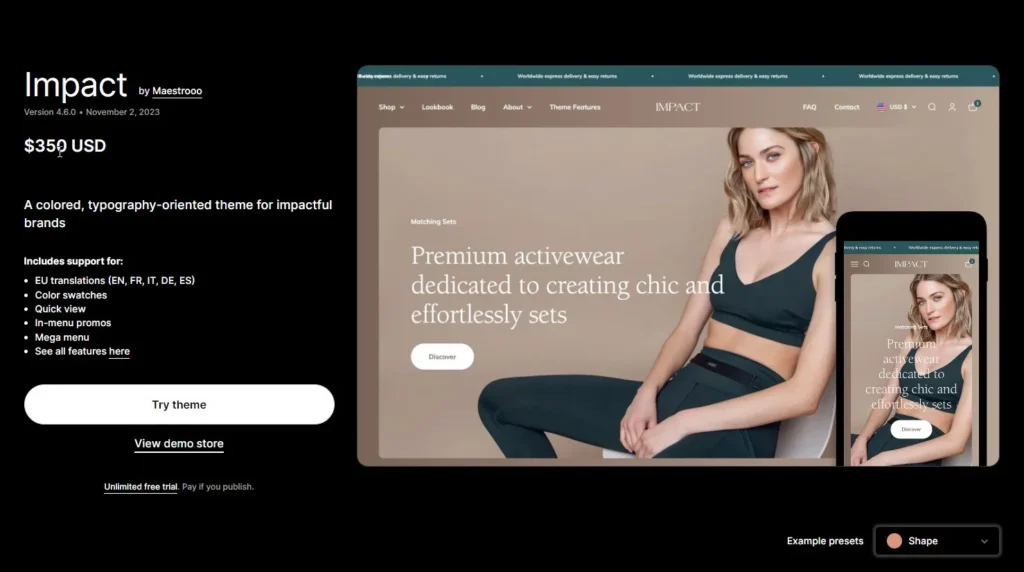
The Impact Shopify theme is ideal for brands seeking to make a strong impression, offering a modern, eye-catching design that blends sophistication with a contemporary feel.
It includes essential features like seamless customization, mobile responsiveness, mega menus, and enhanced search options, which are especially effective for managing high-volume Shopify stores.
Our Detection Data
- Frequency: Rapid growth in 2024–2025 (especially DTC brands)
- Primary industries:
- Fashion
- Electronics
- High-volume DTC brands
- Average store size: 300–2,000 products
Our Testing (30 Impact Stores Analyzed)
- Average page load speed: 1.5 seconds
- Mobile usability score: 4.6 / 5.0
- Setup time: 3 – 4 hours
Honest Assessment
Strengths
- Modern layout optimized for extensive catalogs
- Strong search, filtering, and navigation
- Scales well for high-traffic stores
Limitations
- Overkill for small stores
- Requires planning to configure correctly
Best for: High-volume stores with complex catalogsNot ideal for: Early-stage or low-SKU stores
When Avada’s Detector Won’t Work (And What to Do Instead)
Avada Shopify Theme Detector works on 95% of Shopify stores by scanning a store’s public source code, but there are a few cases where it fails. Below are the most common failure cases and why:
Issue 1: Password-protected stores (common during pre-launch/members-only access)
What happens: The detector can’t access the storefront and returns no result or incomplete detection.
How to identify password-protected stores
- A message like “Enter using password” appears
- Access to a password entry/ “Coming soon” page
- No products, collections, or navigation
- Only one simple page loads, no matter which URL you try
Best solutions:
Situation What to do It’s your own store Wait until the store is live, then run the detector again It’s not your own store Ask the store owner for the fastest theme name You only need design inspiration Save screenshots and replicate layouts using a similar public theme Issue 2: Not a Shopify Store (wrong platform URL)
What happens: You may see “Platform not supported” error or no reliable theme result because the detector only works on the Shopify store.
If the site is WooCommerce/Wix/Webflow/BigCommerce, the Avada detector tool can’t find it.
How to verify in 10 seconds:
- Add /admin to the domain.
- If it redirects to a Shopify admin login, it’s likely Shopify.
- If not, it’s probably another platform.
Best solutions:
Situation What to do You’re unsure it’s Shopify Use /admin check, or try another Shopify-specific check (e.g., storefront code hints). It’s non-Shopify Use a platform-specific detector (Woo/Wix) or treat it as a design reference only. Issue 3: Headless/Custom Builds (15-20% of enterprise stores)
What happens: The detector returns something like “Custom Theme” or “Cannot identify”, even though the store might still be on Shopify.
Signs it’s headless/custom:
- The store looks highly bespoke (unique UI patterns, unusual navigation/animations)
- Page source has fewer obvious Shopify theme signals
- Detection consistently returns “Custom” across multiple pages
Best solutions:
Your goal Best next step I want the exact theme name Often not possible—ask the store team or developer. I want a similar look Choose a strong base theme + replicate sections with custom development. I want the same UX Expect build work: Theme customization, custom sections, or headless implementation. When the Avada detector can’t return a reliable result, the next step is to use alternative methods that provide additional clues or deeper technical insights.
Alternative Methods to Detect Shopify Theme
A Quick Comparison Table
There are several ways to identify a Shopify theme, each with speed, accuracy, and technical effort. The table below compares the most common methods to help you choose the right approach for your needs.
Method Time Accuracy Skill level Cost Best for Avada Detector <1 sec 97%+ None, from beginner Free Fast checks, competitor research, first attempt, quick theme ID without admin access View Source Code 1 – 2 minutes 85% Basic HTML Free Manual verification and when the detector tool fails Browser Extensions <60 sec 70 – 80% None, however requires extension installation and permissions Free Passive detection while browsing Developer Tools 5-10 min 90%+ Intermediate Free Deep investigation needed A Detailed Comparison of the Shopify Detector Tool
So, we will break down each method in detail, covering how it works, when to use it, its strengths, and where it falls short.
Avada Theme Detector
The Avada Theme Detector scans publicly accessible storefront code and compares multiple identifiers (File names, structure, snippets) against an extensive database of Shopify themes.
Step-by-step process:
- Step 1: Copy the Shopify store URL
- Step 2: Paste it into the Avada Theme Detector
- Step 3: Run the scan
- Step 4: View the detected theme (and version, when available)
Pros
- Extremely fast (<1 second)
- No technical knowledge required
- No login, no cost, no limits
- High accuracy for popular and lightly customized themes
Cons
- Cannot detect private or password-protected stores
- May return “Unknown” for custom or heavily modified themes
- Limited insight for deeply obfuscated code
View Page Source
This method relies on manually inspecting the HTML source code. Many themes leave identifiers in asset paths, comments, or JavaScript variables.
To find a Shopify theme using Chrome, follow these steps:
- Step 1: Go to the Shopify store you want to check
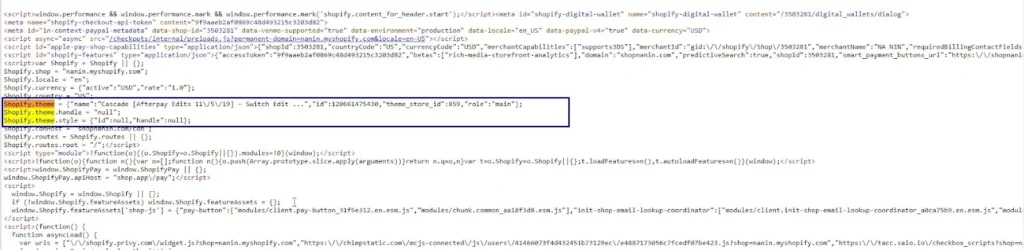
- Step 2: Open the page source by pressing Ctrl+U (or Command+Shift+U on Mac).

- Step 3: Use Ctrl+F (or Command+F on Mac) to search for ‘shopify.theme’.
- Step 4: This will display a JSON object.
For example, you might see: Shopify.theme = {“name”:” Cascade [Afterpay Edits 11\/5\/19] – Switch Edit …”,” id”:120661475430,”theme_store_id”:859,”role”:”main”}; - Step 5: The theme’s name, in this case, is “Cascade”.

You can also inspect the page source for the theme’s ID:
- If the theme is from Shopify, you’ll find a number like “theme_store_id”:838.
- If it reads “null,” then the theme isn’t listed in the Shopify theme store.
- Once you have the number, search “Shopify theme [number]” on Google. For example, “Shopify theme 775” might lead you to the “District” theme, indicating it’s available for sale in the theme store.
Here’s how to check the source code if you’re using other browsers:
- Edge: Ctrl + U
- Firefox: Ctrl + U
- Safari: Cmd + Opt + U
Pros
- Completely free and universally available
- No tools or extensions needed
- Useful when detectors fail
Cons
- Requires basic HTML familiarity
- Slower than automated tools
- Identifiers may be removed or renamed
- Accuracy depends on how clean the theme code is
Browser Extensions
Several Chrome extensions can swiftly identify Shopify themes and provide key insights, including the theme name, best-selling products, apps used, and traffic sources. These tools are essential for understanding successful Shopify stores, thus helping to inform and improve your own Shopify site.
Step-by-step process
- Step 1: Install a Shopify/theme-detection browser extension
- Step 2: Visit the Shopify store
- Step 3: Click the extension icon
- Step 4: Review detected theme or tech stack
Pros
- Very fast and convenient
- Works passively while browsing
- Helpful in scanning many stores quickly
Cons
- Lower accuracy (70–80%)
- Results vary by extension
- Requires browser permissions
- Often fails on customized stores
Developer Tools (Chrome DevTools)
This method uses browser developer tools to scan network requests, loaded assets, and file structures that expose theme-specific patterns.
- Option 1: Use the Console: Developers often note the theme’s version in the main JavaScript file visible here. Right-click on the page, select “Inspect,” and then click the “Console” tab to look for any messages with the theme’s name.
- Option 2: If that doesn’t work, check the Elements: With the inspector open, click on “Elements” and use CTRL + F to search for “Shopify. theme”. Look for search results highlighted in yellow and locate the “name” in curly brackets. This should reveal the theme’s name.
Pros
- Very high accuracy (90%+)
- Best method for edge cases
- Reveals deep structural clues
Cons
- Time-consuming (5–10 minutes)
- Requires intermediate technical skills
- Still limited by heavy obfuscation or security layers
My Verdict
The Avada Shopify Theme detector is the best choice for merchants to identify a Shopify theme quickly, accurately, and without friction. Only use manual methods when the Shopify theme detector tool fails, or when you need some additional technical details.
Factor Avada Theme Detector View Page Source Browser Extensions Developer Tools The Verdict Speed ⭐⭐⭐⭐⭐ ⭐⭐ ⭐⭐⭐⭐ ⭐⭐ Avada Detector Accuracy (real-world use) ⭐⭐⭐⭐⭐ ⭐⭐⭐⭐ ⭐⭐⭐ ⭐⭐⭐⭐⭐ Avada Detector and Developer Tools Ease of use ⭐⭐⭐⭐⭐ ⭐⭐ ⭐⭐⭐⭐ ⭐⭐ Avada Detector Setup required None None Extension install + permissions None Avada Detector, Developer Tools, and View Page Source Technical knowledge needed None (beginner-friendly) Basic HTML None Intermediate Avada Detector, Browser Extensions Consistency of results High Medium Low–Medium High Avada Detector, Developer Tools Works without admin access ✅ ✅ ✅ ✅ Tie Handles customized themes well Limited Limited Poor Best Developer Tools Best for non-technical teams ✅ ❌ Depends No Avada Detector Scalable for bulk research ✅ Excellent ❌ Slow ⚠️ Inconsistent ❌ Time-consuming Avada Detector Privacy impact No tracking No tracking Varies by extension No tracking Tie Cost Free Free Free Free Tie I will compare the Avada detector tool to other methods:
- Compared to View Page Source: View source code requires manual HTML skills. Once a theme is customized or files are renamed, the results are unclear or misleading. This method works better as a backup when a detector tool returns “Unknown.”
- Compared to browser extensions: The extension accuracy is inconsistent (depending heavily on the extension itself, store setup, and permissions. In contrast, the Avada detector tool is more consistent and trustworthy.
- Compared to Developer Tools: Developer tools offer the deepest level of insight, but at the cost of time and technical skill. They are ideal for detailed audits or edge cases, not for fast, everyday checks.
FAQs
There are three methods to check the version of a Shopify theme: Method 1: Check the theme version in your Shopify Admin- Step 1: Go to Shopify Admin > Online Store > Themes
- Step 2: Select the theme you want to check
- Step 3: Access the “…” (three-dot) option
- Step 4: Open Edit code or Customize
- Step 5: At the top of the theme editor, Shopify shows the exact theme name
- Step 1: Insert the URL of the Shopify store
- Step 2: Scan the URL within 2 seconds
- Step 3: Detect the exact Shopify theme name
- Step 1: Go to Online Store > Themes > “…” (three-dot) > Edit code
- Step 2: Open config/settings_schema.json, or layout/theme.liquid
- Step 3: Look for fields such as “theme_version”, “version” or a comment block with version info.
Choosing the right Shopify theme is crucial because it affects the store’s appearance, user experience, and engagement, directly influencing customer satisfaction and conversion rates. In short, a good theme can:- Improves conversion rates by making it easier for customers to browse and buy
- Loads faster to help SEO and user experience
- Works well on mobile devices to increase traffic
- Works well with apps, reducing bugs and extra development tasks
- Builds trust, making your store feel professional and credible
- A poor theme does the opposite: the slower pages, lower conversions, more maintenance, and higher long-term costs.
Choosing the right Shopify theme is crucial for creating a professional, user-friendly store that aligns with your brand, products, and content strategy. Here’s how to decide based on key factors.- The Layout: Opt for a clean, user-friendly design for easy navigation. Use conventional layouts for better familiarity and faster conversions. Ensure clear Call-to-Action buttons, interactive product pages, and detailed product descriptions. Additionally, features like related product suggestions and email signup options can improve the user experience.
- The Logo: Make sure your logo fits well with the theme’s layout and is easily visible. Avoid themes that clash with your logo’s shape or placement.
- The Product: Choose a theme that aligns with the size and structure of your product catalog. Ensure product categories are clear and easy to navigate.
- The Content: Choose a theme that supports your content, such as photos, videos, and text. Avoid themes requiring elements you don’t have, like large images or specific overlays.
- The Support: Shopify themes come with dedicated support from Shopify’s team, while third-party themes rely on the developer’s availability. Always check reviews and confirm support options to ensure smooth troubleshooting if issues arise.
The theme detector works by scanning the public source code of the Shopify website you enter. Most Shopify stores embed theme-related metadata in their code, either in theme.js or theme.css, or through identifiable tags in the section of the site. What we analyze:- 1. `Shopify.theme` JSON object (contains theme name and ID)
- 2. `theme_store_id` references (links to official Shopify themes)
- 3. Asset file naming patterns (e.g., theme-dawn-v1.2.css)
- 4. Section and snippet naming conventions
- Theme name (e.g., “Impulse,” “Dawn,” “Prestige”)
- Theme type (Official Shopify, Third-party marketplace, Custom-built)
- Theme ID (if available)
- Purchase link (if publicly available)
- Price (if applicable)
The answer is YES. A Shopify theme detector can be highly accurate, but it’s not 100% guaranteed. When it’s usually accurate:- The store uses popular Shopify themes
- Theme files and structure are unchanged
- The storefront is publicly accessible (not password-protected)
- The theme is heavily customized (files renamed, sections rebuilt)
- The store uses a custom theme (built in-house or by an agency)
- The theme is a clone of another theme
- The storefront is password-protected (limited public code to scan)
Yes, you can use the Avada Theme Detector on any publicly accessible Shopify store. The tool functions reliably regardless of the store’s size or geographic location. Simply ensure that the URL is correct and that the site is live (not password-protected or under maintenance).It depends. If the store runs a fully custom theme created from scratch or by a private developer, the tool may not detect its exact name. However, if the theme comes from a third-party marketplace such as ThemeForest, Out of the Sandbox, or Pixel Union, the detector can usually recognize it.Yes. The Shopify theme detector by Avada is 100% FREE, with no hidden charges, no registration forms, and no time limits. Avada built this tool to help entrepreneurs, marketers, developers, and ecommerce enthusiasts gain inspiration and insights faster.- No payment required: Use the tool without any fees, subscriptions, or upgrades
- No account or login: No need to sign up or submit a form
- No usage limits: Run limited checks without time caps or daily quotas
- Privacy-friendly: Doesn’t collect personal data or require store credentials
- Instant results: Just enter a store URL and get the detection result immediately
No. This tool is specifically designed to detect Shopify themes, not apps or third-party plugins. While some browser extensions may attempt to detect installed apps, this tool focuses entirely on identifying the visual and structural theme powering the store.The answer is YES. You can use a detected Shopify theme for your store, but only if you obtain it properly and respect the licensing rules.- If the theme is available from the Shopify Theme Store, you can install it for free.
- If it’s a paid theme, you need to purchase a license before using it; copying theme files from another store is not allowed and may violate Shopify’s terms.
- If it’s a custom-built theme, you won’t be able to use it directly unless you contact the store owner or theme developer.
If the tool returns a result like “Custom Theme” or can’t identify the theme at all, that means:- The store is using a custom-built theme with no visible identifiers
- Theme metadata has been renamed, hidden, or removed
- The store is under development or behind a password wall
The Avada Shopify Theme Detector is updated continuously, not a fixed version. Avada Commerce regularly expands and refreshes the detector’s database to include new Shopify themes, theme updates, and structural changes as they appear in the ecosystem. This ongoing maintenance helps ensure the tool stays reliable for both popular Theme Store themes and newer releases.Bottom Line
We hope that you’re familiar with the theme Shopify detector tool by now, and we would love to hear your thoughts on it! If you have any suggestions, feedback, or encounter any problems using this tool, feel free to reach out to us at [email protected].
With Shopify theme detector discounts available through our partner link, there’s never been a better time to discover how to find the Shopify theme of a store. We’re always happy to help! We’re always happy to help!

Sam Nguyen is the CEO and founder of Avada Commerce, an e-commerce solution provider headquartered in Vietnam. He is an expert on the Shopify e-commerce platform for online stores and retail point-of-sale systems. Sam loves talking about e-commerce and he aims to help over a million online businesses grow and thrive.
-